


This is one of those posts I wrote just to be able to link back to it later. I see a lot of questions on the subject, and even though I don’t mind explaining the same thing over and over again, it’s probably easier to just write it down once.
Most people are used to quoting all attribute values in the HTML they write. For example:
<a href="foo" class="bar">baz</a>Single quotes can be used too:
<a href='foo' class='bar'>baz</a>However, the following is valid HTML as well:
<a href=foo class=bar>baz</a>This is nothing new — in fact, the use of unquoted attribute values has been supported since HTML 2.0 (the first HTML standard). It is, however, not allowed in XHTML. (But seriously, who uses XHTML‽)
In HTML, an attribute value can be used without the quotes on certain conditions. For example, if you try to use an attribute value with spaces in it without quoting it, stuff breaks:
<!-- This does what you’d expect: -->
<p class="foo bar">

<!-- This is something entirely different: -->
<p class=foo bar>
<!-- …since it’s equivalent to: -->
<p class="foo" bar="">
Of course, bar is not a valid HTML attribute. So, just by omitting two quotes, you end up with invalid code and a <p> element that doesn’t get the bar classname you wanted it to have. And this is just one of the many examples…
If that didn’t scare you, you’ll probably want to know what the requirements for unquoted attribute values in HTML are. Let’s find out!
The HTML specification says:
Attributes are placed inside the start tag, and consist of a name and a value, separated by an
=character. The attribute value can remain unquoted if it doesn’t contain spaces or any of"'`=<or>. Otherwise, it has to be quoted using either single or double quotes. The value, along with the=character, can be omitted altogether if the value is the empty string.
Note that instead of “spaces”, it should really say “space characters” there (see below). It’s not clear from this explanation that the empty string isn’t a valid unquoted attribute value either. (See bug #12938 which has now been fixed.) Thankfully, this is explained elsewhere in the spec:
The attribute name, followed by zero or more space characters, followed by a single U+003D EQUALS SIGN character (
=), followed by zero or more space characters, followed by the attribute value, which […] must not contain any literal space characters, any U+0022 QUOTATION MARK characters ("), U+0027 APOSTROPHE characters ('), U+003D EQUALS SIGN characters (=), U+003C LESS-THAN SIGN characters (<), U+003E GREATER-THAN SIGN characters (>), or U+0060 GRAVE ACCENT characters (`), and must not be the empty string.
Note that the term “space characters” is a microsyntax that is used throughout the spec, grouping a number of whitespace characters:
The space characters, for the purposes of this specification, are U+0020 SPACE, U+0009 CHARACTER TABULATION (tab), U+000A LINE FEED (LF), U+000C FORM FEED (FF), and U+000D CARRIAGE RETURN (CR).
So, after cross-referencing these three different sections of the HTML spec, we can finally conclude that a valid unquoted attribute value in HTML is any string of text that is not the empty string and that doesn’t contain spaces, tabs, line feeds, form feeds, carriage returns, ", ', `, =, <, or >.
You can use unquoted attribute values in CSS as well. However, the rules are a little different.
a[href="bar"] { /* declarations go here */ }
a[href^="http://"] { /* declarations go here */ }
Single quotes can be used too:
a[href='bar'] { /* declarations go here */ }
a[href^='http://'] { /* declarations go here */ }
Just like in HTML, there are cases where the quotes around the attribute value can be omitted, but doing it blindly will likely result in broken code:
/* This will work: */
a[href=bar] { /* declarations go here */ }

/* This, on the other hand, is an invalid CSS selector: */
a[href^=http://] { /* declarations go here */ }
So when is it acceptable to omit the quotes?
Both the CSS 2.1 and the CSS3 specifications say:
Attribute values must be identifiers or strings.
The spec says the following about strings:
Strings can either be written with double quotes or with single quotes.
Identifiers are defined as follows:
In CSS, identifiers (including element names, classes, and IDs in selectors) can contain only the characters
[a-zA-Z0-9]and ISO 10646 characters U+00A0 and higher, plus the hyphen (-) and the underscore (_).
ISO 10646 defines the Universal Character Set, which correlates to the Unicode standard. Note that they’re actually talking about the hyphen-minus character — not the hyphen character, which is U+2010. The code point for hyphen-minus is U+002D, and for underscore (low line) it’s U+005F. The highest code point currently allowed by Unicode is U+10FFFF. So, any character matching the regular expression [-_a-zA-Z0-9\u00A0-\u10FFFF] is allowed in an identifier.
The spec continues:
[Identifiers] cannot start with a digit, two hyphens, or a hyphen followed by a digit. Identifiers can also contain escaped characters and any ISO 10646 character as a numeric code […]. For instance, the identifier
B&W?may be written asB\&W\?orB\26 W\3F.
This was later relaxed to allow -- at the start of identifiers with the introduction of custom properties.
Translated into regex: any string that matches ^-?\d is not a valid CSS identifier. (I’ve explained how to escape any character in CSS before.)
The empty string isn’t a valid CSS identifier either. For example, p[class=] is an invalid CSS selector. The same goes for a single hyphen: - is not a valid identifier.
So, a valid unquoted attribute value in CSS is any string of text that is not the empty string, is not just a hyphen (-), consists of escaped characters and/or characters matching /[-_\u00A0-\u10FFFF]/ entirely, and doesn’t start with a digit or two hyphens or a hyphen followed by a digit.
Note that any valid CSS selector can also be used with the Selectors API in JavaScript. If you use an invalid unquoted attribute value, the entire CSS selector becomes invalid, and will throw a DOMException if used with querySelector or querySelectorAll. (Note that most JavaScript libraries make use of these internally.) It’s important to get it right.
Even with these simplified definitions, it’s still a pain to remember all the rules for unquoted attribute values, especially as they differ between HTML and CSS. When in doubt, it’s probably best to just use quotes. If you’re confused, it’s likely to confuse your colleagues too. If you’re using user input in an attribute value, always quote (and escape) it to prevent XSS security vulnerabilities. Note that I don’t mean to recommend the use of unquoted attribute values with this article — this is just me reading the spec so you don’t have to.
That said, if you want to find out if a certain string is a valid unquoted attribute value in HTML or CSS, you can just use mothereff.in/unquoted-attributes.
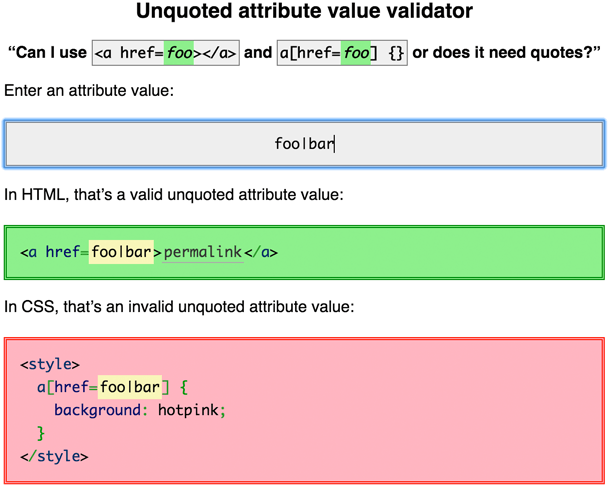
It’s a small tool that I made for Paul Irish’s TXJS presentation. It was meant as a joke, but it’s actually kind of useful. Enjoy!
此内容由惯性聚合(RSS阅读器)自动聚合整理,仅供阅读参考。 原文来自 — 版权归原作者所有。