


Note: This article is based on the ECMAScript 5 specification. For the updated ES2015 version, see Valid JavaScript variable names in ES2015.
Did you know var π = Math.PI; is syntactically valid JavaScript? I thought this was pretty cool, so I decided to look into which Unicode glyphs are allowed in JavaScript variable names, or identifiers as the ECMAScript specification calls them.
The ECMAScript 5.1 spec says:
An
Identifieris anIdentifierNamethat is not aReservedWord.
The spec describes four groups of reserved words: keywords, future reserved words, null literals and boolean literals.
Keywords are tokens that have special meaning in JavaScript: break, case, catch, continue, debugger, default, delete, do, else, finally, for, function, if, in, instanceof, new, return, switch, this, throw, try, typeof, var, void, while, and with.
Future reserved words are tokens that may become keywords in a future revision of ECMAScript: class, const, enum, export, extends, import, and super. Some future reserved words only apply in strict mode: implements, interface, let, package, private, protected, public, static, and yield.
The null literal is, simply, null.
There are two boolean literals: true and false.
None of the above are allowed as variable names.
The NaN, Infinity, and undefined properties of the global object are immutable or read-only properties in ES5. So even though var NaN = 42; in the global scope wouldn’t throw an error, it wouldn’t actually do anything. To avoid confusion, I’d suggest avoiding the use of these variable names.
// In the global scope:
var NaN = 42;
console.log(NaN); // NaN

// …but elsewhere:
(function() {
	var NaN = 42;
	console.log(NaN); // 42
}());
In strict mode, eval and arguments are disallowed as variable names too. (They kind of act like keywords in that case.)
The old ES3 spec defines some reserved words that aren’t reserved words in ES5 anymore: int, byte, char, goto, long, final, float, short, double, native, throws, boolean, abstract, volatile, transient, and synchronized. It’s probably a good idea to avoid these as well, for optimal backwards compatibility.
As mentioned before, the spec differentiates between identifier names and identifiers. Identifiers form a subset of identifier names, since identifiers have the extra restriction that no reserved words are allowed. For example, var is a valid identifier name, but it’s an invalid identifier.
So, what is allowed in an identifier name?
An identifier must start with $, _, or any character in the Unicode categories “Uppercase letter (Lu)”, “Lowercase letter (Ll)”, “Titlecase letter (Lt)”, “Modifier letter (Lm)”, “Other letter (Lo)”, or “Letter number (Nl)”.
The rest of the string can contain the same characters, plus any U+200C zero width non-joiner characters, U+200D zero width joiner characters, and characters in the Unicode categories “Non-spacing mark (Mn)”, “Spacing combining mark (Mc)”, “Decimal digit number (Nd)”, or “Connector punctuation (Pc)”.
That’s it, really. There are a few things to note, though…
As you know, JavaScript uses UCS-2 internally, and the spec defines “characters” as follows:
Throughout the rest of this document, the phrase “code unit” and the word “character” will be used to refer to a 16-bit unsigned value used to represent a single 16-bit unit of text.
This effectively means that supplementary Unicode characters (e.g. 丽, i.e. U+2F800 CJK Compatibility Ideograph, which is listed in the [Lo] category) are disallowed in identifier names, as JavaScript interprets them as two individual surrogate halves (e.g. \uD87E\uDC00) which don’t match any of the allowed Unicode categories.
Another gotcha is the following:
Unicode escape sequences are also permitted in an
IdentifierName, where they contribute a single character. […] AUnicodeEscapeSequencecannot be used to put a character into anIdentifierNamethat would otherwise be illegal.
This means that you can use var \u0061 and var a interchangeably. Similarly, since var 1 is invalid, so is var \u0031.
For web browsers, there is an exception to this rule, namely when reserved words are used. Most browsers support identifiers that unescape to a reserved word, as long as at least one character is escaped using a Unicode escape sequence. For example, var var; wouldn’t work, but e.g. var v\u0061r; would — even though strictly speaking, the ECMAScript spec disallows it. Subsequent use of such identifiers must also have at least one character escaped (otherwise the reserved word will be used instead), but it doesn’t have to be the same character(s) that were originally used to create the identifier. For example, var v\u0061r = 42; alert(va\u0072); would alert 42. This is very confusing, so I wouldn’t recommend relying on this hack. Luckily, it looks like the ECMAScript 6 spec will explicitly make this behavior non-conforming. Firefox/Spidermonkey, Safari/JavaScriptCore, and IE/Chakra have already dropped this behavior.
Two
IdentifierNames that are canonically equivalent according to the Unicode standard are not equal unless they are represented by the exact same sequence of code units.
So, ma\u00F1ana and man\u0303ana are two different variable names, even though they’re equivalent after Unicode normalization.
The following are all examples of valid JavaScript variable names.
// How convenient!
var π = Math.PI;

// Sometimes, you just have to use the Bad Parts of JavaScript:
var ಠ_ಠ = eval;

// Code, Y U NO WORK?!
var ლ_ಠ益ಠ_ლ = 42;

// How about a JavaScript library for functional programming?
var λ = function() {};

// Obfuscate boring variable names for great justice
var \u006C\u006F\u006C\u0077\u0061\u0074 = 'heh';

// …or just make up random ones
var Ꙭൽↈⴱ = 'huh';

// Did you know about the [.] syntax?
var ᱹ = 1;
console.assert([1, 2, 3][ᱹ] === 2);

// While perfectly valid, this doesn’t work in most browsers:
var foo\u200Cbar = 42;

// This is *not* a bitwise left shift (`<<`):
var 〱〱 = 2;
// This is, though:
〱〱 << 〱〱; // 8

// Give yourself a discount:
var price_9̶9̶_89 = 'cheap';

// Fun with Roman numerals
var Ⅳ = 4;
var Ⅴ = 5;
Ⅳ + Ⅴ; // 9

// Cthulhu was here
var Hͫ̆̒̐ͣ̊̄ͯ͗͏̵̗̻̰̠̬͝ͅE̴̷̬͎̱̘͇͍̾ͦ͊͒͊̓̓̐_̫̠̱̩̭̤͈̑̎̋ͮͩ̒͑̾͋͘Ç̳͕̯̭̱̲̣̠̜͋̍O̴̦̗̯̹̼ͭ̐ͨ̊̈͘͠M̶̝̠̭̭̤̻͓͑̓̊ͣͤ̎͟͠E̢̞̮̹͍̞̳̣ͣͪ͐̈T̡̯̳̭̜̠͕͌̈́̽̿ͤ̿̅̑Ḧ̱̱̺̰̳̹̘̰́̏ͪ̂̽͂̀͠ = 'Zalgo';
Some of these don’t work in all browsers/environments — at least, not yet. See WebKit/JavaScriptCore bug #79353 and #78908 (now fixed), Chrome/V8 bug #1965 (now fixed) and #1958 (now fixed), Internet Explorer/Chakra bug #725622, Opera/Carakan bug DSK-358119 and DSK-357714/CORE-44659 (now fixed), and Firefox/Spidermonkey bug #744784.
I fixed some bugs myself, by writing patches for V8, WebKit/JavaScriptCore, Esprima and JSHint.
Even if you’d learn these rules by heart, it would be virtually impossible to memorize every character in the different Unicode categories that are allowed. If you were to summarize all these rules in a single ASCII-only regular expression for JavaScript, it would be 11,236 characters long.
For that reason, I created mothereff.in/js-variables, a tool that makes it easy for you to check if a given string is a valid variable name in JavaScript.
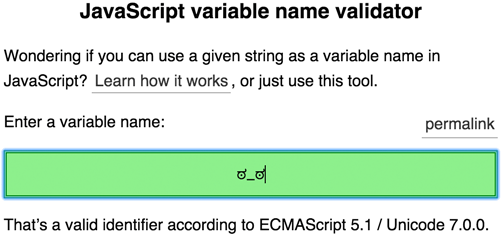
If a valid variable name is entered, the tool checks if the browser you’re using handles the identifier correctly. If not, it will show a warning, encouraging you to file a browser bug.
The validator will warn you if an ECMAScript 3 reserved word (that isn’t a reserved word anymore) is entered. Try char, for example.
This tool uses the Unicode 7.0.0 character database. Of course, not all JavaScript engines have the same level of Unicode support yet. As the spec says:
ECMAScript implementations may recognize identifier characters defined in later editions of the Unicode Standard. If portability is a concern, programmers should only employ identifier characters defined in Unicode 3.0.
For this reason, the validator will warn you if a variable name is invalid when the Unicode 3.0 database is used. Try \u0CF1, for example.
此内容由惯性聚合(RSS阅读器)自动聚合整理,仅供阅读参考。 原文来自 — 版权归原作者所有。