
惯性聚合 高效追踪和阅读你感兴趣的博客、新闻、科技资讯
阅读原文 在惯性聚合中打开

推荐订阅源

Martin Fowler
Martin Fowler
L
LINUX DO - 最新话题
P
Proofpoint News Feed
Cyberwarzone
Cyberwarzone
Know Your Adversary
Know Your Adversary
cs.CL updates on arXiv.org
L
Lohrmann on Cybersecurity
D
Darknet – Hacking Tools, Hacker News & Cyber Security
Security Latest
Security Latest
T
The Exploit Database - CXSecurity.com
Exploit-DB.com RSS Feed
P
Privacy & Cybersecurity Law Blog
K
Kaspersky official blog
The Last Watchdog
The Last Watchdog
Webroot Blog
Webroot Blog
Scott Helme
Scott Helme
T
Threat Research - Cisco Blogs
C
Cyber Attacks, Cyber Crime and Cyber Security
WordPress大学
WordPress大学
L
LINUX DO - 热门话题
OSCHINA 社区最新新闻
OSCHINA 社区最新新闻
博客园 - Franky
V
Visual Studio Blog
O
OpenAI News
AI
AI
Hacker News: Ask HN
Hacker News: Ask HN
V2EX - 技术
V2EX - 技术
GbyAI
GbyAI
Recent Commits to openclaw:main
Simon Willison's Weblog
S
Schneier on Security
Spread Privacy
Spread Privacy
Y
Y Combinator Blog
I
InfoQ
H
Hackread – Cybersecurity News, Data Breaches, AI and More
T
Threatpost
C
Cybersecurity and Infrastructure Security Agency CISA
F
Fortinet All Blogs
C
CERT Recently Published Vulnerability Notes
T
The Blog of Author Tim Ferriss
C
Check Point Blog
Apple Machine Learning Research
有赞技术团队
有赞技术团队
人人都是产品经理
人人都是产品经理
N
News and Events Feed by Topic
Project Zero
Project Zero
小众软件
小众软件
让小产品的独立变现更简单 - ezindie.com
B
Blog
G
Google Developers Blog

Google Chrome

Chrome is bringing advanced autofill capabilities to your phone with Google Wallet We’re expanding Gemini in Chrome to users in Latin America, Africa, the Middle East and more. Bringing the best of Gemini in Chrome to Android Approximate location sharing gives you more control over your location data in Chrome. We’re expanding Gemini in Chrome to users in Asia Pacific. A new way to explore the web with AI Mode in Chrome Turn your best AI prompts into one-click tools in Chrome Expanding Chrome’s AI experiences to India, New Zealand and Canada New features in Chrome for work, life and everything in between The latest AI news we announced in January The new era of browsing: Putting Gemini to work in Chrome 60 of our biggest AI announcements in 2025 Take the web for a fresh spin with GenTabs, built with Gemini 3 4 new ways Chrome autofill will simplify your holidays Our favorite Chrome extensions in 2025 AI Mode in Chrome is easier to use on iOS and Android. Chrome now helps you fill in passport, driver’s license, vehicle information and more. The latest AI news we announced in September Chrome: The browser you love, reimagined with AI
Get more done with new vertical tabs and immersive reading mode in Chrome
Alex Tsu · 2026-04-08 · via Google Chrome

Jess Carpenter

Product Manager, Chrome

General summary

Chrome has two new features to help you focus and be more productive. You can now move your tabs to the side of your browser window by right-clicking and selecting “Show Tabs Vertically.” Also, you can remove distractions from any webpage by right-clicking and selecting “Open in reading mode.”

Summaries were generated by Google AI. Generative AI is experimental.

Basic explainer

Chrome has new features to help you focus. Vertical tabs let you see all your tabs on the side. Reading mode makes web pages simpler so it's easier to read.

Summaries were generated by Google AI. Generative AI is experimental.

Explore other styles:
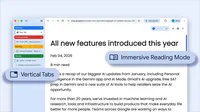
Image of browser window using vertical tabs and immersive reading mode

Your browser does not support the audio element.

Listen to article

This content is generated by Google AI. Generative AI is experimental

[[duration]] minutes

Today we are beginning to roll out two new features designed to streamline your browser and help you maximize productivity in Chrome.

You now have the option to use vertical tabs in Chrome, depending on your preferences. Just right click on any Chrome window and select “Show Tabs Vertically.” By moving your tabs to the side of your browser window, you can read full page titles and manage tab groups with ease — even when your tab count hits double digits. This layout is perfect for multitasking, saving you time by making sure you never lose a tab.

And reading mode, a favorite Chrome feature for deep focus, is even better with a new full-page interface. Right-click on any page and select “Open in reading mode” to remove visual distractions and transform a busy webpage into an immersive, text-focused reading experience.

Try both features to see how a little extra focus can make a big difference.

Related stories