


What's wrong with this code?
import * as React from 'react'
import ReactDOM from 'react-dom'

function Greeting({ subject }) {
	return <div>Hello {subject.toUpperCase()}</div>
}

function Farewell({ subject }) {
	return <div>Goodbye {subject.toUpperCase()}</div>
}

function App() {
	return (
		<div>
			<Greeting />
			<Farewell />
		</div>
	)
}

ReactDOM.render(<App />, document.getElementById('root'))
If you send that to production, your users are going to get the white screen of sadness:
If you run this with create-react-app's error overlay (during development), you'll get this:
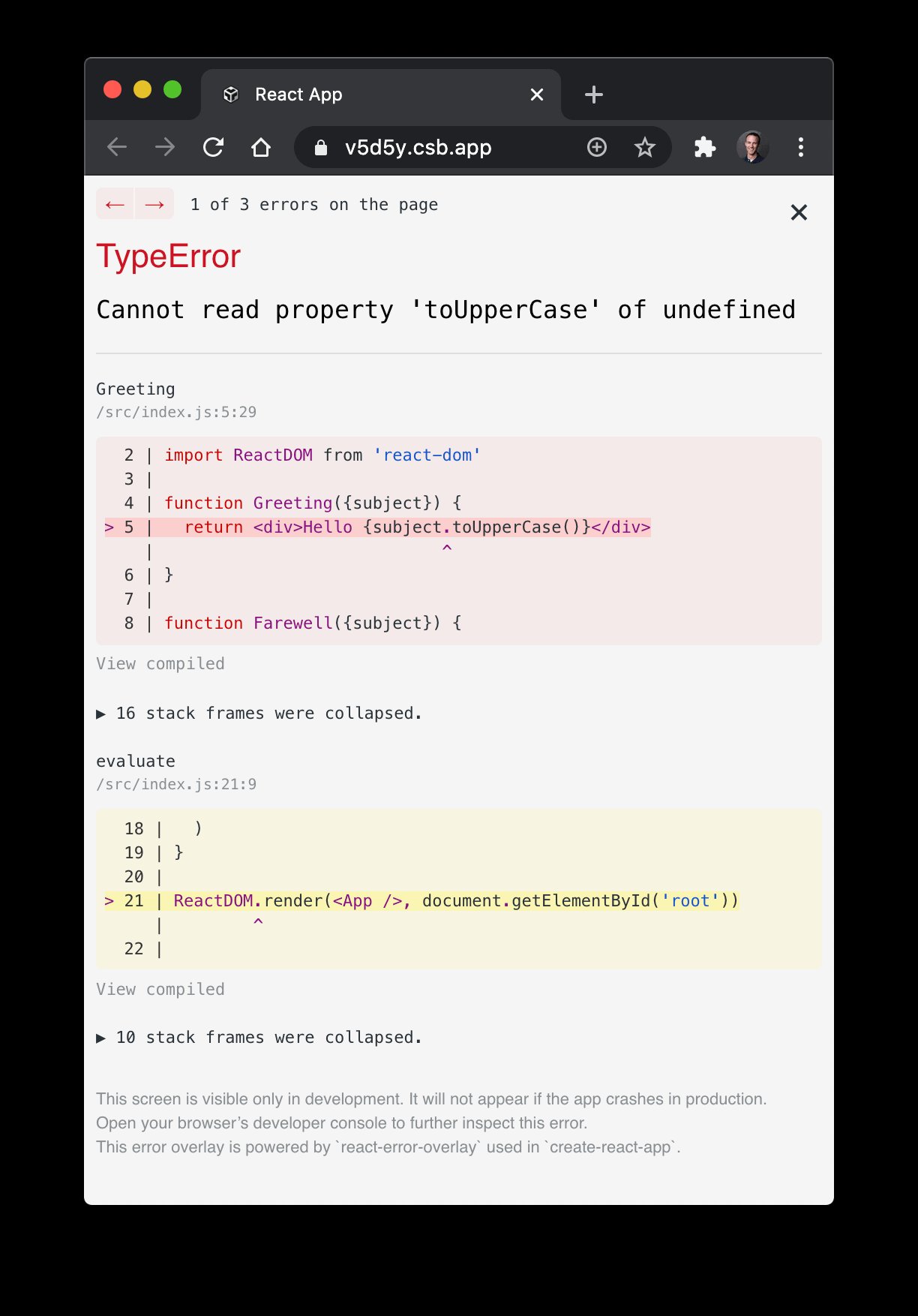
The problem is we need to either pass a subject prop (as a string) or default
the subject prop's value. Obviously, this is contrived, but runtime errors
happen all of the time and that's why it's a good idea to gracefully handle such
errors. So let's leave this error in for a moment and see what tools React has
for us to handle runtime errors like this.
The naive approach to handling this kind of error would be to add a try/catch:
import * as React from 'react'
import ReactDOM from 'react-dom'

function ErrorFallback({ error }) {
	return (
		<div role="alert">
			<p>Something went wrong:</p>
			<pre style={{ color: 'red' }}>{error.message}</pre>
		</div>
	)
}

function Greeting({ subject }) {
	try {
		return <div>Hello {subject.toUpperCase()}</div>
	} catch (error) {
		return <ErrorFallback error={error} />
	}
}

function Farewell({ subject }) {
	try {
		return <div>Goodbye {subject.toUpperCase()}</div>
	} catch (error) {
		return <ErrorFallback error={error} />
	}
}

function App() {
	return (
		<div>
			<Greeting />
			<Farewell />
		</div>
	)
}

ReactDOM.render(<App />, document.getElementById('root'))
That "works":
But, it may be ridiculous of me, but what if I don't want to wrap every
component in my app in a try/catch block? In regular JavaScript, you can
simply wrap the calling function in a try/catch and it'll catch any errors in
the functions it calls. Let's try that here:
import * as React from 'react'
import ReactDOM from 'react-dom'

function ErrorFallback({ error }) {
	return (
		<div role="alert">
			<p>Something went wrong:</p>
			<pre style={{ color: 'red' }}>{error.message}</pre>
		</div>
	)
}

function Greeting({ subject }) {
	return <div>Hello {subject.toUpperCase()}</div>
}

function Farewell({ subject }) {
	return <div>Goodbye {subject.toUpperCase()}</div>
}

function App() {
	try {
		return (
			<div>
				<Greeting />
				<Farewell />
			</div>
		)
	} catch (error) {
		return <ErrorFallback error={error} />
	}
}

ReactDOM.render(<App />, document.getElementById('root'))
Unfortunately, this doesn't work. And that's because we're not the ones calling
Greeting and Farewell. React calls those functions. When we use them in JSX,
we're simply creating React elements with those functions as the type. Telling
React that "if the App is rendered, here are the other components that will
need to be called." But we're not actually calling them, so the try/catch
won't work.
I'm not too disappointed by this to be honest, because try/catch is inherently
imperative and I'd prefer a declarative way to handle errors in my app anyway.
This is where the Error Boundary feature comes in to play. An "Error Boundary" is a special component that you write to handle runtime errors like those above. For a component to be an Error Boundary:
getDerivedStateFromError or componentDidCatch.Luckily, we have react-error-boundary
which exposes the last Error Boundary component anyone needs to write because it
gives you all the tools you need to declaratively handle runtime errors in your
React apps.
So let's add react-error-boundary and
render the ErrorBoundary component:
import * as React from 'react'
import ReactDOM from 'react-dom'
import { ErrorBoundary } from 'react-error-boundary'

function ErrorFallback({ error }) {
	return (
		<div role="alert">
			<p>Something went wrong:</p>
			<pre style={{ color: 'red' }}>{error.message}</pre>
		</div>
	)
}

function Greeting({ subject }) {
	return <div>Hello {subject.toUpperCase()}</div>
}

function Farewell({ subject }) {
	return <div>Goodbye {subject.toUpperCase()}</div>
}

function App() {
	return (
		<div>
			<ErrorBoundary FallbackComponent={ErrorFallback}>
				<Greeting />
				<Farewell />
			</ErrorBoundary>
		</div>
	)
}

ReactDOM.render(<App />, document.getElementById('root'))
And that works perfectly:
The nice thing about this is you can almost think about the ErrorBoundary
component the same way you do a try/catch block. You can wrap it around a
bunch of React components to handle lots of errors, or you can scope it down to
a specific part of the tree to have more granular error handling and recovery.
react-error-boundary gives us all the
tools we need to manage this as well.
Here's a more complex example:
function ErrorFallback({ error, resetErrorBoundary }) {
	return (
		<div role="alert">
			<p>Something went wrong:</p>
			<pre style={{ color: 'red' }}>{error.message}</pre>
			<button onClick={resetErrorBoundary}>Try again</button>
		</div>
	)
}

function Bomb({ username }) {
	if (username === 'bomb') {
		throw new Error('💥 CABOOM 💥')
	}
	return `Hi ${username}`
}

function App() {
	const [username, setUsername] = React.useState('')
	const usernameRef = React.useRef(null)

	return (
		<div>
			<label>
				{`Username (don't type "bomb"): `}
				<input
					placeholder={`type "bomb"`}
					value={username}
					onChange={(e) => setUsername(e.target.value)}
					ref={usernameRef}
				/>
			</label>
			<div>
				<ErrorBoundary
					FallbackComponent={ErrorFallback}
					onReset={() => {
						setUsername('')
						usernameRef.current.focus()
					}}
					resetKeys={[username]}
				>
					<Bomb username={username} />
				</ErrorBoundary>
			</div>
		</div>
	)
}
Here's what that experience is like:
Username (don't type "bomb"):
Hi
You'll notice that if you type "bomb", the Bomb component is replaced by the
ErrorFallback component and you can recover by either changing the username
(because that's in the resetKeys prop) or by clicking "Try again" because
that's wired up to resetErrorBoundary and we have an onReset that resets our
state to a username that won't trigger the error all over again.
Unfortunately, there are some errors that React doesn't/can't hand off to our Error Boundary. To quote the React docs:
Error boundaries do not catch errors for:
- Event handlers (learn more)
- Asynchronous code (e.g. setTimeout or requestAnimationFrame callbacks)
- Server side rendering
- Errors thrown in the error boundary itself (rather than its children)
Most of the time, folks will manage some error state and render something
different in the event of an error, like so:
function Greeting() {
	const [{ status, greeting, error }, setState] = React.useState({
		status: 'idle',
		greeting: null,
		error: null,
	})

	function handleSubmit(event) {
		event.preventDefault()
		const name = event.target.elements.name.value
		setState({ status: 'pending' })
		fetchGreeting(name).then(
			(newGreeting) => setState({ greeting: newGreeting, status: 'resolved' }),
			(newError) => setState({ error: newError, status: 'rejected' }),
		)
	}

	return status === 'rejected' ? (
		<ErrorFallback error={error} />
	) : status === 'resolved' ? (
		<div>{greeting}</div>
	) : (
		<form onSubmit={handleSubmit}>
			<label>Name</label>
			<input id="name" />
			<button type="submit" onClick={handleClick}>
				get a greeting
			</button>
		</form>
	)
}
Unfortunately, doing things that way means that you have to maintain TWO ways to handle errors:
fetchGreeting errorsLuckily, react-error-boundary also
exposes a simple hook to help with these situations as well. Here's how you
could use that to side-step this entirely:
function Greeting() {
	const [{ status, greeting }, setState] = React.useState({
		status: 'idle',
		greeting: null,
	})
	const { showBoundary } = useErrorBoundary()

	function handleSubmit(event) {
		event.preventDefault()
		const name = event.target.elements.name.value
		setState({ status: 'pending' })
		fetchGreeting(name).then(
			(newGreeting) => setState({ greeting: newGreeting, status: 'resolved' }),
			(error) => showBoundary(error),
		)
	}

	return status === 'resolved' ? (
		<div>{greeting}</div>
	) : (
		<form onSubmit={handleSubmit}>
			<label>Name</label>
			<input id="name" />
			<button type="submit" onClick={handleClick}>
				get a greeting
			</button>
		</form>
	)
}
So when our fetchGreeting promise is rejected, the handleError function is
called with the error and react-error-boundary will make that propagate to the
nearest error boundary like usual.
Alternatively, let's say you're using a hook that gives you the error:
function Greeting() {
	const [name, setName] = React.useState('')
	const { status, greeting, error } = useGreeting(name)
	if (error) throw error

	function handleSubmit(event) {
		event.preventDefault()
		const name = event.target.elements.name.value
		setName(name)
	}

	return status === 'resolved' ? (
		<div>{greeting}</div>
	) : (
		<form onSubmit={handleSubmit}>
			<label>Name</label>
			<input id="name" />
			<button type="submit" onClick={handleClick}>
				get a greeting
			</button>
		</form>
	)
}
In this case, if the error is ever set to a truthy value, then it will be
propagated to the nearest error boundary.
In either case, you could handle those errors like this:
const ui = (
	<ErrorBoundary FallbackComponent={ErrorFallback}>
		<Greeting />
	</ErrorBoundary>
)
And now that'll handle your runtime errors as well as the async errors in the
fetchGreeting or useGreeting code.
Error Boundaries have been a feature in React for years and we're still in this
awkward situation of handling runtime errors with Error Boundaries and handling
other error states within our components when we would be much better off
reusing our Error Boundary components for both. If you haven't already given
react-error-boundary a try, definitely
give it a solid look!
Good luck.
Oh, one other thing. Right now, you may notice that you'll experience that error overlay even if the error was handled by your Error Boundary. This will only happen during development (if you're using a dev server that supports it, like react-scripts, gatsby, or codesandbox). It won't show up in production. Yes, I agree this is annoying. PRs welcome.
此内容由惯性聚合(RSS阅读器)自动聚合整理,仅供阅读参考。 原文来自 — 版权归原作者所有。