


We all have workflows we go through regularly to get our job done. When we start working we need to open a few applications, websites, and start a few servers. When we commit code we want to make sure we didn't break tests or fail linting.
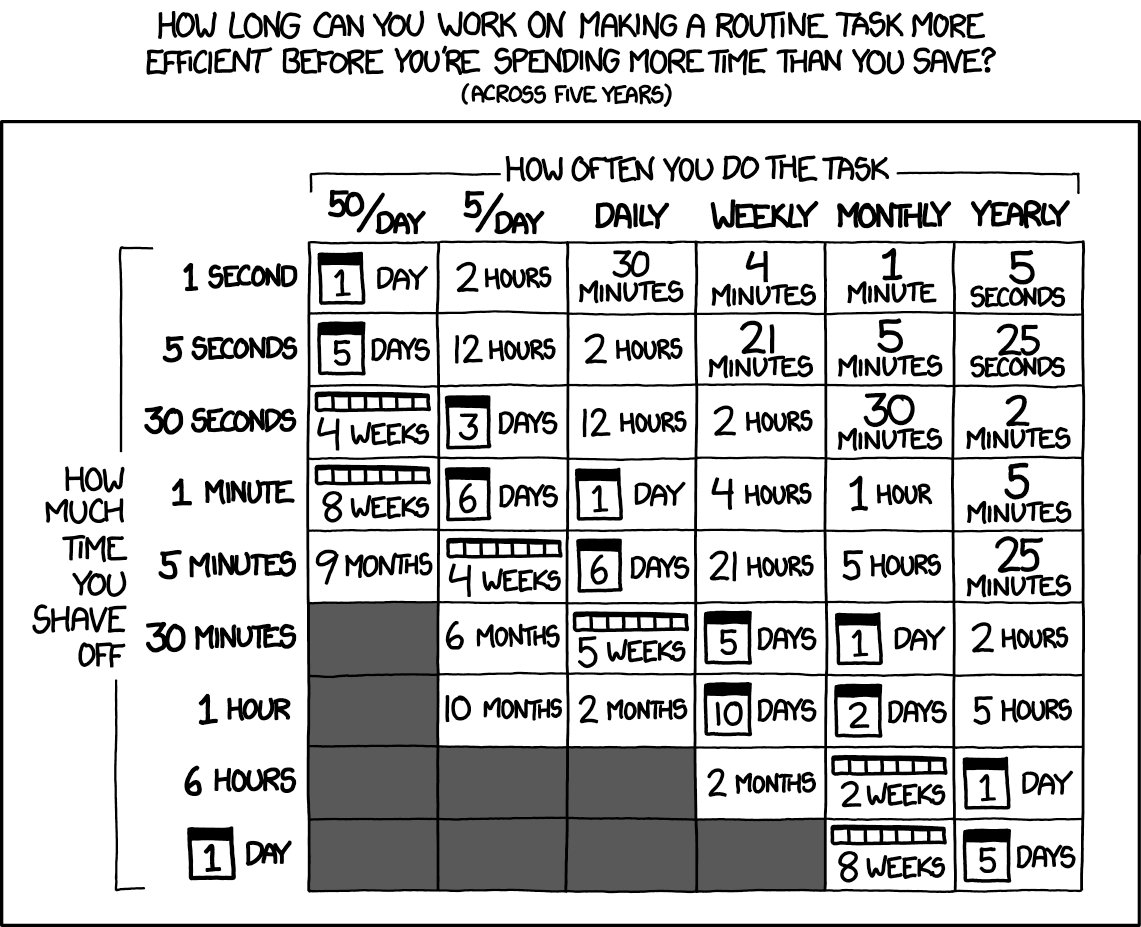
You could take time to automate all of this stuff, but is it really worth it? I
mean, how long does it take to open a few apps, copy/paste some skeleton code,
etc.? Let's say it takes 4 hours to automate creating all the files and things I
need for a new blog post (index.mdx with metadata content and optimized banner
image) — a task that takes about 60 seconds. I'd have to do that 240 times to
make it worth it, right?
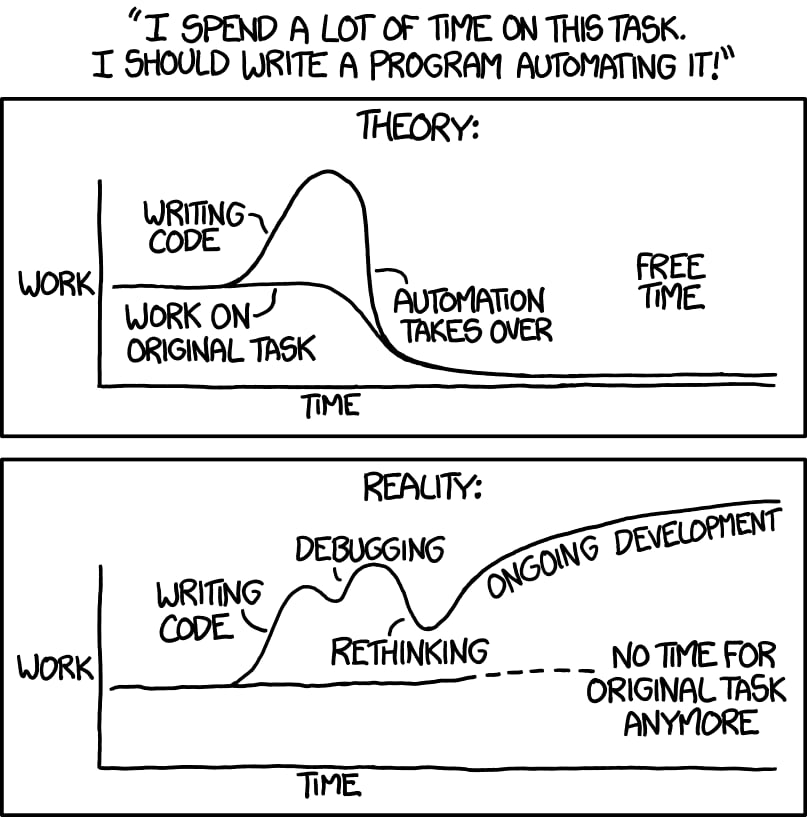
I mean, after all, just look at these XKCD comics!
If you're just doing the math like that, you might think, "yeah, it's probably not worth it." But...
Saving time is not the only reason to automate workflows
Let's talk about the blog post example as that's something I've done pretty recently. Hopefully you can apply this same concept to manual processes that you follow.
My blog is open source on GitHub.
The content is stored in mdx files with metadata for the
post stored as frontmatter (yaml syntax between two --- lines) at the top of
the file (things like title, date, description, keywords, etc.). I get a
tangentially related and memorable banner image from
unsplash.com which is stored next to the mdx file in
an images directory.
With that in mind, as of the time of this writing, here are the minimum number of steps I need to take when I create a new blog post:
content/blog/<name-of-post>/index.mdxcontent/blog/<name-of-post>/images/banner.jpgtitle, date, description, keywords,
categories, banner (./images/banner.jpg), bannerCredit
(Photo by [author](https://unsplash.com/photos/<photo_id>))From there, everything is automated to get the blog post built and deployed thanks to Netlify and Gatsby Cloud.
By far, the longest part of this process is writing the blog post. Everything else takes just about 60 seconds. So, why is it still worthwhile to automate?
One of my favorite benefits of automating repetitive workflows is that I can keep my brain focused on the task at hand rather than shifting gears to deal with boilerplate or setup. Especially when the task at hand is creative and brain intensive (like writing a blog post or closing bugs). It's a real challenge to write a blog post mostly because you have to decide what to write about and how to go about communicating those ideas. Once I get to the point that I know what I'm going to write about, I don't want anything to come between me and creating the content because that level of friction makes it unnecessarily harder. When that friction is there, my brain is taken off into autopilot mode for a few minutes while I repeat a task I've done a million times. Unfortunately, I need to stay conscious enough to account for the minor differences (like the blog post name and banner image for example). This is called context switching and can come at a huge cost.
By the time I finish setting up the skeleton stuff, I've forgotten exactly what I originally set out to do and need to go back to be reminded (or hit the foosball table for a minute ⚽️).
The ability to stay focused on the task at hand is a huge benefit to automating workflows.
Something we humans do much better than computers is the creative process of understanding a problem and coming up with a solution. So computers have been created to facilitate us doing what we're good at. Something that humans do really poorly though is performing mundane tasks over and over again. This is something that computers can do with 100% accuracy. By automating our workflows we can hand over to the computer what it's been designed to do (and does really well) and focus on what we're really good at (back to the idea of context there).
The risk of human error and difficulty of catching problems grows exponentially greater with the amount of mundane manual tasks you have to perform. Computers don't have this problem.
The list of tasks for creating a blog post that I made above is only the bare minimum of things I have to do to get a blog post out the door. But there's more that I can and should do for each blog post and thanks to the fact I have it automated, it's easy to make these things happen automatically:
banner path to where the image was downloadedslug for the permalinkdate for the postIn fact, because I've done all of this, when I do the stuff that can't be automated (like selecting a title, categories, keywords, and the banner image) I'm more likely to do a better job of doing those things because I've reduced the amount of mundane work I have to do.
In addition to doing more per-blog post, when I have the process automated, I'm more likely to do it, so I end up blogging more frequently. Another example would be continuous delivery. If you have that automated in a reliable fashion, then you're more likely to release more often.
The computer doesn't get fatigued or bored, so you can make it do more than you would bother doing yourself.
Once you've finished automating your workflow, you can share the automation you've developed with others. This is one area where the math can totally blow up in favor of automation.
For the specific example above, it's most likely that your file generator would be used only by people contributing to your project. But that's alright. It's nice to have all files in a project generally the same (a subject for another blog post).
However, if you automate something that's general enough to be used by more developers, you could open source your solution and tons of developers can use it. This is something that Stephan Bönnemann did with semantic-release, and I can't tell you how much time that's saved me; it's amazing.
The XKCD joke about "Rethinking" and "No Time for Original Task Anymore" is funny, and can be true. But for mature and responsible adults this can be a great thing. Consider all of the companies that were created and succeeded because someone automated a task and sold their creation to others, hopefully making the world a better place in the process.
If your automation is used by even only 100 other people, that's 100x the time saved. It's a no brainer. And if the automation is good enough that people are paying you, all the better!
One of the things I love about our industry is that it favors and encourages lifelong learning.
You could learn how to build desktop or web apps by making a GUI for your automation. Or, you could build your own CLI tool using something like inquirer. Using a variety of APIs can help you learn different ways to design APIs to solve problems and may help you design APIs to solve your future problems. You also learn the specific tools which can help you automate things more quickly in the future.
Then if you open source your solution you'll learn a ton about what it means to open source a project: add testing, continuous integration, releases (I recommend you automate that with the aforementioned semantic-release module), and so much more.
The process of automating your workflow is a fantastic learning experience (especially if you open source it).
I'm not claiming that everything you do should be automated and open sourced. Certainly not. We've got to get our jobs done and ship stuff. But there are definitely many instances (probably more than you realize) where automating something will actually help you get your job done and ship stuff faster — with fewer bugs than by regularly repeating the same steps in your workflow.
If you've automated something and want to open source it, you might check out my egghead.io series of over 20 free 5 minute lessons called “How to Write an Open Source JavaScript Library”
P.S. I've rewritten my website quite a bit since this post was originally written. You can check out my original blog post automation script here. You can check out my new blog post automation script here.
此内容由惯性聚合(RSS阅读器)自动聚合整理,仅供阅读参考。 原文来自 — 版权归原作者所有。