


In Application State Management with React, I talk about how using a mix of local state and React Context can help you manage state well in any React application. I showed some examples and I want to call out a few things about those examples and how you can create React context consumers effectively so you avoid some problems and improve the developer experience and maintainability of the context objects you create for your application and/or libraries.
Please do read Application State Management with React and follow the advice that you shouldn't be reaching for context to solve every state sharing problem that crosses your desk. But when you do need to reach for context, hopefully this blog post will help you know how to do so effectively. Also, remember that context does NOT have to be global to the whole app, but can be applied to one part of your tree and you can (and probably should) have multiple logically separated contexts in your app.
First, let's create a file at src/count-context.js and we'll create our
context there:
import * as React from 'react'

const CountContext = React.createContext()
First off, I don't have an initial value for the CountContext. If I wanted an
initial value, I would call React.createContext({count: 0}). But I don't
include a default value and that's intentional. The defaultValue is only
useful in a situation like this:
function CountDisplay() {
	const { count } = React.useContext(CountContext)
	return <div>{count}</div>
}

ReactDOM.render(<CountDisplay />, document.getElementById('⚛️'))
Because we don't have a default value for our CountContext, we'll get an error
on the highlighted line where we're destructuring the return value of
useContext. This is because our default value is undefined and you cannot
destructure undefined.
None of us likes runtime errors, so your knee-jerk reaction may be to add a
default value to avoid the runtime error. However, what use would the context be
if it didn't have an actual value? If it's just using the default value that's
been provided, then it can't really do much good. 99% of the time that you're
going to be creating and using context in your application, you want your
context consumers (those using useContext) to be rendered within a provider
which can provide a useful value.
There are situations where default values are useful, but most of the time they're not necessary or useful.
The React docs suggest that providing a default value "can be helpful in testing components in isolation without wrapping them." While it's true that it allows you to do this, I disagree that it's better than wrapping your components with the necessary context. Remember that every time you do something in your test that you don't do in your application, you reduce the amount of confidence that test can give you. There are reasons to do this, but that's not one of them.
If you're using TypeScript, not providing a default value can be really
annoying for people who are using React.useContext, but I'll show you how to
avoid that problem altogether below. Keep reading!
Ok, let's continue. For this context module to be useful at all we need to use the Provider and expose a component that provides a value. Our component will be used like this:
function App() {
	return (
		<CountProvider>
			<CountDisplay />
			<Counter />
		</CountProvider>
	)
}

ReactDOM.render(<App />, document.getElementById('⚛️'))
So let's make a component that can be used like that:
import * as React from 'react'

const CountContext = React.createContext()

function countReducer(state, action) {
	switch (action.type) {
		case 'increment': {
			return { count: state.count + 1 }
		}
		case 'decrement': {
			return { count: state.count - 1 }
		}
		default: {
			throw new Error(`Unhandled action type: ${action.type}`)
		}
	}
}

function CountProvider({ children }) {
	const [state, dispatch] = React.useReducer(countReducer, { count: 0 })
	// NOTE: you *might* need to memoize this value
	// Learn more in http://kcd.im/optimize-context
	const value = { state, dispatch }
	return <CountContext.Provider value={value}>{children}</CountContext.Provider>
}

export { CountProvider }
This is a contrived example that I'm intentionally over-engineering to show
you what a more real-world scenario would be like. This does not mean it has
to be this complicated every time! Feel free to use useState if that suits
your scenario. In addition, some providers are going to be short and simple
like this, and others are going to be MUCH more involved with many hooks.
Most of the APIs for context usages I've seen in the wild look something like this:
import * as React from 'react'
import { SomethingContext } from 'some-context-package'

function YourComponent() {
	const something = React.useContext(SomethingContext)
}
But I think that's a missed opportunity at providing a better user experience. Instead, I think it should be like this:
import * as React from 'react'
import { useSomething } from 'some-context-package'

function YourComponent() {
	const something = useSomething()
}
This has the benefit of you being able to do a few things which I'll show you in the implementation now:
import * as React from 'react'

const CountContext = React.createContext()

function countReducer(state, action) {
	switch (action.type) {
		case 'increment': {
			return { count: state.count + 1 }
		}
		case 'decrement': {
			return { count: state.count - 1 }
		}
		default: {
			throw new Error(`Unhandled action type: ${action.type}`)
		}
	}
}

function CountProvider({ children }) {
	const [state, dispatch] = React.useReducer(countReducer, { count: 0 })
	// NOTE: you *might* need to memoize this value
	// Learn more in http://kcd.im/optimize-context
	const value = { state, dispatch }
	return <CountContext.Provider value={value}>{children}</CountContext.Provider>
}

function useCount() {
	const context = React.useContext(CountContext)
	if (context === undefined) {
		throw new Error('useCount must be used within a CountProvider')
	}
	return context
}

export { CountProvider, useCount }
First, the useCount custom hook uses React.useContext to get the provided
context value from the nearest CountProvider. However, if there is no value,
then we throw a helpful error message indicating that the hook is not being
called within a function component that is rendered within a CountProvider.
This is most certainly a mistake, so providing the error message is valuable.
#FailFast
If you're able to use hooks at all, then skip this section. However if you need
to support React < 16.8.0, or you think the Context needs to be consumed by
class components, then here's how you could do something similar with the
render-prop based API for context consumers:
function CountConsumer({ children }) {
	return (
		<CountContext.Consumer>
			{(context) => {
				if (context === undefined) {
					throw new Error('CountConsumer must be used within a CountProvider')
				}
				return children(context)
			}}
		</CountContext.Consumer>
	)
}
And here's how class components would use it:
class CounterThing extends React.Component {
	render() {
		return (
			<CountConsumer>
				{({ state, dispatch }) => (
					<div>
						<div>{state.count}</div>
						<button onClick={() => dispatch({ type: 'decrement' })}>
							Decrement
						</button>
						<button onClick={() => dispatch({ type: 'increment' })}>
							Increment
						</button>
					</div>
				)}
			</CountConsumer>
		)
	}
}
This is what I used to do before we had hooks and it worked ok. I would not recommend bothering with this if you can use hooks though. Hooks are much better.
I promised I'd show you how to avoid issues with skipping the defaultValue
when using TypeScript. Guess what! By doing what I'm suggesting, you avoid the
problem by default! It's actually not a problem at all. Check it out:
import * as React from 'react'

type Action = { type: 'increment' } | { type: 'decrement' }
type Dispatch = (action: Action) => void
type State = { count: number }
type CountProviderProps = { children: React.ReactNode }

const CountStateContext = React.createContext<
	{ state: State; dispatch: Dispatch } | undefined
>(undefined)

function countReducer(state: State, action: Action) {
	switch (action.type) {
		case 'increment': {
			return { count: state.count + 1 }
		}
		default: {
			throw new Error(`Unhandled action type: ${action.type}`)
		}
	}
}

function CountProvider({ children }: CountProviderProps) {
	const [state, dispatch] = React.useReducer(countReducer, { count: 0 })
	// NOTE: you *might* need to memoize this value
	// Learn more in http://kcd.im/optimize-context
	const value = { state, dispatch }
	return (
		<CountStateContext.Provider value={value}>
			{children}
		</CountStateContext.Provider>
	)
}

function useCount() {
	const context = React.useContext(CountStateContext)
	if (context === undefined) {
		throw new Error('useCount must be used within a CountProvider')
	}
	return context
}

export { CountProvider, useCount }
With that, anyone can use useCount without having to do any undefined-checks,
because we're doing it for them!
type typos?At this point, you reduxers are yelling: "Hey, where are the action creators?!" If you want to implement action creators that is fine by me, but I never liked action creators. I have always felt like they were an unnecessary abstraction. Also, if you are using TypeScript and have your actions well typed, then you should not need them. You can get autocomplete and inline type errors!
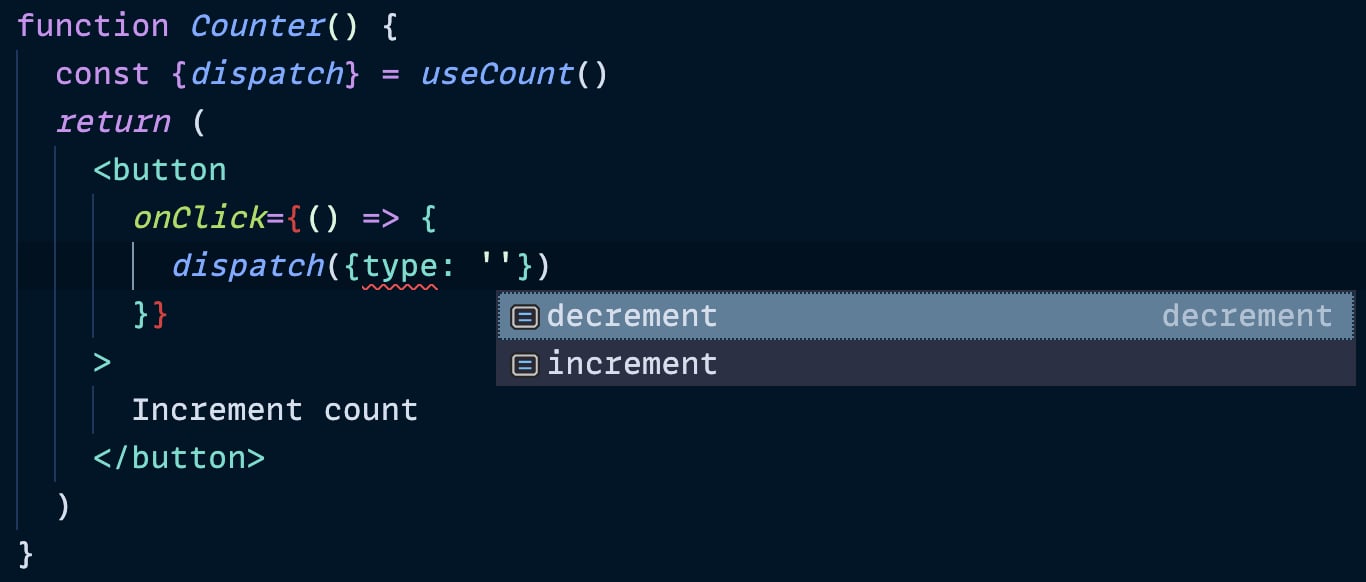
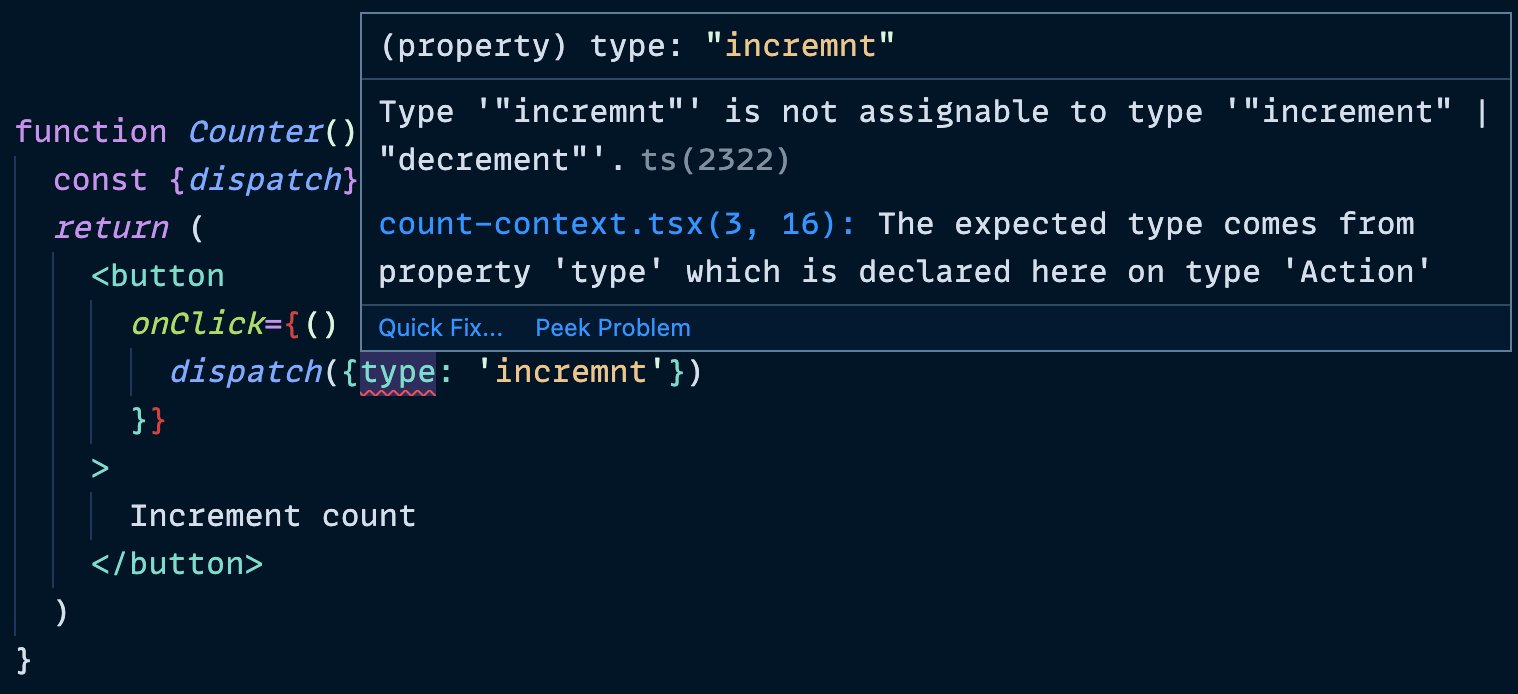
I really like passing dispatch this way and as a side benefit, dispatch is
stable for the lifetime of the component that created it, so you don't need to
worry about passing it to useEffect dependencies lists (it makes no difference
whether it is included or not).
If you are not typing your JavaScript (you probably should consider it if you have not), then the error we throw for missed action types is a failsafe. Also, read on to the next section because this can help you too.
This is a great question. What happens if you have a situation where you need to make some asynchronous request and you need to dispatch multiple things over the course of that request? Sure you could do it at the calling component, but manually wiring all of that together for every component that needs to do something like that would be pretty annoying.
What I suggest is you make a helper function within your context module which
accepts dispatch along with any other data you need, and make that helper be
responsible for dealing with all of that. Here's an example from
my Advanced React Patterns workshop:
async function updateUser(dispatch, user, updates) {
	dispatch({ type: 'start update', updates })
	try {
		const updatedUser = await userClient.updateUser(user, updates)
		dispatch({ type: 'finish update', updatedUser })
	} catch (error) {
		dispatch({ type: 'fail update', error })
	}
}

export { UserProvider, useUser, updateUser }
Then you can use that like this:
import { useUser, updateUser } from './user-context'

function UserSettings() {
	const [{ user, status, error }, userDispatch] = useUser()

	function handleSubmit(event) {
		event.preventDefault()
		updateUser(userDispatch, user, formState)
	}

	// more code...
}
I'm really happy with this pattern and if you'd like me to teach this at your company let me know (or add yourself to the waitlist for the next time I host the workshop)!
So here's the final version of the code:
import * as React from 'react'

const CountContext = React.createContext()

function countReducer(state, action) {
	switch (action.type) {
		case 'increment': {
			return { count: state.count + 1 }
		}
		case 'decrement': {
			return { count: state.count - 1 }
		}
		default: {
			throw new Error(`Unhandled action type: ${action.type}`)
		}
	}
}

function CountProvider({ children }) {
	const [state, dispatch] = React.useReducer(countReducer, { count: 0 })
	// NOTE: you *might* need to memoize this value
	// Learn more in http://kcd.im/optimize-context
	const value = { state, dispatch }
	return <CountContext.Provider value={value}>{children}</CountContext.Provider>
}

function useCount() {
	const context = React.useContext(CountContext)
	if (context === undefined) {
		throw new Error('useCount must be used within a CountProvider')
	}
	return context
}

export { CountProvider, useCount }
Note that I'm NOT exporting CountContext. This is intentional. I expose only
one way to provide the context value and only one way to consume it. This allows
me to ensure that people are using the context value the way it should be and it
allows me to provide useful utilities for my consumers.
I hope this is useful to you! Remember:
Good luck!
此内容由惯性聚合(RSS阅读器)自动聚合整理,仅供阅读参考。 原文来自 — 版权归原作者所有。