


Let's say you've got this test:
const add = (a, b) => a + b

if (add(1, 2) !== 4) {
	throw new Error('Expected 3 to be 4')
}
If you run that with node, here's the output you could expect:
add.test.js:4
  throw new Error('Expected 3 to be 4')
  ^

Error: Expected 3 to be 4
    at add.test.js:4:9
    at Script.runInThisContext (vm.js:116:20)
    at Object.runInThisContext (vm.js:306:38)
    at Object.<anonymous> ([stdin]-wrapper:9:26)
    at Module._compile (internal/modules/cjs/loader.js:959:30)
    at evalScript (internal/process/execution.js:80:25)
    at internal/main/eval_stdin.js:29:5
    at Socket.<anonymous> (internal/process/execution.js:192:5)
    at Socket.emit (events.js:215:7)
    at endReadableNT (_stream_readable.js:1184:12)
That's a pretty standard stack trace for that error. The message is clear-ish, but we can do better and we do! If we write this same test with Jest, the resulting error is much more helpful:
test('sums numbers', () => {
	expect(add(1, 2)).toBe(4)
})
That will fail with an error like this:
FAIL  ./add.test.js
  ✕ sums numbers (3 ms)

  ● sums numbers

    expect(received).toBe(expected) // Object.is equality

    Expected: 4
    Received: 3

      2 |
      3 | test('sums numbers', () => {
    > 4 |   expect(add(1, 2)).toBe(4)
        |                     ^
      5 | })
      6 |

      at Object.<anonymous> (src/__tests__/add.js:4:21)
It looks even better in the terminal:
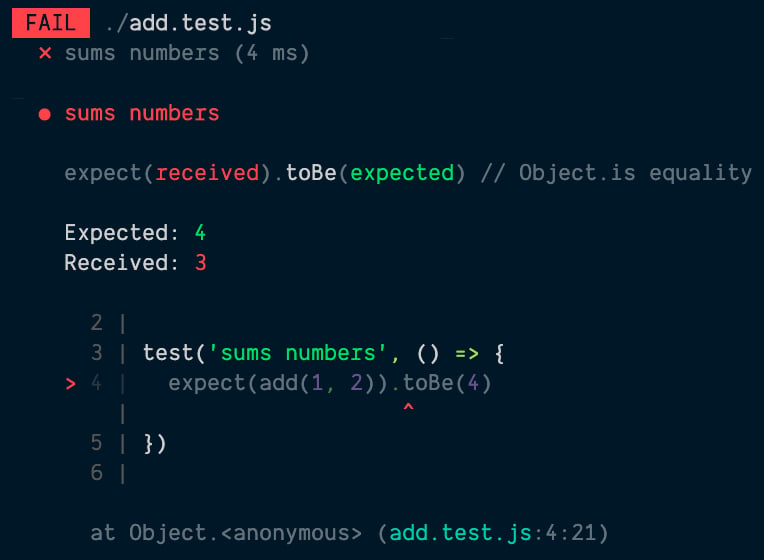
Nice right? Especially that codeframe. Being able to see not only the error itself. Now, I'm going to keep things contrived here to make it simple, but stick with me here. What if I like that assertion so much (or I have a collection of assertions) that I want to abstract it away into a function so I can use it in a bunch of different tests? Let's try that:
const add = (a, b) => a + b

function assertAdd(inputs, output) {
	expect(add(...inputs)).toBe(output)
}

test('sums numbers', () => {
	assertAdd([1, 2], 4)
})
Please keep in mind, I am not recommending you create useless abstractions like the one above. As with everything, you should be applying AHA Programming (and for testing). This blog post is just useful for situations where the abstraction is clear and you want to include assertions in your abstraction.
Alright, with this little abstraction, here's the error we get:
FAIL  ./add.test.js
  ✕ sums numbers (3 ms)

  ● sums numbers

    expect(received).toBe(expected) // Object.is equality

    Expected: 4
    Received: 3

      2 |
      3 | function assertAdd(inputs, output) {
    > 4 |   expect(add(...inputs)).toBe(output)
        |                          ^
      5 | }
      6 |
      7 | test('sums numbers', () => {

      at assertAdd (add.test.js:4:26)
      at Object.<anonymous> (add.test.js:8:3)
What!? That's not nearly as helpful! What if we had a bunch of places we're
calling assertAdd? What good is that codeframe going to do us? How do we know
which one failed. Oh, there it is, I we do get a line in the stack trace,
but... like... talk about a step backward. I'd much rather have the line that
called assertAdd be what shows up in the codeframe.
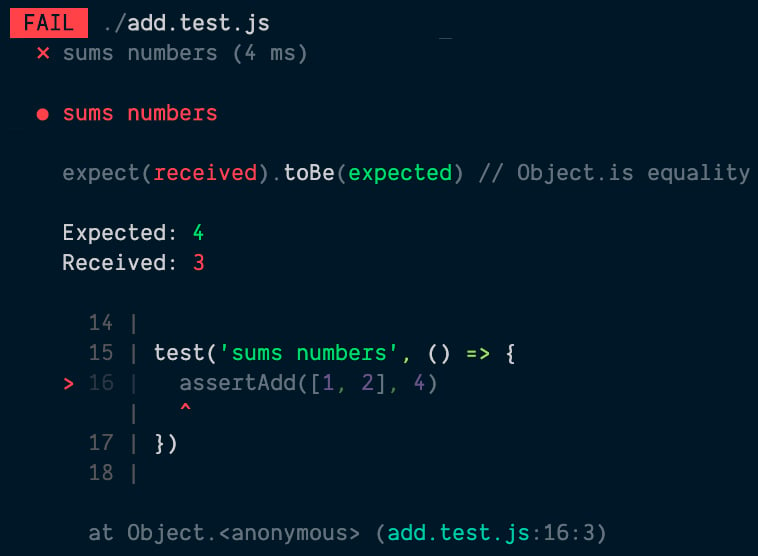
Well, there's no API into Jest for this (yet?), but you can force Jest to give you a codeframe where you want. So what I'm going to show you next is how we can make this error output like this:
FAIL  ./add.test.js
  ✕ sums numbers (3 ms)

  ● sums numbers

    expect(received).toBe(expected) // Object.is equality

    Expected: 4
    Received: 3

      14 |
      15 | test('sums numbers', () => {
    > 16 |   assertAdd([1, 2], 4)
         |   ^
      17 | })
      18 |

      at Object.<anonymous> (add.test.js:16:3)
Interested? Cool. Let's dive in.
Actually, it's pretty simple. Remember the full stack trace we had with regular
node? Well, when the expect library throws an error, we get a full stack trace
as well. Let's take the contents of our assertAdd function and put it in a
try/catch so we can check out the error.stack:
function assertAdd(inputs, output) {
	try {
		expect(add(...inputs)).toBe(output)
	} catch (error) {
		console.log(error.stack)
		throw error
	}
}
Here's what's logged with that:
Error: expect(received).toBe(expected) // Object.is equality

Expected: 4
Received: 3
    at assertAdd (/Users/kentcdodds/code/kentcdodds.com/add.test.js:5:28)
    at Object.<anonymous> (/Users/kentcdodds/code/kentcdodds.com/add.test.js:17:3)
    at Object.asyncJestTest (/Users/kentcdodds/code/kentcdodds.com/node_modules/jest-jasmine2/build/jasmineAsyncInstall.js:100:37)
    at /Users/kentcdodds/code/kentcdodds.com/node_modules/jest-jasmine2/build/queueRunner.js:47:12
    at new Promise (<anonymous>)
    at mapper (/Users/kentcdodds/code/kentcdodds.com/node_modules/jest-jasmine2/build/queueRunner.js:30:19)
    at /Users/kentcdodds/code/kentcdodds.com/node_modules/jest-jasmine2/build/queueRunner.js:77:41
    at processTicksAndRejections (internal/process/task_queues.js:93:5)
That error.stack has already gotten some helpful treatment from Jest's
expect assertion library (it's even got helpful colors at this point).
Note that error.stack is actually a combination of the error.message + the
stack trace, so the error message that expect provides is everything above
the first "at" line which is where the stack trace actually starts.
Ok, so you'll notice that the stack trace we've got here is very different from
the one that Jest shows us. This is because most of the stuff in there is pretty
useless to developers. It's just noise. Why do developers need to know that
their code ran through mapper function at queueRunner.js:30:19? Yeah, pretty
useless. So
when Jest formats the stack trace,
it
filters out a bunch of the noise,
and we're left with:
Error: expect(received).toBe(expected) // Object.is equality

Expected: 4
Received: 3
    at assertAdd (/Users/kentcdodds/code/kentcdodds.com/add.test.js:5:28)
    at Object.<anonymous> (/Users/kentcdodds/code/kentcdodds.com/add.test.js:17:3)
Definitely more helpful. The next thing Jest does is it takes the first line in the remaining stack trace lines and creates the codeframe for the first line. Then it formats filepaths and we're left with the relatively useless error + codeframe + stack trace shown above.
So, understanding that, the solution is pretty simple: ensure that the first relevant line in our stack trace is the one we want in the codeframe!
So, what we need to do, is filter out the one that includes the function
assertAdd and we're off the races:
function assertAdd(inputs, output) {
	try {
		expect(add(...inputs)).toBe(output)
	} catch (error) {
		error.stack = error.stack
			// error.stack is a string, so let's split it into lines
			.split('\n')
			// filter out the line that includes assertAdd (you could make this more robust by using your test utils filename instead).
			.filter((line) => !line.includes('assertAdd'))
			// join the lines back up into a single (multiline) string
			.join('\n')
		throw error
	}
}
And with that we get the stack trace I previewed to you above. Here's a screenshot of that:
The problem with this is we actually don't want to just filter out our
utility. What if that utility function is built on top of other functions. So
really, we want to remove everything above our utility as well. This is
actually what Jest's expect does and
it uses Error.captureStackTrace.
Let's try that:
function assertAdd(inputs, output) {
	try {
		expect(add(...inputs)).toBe(output)
	} catch (error) {
		Error.captureStackTrace(error, assertAdd)
		throw error
	}
}
Wow, that's a lot cleaner. So we pass the error we want updated and the
function we want removed from the stack trace. That argument is called the
constructorOpt.
According to the Node.js docs:
The optional constructorOpt argument accepts a function. If given, all
frames above constructorOpt, including constructorOpt, will be omitted
from the generated stack trace.
It's almost as if this were created for our exact use case!
So here it is all together:
const add = (a, b) => a + b

function assertAdd(inputs, output) {
	try {
		expect(add(...inputs)).toBe(output)
	} catch (error) {
		Error.captureStackTrace(error, assertAdd)
		throw error
	}
}

test('sums numbers', () => {
	assertAdd([1, 2], 4)
})
And here's the output:
FAIL  ./add.test.js
  ✕ sums numbers (3 ms)

  ● sums numbers

    expect(received).toBe(expected) // Object.is equality

    Expected: 4
    Received: 3

      11 |
      12 | test('sums numbers', () => {
    > 13 |   assertAdd([1, 2], 4)
         |   ^
      14 | })
      15 |

      at Object.<anonymous> (add.test.js:13:3)
And here's what that looks like visually:
One other thing to note is that Jest automatically knows to not make a codeframe
out of a line that's coming from node_modules. So if you publish your
utilities to npm, you probably don't need to bother filtering things out
yourself. This is really only useful for those testing abstractions you find
yourself writing in a testbase at scale.
But manipulating the stack trace for improved error messages can be good
knowledge to have, even for things you publish to a registry. For example,
DOM Testing Library does this in waitFor
to make sure failures of asynchronous utilities (like find* queries and
waitFor itself) have beautiful errors and sensible stack traces (async stack
traces are pretty useless).
● waitFor works

  TestingLibraryElementError: Unable to find an element with the text: /nothing matches this/. This could be because the text is broken up by multiple elements. In this case, you can provide a function for your text matcher to make your matcher more flexible.

    <body />

      2 |
      3 | test('waitFor has a nice stack trace', async () => {
    > 4 |   await waitFor(() => {
        |         ^
      5 |     screen.getByText(/nothing matches this/)
      6 |   })
      7 | })

      at waitForWrapper (node_modules/@testing-library/dom/dist/wait-for.js:94:27)
      at Object.<anonymous> (add.test.js:4:9)
I hope that helps you understand how to make the error messages better for custom utilities you make for your tests! Good luck.
此内容由惯性聚合(RSS阅读器)自动聚合整理,仅供阅读参考。 原文来自 — 版权归原作者所有。