


惯性聚合 高效追踪和阅读你感兴趣的博客、新闻、科技资讯
阅读原文 在惯性聚合中打开

推荐订阅源

T
Tenable Blog
博客园_首页
Vercel News
Vercel News
WordPress大学
WordPress大学
美团技术团队
G
Google Developers Blog
大猫的无限游戏
大猫的无限游戏
小众软件
小众软件
Y
Y Combinator Blog
博客园 - 【当耐特】
量子位
酷 壳 – CoolShell
酷 壳 – CoolShell
The Cloudflare Blog
T
The Blog of Author Tim Ferriss
奇客Solidot–传递最新科技情报
奇客Solidot–传递最新科技情报
Google DeepMind News
云风的 BLOG
云风的 BLOG
腾讯CDC
M
MIT News - Artificial intelligence
爱范儿
爱范儿
Recent Announcements
雷峰网
雷峰网
Last Week in AI
Last Week in AI
宝玉的分享
宝玉的分享
The Register - Security
Jina AI
Jina AI
CTFtime.org: upcoming CTF events
cs.CL updates on arXiv.org
Hugging Face - Blog
Hugging Face - Blog
P
Privacy & Cybersecurity Law Blog
Recorded Future
Recorded Future
Help Net Security
Help Net Security
N
News and Events Feed by Topic
博客园 - Franky
P
Proofpoint News Feed
L
LINUX DO - 热门话题
S
SegmentFault 最新的问题
The GitHub Blog
The GitHub Blog
K
KPMG report finds enterprise disconnect between AI and its ROI | CIO
钛媒体:引领未来商业与生活新知
钛媒体:引领未来商业与生活新知
月光博客
月光博客
D
Docker
Google DeepMind News
有赞技术团队
有赞技术团队
IT之家
IT之家
Security Latest
Security Latest
L
LangChain Blog
V
V2EX
阮一峰的网络日志
阮一峰的网络日志
J
Java Code Geeks

Articles on Smashing Magazine — For Web Designers And Developers

Designing For Distressed Users: Why Mental Health Apps Shouldn’t Follow Every UI Fashion Meet Kirki: WordPress’s First Visual Builder With An Infinite Canvas — Smashing Magazine Matching AI Modality To User Intent: Designing The Right Interface — Smashing Magazine Why Accessibility Is An Operational Capability, Not A Feature — Smashing Magazine Snapshots Of Summer (July 2026 Wallpapers Edition) — Smashing Magazine Designing With Uncertainty: How AI Supercharges Probabilistic Thinking — Smashing Magazine The Impact Of Humanoid Robots On Humanity — Smashing Magazine The Benefits Of Cognitive Inclusion In UX Research — Smashing Magazine How To Make Your Design System AI-Ready — Smashing Magazine June Is For Exploring (2026 Wallpapers Edition) — Smashing Magazine Algorithmic Theming Engines: Building Self-Correcting Color Systems With contrast-color() — Smashing Magazine Your Prototype Is Not Being Honest With Your Users (And Here’s How To Fix It) — Smashing Magazine Four Levels Of Customer Understanding — Smashing Magazine Advanced Tree Counting: Mathematical Layouts With sibling-index() And sibling-count() — Smashing Magazine Ten Data-Backed Truths Of User Experience ROI — Smashing Magazine Practical Interface Patterns For AI Transparency (Part 2) — Smashing Magazine The Architecture Of Local-First Web Development — Smashing Magazine Rethinking The Experience Of System Tools — Smashing Magazine Designing Stable Interfaces For Streaming Content — Smashing Magazine A Fresh View In May (2026 Wallpapers Edition) — Smashing Magazine The “Bug-Free” Workforce: How AI Efficiency Is Subtly Disrupting The Interactions That Build Strong Teams — Smashing Magazine The UX Designer’s Nightmare: When “Production-Ready” Becomes A Design Deliverable — Smashing Magazine Session Timeouts: The Overlooked Accessibility Barrier In Authentication Design — Smashing Magazine How To Improve UX In Legacy Systems — Smashing Magazine Identifying Necessary Transparency Moments In Agentic AI (Part 1) — Smashing Magazine A Practical Guide To Design Principles — Smashing Magazine The Joy Of A Fresh Beginning (April 2026 Wallpapers Edition) — Smashing Magazine The Site-Search Paradox: Why The Big Box Always Wins — Smashing Magazine Testing Font Scaling For Accessibility With Figma Variables — Smashing Magazine Modal vs. Separate Page: UX Decision Tree — Smashing Magazine Anime vs. Marvel/DC: Designing Digital Products With Emotion In Flow — Smashing Magazine Moving From Moment.js To The JS Temporal API — Smashing Magazine Beyond border-radius: What The CSS corner-shape Property Unlocks For Everyday UI — Smashing Magazine Building Dynamic Forms In React And Next.js — Smashing Magazine Persuasive Design: Ten Years Later — Smashing Magazine Human Strategy In An AI-Accelerated Workflow — Smashing Magazine Now Shipping: Accessible UX Research, A New Smashing Book By Michele Williams — Smashing Magazine Getting Started With The Popover API — Smashing Magazine Fresh Energy In March (2026 Wallpapers Edition) — Smashing Magazine Say Cheese! Meet SmashingConf Amsterdam 🇳🇱 — Smashing Magazine
Users Don’t Need More Tools: They Need Seamless Integrations — Smashing Magazine
https://www.smashingmagazine.com/author/vitaly-friedman/ · 2026-07-03 · via Articles on Smashing Magazine — For Web Designers And Developers

A closer look at why users don’t need more tools in their daily lives. What they need are seamless integrations of useful features to match already existing, established mental models. Brought to you by Design Patterns For AI Interfaces, friendly video course on UX and design patterns by Vitaly.

We often hear about shiny new tools that change everything (yet again). But in practice, most people don’t need more tools to deal with in their daily lives. What we actually need are better integrations of useful capabilities that neatly align with our existing and established mental models.

Users don’t get excited about shiny new “smart” workflows, or navigating Terminal commands, or jumping between endless back-and-forth chat interactions. They need seamless integrations of useful features to address problems with high severity, high frequency, and a high level of frustration.

A screenshot shows a document management interface titled Folder Instructions for System-level AI, with two detailed folder instruction examples.
Now, that’s useful: seamless integration of AI features when creating new folders. By Karthikeya GS. (Large preview)

1. AI-First vs. Quiet AI

I’ve always been puzzled by the notion of “AI-first” products. They might speed up production, but we need to know really well first what we actually want to build. AI-first often doesn’t account for years of small and big design decisions that have shaped expectations and mental models over the years.

A neat Claude Excel integration
A neat Claude Excel integration, with users studying specific rows or columns, instead of switching between tools all the time. (Large preview)

I love the notion of “Quiet AI”. These are tools that are mostly invisible, sit in the background, and do small tasks on the user’s behalf. They never scream for attention but happily assist in repetitive, frustrating tasks that can easily be automated or assisted with a smart helper.

Excellent examples of Quiet AI include Claude’s integration within Microsoft Excel, PowerPoint, and Word, providing assistance in context without disrupting the user’s workflow.

2. Folder Instructions For AI Actions

So no wonder that I absolutely love the idea of folder instructions! There, users can define what a folder is supposed to do, based on the purpose they created it for. It sounds much more complicated than it actually is.

A dark-themed digital interface showing a folder labeled Passport Application, with instructions and system rules for a passport renewal process.
Users define instructions, choose system rules, and the system takes care of the task. (Large preview)

The instructions define what the folder is for, how files should be organized, how sub-folders should behave, and what actions can happen inside. Instead of manually maintaining a folder, you set its intent once and let the system follow it.

It’s a seamless integration of AI helpers just when and where users want and need it. With permissions and actions locally scoped to that specific folder on the user’s machine, unless the user extends access, permissions, or system rules on their own.
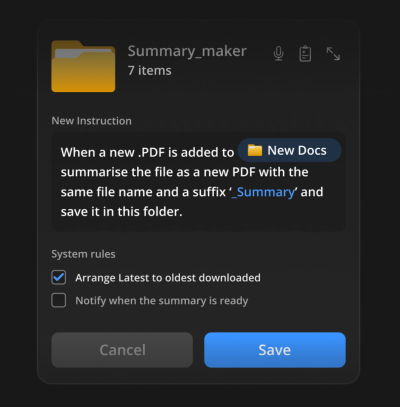
A dark-themed software interface showing a file management setup for summarizing PDFs. It displays instructions and system rules.
Users could automate tasks where the work actually happens, e.g., generating summaries on the fly. (Large preview)

Here are some useful examples:

  • For a passport renewal, get the form and collect all the documents I need for it. Inform about missing documents, and fill out the form to the best of your abilities.
  • When new invoices are added to the folder, rename them according to the sequence, sort them by invoice number, and organize them in folders by client.
  • When a new PDF is added to the folder, generate a summary, send it to my pocket, and send me a notification via email.

Note: For a deeper dive into this concept, you can jump to Karthikeya GS’s wonderful post “Folder Instructions: Instructions For System-Level AI”.

Wrapping Up

User’s value doesn’t emerge from users having to juggle between multiple applications, views, and sources every few minutes. That’s when they are slowed down, and that’s when they make mistakes.

It comes from helping users do the work they need to do — by reducing frustrations, slowdowns and mistakes, and taking care of tasks that otherwise would take too much time and too much effort to complete well.

Yet again, seamless integrations — a very underused but incredibly impactful way to deliver value fast, without adding the burden of installing and learning yet another tool.

Meet “Design Patterns For AI Interfaces”

Meet Design Patterns For AI Interfaces, Vitaly’s new video course with 100s of real-life examples and UX guidelines to design AI features that people actually use — with a live UX training later this year. Jump to a free preview.

Design Patterns For AI Interfaces promo picture
Meet Design Patterns For AI Interfaces, Vitaly’s video course on interface design & UX.

Smashing Editorial (yk)