


On AngularConnect 2017 in London, I gave a talk called “Purely Fast.” In the presentation, I showed how step by step we can improve the performance of a business application. In the example, I incorporated as many performance issues as possible which I faced over the past a couple of years developing enterprise Angular and AngularJS applications. After the presentation, I got great feedback for the content, so I decided to write a series of blog posts which aim to explain the content from “Purely Fast” in details.
In this part, we will focus on immutable data structures and OnPush change detection.
The code for this blog post is available at my GitHub account:
A big issue in the modern single-page applications is reducing the initial load time. This includes reducing the number of bytes transferred over the network and minimizing the number of network requests. Last year I wrote a few articles related to reducing the bundle size (you can find them here and here). Although it’s always a good idea to invest time in exploring the bundles of our apps in details with tools like source-map-explorer and reducing its size, there are many folks working in this direction.
For instance, the Google Closure Compiler team is continuously trying to provide the most optimal minification and dead code elimination, same for the webpack team. On top of that, we have the Angular CLI team which combines the best from both worlds by allowing us to have the most efficient and well-encapsulated build possible.
In the end, all we can do is either combine effort with any of these teams to improve the minification that their tools provide or apply some application-specific optimizations such as lazy-loading.
On the other hand, the runtime performance of our applications is entirely in our own hands. Before going any further, lets put the practices that we’re going to look at into the context of a simplified business application.
We’re going to put all the practices for performance improvement into the context of this sample business application.
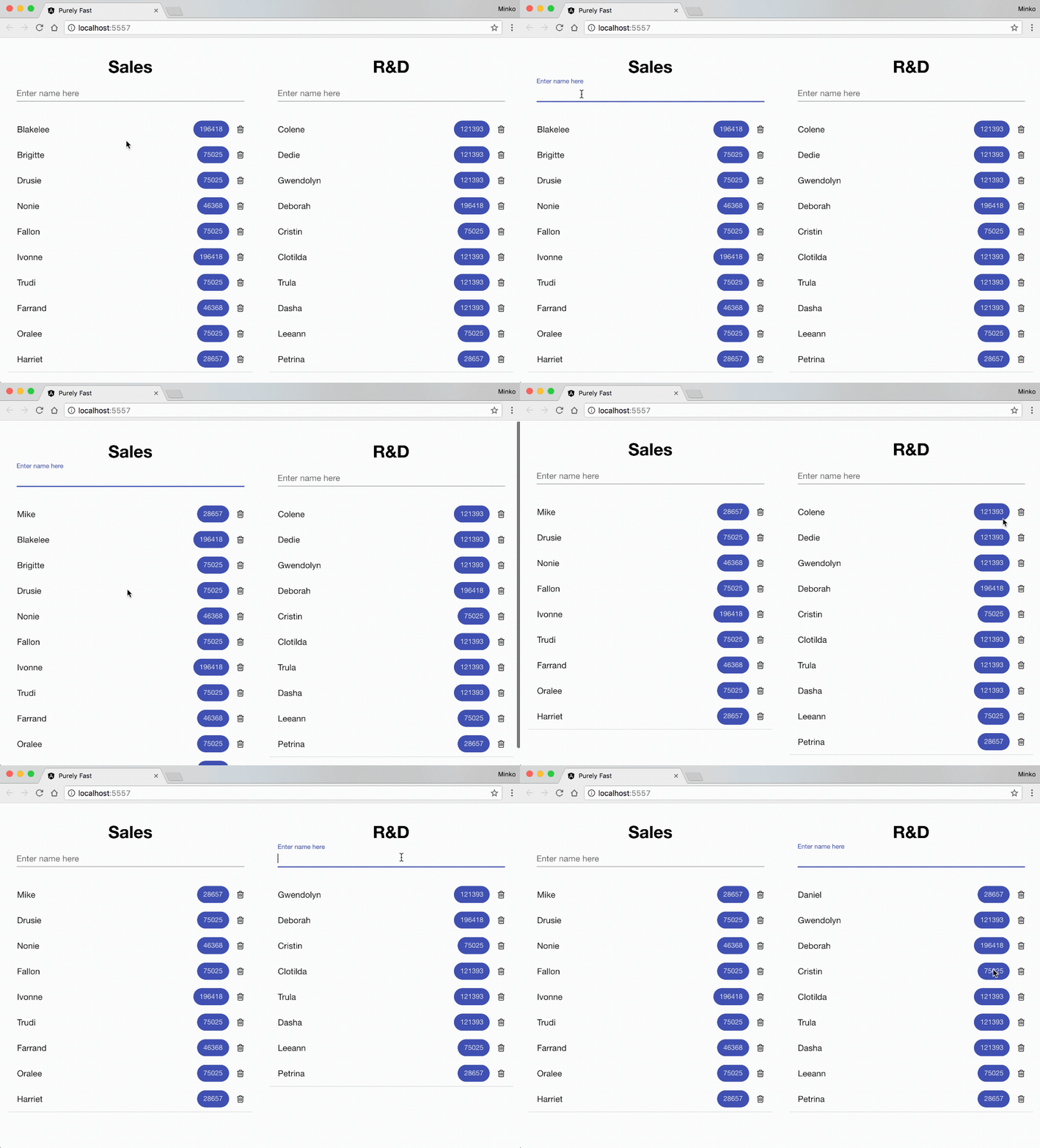
On the GIF above you can see the business application that we’re going to optimize. On the screen we have:
That’s pretty much all we have! Let’s take a brief look at the component structure of the application.
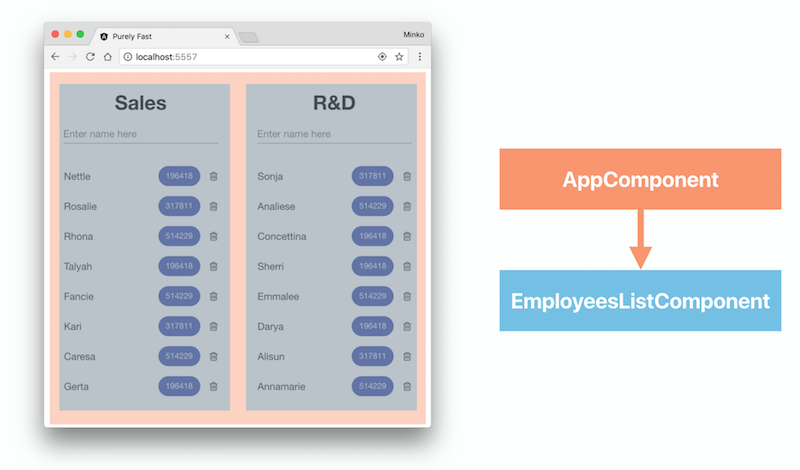
The image above shows the component structure of the application. We have a component called AppComponent which wraps the entire application, and two instances of the EmployeeListComponent which show the employees from the individual departments.
Now lets take a look at the template of the EmployeeListComponent:
<h1 title="Department">{{ department }}</h1>

<mat-form-field>
  <input placeholder="Enter name here" matInput type="text" [(ngModel)]="label" (keydown)="handleKey($event)">
</mat-form-field>

<mat-list>
  <mat-list-item *ngFor="let item of data">
    <h3 matLine title="Name">
      {{ item.label }}
    </h3>
    <mat-chip-list>
      <md-chip title="Score" class="mat-chip mat-primary mat-chip-selected" color="primary" selected="true">
        {{ calculate(item.num) }}
      </md-chip>
    </mat-chip-list>
    <i title="Delete" class="fa fa-trash-o" aria-hidden="true" (click)="remove.emit(item)"></i>
  </mat-list-item>
</mat-list>
Firstly, we print the department name. After that, we declare a material design form field where with ngModel we create two-way data-binding between the label property declared inside of the EmployeeListComponent’s controller and the text input.
Right after that, we declare a list of items, and we iterate over the individual employees, show their name and calculate the numeric value associated with them. We directly invoke the calculate method inside the template. The calculate method is defined inside the controller of EmployeeListComponent:
const fibonacci = (num: number): number => {
  if (num === 1 || num === 2) {
    return 1;
  }
  return fibonacci(num - 1) + fibonacci(num - 2);
};

@Component(...)
export class EmployeeListComponent {
  @Input() data: EmployeeData[];
  @Input() department: string;

  @Output() remove = new EventEmitter<EmployeeData>();
  @Output() add = new EventEmitter<string>();

  label: string;

  handleKey(event: any) {
    if (event.keyCode === 13) {
      this.add.emit(this.label);
      this.label = '';
    }
  }

  calculate(num: number) {
    return fibonacci(num);
  }
}
The definition of the EmployeeListComponent is quite simple:
data - a list of the employees from the specific department.department - the name of the department.remove - triggered when we remove an employee from the list.add - triggered when we add a new employee to the list.The inputs are going to be passed from the AppComponent to its child EmployeeListComponent instances.
Notice that we’re mocking the business calculation with a function which calculates the number of Fibonacci from the employee’s numeric value. This way instead of introducing a complicated business calculation we can focus entirely on the performance optimizations that we’re going to perform. The Fibonacci function defined above has the same properties as any other mathematical function which we may use for calculating some meaningful value for the employee.
You might have also noticed that we’re calculating the nth number of Fibonacci by performing an extremely inefficient calculation:
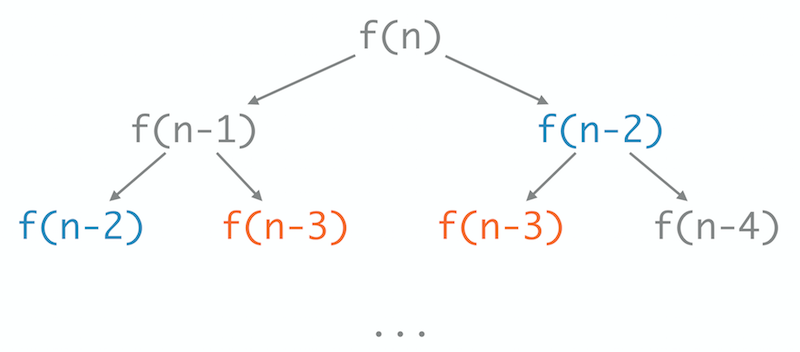
We do that to slow down our application artificially and simulate as precisely as possible a computationally intensive business calculation.
EmployeeListComponent which has some list items.On the image below you can see what the typing experience is when both lists have in total of 140 items. No, unfortunately, it does not look slow because of the frame rate of the GIF.
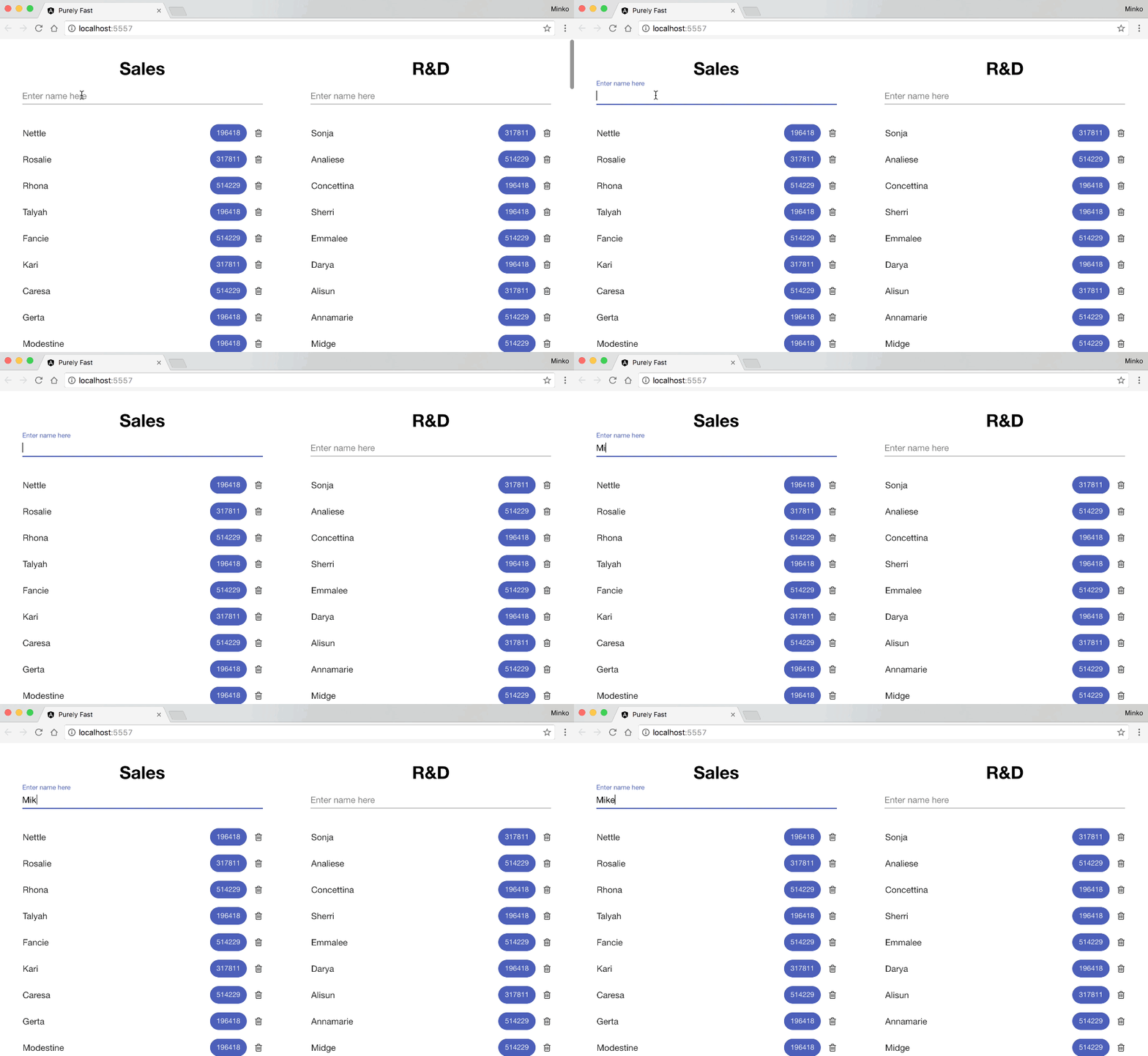
There’s obviously something going on. In order to debug it, we can turn to Chrome DevTools > Performance:
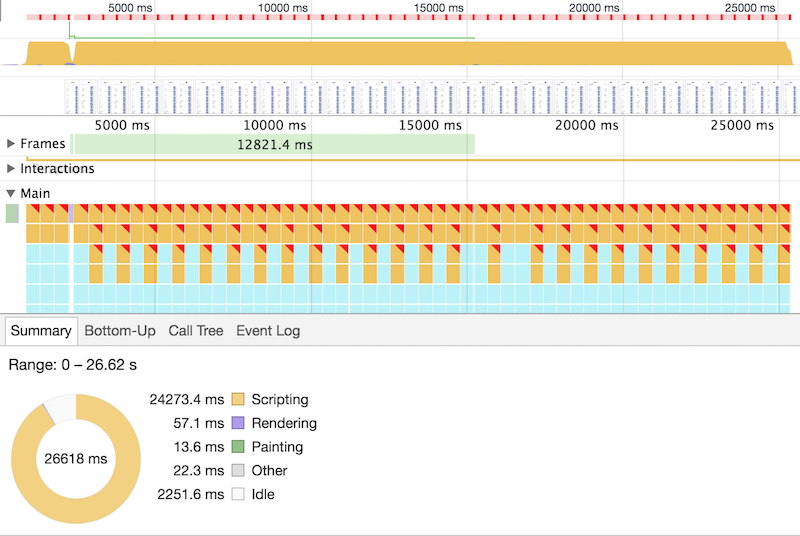
As we can see from this screenshot, as expected, most of the slowdowns happen because of a heavy computations happening in the main thread. If we switch to the Bottom-Up tab we can see the following:
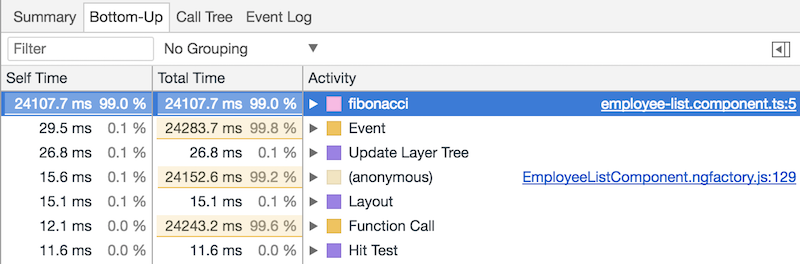
We can see that the fibonacci function takes most of the script time. Lets see how often it gets invoked by adding a log statement inside of the calculate method defined in EmployeeListComponent:
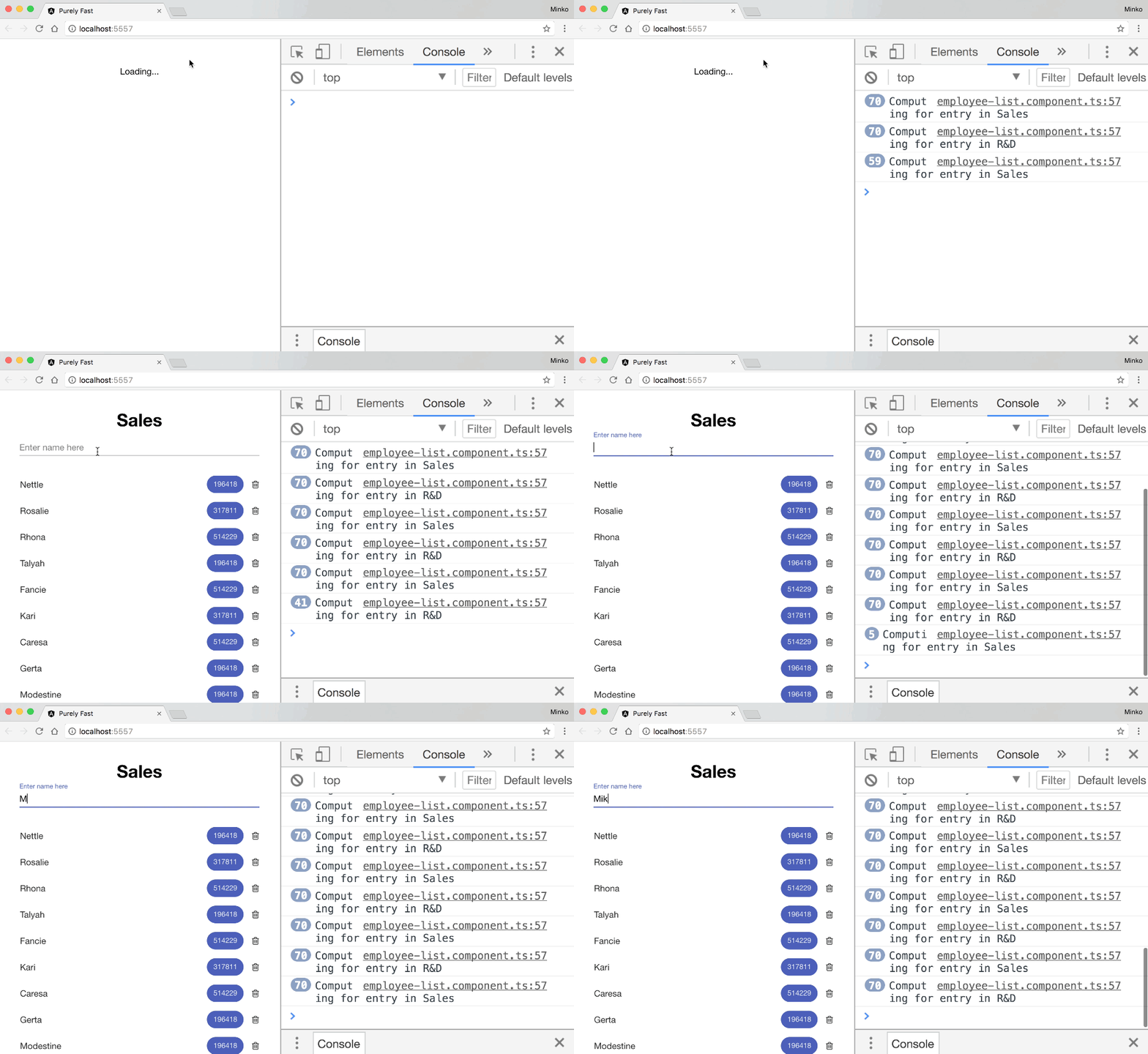
The image above shows that the fibonacci function gets invoked multiple times for each entry in both lists. In fact, it gets invoked at least twice for each item in the list when we type a single character:
mousedown event of the input.mouseup event of the input.Although we have calculated the numeric values for all the employees in the list and we have visualized them we’re recomputing them again, multiple times. This happens because the Angular’s change detection gets triggered after each of the listed events above. Once the change detection gets triggered, it’ll re-evaluate all the expressions in the templates and compare them with their previous values. If there’s a change, the Angular’s change detection will update the DOM most efficiently. This means that each change detection tick will re-evaluate all the expressions in the templates of the components. Based on this, very important advice that I included in the “Angular Performance Checklist” is - do not perform heavy computations in templates.
Well, in our case we’re 100% sure that the numeric values for the two lists of employees haven’t changed, which means that Angular will not find any reason to update the DOM. The question is - how to tell Angular to not recompute the numeric values for the employees unless it gets new lists for the two departments?
The answer to this question is to use a custom change detection strategy. In fact, the OnPush change detection strategy is exactly what we’re looking for. By setting the change detection of EmployeeListComponent to OnPush we will hint Angular that it should not run its change detection mechanism for this component unless it receives a new value for any of its inputs. Keep in mind that Angular will use equality check in order to verify that!
In order to explain this, let’s suppose for a second that EmployeeListComponent is a function. Let’s also suppose that the function’s arguments are the inputs of the EmployeeListComponent and the result that the function returns is the DOM rendered on the screen. So:
function runChangeDetection() {
  console.log('Detecting for changes');
}

function EmployeeListComponent(args) {
  const shouldRun = Object.keys(args).reduce((a, i) => {
    return a || args[i] !== EmployeeListComponent[i];
  }, false);

  Object.keys(args).forEach(i => {
    EmployeeListComponent[i] = args[i];
  });

  if (shouldRun) {
    runChangeDetection();
  }
}

const f = EmployeeListComponent;
const data = [e1];
In the snippet above we’ve modeled the EmployeeListComponent as a function. We have three important things going on there:
const shouldRun = Object.keys(args).reduce((a, i) => {
  return a || args[i] !== EmployeeListComponent[i];
}, false);
Will return true if any of the values of the object literal args we passed differs from the values associated with the same keys in the EmployeeListComponent. This check is algorithmically similar to the check that Angular is going to perform to decide if the change detection for a component with OnPush change detection strategy should be invoked.
After that we have:
Object.keys(args).forEach(i => {
  EmployeeListComponent[i] = args[i];
});
This simply sets the “inputs.” Finally, we have:
if (shouldRun) {
  runChangeDetection();
}
Which runs the change detection.
Now, f is our EmployeeListComponent and data is the list of employees which initially contains only a single item - e1. If we invoke f and pass data as an argument (in the language of Angular, as an input):
// will invoke `runChangeDetection`.
f({ data: data });
…the change detection will be triggered since the initial value of the input data was undefined. This will be the behavior in Angular as well if we pass an input with a different value. However, if run:
data.push(e2);
f({ data: data });
Although we pass data as an argument (or input) again, the change detection will not be invoked because after performing an equality check we will determine that the previous value of the input data has the same reference. On the other hand, if we:
f({ data: data.slice() });
We will trigger its change detection because we’d have passed a new reference for the data input. That’s pretty much how the things will happen in Angular as well.
This means that we can update EmployeeListComponent to the following:
@Component({
  changeDetection: ChangeDetectionStrategy.OnPush,
  ...
})
export class EmployeeListComponent {
  @Input() data: EmployeeData[];
  @Input() department: string;

  handleKey(event: any) {
    if (event.keyCode === 13) {
      this.add.emit(this.label);
      this.label = '';
    }
  }
  ...
}
…and AppComponent to:
@Component({
  template: `
    <sd-employee-list [data]="salesList" department="Sales" (add)="addToSales($event)">
  `
})
export class AppComponent implements OnInit {
  salesList: EmployeeData[];

  addToSales(name: string) {
    this.salesList = this.salesList
      .unshift({ label: name, num: this.generator.generateNumber(NumRange) })
      .slice();
  }
  ...
}
This way, each time when the user presses “Enter” we will emit the value of the label using the add output. AppComponent will handle the output with its addToSales method which will push a new employee to the salesList, copy the entire list and set the returned new reference as the value of the salesList.
All right, this will work; however, we introduce two issues:
To handle these two issues we can use efficiently implemented immutable data structures such as Immutable.js.
I’ve written a lot about immutable.js in the past (here and here), so now I’ll make a very brief introduction.
Immutable.js provides a collection of immutable data structures. All of them have two essential properties:
Here’s an example of the first point:
import { List } from 'immutable';

const data = List([a, b, c]);

console.log(data.toJS()); // [a, b, c]

const appended = data.push(d);

console.log(data.toJS()); // [a, b, c]
console.log(appended.toJS()); // [a, b, c, d]
As we can see from the snippet above, when we invoke the push method of the List instance we get a new list which has the mutation applied. On top of that, the list we applied the mutation to stays unchanged.
Based on the second property we can conclude that the immutable data structures from immutable.js will be much more efficient compared to what we did in the example above - copying the entire data structure on change.
In order to see what are going to be the performance implications of using OnPush with immutable.js, I developed an e2e test with protractor which types a number of characters in the text input for the sales department. On top of that, I run benchpress on top of it which by using APIs provided by Google Chrome can measure the time required for this operation to be completed.
The e2e test I run for both - the optimized version of the application (OnPush & Immutable.js) and the non-optimized one. Here are the results:
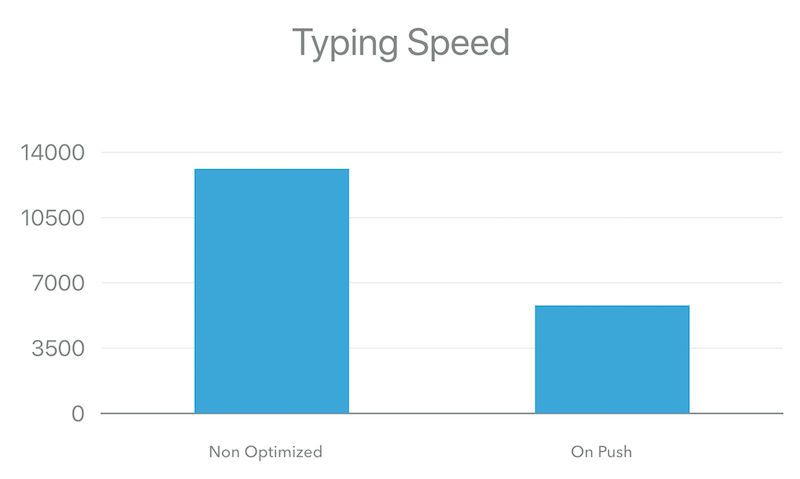
It looks like we have a decent optimization. We’re about 3x faster! Based on the benchmarks it looks like typing the string “AngularConnect” in the sales department’s input took 13124.81ms for the non-optimized version and 5804.12ms for the optimized one.
Lets see the typing speed again:
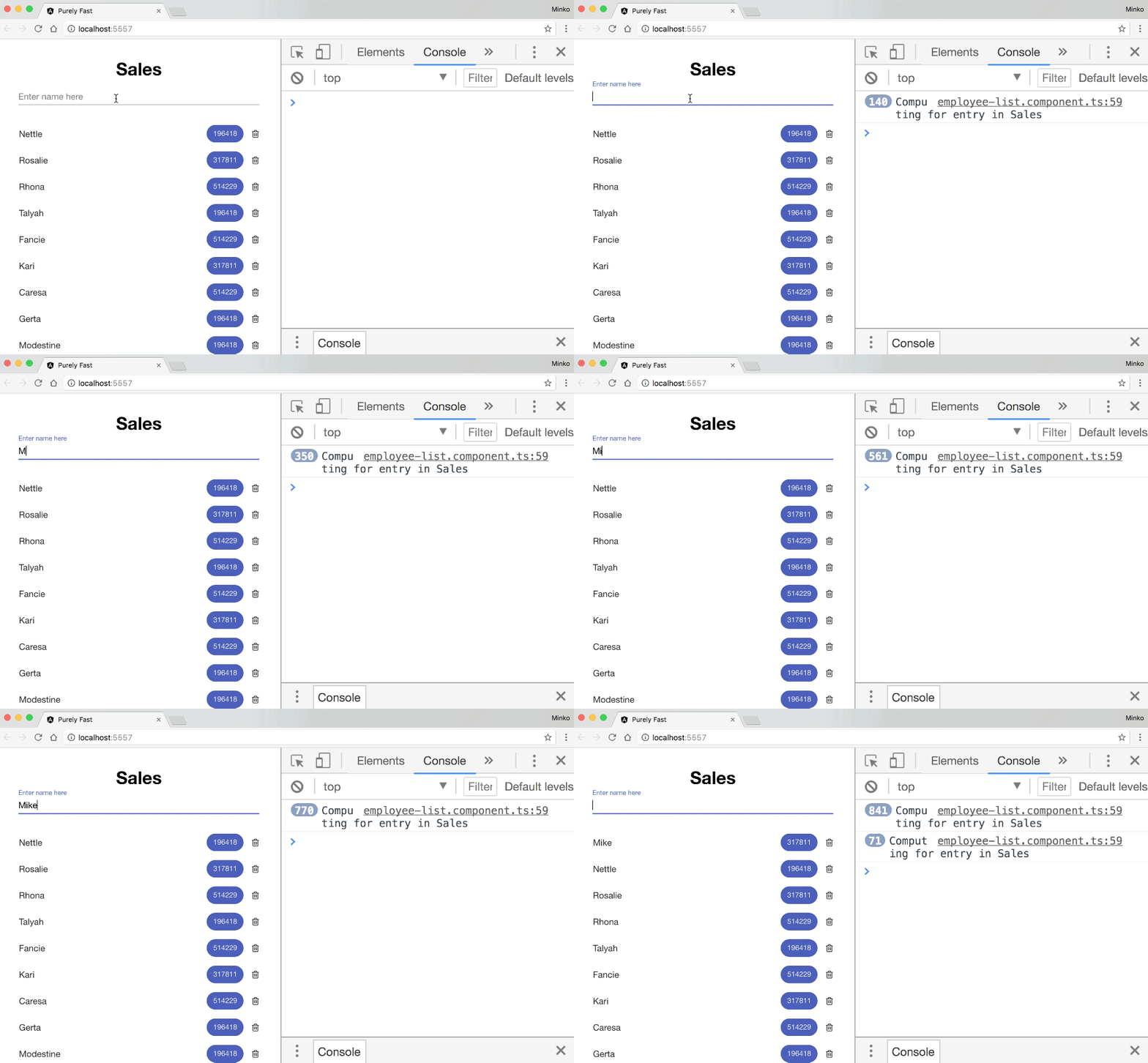
All right, so we’re still quite slow. As we can see, the calculate method gets executed less frequently but still gets invoked quite a lot. If we take a more careful look, we can notice that this time we recalculate only the numeric values for all the employees in the sales department. So, OnPush optimization almost worked.
While typing, we’re not getting new instances of the salesList since we’re not applying any operations which are mutating it. Why we’re getting the change detection for the sales department triggered?
The answer lies in the way OnPush works. Using OnPush change detection strategy the change detection for a given component will be triggered when we pass a new value to any of its inputs or when an event inside of the component happens. The second part is not completely obvious from the documentation, but it can be seen in this e2e test in the Angular’s core repository.
To fix this, we need to do some refactoring. This will help us not only to eliminate the unnecessary change detection invocations but also enforce better separation of concerns in our application.
For this purpose, we will decompose the EmployeeListComponent to:
NameInputComponent - responsible for holding the new name of the employee we want to add to the list.ListComponent - will list the individual employees and calculate their numeric values: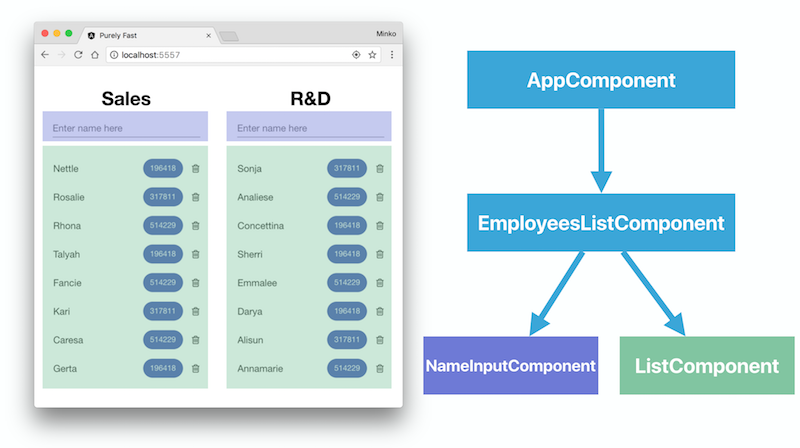
Now lets run the e2e tests again and see what we got:
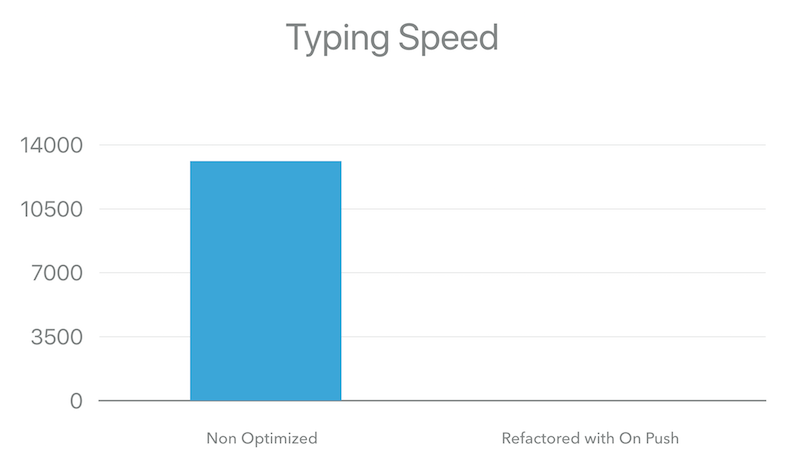
It may look like there’s a glitch in the chart. No there isn’t, we’re just hundreds of times faster - 13124.81ms vs. 10.45ms for typing the string “AngularConnect.”
And here’s the user experience when typing in the text input for the optimized version:
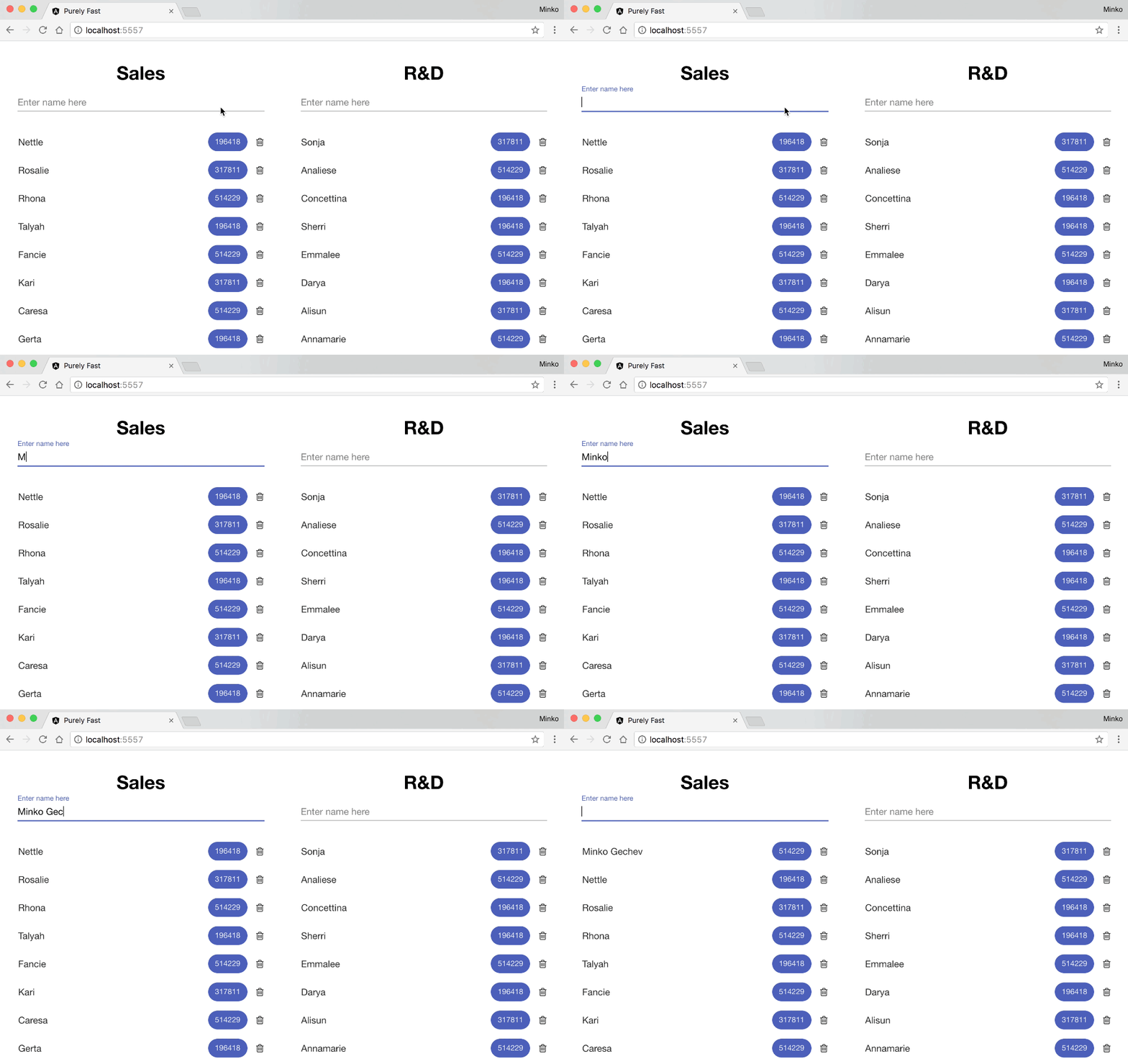
In this part of the series “Faster Angular Applications,” we covered how we can optimize an Angular application regarding runtime performance by using immutable data structures and a custom change detection strategy.
We started by introducing a sample business application which lists two departments of employees and using a heavy computation calculates a numeric value for each of them.
There were some apparent slowdowns in the app caused by the two-way data-binding that we’re using - the typing experience for entering a new employee was extremely slow. To reduce the number of computations going on we used OnPush change detection strategy and immutable data structures.
Although OnPush introduced a significant improvement we missed a very important detail - it causes Angular to detect for changes when an event inside of the given component gets triggered. We fixed this issue by decomposing the EmployeeListComponent and enforcing better separation of concerns.
In the next blog post from the series, we’ll take a look at pure pipes. We’ll also illustrate how pure pipes and OnPush change detection relate to functional programming and more precisely pure functions & memoization.
此内容由惯性聚合(RSS阅读器)自动聚合整理,仅供阅读参考。 原文来自 — 版权归原作者所有。