
惯性聚合 高效追踪和阅读你感兴趣的博客、新闻、科技资讯
阅读原文 在惯性聚合中打开

推荐订阅源

Spread Privacy
Spread Privacy
V
Visual Studio Blog
Cyber Security Advisories - MS-ISAC
Recorded Future
Recorded Future
云风的 BLOG
云风的 BLOG
Microsoft Azure Blog
I
InfoQ
Apple Machine Learning Research
MyScale Blog
MyScale Blog
M
MIT News - Artificial intelligence
WordPress大学
WordPress大学
Recent Announcements
V
V2EX
The GitHub Blog
The GitHub Blog
奇客Solidot–传递最新科技情报
奇客Solidot–传递最新科技情报
Jina AI
Jina AI
小众软件
小众软件
aimingoo的专栏
aimingoo的专栏
V
Vulnerabilities – Threatpost
C
Check Point Blog
C
Cyber Attacks, Cyber Crime and Cyber Security
AI
AI
宝玉的分享
宝玉的分享
P
Proofpoint News Feed
量子位
Attack and Defense Labs
H
Hackread – Cybersecurity News, Data Breaches, AI and More
P
Privacy International News Feed
Google DeepMind News
CTFtime.org: upcoming CTF events
C
CERT Recently Published Vulnerability Notes
腾讯CDC
Latest news
Latest news
Google DeepMind News
The Register - Security
cs.CV updates on arXiv.org
cs.AI updates on arXiv.org
G
GRAHAM CLULEY
Blog — PlanetScale
Blog — PlanetScale
博客园_首页
美团技术团队
The Cloudflare Blog
T
Tenable Blog
cs.CL updates on arXiv.org
J
Java Code Geeks
SecWiki News
SecWiki News
Webroot Blog
Webroot Blog
N
News | PayPal Newsroom
博客园 - 叶小钗
博客园 - Franky

Minko Gechev's blog

skillgrade Unit Tests for AI Agent Skills You Should Care About AI Generative Development LLM-first Web Framework Reactive framework in ~200 lines of JavaScript Managing Angular Are LLMs going to replace us? Prefetching Heuristics Design Patterns in Open Source Projects - Part II Design Patterns in Open Source Projects - Part I What I learned doing 125 public talks - Part I Dynamic imports solve all the problems, right? 5 Angular CLI Features You Didn't Know About Angular quicklink Preloading Strategy Introducing Bazel Schematics for Angular CLI Building TypeScript Projects with Bazel Joining Google Playing Mortal Kombat with TensorFlow.js. Transfer learning and data augmentation Fast, extensible, configurable, and beautiful linter for Go Introducing Guess.js - a toolkit for enabling data-driven user-experiences on the Web Machine Learning-Driven Bundling. The Future of JavaScript Tooling. JavaScript Decorators for Declarative and Readable Code 3 Tricks For Using Redux and Immutable.js with TypeScript Follow Your Dream Career with Open Source. Personal Story. Redux Anti-Patterns - Part 1. State Management. Faster Angular Applications - Understanding Differs. Developing a Custom IterableDiffer Faster Angular Applications - Part 2. Pure Pipes, Pure Functions and Memoization Faster Angular Applications - Part 1. On Push Change Detection and Immutability Understanding Dynamic Scoping and TemplateRef Implementing a Simple Compiler on 25 Lines of JavaScript Developing Statically Typed Programming Language WebVR for a Gamified IDE 7 Angular Tools That You Should Consider Announcing ngrev - Reverse Engineering Tool for Angular Implementing Angular's Dependency Injection in React. Understanding Element Injectors. Distributing an Angular Library - The Brief Guide Angular in Production Ahead-of-Time Compilation in Angular 2.5X Smaller Angular 2 Applications with Google Closure Compiler Using Stripe with Angular (Deprecated) Building an Angular Application for Production Implementing the Missing "resolve" Feature of the Angular 2 Router Scalable Single-Page Application Architecture Managing ambient type definitions and dealing with the "Duplicate identifier" TypeScript error Static Code Analysis of Angular 2 and TypeScript Projects Enforcing Best Practices with Static Code Analysis of Angular 2 Projects ViewChildren and ContentChildren in Angular Dynamically Configuring the Angular's Router Angular 2 Hot Loader Lazy Loading of Route Components in Angular 2 Aspect-Oriented Programming in JavaScript Flux in Depth. Store and Network Communication. Flux in Depth. Overview and Components. Even Faster AngularJS Data Structures Boost the Performance of an AngularJS Application Using Immutable Data - Part 2 Angular2 - First Impressions Build Your own Simplified AngularJS in 200 Lines of JavaScript Persistent State of ReactJS Component Boost the Performance of an AngularJS Application Using Immutable Data Processing Binary Protocols with Client-Side JavaScript Stream your Desktop to HTML5 Video Element Multi-User Video Conference with WebRTC Asynchronous calls with ES6 generators Binary Tree iterator with ES6 generators WebRTC chat with React.js AngularJS in Patterns (Part 3) AngularJS in Patterns (Part 2). Services. Using GitHub Pages with Jekyll! AngularJS in Patterns (Part 1). Overview of AngularJS Singleton in JavaScript Express over HTTPS What I get from the JavaScript MV* frameworks Remote Desktop Client with AngularJS and Yeoman The magic of $resource (or simply a client-side Active Record) AngularJS Inheritance Patterns AngularAOP v0.1.0 Advanced JavaScript at Sofia University AngularJS style guide Lazy prefetching of AngularJS partials VNC client on 200 lines of JavaScript Aspect-Oriented Programming with AngularJS CSS3 flipping effect Practical programming with JavaScript Why I should use publish/subscribe in JavaScript JavaScript, the weird parts Functional programming with JavaScript plainvm Looking for performance? Probably you should NOT use [].sort (V8) JavaScript image scaling ELang Caching CSS with localStorage Self-invoking functions in JavaScript (or Immediately Invoked Function Expressions) Asus N56VZ + Ubuntu 12.04 (en) Asus N56VZ + Ubuntu 12.04 Debian Squeeze + LXDE on Google Nexus S (or having some fun while suffering) HTML5 image editor Курсови проекти – ФМИ Carousel Gallery SofiaJS...
Using JSX with TypeScript
2015-07-05 · via Minko Gechev's blog

JavaScript is a weird language although, we love it the way it is. However, I’ve had quite a painful experience working on big JavaScript projects. It was painful in the same way it gets painful working on huge Ruby, Python, PHP projects.

Once you have code base above 10-15k lines of code and you decide to do some refactoring…well it gets messy. Although grep and sed are powerful tools for text manipulation, when you start replacing code with them, you’re missing the semantics (or the context) of the snippets you substitute.

Another common problem - you simply misspell a variable or property name and once in a while your code breaks telling you: undefined is not a function (alright, we passed these days…)

How we can deal with these problems using our favorite language? Well, writing a lot of tests may help. Testing everything is good but testing everything in order to make our refactoring process slightly smoother and staying away from typos…seems kind of unpractical and workaround.

TypeScript

What we can do is change the language we’re using. Replace it with something more powerful - TypeScript. TypeScript is JavaScript superset. Using TypeScript gives us a couple of benefits:

  • You get type errors compile-time and runtime (since version 1.5 TypeScript has run-time type checking). This way it’ll be easier to debug your code and you will be more secure that what you’ve developed actually works.
  • You get better auto-completion by the text editors and IDEs. WebStorm 10 supports TypeScript 1.5 + decorators and ES6 modules. For vim you can use the typescript-tools, which could be integrated with emacs and SublimeText. You will get hints for method names, parameters, parameters types by your editor/IDE for each method (yes, with Tern.js or Flow you can get the same experience but based on JSDoc or some very sophisticated decisions made using the AST of your code, now it’ll be much less tricky).
  • The JavaScript VM is able to make better code optimizations. Since when we define that given property/variable has specific type we sign some kind of contract with the JavaScript VM, this way it is much easier for it to reason about the types of the variables, which are being used and to do better runtime optimizations (for instance).

So you get smoother refactoring experience (yey!), faster code and a compiler, which can slap your hands if you misspell a property or a variable name. And the static typing - it is optional. If you don’t want to, you don’t need to provide type information (however, I’d recommend you to be consistent in most cases). You can learn more about TypeScript here.

The Problem

However, famous frameworks and libraries, like React, AngularJS 1, Backbone, jQuery, etc. are not written in TypeScript so we don’t gain any benefits like auto-completion and type checking when using them.

On top of this React has this weird extension of JavaScript called JSX, which allows us to embed markup inside our JavaScript…

The Solution

The guys from Microsoft, designing TypeScript, were quite smart and took the first problem under consideration. From the first version of the language were introduced the ambient type definitions. Basically, you can provide definition of the interface of an external library and include reference to it inside the files where you use it. This way you get type checking and text editors auto-completion support. How awesome is that?

In DefinitelyTyped you can find up-to-date type definitions for most libraries you may want to use. Once you got, lets say the React type definition, you can simply add a reference to it inside the files you use React like:

/// <reference path="react.d.ts" />

// ... your awesome code here

Alright, TypeScript introduced these ambient type definitions. Cool. However, this doesn’t solve our JSX problem. What if we want to use JSX inside our TypeScript & React project? Well, for a couple of weeks, I’m following this GitHub issue, which aims decoupling of TypeScript from JSX. A few days ago a patch was merged into the master branch of TypeScript, which allows to transform your TypeScript to JavaScript and keep your JSX markup or transpile it to React calls instead!

How to do That?

Install TypeScript and react via npm:

npm init
npm install typescript react

In order to verify that you’ve installed proper TypeScript version use:

./node_modules/typescript/bin/tsc --version

You should see output similar to:

message TS6029: Version 1.6.2

If npm have installed older version of TypeScript on any reason use:

npm install typescript@1.6.2

If you want have the TypeScript’s compiler as global executable (tsc) use:

npm install -g typescript

Developing a Component in TSX file

Now create an app directory and enter it:

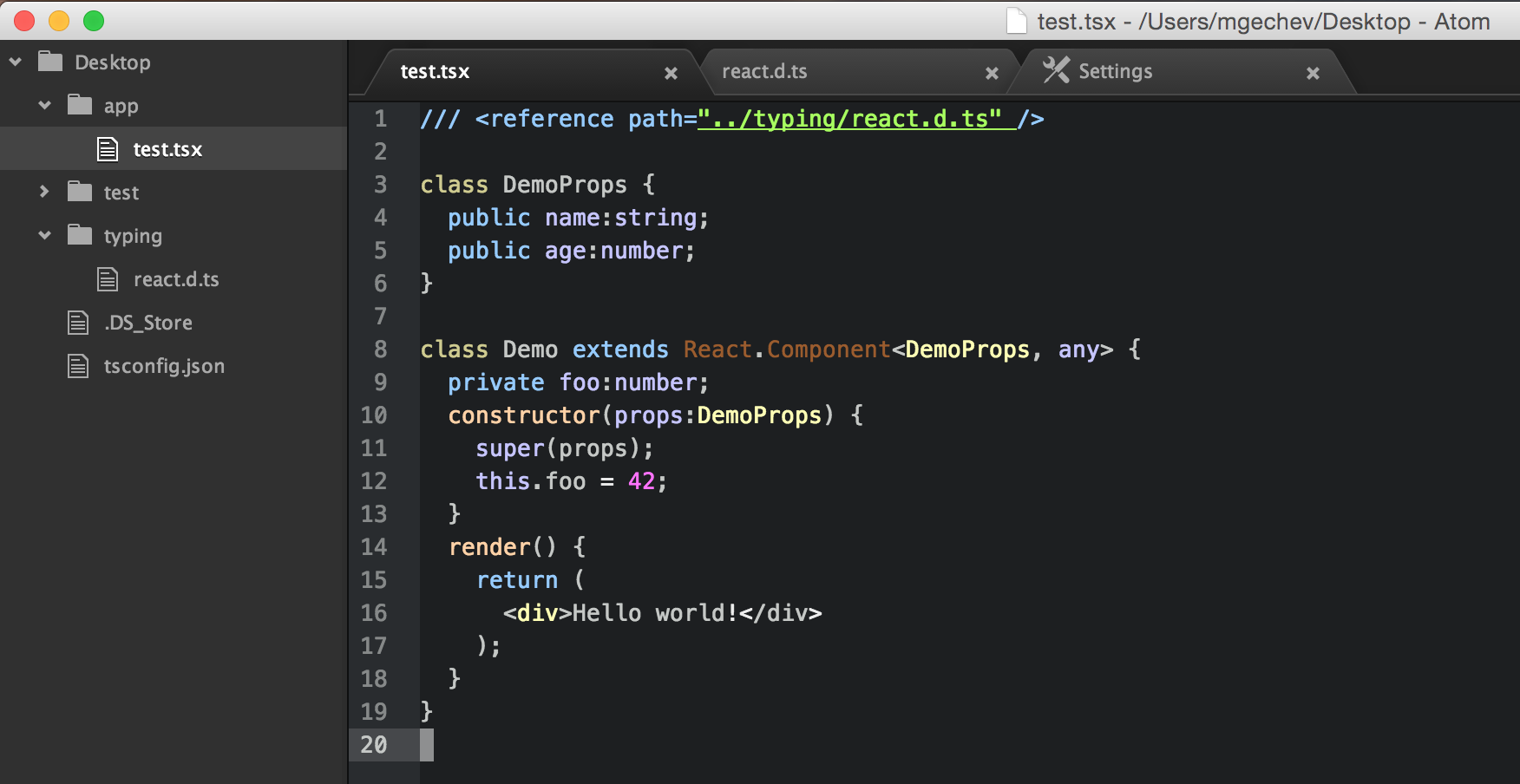
Create a sample file called test.tsx (notice the extension tsx, it is mandatory) and add the following content:

/// <reference path="../typing/react.d.ts" />

import * as React from 'react';

class DemoProps {
  public name:string;
  public age:number;
}

class Demo extends React.Component<DemoProps, any> {
  private foo:number;
  constructor(props:DemoProps) {
    super(props);
    this.foo = 42;
  }
  render() {
    return <div>Hello world!</div>
  }
}

In the code above we defined a component called Demo. It accepts properties, which are instances of the class DemoProps and state, which could be of any kind.

Alright, we’re almost there!

Create a directory called typing inside the root of your project:

cd ..
mkdir typing
cd typing

Now take the React’s ambient type declaration from here and save it inside typing. Make sure the file is called react.d.ts. This will prevent us from getting any compile-time errors.

Now the directory structure should look like:

.
├── app
│   └── test.tsx
├── typings
│   └── react.d.ts
├── package.json
└── node_modules

The last step is to compile the test.tsx file:

cd ..
# This line will run the typescript compiler over your `test.tsx` file and
# output the transpiler content in `./app/test.js`
./node_modules/typescript/bin/tsc --jsx react --module commonjs ./app/test.tsx

Thats it. Now you can check out the content of ./app/test.js. There you should find the transpiled content. Did you notice the --jsx option of the TypeScript compiler? It may accepts two different values:

  • react - Transpiles JSX to React calls
  • preserve - Preserves the JSX the way it was defined in the source file

The JSX support in TypeScript is part of the roadmap for version 1.6. This means that in the next a couple of weeks you won’t have to build TypeScript from scratch but use it with the standard build tools you’re used to.

Results

This is how you can use TypeScript with React and JSX for projects that scale. Support for tsx files is already implemented in atom-typescript. If you use Atom, you’ll see something like this:
JSX + TypeScript