


Edit · Oct 1, 2013 · 6 minutes read · Follow @mgechev AngularJS JavaScript Lazy loading performance Pre-fetching
This blog post is concentrated about web performance. I’ll skip the well known stuff about combining images into sprites, inlining images, DNS pre-fetching, combining and minifying script files, gzipping and so on. There are plenty of articles and tools which will help you about these things. There are also excellent researches on these topics, few of the best I’ve read are these by Mobify, Web Performance Daybook Volume, High Performance Web Sites and Critical rendering path – Crash course on web performance and many others. I hope HTTP 2.0 will eliminate few of the dirty hacks we all make…
I’ll focus on the performance in the Single-Page Applications and especially template prefetching strategy we use in the web application of Brownie Points. I’ll give code samples with AngularJS but these methods can be also applied with Ember.js, Backbone.js (with little more pain) and other MV* frameworks, I guess.
To find the best approach for your app you should understand it very well and know all the relations between the different pages. One way to do this is by visualising all the relations using UML state machine diagram. It will show you how your pages are connected, triggering of which event will lead to page change (events), based on which conditions the pages will change (guards) and what is done during the transition (actions).
For illustrating the way this partials pre-fetching strategy works, I’ll use example with a web application which is web interface for revision control system.
So, we have the following pages:
- Home
- User profile
- User projects
- Project
- Project issues
- Project wiki
From the home screen the user will be able to view the profile of chosen user or navigate to his own projects. From the user’s profile view the user will be able to navigate to projects list or go back to the home screen. In case the user view the projects list (his own or projects of another user) he can navigate to a project details or go back to the home screen. From the project view the user can go to the wiki or issues pages (if the page exists).
This brief description is illustrated by the following state diagram (some events, actions and guards are not very descriptive because the diagram would become messy with verbose explanations).
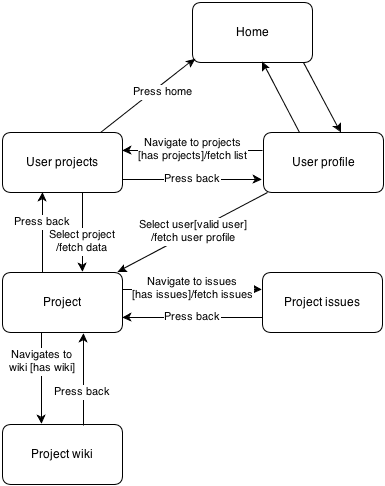
UML state machine diagram of SPA
It is not exactly state machine diagram because the beginning and end pseudo states are missing, but it illustrates our idea pretty well.
If the user is in the home page he may go to the projects page or the user’s profile page, lets suppose that the same template is used for his own projects and for other users’ projects. Something we can do is to prefetch the templates for the projects list and user’s profile, these are only 2 pages which are neighbours of the home page so the browser will create two threads (eventually), using XHR we will fetch the templates and put them in the $templateCache using the template url as key and it’s content as content.
We can define our routes relations like:
var pageRelations = {
  'home': ['user-profile', 'user-projects'],
  'user-project': ['home', 'project'],
  'user-profile': ['home', 'user-projects', 'project'],
  'project': ['user-projects', 'project-issues', 'project-wiki'],
  'project-wiki': ['project'],
  'project-issues': ['project']
};
With routing definition like this:
var routes = [
  {
    id: 'home',
    url: '/home',
    templateUrl: 'partials/home.html',
    controller: 'HomeCtrl'
  },
  {
    id: 'user-projects',
    url: '/projects-list/:userid',
    templateUrl: 'partials/user-projects.html',
    controller: 'ProjectsListCtrl',
    resolve: {
      'ProjectsList': function ($routeParams, ProjectsService) {
         return ProjectsService.getList($routeParams.userid);
      }
    }
  },
  {
    id: 'user-profile',
    url: '/user-profile/:userid',
    templateUrl: 'partials/user-profile.html',
    controller: 'UserProfileCtrl',
    resolve: {
      'UserProfile': function ($routeParams, UserService) {
        return UserService.getProfile($routeParams.userid);
      }
    }
  },
  {
    id: 'project',
    url: '/project/:projectid',
    templateUrl: 'partials/project.html',
    controller: 'ProjectCtrl',
    resolve: {
      'Project': function ($routeParams, ProjectsService) {
        return ProjectsService.getDetails($routeParams.projectid);
      }
    }
  },
  {
    id: 'project-wiki',
    url: '/project-wiki/:projectid',
    templateUrl: 'partials/project-wiki.html',
    controller: 'WikiCtrl',
    resolve: {
      'Project': function ($routeParams, ProjectsService) {
        return ProjectsService.getWiki($routeParams.projectid);
      }
    }
  },
  {
    id: 'project-issues',
    url: '/project-issues/:projectid',
    templateUrl: 'partials/project-issues.html',
    controller: 'ProjectCtrl',
    resolve: {
      'Project': function ($routeParams, ProjectsService) {
        return ProjectsService.getIssues($routeParams.projectid);
      }
    }
  }
];

routes.forEach(function (r) {
  $routeProvider.when(r.url, r);
});
And to prefetch the neighbour views’ templates when we are at specific state:
var prefetched = {};
$rootScope.$on('$routeStateChange', function (evnt, state) {
  pageRelations[state.id].forEach(function (c) {
    var n = routes[c];
    if ($templateCache.get(n.templateUrl)) return; //prevent the prefetching if the template is already in the cache
    $http.get(n.templateUrl).success(function (t) {
      $templateCache.put(n.templateUrl, t);
    });
  });
});
The pre-fetching control can be put at directive or top-level controller. I prefer the directive option, because if there are more things to be prefetched, not only the templates, you can configure it using markup and you won’t have to change your JavaScript code when you decide to change your pre-fetching options.
If we look more abstract of the thing we did – we actually created a graph presented with list of neighbours and in each page change we pre-fetch the templates of all its neighbours.
With not so complex web application everything is cool, the browser can run up to 6 different threads, one for each XHR. But when from a single page the user can go to 30 others and your server response time is not that fast the things may become not very efficient. If the order of the neighbours in the array is not the most appropriate one the user may have to wait because the first few threads won’t fetch the template required by him.
To do it better you should review each connection between the pages and sort the neighbours arrays by some kind of weight. It can be statistical data gained from the user, your suggestion, six sense, you can even roll dice if you think you’ll be more accurate. To keep the array ordered by hand is error-prone so you can do something like:
var pageRelations = {
  'home': [{ name: 'user-profile', weight: 10 }, { name: 'user-projects', weight: 8 }],
  'user-projects': [{ name: 'home', weight: 7 }, { name: 'project', weight: 9 }],
  'user-profile': [{ name: 'home', weight: 8 }, { name: 'user-projects', weight: 4 }, { name: 'project', weight: 9 }],
  'project': [{ name: 'user-projects', weight: 8 }, { name: 'project-issues', weight: 9 }, { name: 'project-wiki', weight: 6 }],
  'project-wiki': [{ name: 'project', weight: 9 }],
  'project-issues': [{ name: 'project', weight: 9 }]
};
Now the pageRelations is a hash table with keys – the web app’s pages, values – all neighbour views for the current one, and rating associated to each neighbour.
In that way you actually use a directed graph with weighted edges, all you have to do is to walk the neighbours of the current node (current page) by their priority and prefetch the template for each node:
$rootScope.$on('$routeStateChange', function (evnt, state) {
  pageRelations[state.id].sort(function (a, b) {
    return b.weight - a.weight;
  }).forEach(function (c) {
    var n = routes[c.name];
    if ($templateCache.get(n.templateUrl)) return; //prevent the prefetching if the template is already in the cache
    $http.get(n.templateUrl).success(function (t) {
      $templateCache.put(n.templateUrl, t);
    });
  });
});
And that’s all. Possible issue which should be taken under attention is the loading of the images used by the prefetched templates, it’s not enough to load only the html, usually the images takes more bandwidth. Here you can use different approaches – parse the template, take all “img” elements and pre-fetch their source. Anyway, this doesn’t work with the CSS “background-image” property. When there are elements with “background-image” property you can get it’s value only after the element is added to the DOM tree but adding each template and walking its elements may have performance impact when you have large, complex templates.