
惯性聚合 高效追踪和阅读你感兴趣的博客、新闻、科技资讯
阅读原文 在惯性聚合中打开

推荐订阅源

Hacker News - Newest:
Hacker News - Newest: "LLM"
Webroot Blog
Webroot Blog
S
Security @ Cisco Blogs
H
Heimdal Security Blog
cs.CV updates on arXiv.org
www.infosecurity-magazine.com
N
News and Events Feed by Topic
H
Hacker News: Front Page
K
KPMG report finds enterprise disconnect between AI and its ROI | CIO
cs.AI updates on arXiv.org
Application and Cybersecurity Blog
SecWiki News
SecWiki News
N
News | PayPal Newsroom
T
Tor Project blog
W
WeLiveSecurity
A
Arctic Wolf
Security Archives - TechRepublic
S
Secure Thoughts
月光博客
月光博客
AWS News Blog
AWS News Blog
D
Docker
C
CERT Recently Published Vulnerability Notes
MyScale Blog
MyScale Blog
Google Online Security Blog
大猫的无限游戏
大猫的无限游戏
T
The Blog of Author Tim Ferriss
I
InfoQ
人人都是产品经理
人人都是产品经理
Recent Announcements
Google DeepMind News
Hacker News: Ask HN
Hacker News: Ask HN
Blog — PlanetScale
Blog — PlanetScale
博客园 - 【当耐特】
Engineering at Meta
Engineering at Meta
Stack Overflow Blog
Stack Overflow Blog
Recorded Future
Recorded Future
罗磊的独立博客
Exploit-DB.com RSS Feed
T
The Exploit Database - CXSecurity.com
D
DataBreaches.Net
S
Security Affairs
WordPress大学
WordPress大学
T
Threatpost
Microsoft Security Blog
V
Vulnerabilities – Threatpost
The Hacker News
The Hacker News
S
SegmentFault 最新的问题
B
Blog RSS Feed
Project Zero
Project Zero
P
Proofpoint News Feed

Minko Gechev's blog

skillgrade Unit Tests for AI Agent Skills You Should Care About AI Generative Development LLM-first Web Framework Reactive framework in ~200 lines of JavaScript Managing Angular Are LLMs going to replace us? Prefetching Heuristics Design Patterns in Open Source Projects - Part II Design Patterns in Open Source Projects - Part I What I learned doing 125 public talks - Part I Dynamic imports solve all the problems, right? Angular quicklink Preloading Strategy Introducing Bazel Schematics for Angular CLI Building TypeScript Projects with Bazel Joining Google Playing Mortal Kombat with TensorFlow.js. Transfer learning and data augmentation Fast, extensible, configurable, and beautiful linter for Go Introducing Guess.js - a toolkit for enabling data-driven user-experiences on the Web Machine Learning-Driven Bundling. The Future of JavaScript Tooling. JavaScript Decorators for Declarative and Readable Code 3 Tricks For Using Redux and Immutable.js with TypeScript Follow Your Dream Career with Open Source. Personal Story. Redux Anti-Patterns - Part 1. State Management. Faster Angular Applications - Understanding Differs. Developing a Custom IterableDiffer Faster Angular Applications - Part 2. Pure Pipes, Pure Functions and Memoization Faster Angular Applications - Part 1. On Push Change Detection and Immutability Understanding Dynamic Scoping and TemplateRef Implementing a Simple Compiler on 25 Lines of JavaScript Developing Statically Typed Programming Language WebVR for a Gamified IDE 7 Angular Tools That You Should Consider Announcing ngrev - Reverse Engineering Tool for Angular Implementing Angular's Dependency Injection in React. Understanding Element Injectors. Distributing an Angular Library - The Brief Guide Angular in Production Ahead-of-Time Compilation in Angular 2.5X Smaller Angular 2 Applications with Google Closure Compiler Using Stripe with Angular (Deprecated) Building an Angular Application for Production Implementing the Missing "resolve" Feature of the Angular 2 Router Scalable Single-Page Application Architecture Managing ambient type definitions and dealing with the "Duplicate identifier" TypeScript error Static Code Analysis of Angular 2 and TypeScript Projects Enforcing Best Practices with Static Code Analysis of Angular 2 Projects ViewChildren and ContentChildren in Angular Dynamically Configuring the Angular's Router Angular 2 Hot Loader Lazy Loading of Route Components in Angular 2 Aspect-Oriented Programming in JavaScript Flux in Depth. Store and Network Communication. Using JSX with TypeScript Flux in Depth. Overview and Components. Even Faster AngularJS Data Structures Boost the Performance of an AngularJS Application Using Immutable Data - Part 2 Angular2 - First Impressions Build Your own Simplified AngularJS in 200 Lines of JavaScript Persistent State of ReactJS Component Boost the Performance of an AngularJS Application Using Immutable Data Processing Binary Protocols with Client-Side JavaScript Stream your Desktop to HTML5 Video Element Multi-User Video Conference with WebRTC Asynchronous calls with ES6 generators Binary Tree iterator with ES6 generators WebRTC chat with React.js AngularJS in Patterns (Part 3) AngularJS in Patterns (Part 2). Services. Using GitHub Pages with Jekyll! AngularJS in Patterns (Part 1). Overview of AngularJS Singleton in JavaScript Express over HTTPS What I get from the JavaScript MV* frameworks Remote Desktop Client with AngularJS and Yeoman The magic of $resource (or simply a client-side Active Record) AngularJS Inheritance Patterns AngularAOP v0.1.0 Advanced JavaScript at Sofia University AngularJS style guide Lazy prefetching of AngularJS partials VNC client on 200 lines of JavaScript Aspect-Oriented Programming with AngularJS CSS3 flipping effect Practical programming with JavaScript Why I should use publish/subscribe in JavaScript JavaScript, the weird parts Functional programming with JavaScript plainvm Looking for performance? Probably you should NOT use [].sort (V8) JavaScript image scaling ELang Caching CSS with localStorage Self-invoking functions in JavaScript (or Immediately Invoked Function Expressions) Asus N56VZ + Ubuntu 12.04 (en) Asus N56VZ + Ubuntu 12.04 Debian Squeeze + LXDE on Google Nexus S (or having some fun while suffering) HTML5 image editor Курсови проекти – ФМИ Carousel Gallery SofiaJS...
5 Angular CLI Features You Didn't Know About
2019-02-06 · via Minko Gechev's blog

I’ve been using Angular for years, not only the framework itself but the entire development platform, including the CLI. Since I joined the Angular team and started digging into the source code, however, I started noticing features in the CLI that I’ve never used before. In this blog post I want to share some of them, which will make your work life easier and more productive!

Conditional Polyfill Serving

In the development of Angular we’re using TypeScript with a lot of modern JavaScript features. Not all of them are supported by the users’ browsers so that’s why as part of the production build we ship a file called polyfills.js, which provides features such as Map, Set, zones.js, etc.

Over the past a couple of years, browser vendors started implementing a lot of these APIs. The chances are that a user who’s on the latest version of Chrome, for instance, will not need any of the ES2015 polyfills that we ship as part of polyfills.js. Instead, their browser will support them natively. This makes large portion of the content of polyfills.js obsolete and unnecessary.

That’s why, as part of Angular CLI 7.3.0, we introduced conditional polyfill loading! As part of the default build process, Angular CLI will produce two bundles polyfills.js and es2015-polyfills.js. polyfills.js includes only the polyfills required by the browsers which have all the ES2015 features implemented natively. In contrast, es2015-polyfills.js contains all the polyfills from polyfills.js + ES2015 ones (such as Map, Set, etc). Users who’re using newer browsers will only download polyfills.js which will load, parse, and execute faster.

You might be wondering: all my users are with modern browsers, why would I have to wait for the CLI to produce es2015-polyfills.js that will never be in use? If you’re really thinking this, then you’re a happy developer. If you want to ignore ES2015 polyfills completely, then build your application running:

ng build --es5BrowserSupport=false

By setting the --es5BrowserSupport flag to false, Angular CLI will produce only polyfills.js which contains the polyfills required by ES2015 enabled browsers.

<!doctype html>
<html lang="en">
<head>
  <meta charset="utf-8">
  <title>Bar</title>
  <base href="/">

  <meta name="viewport" content="width=device-width, initial-scale=1">
  <link rel="icon" type="image/x-icon" href="favicon.ico">
<link rel="stylesheet" href="styles.3ff695c00d717f2d2a11.css"></head>
<body>
  <app-root></app-root>
  <script type="text/javascript" src="runtime.a5dd35324ddfd942bef1.js"></script>
  <script type="text/javascript" src="es2015-polyfills.22a880c57ce4cc126b27.js" nomodule></script>
  <script type="text/javascript" src="polyfills.407a467dedb63cfdd103.js"></script>
  <script type="text/javascript" src="main.9a92bcc7ef41b7baa863.js"></script></body>
</html>

On the snippet above, you can see how Angular CLI downloads the polyfills conditionally using the nomodule attribute.

Source maps are an amazing tool which helps us with debugging transformed code in its original form. For example, although the browser executes JavaScript, we can debug the original TypeScript that we’ve written. It’s likely, however, that we would not want to ship source maps to our production servers. There are a couple of reasons for this:

  • Source maps are usually large; they could be several hundreds of KBs even after compression
  • We may not want to share the original source code of our application with the users

Angular CLI has a solution for this! In development all the source files have associated source maps. In production, however, you can choose between not generating source maps at all, generating external, or “hidden” source maps. There’s nothing that hidden or special in the latter kind - we generate the source maps but do not reference them in the JavaScript files.

Why is this useful? If you’re using an error reporting service such as Sentry, you can upload the produced source maps so you can get runtime errors mapped to their original position in the code that you’ve written. You can read more about how to upload source maps to Sentry here.

How to enable hidden source maps?

Open angular.json and set the sourceMap property under the production builder:

...
"configurations": {
  "production": {
    "sourceMap": {
      "scripts": true,
      "hidden": true
    }
  }
}
...

The source map property is under projects.[PROJECT_NAME].architect.build.configurations.production.sourceMap.
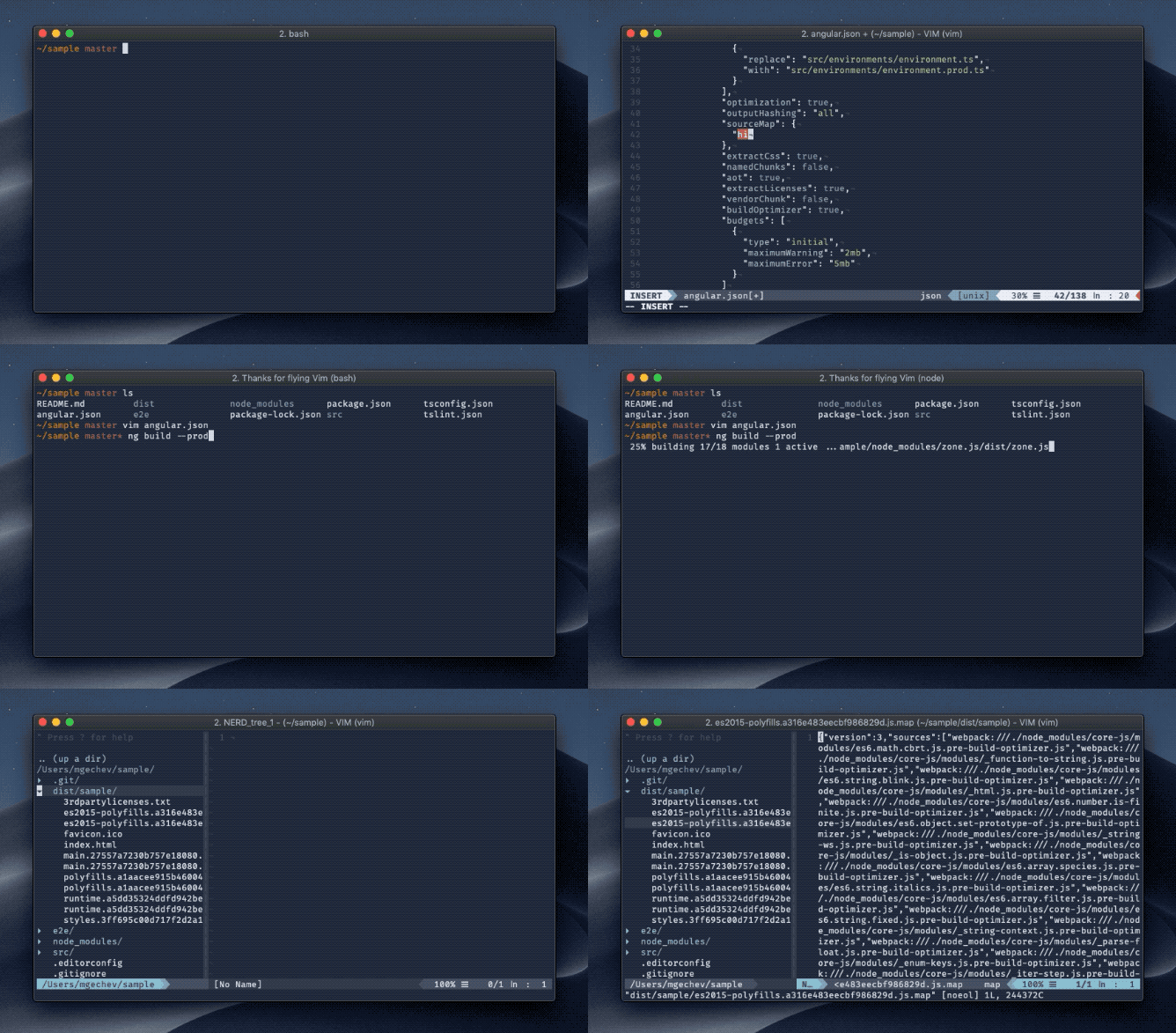
To take advantage of this feature, make sure you’re using Angular CLI ^7.2.0.

Looking up the Documentation

While working on a project, I spend most of my time in the terminal. Often I want to look up something in the Angular’s documentation quickly from the command line. Angular CLI provides ng doc which accepts a keyword. The doc command will open https://angular.io in the browser and automatically search for the provided keyword.

Here’s how this works in practice:
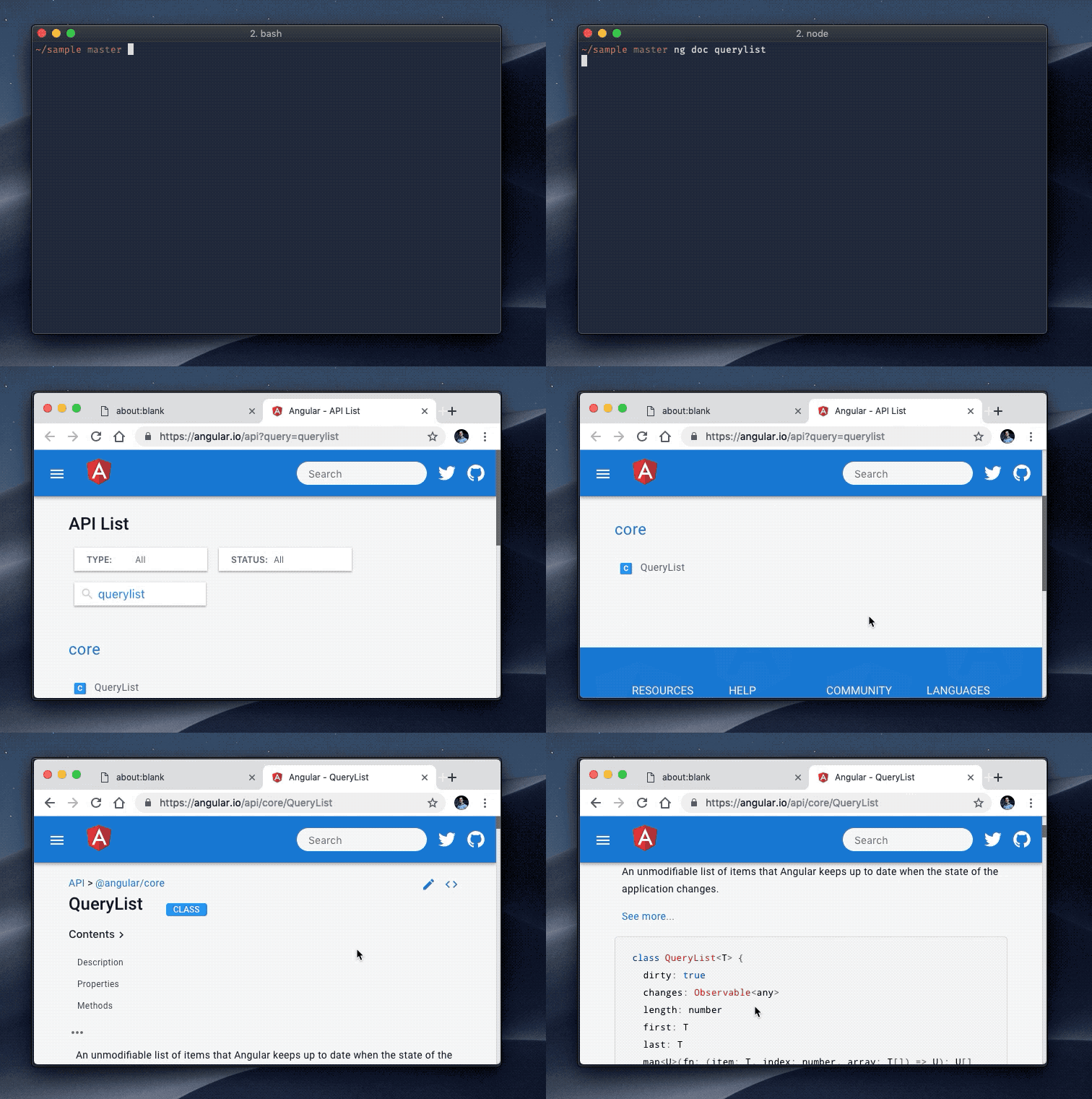
At the moment of writing, there’s a known issue on Windows

Profiling the Build

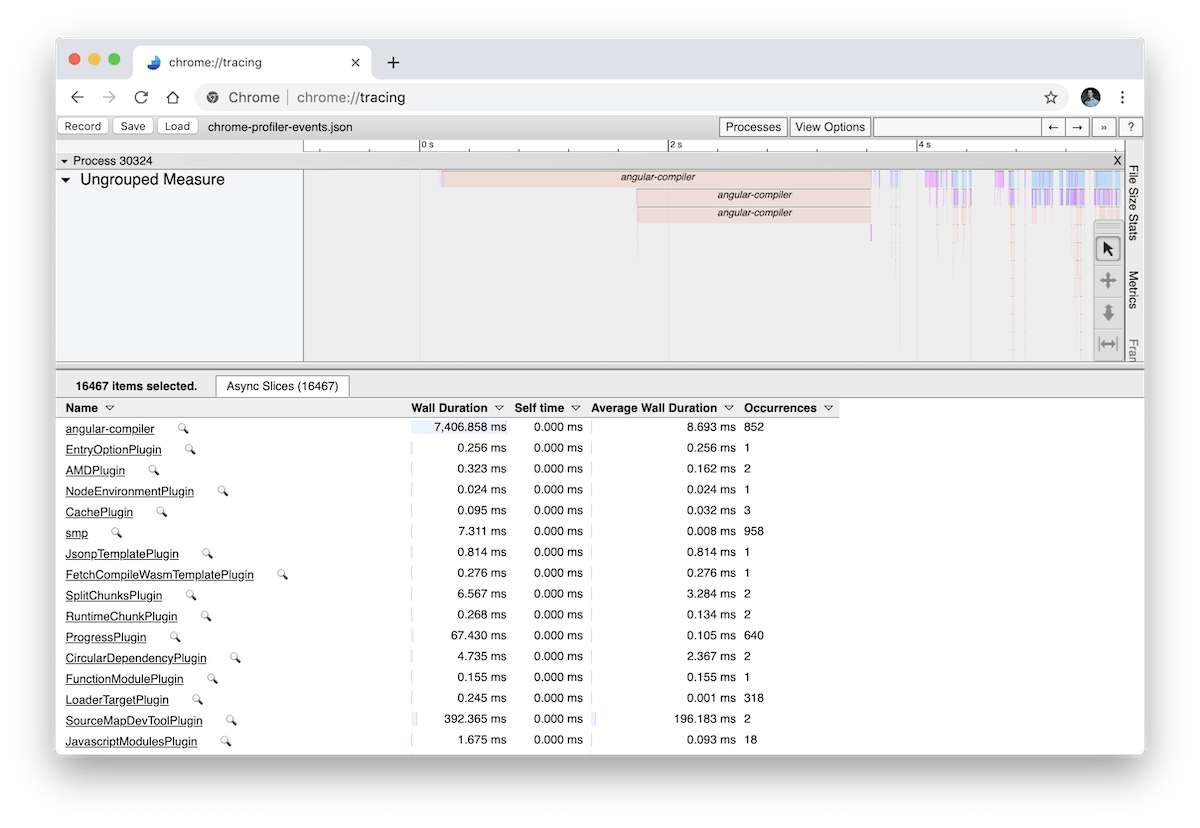
The more the application grows, the slower the build gets. Angular CLI version 7.0.0 introduced a --profile flag that outputs the build events and lets you profile them in chrome://tracing. You can use this feature as follows:

  1. Build your project with --profile flag on (ng build --prod --profile), Angular CLI will produce a file called chrome-profiler-events.json
  2. Open chrome://tracing and click on “Load” in the top left corner
  3. Select chrome-profiler-events.json
  4. 🎉

Here’s a link which explains how to get started with the trace event profiling tool.
Open the Browser

This is an obvious one, but I’ve been really missing it since few days ago when I saw that it has been in the CLI the entire time… In Angular Seed, I was feeling strongly for opening the browser once the development server is ready. I used Angular CLI in the past and I noticed that this wasn’t the case there, which I found a little disappointing.

Oh well, I didn’t look at the documentation back then…but while reading through the source code I found the --open=true or -o command line option, which opens the browser for you. This tiny little feature saves me over a minute every day.

Conclusion

In this blog post we looked at five not very popular CLI features:

  • Conditional polyfill serving
  • Hidden source maps, consumable by error reporting services
  • Searching in the Angular’s documentation using ng doc
  • Profiling the build with Chrome’s trace event profiling tool
  • Opening the browser when the development server starts

Be tunned for Angular CLI v8.0.0 with more upcoming feature. Make sure you follow https://blog.angular.io for updates!