


Edit · Sep 30, 2015 · 7 minutes read · Follow @mgechev JavaScript Angular 2 Angular Router Performance
Warning: This version of the Angular 2 router is now deprecated! This means that soon the used below APIs will no longer be available.
For the examples in the content below I’ve used the angular2-seed project. The code for the article could be found at my GitHub account.
This blog post is mostly about performance and more accurately - lazy loading. Before we get started lets make a quick recap of what problem we’re about to solve.
Background
Disclaimer: Angular 2 is still in alpha. All the APIs we’re using here are quite likely to change. If you notice that the article is not up to date, please open a PR, leave a comment or contact me via twitter.
In order to get familiar with the upcoming content you need to have basic understanding of Angular 2 and the component based router introduced by the framework. Good introduction to routing in Angular 2 could be found here.
Sample Application
Lets take a look at this sample application:
import {Component, View, bootstrap} from 'angular2/angular2';
import {RouteConfig, ROUTER_DIRECTIVES, ROUTER_PROVIDERS} from 'angular2/router';
import {Home} from './components/home/home';
import {About} from './components/about/about';

@Component({
  selector: 'app'
})
@RouteConfig([
  { path: '/', component: Home, name: 'home' },
  { path: '/about', component: About, name: 'about' }
])
@View({
  templateUrl: './app.html',
  styleUrls: ['./app.css'],
  directives: [ROUTER_DIRECTIVES]
})
class App {}

bootstrap(App, [ROUTER_PROVIDERS]);
This is the root component of angular2-seed.
In the snippet above we create a new component with controller the App class. We also register two routes:
/- once opened theHomecomponent will be rendered./about- once opened theAboutcomponent will be rendered.
Here’s the implementation of the About component:
import {Component, View, CORE_DIRECTIVES} from 'angular2/angular2';

import {NameList} from '../../services/NameList';

@Component({
  selector: 'about',
  providers: [NameList],
  templateUrl: './components/about/about.html',
  directives: [CORE_DIRECTIVES]
})
export class About {
  constructor(public list: NameList) {}
  addName(newname):boolean {
    this.list.add(newname.value);
    newname.value = '';
    return false;
  }
}
The About component uses the service NameList, which is located under ../../services/NameList. So far so good, now lets take a look at how our application looks like:
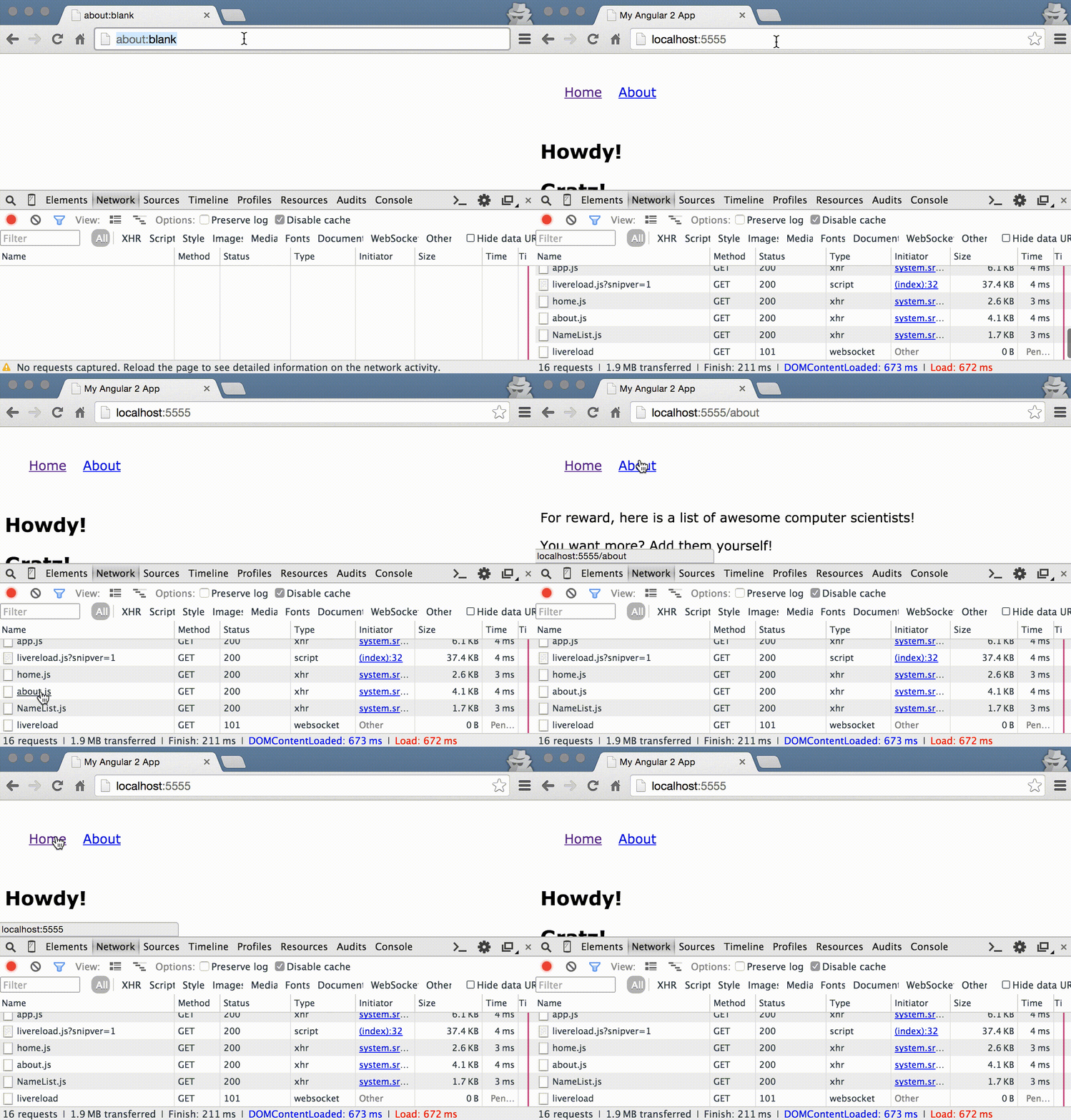
As we can see from Chrome DevTools’ Network tab, during the initial page load all the components and services used in the entire application are being downloaded. However, in order to render the Home view we don’t need the About component, neither the NameList service (usually the template of the About component will be requested as well. However, in this example it is being inlined inside the component by a gulp task).
Place for Improvements!
In the sample application above, loading a couple of files more is not such a big problem since the entire app consists only two views and a single service. However, in a real-life application downloading the entire dependency graph during the initial page load may create quite poor user experience. Imagine we had n views, each of these n components had m dependencies, which had another k dependencies, etc.
Lazy Loading
The practice of lazy loading is quite common in web development. We lazy load assets, partials, basically whatever we need in order to speedup our load time and we load it on demand!
The Problem
Although the About component is not essential for rendering the Home component it is referenced directly inside the file, which contains the definition of the root component of our application (App). App cannot be rendered until all of the dependencies, which are declared inside of the file are not loaded. Although the ES2015 modules have implicit asynchronous behavior the rendering of the App component happens synchronously, since we need to resolve all of its dependencies before it appears onto the screen.
In order to workaround this issue we can use the ES2015 module loader imperative API.
AsyncRoute
The obvious Angular solution to the problem us using AsyncRoute. This is class, which implements RouteDefinition and allows asynchronous loading of the component associated with given route. This allows on demand loading of the component’s dependencies as well. Here’s now our definition will look like with AsyncRoute:
@RouteConfig([
  { path: '/', component: Home, name: 'home' },
  new AsyncRoute({
    path: '/about',
    loader: () => System.import('./components/about/about').then(m => m.About),
    name: 'about'
  })
])
Basically we register two routes:
- A regular route
- Async route. The async route accepts as argument a
loader. Theloaderis a function that must return a promise, which needs to be resolved with the component that needs to be rendered.
So far so good! Everything looks great and we achieved our goal. However, there are some more advanced cases we may want to cover. For example, we may need to throw events when the route change has started and completed. In the case of AsyncRoute we can implement a generic loader, which takes care of this. However, we may want to implement something like a splash screen or have even further control on the component’s rendering. In such case we may use a:
Virtual Proxy
The Angular router accepts a component for value of the component property of all of its routes definitions. However, instead of providing the concrete component, which needs to be rendered we can provide a component proxy. This is the Virtual Proxy pattern. Inside the component proxy we can load the target component and later, when it is loaded, using the DynamicComponentLoader we can render it onto the screen.
Lets define a componentProxyFactory, which will be responsible for creating component proxies:
export class ComponentProvider {
  path:string;
  provide:{(module:any):any};
}

const PROXY_CLASSNAME = 'component-wrapper';
const PROXY_SELECTOR = `.${PROXY_CLASSNAME}`;

export function componentProxyFactory(provider: ComponentProvider): Type {
  @Component({
    selector: 'component-proxy',
    providers: [provide(ComponentProvider, { useValue: provider })]
  })
  @View({
    template: `<span #content/>`
  })
  class VirtualComponent {
    constructor(
      el: ElementRef,
      loader:DynamicComponentLoader,
      inj:Injector,
      provider:ComponentProvider) {
        System.import(provider.path)
        .then(m => {
          loader.loadIntoLocation(provider.provide(m), el, 'content');
        });
      }
  }
  return VirtualComponent;
}
Now lets take a look at the code step by step:
- We define a class called
ComponentProvider. It contains two properties:
path- a path to the component, which will be used by the module loader.provide- a provider, which will return the target component based on the passed module as argument
- We define a function called
componentProxyFactory:
- This function accepts as argument a
ComponentProviderobject and returns a new component calledVirtualComponent. - The
VirtualComponentdefines a single provider, in order to allow the provider to be passed as argument to the constructor through DI. - Inside
VirtualComponent’s constructor we load the module based on the provider’spathand right after that loaded in the template using:loader.loadIntoLocation(provider.provide(m), el, 'content');
And thats all!
Now lets take a look how we can refactor our root component in order to take advantage of the lazy loading:
import {Component, View, bootstrap} from 'angular2/angular2';
import {RouteConfig, ROUTER_DIRECTIVES, ROUTER_PROVIDERS} from 'angular2/router';
import {Home} from './components/home/home';

import {componentProxyFactory} from './component_proxy';

@Component({
  selector: 'app',
})
@RouteConfig([
  { path: '/', component: Home, name: 'home' },
  {
    path: '/about',
    component: componentProxyFactory({
      path: './components/about/about',
      provide: m => m.About
    }),
    name: 'about'
  }
])
@View({
  templateUrl: './app.html',
  styleUrls: ['./app.css'],
  directives: [ROUTER_DIRECTIVES]
})
class App {}

bootstrap(App, [ROUTER_PROVIDERS]);
Now the file doesn’t contain any reference to the About component. Instead it registers in the route definition for the About component using:
{
  path: '/about',
  component: componentProxyFactory({
    path: './components/about/about',
    provide: m => m.About
  }),
  name: 'about'
}
Results
Lets take a look at how the page load will look this time:
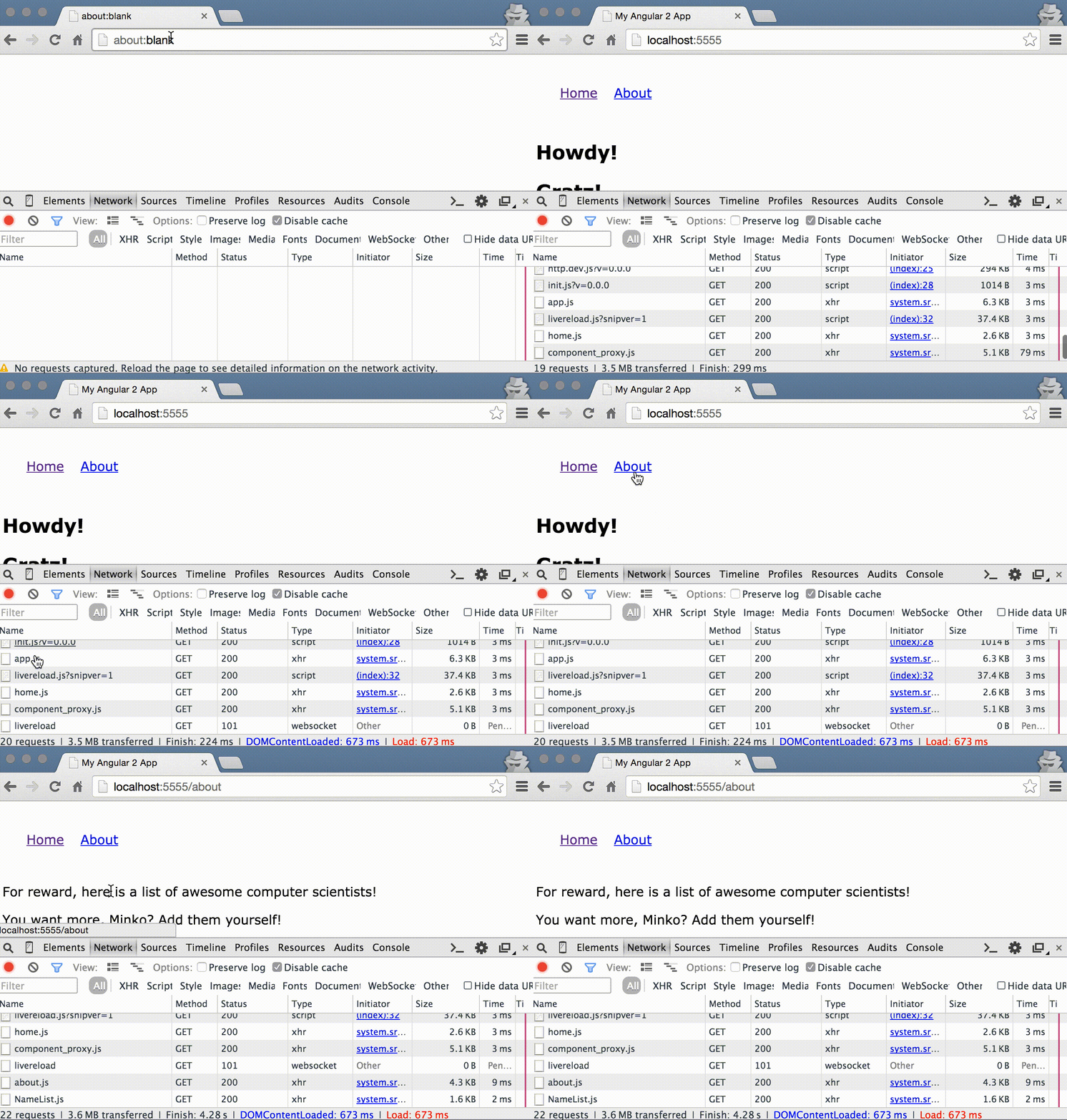
As we can see there are two additional resources, which are being downloaded on demand:
about.jsNameList.js

Conclusion
There are still a lot of things to be considered. For example, in a real-life application you’ll most likely have different bundles in order to reduce the number of downloaded files even further. In our case we can combine the About component and NameList in a single file during the build process.
Also do not forget that Angular 2 is still in early alpha so the framework and the entire API are under development. However, no one stops you from having fun with it!