


Time to First Byte (TTFB)


Published: October 26, 2021, Last updated: November 18, 2025
What is TTFB?
TTFB is a metric that measures the time between starting navigating to a page and when the first byte of a response begins to arrive.
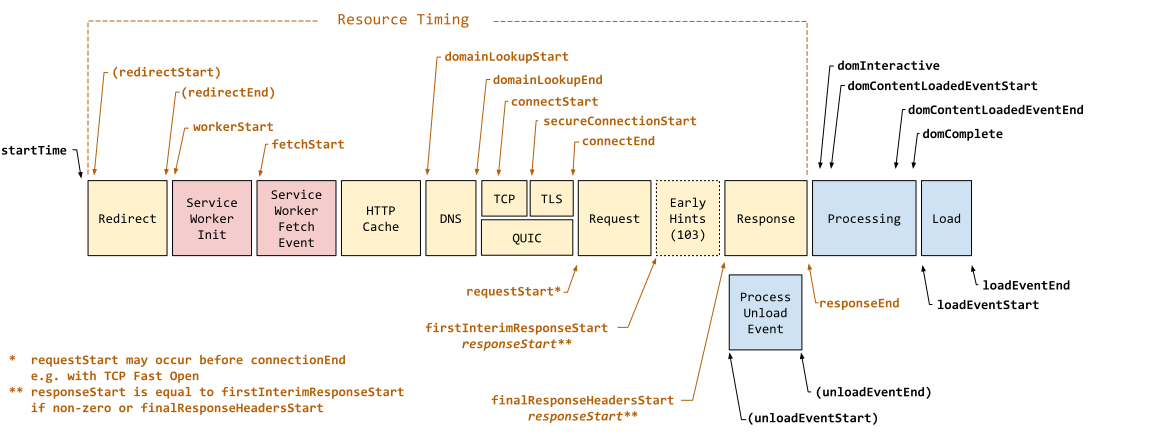
startTime and responseStart.
TTFB is the sum of the following request phases:
- Redirect time
- Service worker startup time (if applicable)
- DNS lookup
- Connection and TLS negotiation
- Request, up until the point at which the first byte of the response has arrived
Reducing latency in connection setup time and on the backend can lower your TTFB.
TTFB and Early Hints
The introduction of 103 Early Hints causes some confusion as to what "first byte" TTFB measures. The 103 Early Hints counts as the "first bytes". The finalResponseHeadersStart is an additional timing entry to responseStart that measures the the start of the final document response (typically an HTTP 200 response) to be measured.
Early Hints is just a newer example of responding early. Some servers allow early flushing of the document response to happen before the main body is available—either with just the HTTP headers, or with the <head> element, both of which could be considered similar in effect to Early Hints. This is another reason why all these are measured as responseStart and so TTFB.
There is real value in sending back data early if the full response is going to take some more time. However, this does make it difficult to compare TTFB across different platforms or technologies depending on what features they use, and how that impacts the TTFB measurement being used. What is most important is to understand what the measure the tool you are using measures and how that is affected by the platform being measured.
What is a good TTFB score?
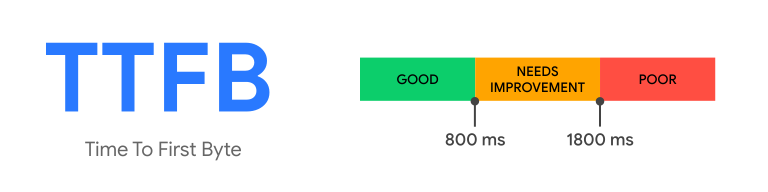
Because TTFB precedes user-centric metrics such as First Contentful Paint (FCP) and Largest Contentful Paint (LCP), it's recommended that your server responds to navigation requests quickly enough so that the 75th percentile of users experience an FCP within the "good" threshold. As a rough guide, most sites should strive to have a TTFB of 0.8 seconds or less.
How to measure TTFB
TTFB can be measured in the lab or in the field in the following ways.
Field tools
Lab tools
- In the network panel of Chrome's DevTools
- WebPageTest
Measure TTFB in JavaScript
You can measure the TTFB of navigation requests in the browser with the Navigation Timing API. The following example shows how to create a PerformanceObserver that listens for a navigation entry and logs it to the console:
new PerformanceObserver((entryList) => {
  const [pageNav] = entryList.getEntriesByType('navigation');

  console.log(`TTFB: ${pageNav.responseStart}`);
}).observe({
  type: 'navigation',
  buffered: true
});
The web-vitals JavaScript library can also measure TTFB in the browser more succinctly:
import {onTTFB} from 'web-vitals';

// Measure and log TTFB as soon as it's available.
onTTFB(console.log);
Measure resource requests
TTFB can also be measured on all requests, not just navigation requests. In particular, resources hosted on cross-origin servers can introduce latency due to the need to set up connections to those servers.
To measure TTFB for resources in the field, use the Resource Timing API within a PerformanceObserver:
new PerformanceObserver((entryList) => {
  const entries = entryList.getEntries();

  for (const entry of entries) {
    // Some resources may have a responseStart value of 0, due
    // to the resource being cached, or a cross-origin resource
    // being served without a Timing-Allow-Origin header set.
    if (entry.responseStart > 0) {
      console.log(`TTFB: ${entry.responseStart}`, entry.name);
    }
  }
}).observe({
  type: 'resource',
  buffered: true
});
The previous code snippet is similar to the one used to measure the TTFB for a navigation request, except instead of querying for 'navigation' entries, you query for 'resource' entries instead. It also accounts for the fact that some resources loaded from the primary origin may return a value of 0, since the connection is already open, or a resource is instantaneously retrieved from a cache.
How to improve TTFB
For guidance on improving your site's TTFB, see our in-depth guide to optimizing TTFB.