


You've shipped an agent. It works. You tweak a prompt to fix the one thing a user complained about, and it looks better on the three examples you tried. The question that keeps you up at night: did I just break ten others?
That gap, between "looks better on a few examples" and "actually better in production", is the daily reality of building agents. Most teams have eval cases somewhere. Most teams tweak prompts. Few connect the two with enough discipline to know whether a change moved the metric or just moved the vibe.
The scariest failures aren't the loud ones. They're the agents that look like they're working (confident answers, a plan that reads fine) while quietly getting the user's actual goal wrong. At Cloud Next '26 we talked about agent quality as a three-phase flywheel — Build & Test → Ship & Monitor → Learn & Refine — and showed the building blocks. Today we're adding the developer-facing path: a skill your coding agent installs and then drives on your behalf.
This flywheel — the methodology and the AutoRaters at its core — is built on the same principles we use to evaluate and improve our own models and first-party agents, with the AutoRaters developed in close partnership with Google DeepMind.
The skill is centered on Build & Test, the fast iteration loop, and expands it into five concrete stages. It isn't confined to that phase: the same stages run against production traces too, with more of the flywheel coming into reach over time. Run them in order on the first pass, then loop stages 2–5 until quality targets are met:
Most failing cases take several iterations before metrics actually move, and the skill encodes that discipline.
The optimizer and the evaluator stay decoupled: whatever proposes a fix (your coding agent, an automated optimizer, or you) never grades it. The Gemini Enterprise Agent Platform GenAI evaluation service scores it independently. An optimizer that grades itself learns to game the metric instead of improving the agent. A small architectural choice matters more than it looks.
It is methodology plus orchestration running inside your coding agent: it chooses the right metric for the goal, runs the GenAI evaluation service, reads the verdicts, proposes fixes, and compares before/after.
It isn't:
It ships in two packages against the same GenAI evaluation service. Pick whichever fits your stack:
Here's one cycle on a real agent. The thing to notice as you read: the developer never touches the eval CLI, and never names a metric. They install the skill, describe a worry in plain language, approve a plan, and read the results. The skill decides how, and the most interesting decision it makes is which metric can even detect the failure.
The agent under test is travel-concierge, an ADK multi-agent trip planner from google/adk-samples (inspiration → planning → booking → pre/in/post-trip). It keeps the working itinerary in session state, which sets up a specific, subtle failure.
What you tell your coding agent:
"Use the quality-flywheel skill on this repo. I'm worried about whether travel-concierge honors mid-conversation changes. When a user revises the trip partway through (different dates, a different hotel, a different number of travelers), does the final plan reflect the change, or does it keep operating on the original? Figure out how to test it and propose a plan before running anything."
That's the whole interface. No flags, no metric names. The skill's job is to translate that goal into the right evaluation, and here's where it earns its keep. It reads the agent's code first, then comes back with a plan. It reaches for the two built-in multi-turn AutoRaters, then does something a fixed script wouldn't: it adds a custom rubric on top of them, purpose-built to pin the before/after to exactly the behavior you asked about:
coding agent · quality-flywheel skill
"multi_turn_task_successandmulti_turn_trajectory_qualityare adaptive: they'll generate a rubric for each case and will surface a revision miss inside it. But it lands as one criterion among several that are regenerated differently every run, folded into a blended score; there's no stable 'revision-honoring' number to threshold or trend. So I'll promote that one concern to its own metric: a custom rubric,revision_honored, with a categorical verdict (HONORED / IGNORED / PARTIAL / NO_REVISION) that I can count, gate on (act if more than 20% come back IGNORED), and track cycle over cycle. I'll bootstrap 25 scenarios with the User Simulator, partitioned across the five revision types. Proceed?"
You approve. Behind that paragraph the skill runs the User Simulator to synthesize those scenarios and grades the traces with the two built-ins plus its own revision_honored rubric. Only a handful of cases fail, below the threshold where clustering pays off, so it reads those verdicts directly instead of reaching for Automatic Loss Analysis. Here's what it actually ran:
# one User Simulator pass per revision type (×5: party_size, destination, dates, hotel, dropped_stop)
agents-cli eval dataset synthesize -n 5 --max-turns 8 --model gemini-3.5-flash \
    --instruction "$(cat instr_party_size.txt)" \
    --environment-context "$(cat synthesize_env_context.txt)" \
    -o traces_party_size.json

# merge the five trace files, then grade all 25 in one pass
agents-cli eval grade --traces traces_merged.json --config eval_config_revisions.yaml
Shell
Copied
You wrote none of it. The skill chose the metrics, the simulator, and the partitioning; you described the goal.
First pass. All three metrics fired. The built-in AutoRaters already showed clearly sub-par quality (means in the mid-0.6s, with low pass-rates against a strict bar), and the custom rubric isolated how much of that was the revision problem specifically:
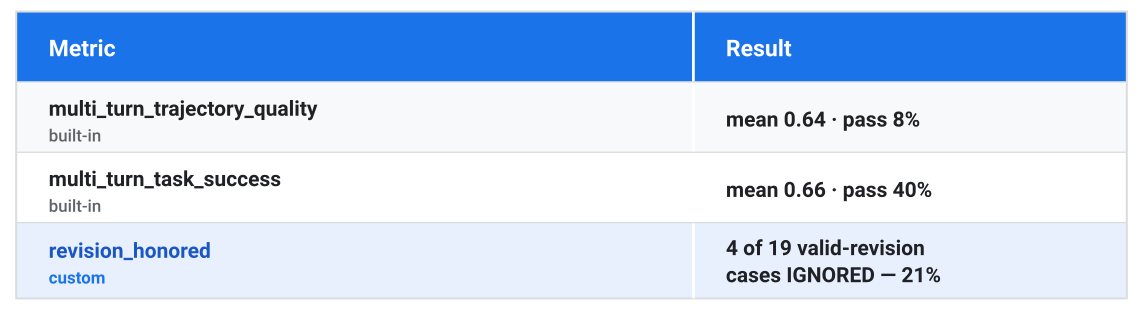
On this rubric, IGNORED means the revision was dropped (the other verdicts are HONORED, PARTIAL, and NO_REVISION). That 21% cleared the skill's own action threshold. And the verdicts located the failure precisely. It isn't what you'd guess: the agent doesn't confidently confirm a wrong itinerary. In three of the four failures, its internal state was correct (the right value was stored, the right tool was called), but its final message to the user echoed the stale value anyway. The agent did the right thing internally and contradicted itself out loud. One verdict makes it concrete:
"While the agent's internalmemorizecalls forstart_dateandend_datein Turn 3 correctly stored '2027-04-15' and '2027-04-19', it failed to provide the correct date in its final output to the user after the explicit correction."
That's the "looks like it's working" failure in miniature: nothing crashes, the plan reads fine on a quick skim, the agent sounds like it did what you asked, but the answer the user actually receives is wrong. The common cause across the cases: nothing in the root agent's instruction told it to check its final response against the user's most recent message before sending.
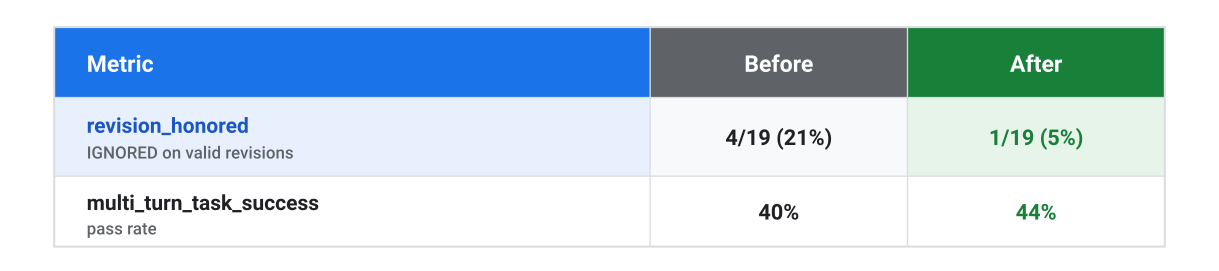
You might wonder whether the custom rubric was needed at all: the built-ins are adaptive, after all. It turns out detection is not the problem, but isolating the failure is. Take the one IGNORED case where built-in task-success still scored a comfortable 0.80: party_size_02, where the user revised their hotel request to dorm rooms at a specific hostel. The annotation below shows why: the rater did generate a criterion for that exact request and marked it unmet (it caught the miss and explained it), but that one criterion sat among four that passed, so the blended score stayed high. What the built-in couldn't give you is a single "did it honor the revision?" number across all 25 cases; promoting the concern to its own categorical metric is what made the 21%→5% before/after countable.
One case, three raters: party_size_02
The user asked for a cheap Berlin→Amsterdam trip for 5, then mid-conversation revised the hotel request to "dorm rooms at Hostel World Amsterdam."
revision_honored (custom) → IGNORED. "The agent acknowledged the request but re-offered the earlier results instead of searching the revised criteria, and never memorized the new preference."
multi_turn_task_success (built-in) → 0.80. Five generated criteria, four passed: ✓ cheap trip for 5 · ✓ flight options · ✓ easyJet selection confirmed · ✓ hotel options provided. The fifth failed: ✗ "provides dorm room options at 'Hostel World Amsterdam'" : "the agent failed to provide the specific information requested … because it claimed a lack of tool capability." The revision miss is real and named; it's just one line in five, so the blended score stays high.
multi_turn_trajectory_quality (built-in) → 0.67. Its misses here are an eval-config artifact, not a defect: the agent's tool schemas weren't surfaced to the rater, so it flagged legitimate calls (flight_search_agent, _memorize_impl) as "tools not permitted." That's why we lean on the custom rubric and task-success, not trajectory, for the before/after.
The fix and the re-run. You approve a targeted change: three sentences added to the root agent's instruction, telling it to reconcile its final response with the latest user revision. The skill re-runs the same evaluation:
That cycle started from a clear goal. But the skill works just as well when you don’t have one yet, when you can’t name what’s wrong. Point it at an agent cold and say “find a real failure and fix it,” and it runs broad: synthesizing varied scenarios, grading them on the built-in multi-turn metrics, and surfacing the dominant failure cluster on its own.
We tried exactly that on a different agent: software-bug-assistant from google/adk-samples, a bug-triage assistant wired to real tools (a Postgres ticket database behind an MCP toolbox, plus web and StackExchange search). With no hypothesis, the skill surfaced one cluster immediately: in 14 of 15 cases the agent did the work correctly but never told the user which tools it had called. Its own instruction asked for it, and the model had quietly treated it as optional. A one-paragraph fix mandating that every response now ends with a footer like “Tools used: search-tickets, get-ticket-by-id” took that from 0% to 96% of responses across all 15 cases, in a single cycle.
Same skill, looser prompt. “Here’s my goal” and “find me a problem” both land.
In both cycles the trick was the same: pick one stable measure for the behavior you changed (a custom rubric or a plain count) and treat the adaptive built-ins as your broad-health signal, since their rubrics shift from run to run.
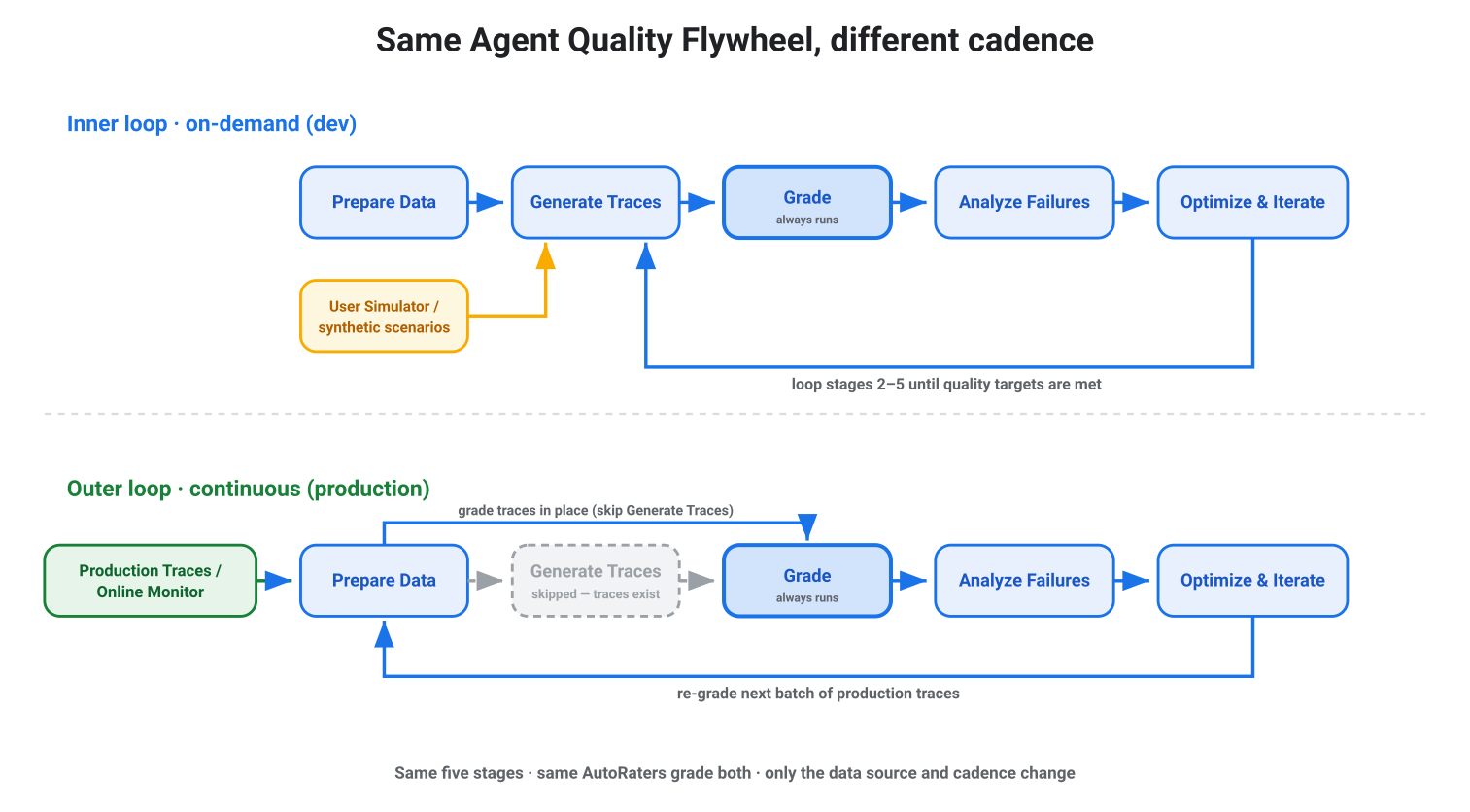
The cycle above used the User Simulator because we had no real usage yet — the on-demand, dev side of the loop. As the agent matures and serves real traffic, production sessions become the most valuable input: each one is a genuine request — from a user, another agent, or an upstream service and each failure is a ready-made test case for the next cycle. The same stages are now fed by real usage instead of simulation.
The same skill runs against production traffic; you just point it at real traces instead of synthesized ones. Tell it to grade last week's production sessions, and because those traces are already complete, it skips Run Inference entirely and grades them in place with the same raters. Online Monitors continuously evaluate live traffic and write quality scores to Cloud Monitoring; when scores drift, you hand the failing traces to the same skill: the eval-fix loop you just saw. Same flywheel, different cadence: continuous in production, on-demand in dev, with the same AutoRaters grading both.
Today the skill runs the inner loop on demand and grades production traces when you point it at them. The direction is to let it drive more of that outer loop on its own: watching the monitors, surfacing regressions, and proposing fixes as your traffic shifts.
You will need: a GCP project with the Agent Platform GenAI Evaluation Service enabled, an agent to evaluate (ADK or any framework), and a coding agent to drive the skill. To grade production traffic, your agent should also emit OpenTelemetry traces (ADK does by default).
Install the skill your coding agent will drive:
# CLI-driven (ADK + agents-cli):
npx skills add https://github.com/google/agents-cli --skill google-agents-cli-eval

# SDK-driven (any framework):
npx skills add https://github.com/google/skills --skill agent-platform-eval-flywheel
Shell
Copied
Then start a cycle: point it at your agent and describe what you want measured. Your coding agent picks up the rest.
Your agent doesn't have to be perfect. It has to be improvable.
Credits: Quality Flywheel skills and the underlying services built by Jason Dai, Ludwik Trammer, Iwo Naglik, Xi Liu,Aleksandra Grzegorczyk, and the broader Cloud AI Agent Platform team. The talk this builds on was delivered at Cloud Next '26 with Alex Martin (Google) and Daniel J. Lewis (Geotab).
Learn more: Cloud Next '26 talk · Agent Evaluation docs · agents-cli on GitHub · google/skills on GitHub.
此内容由惯性聚合(RSS阅读器)自动聚合整理,仅供阅读参考。 原文来自 — 版权归原作者所有。