





With the proper setup and guidance, you can have Claude Code, Codex, Posit Assistant, and other coding agents writing R code like a pro. Here’s how.
Most generative AI tools know less about R than languages like JavaScript and Python, thanks to how much training data is available for each. However, with a little extra setup, you can give a large language model (LLM) the knowledge it needs to improve its R skills.
Here are 10 ways to help generative AI write R code like a pro.
Use a coding agent
AI coding agents have more power, flexibility, and coding-focused tools than general-purpose chatbots.
Anthropic’s Claude Code and OpenAI’s Codex agents have versions that run in a terminal, IDE extensions, desktop and mobile apps, and other integrations.
R users may also be interested in Posit’s Posit Assistant, which is designed for data analysis in both R and Python. It needs less setup for R than general-purpose coding agents, and it has more built-in knowledge about data science, R package development, and Shiny apps. Plus, it can read objects in your R and Python environments by default, which can be useful in some situations (although perhaps not if you’re working with sensitive data). There are versions of Posit Assistant for RStudio, the Positron IDE, and the terminal. Setup info is here.
Note: Posit Assistant is not the same as the older Positron Assistant that was demo’d at last year’s posit::conf(). The older assistant will eventually be superceded by Posit Assistant. Posit Assistant comes pre-installed with RStudio but not pre-activated, so you don’t need to use it unless you want to.
Google’s original entry in this space, Gemini CLI, is being retired in favor of a new “Antigravity CLI” starting June 18.
There are other IDE platforms with built-in agents, including Cursor and Windsurf, and terminal + subscription coding agents such as Warp, which was open-sourced in April. However, I won’t be covering those here.
You may be limited at work by what your employer allows you to use, but you can still experiment on your own with public data — and then lobby for a new agent if a different one better meets your needs. Whatever you choose, though, moving to one of these from a web-based chatbot should produce better code.
“The shift from chatbot to agent is the most important change in how people use AI since ChatGPT launched,” says Ethan Mollick, co-director of the Wharton School’s Generative AI Labs at the University of Pennsylvania.
Set up CLAUDE.md, AGENTS.md, or GEMINI.md knowledge files
All the major coding agents look for knowledge files to load each time you start a session, and you can easily edit those files. The files can include things like your proficiency in various languages and how you like to document projects. For example, I tell my LLMs that I’d like a README.md in every project with info on how to use the project and technical info on how the project was coded.
Most coding tools let you have both an overarching main file that’s loaded into every session, and an additional file per project.
If you’re adding Claude or Codex to an existing code base, the /init slash command will create one of those .md project files after scanning and analyzing the code. You can also ask an LLM to interview you to create or add to one of those files.
Claude Code looks for a user-level main CLAUDE.md file at ~/.claude/CLAUDE.md and then a project-level file at ./CLAUDE.md or ./.claude/CLAUDE.md. The /memory slash command shows where those files are located. Codex uses AGENTS.md files. Antigravity docs say it looks for a main GEMINI.md file plus GEMINI.md and/or AGENTS.md files in your working directory.
Positron Assistant is set up to read AGENT.md, AGENTS.md, POSITRON.md, CLAUDE.md, GEMINI.md, and LLMS.txt in a workspace root directory, according to the docs. See the Positron docs for more on custom instructions.
Use agent skills
Agent skills can turn an LLM with questionable R knowledge into an expert that understand how you want it to write code. You can develop your own skills, work with your LLM to create skills, or download skills written by others. Claude even has a skill to help you build skills. This is one of the best ways to stop having to repeat the same instructions over and over. Instead, the LLM will “remember” what’s in your skills files by loading them when they’re needed.
What’s the difference between the knowledge .md files mentioned above and a skill? I like to think of CLAUDE.md or AGENTS.md files as important background info that’s always available, while skills are more specific instructions that are useful at certain times. Or, as Claude Opus 4.7 put it: “Skills are for triggered workflows (‘when user asks X, do Y’). A standing rule that applies to every project isn’t trigger-based; it’s a directive I should always follow.” Standing rules should go in CLAUDE.md.
“Create a skill when you keep pasting the same instructions, checklist, or multi-step procedure into chat, or when a section of CLAUDE.md has grown into a procedure rather than a fact,” according to Anthropic’s Claude Code docs. “Unlike CLAUDE.md content, a skill’s body loads only when it’s used, so long reference material costs almost nothing until you need it.” Only skill descriptions are loaded at the start of each session, so the LLM knows what skills are available.
Anthropic originally created skills for Claude in October 2025 and then published the concept as an open standard a couple of months later. Most coding agents now use them.
Anthropic has an easy-to-folllow guide to creating custom skills here if you want to try your hand at building your own.
Posit Assistant comes with several R-related skills built in and allows users to add more. You’ll find them here.
If you’re not using Posit Assistant, you can add Posit-developed skills to another coding agent. Posit published a GitHub repository with skills for creating R packages, Shiny apps, and Quarto documents; for creating and resolving GitHub pull requests; for open-source R and Python package releases; for code reviews (R, Python, JavaScript/TypeScript, SQL); and for creating architectural documentation for a codebase. Browse them all here.
Read and edit the skills you download
Skills are just a folder with one or more markdown text files that have a structured YAML header. That folder can include optional resources and scripts, too. Skill instruction files are easy to read and edit, so you can make sure they do what you want. Tweak them as desired.
For example, Claude helped me write my own customized R skill. Claude leans toward tidyverse packages, but there are other packages I like a lot, too, such data.table. I made sure the R skill knows my package preferences, and under what circumstances I prefer each.
If one of your preferred procedures changes, remember to update the associated skills. Or, ask an LLM to update it for you. Keeping skills up to date will make your coding agent more useful.
Keep your CLAUDE.md or AGENTS.md files updated, too. Maybe you started off with a CLAUDE.md file that said you’re an experienced Python programmer who is just learning R. Three months from now, you might want to update your R skill level. Or, perhaps you told an AGENTS.md file that you like thoroughly documented code, but now you’d prefer a lighter touch. You may want to have your coding agent go over those files with you from time to time and ask you about the main points and whether they need updating.
Use the btw R package and its MCP server
It’s frustrating when an LLM writes code based on an ancient R package version in its training data, or when it doesn’t know about a relatively recent package at all. btw solves this problem by letting your coding agent access info about all the R packages installed on your system. That means it can write code based on your specific R environment. Plus, btw lets an LLM access variables in your current R environment via a Model Context Protocol (MCP) server.
MCP servers are a standardized way for LLMs to access external data — in this case, your running R session (external doesn’t have to mean cloud). Like skills, MCP was created by Anthropic as an open standard and has since been adopted by most major AI platforms. The btw R package includes an MCP server, which you can install for Claude Code by running the following code in a terminal window (not R console).
claude mcp add -s "user" r-btw -- Rscript -e "btw::btw_mcp_server()"
btw comes with a lot of tools. It’s not a great idea to overload your LLM with tools it may never use. If you just want to register btw tools for accessing your R session and looking up package documentation, you can run a command like this instead:
claude mcp add -s "user" r-btw -- Rscript -e "btw::btw_mcp_server(tools = btw::btw_tools('btw_tool_run_r', 'docs', 'env'))"
You only need to do this once.
To connect Claude Code to your open R session, you also need to run btw::btw_mcp_session() in every new R session. (I sometimes forget this part until I’m puzzled why Claude can’t read my R variables or even see what packages I have installed.)
You can see a demo of btw in this Posit video that compares Claude Code and Posit Assistant.
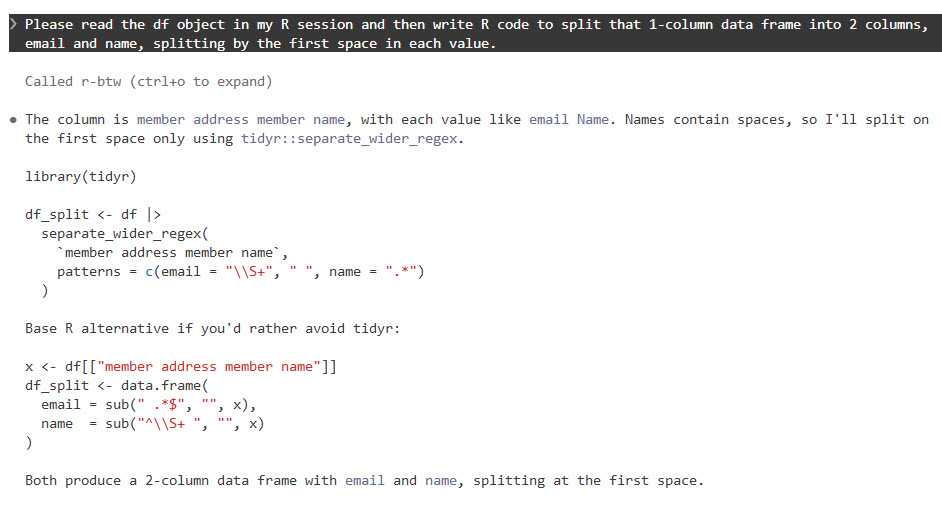
The btw R package lets Claude Code and other agents read objects in your R session.
Foundry
You don’t need to do this setup for Posit Assistant, since tools for accessing your R session and variables are built in.
Use plan mode for your projects
I cannot stress this enough. Just as humans benefit from having a plan before starting to implement a project, LLMs benefit from working through a plan before beginning to generate code. Plus, it can be useful at times to “brainstorm” with an LLM about structures and features, ask it for alternatives, or even have another LLM review a plan before implementing it.
Anthropic advises starting with plan mode. “Letting Claude jump straight to coding can produce code that solves the wrong problem. Use plan mode to separate exploration from execution,” they wrote in a best practices doc.
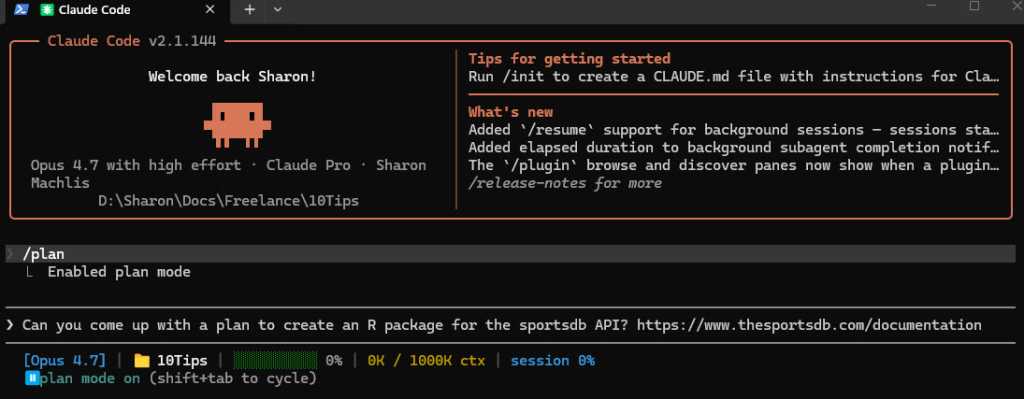
Claude, Codex, Gemini, and Posit Assistant all have a plan mode in their CLI versions that can be activated with the /plan slash command.
Foundry
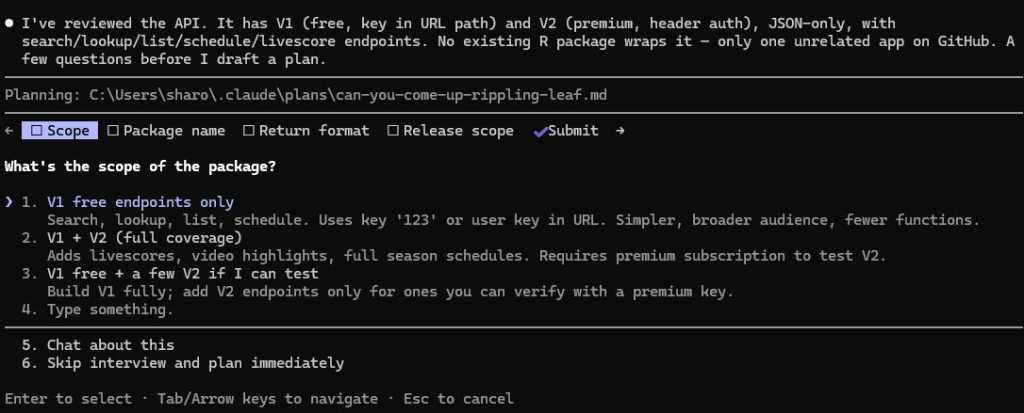
When in plan mode activated with /plan, Claude will often ask questions before coming up with its plan.
Foundry
Make sure your coding agent learns from its mistakes
This is one of the best tips I read first from Joe Amditis, associate director of operations at the Center for Cooperative Media at Montclair State University: If your coding agent makes a mistake and you work together to fix it, make sure to save that memory so it doesn’t make the same error again.
Your agent may have an auto memory system that’s supposed to do some of this (I’ve used Claude Code’s), but you can instruct any coding agent to keep a separate lessons learned file for each project, too, or ask it what’s the best way to ensure it doesn’t make the same error again. This isn’t a guarantee, any more than you can be assured an LLM will follow all the rules in a CLAUDE.md or AGENTS.md file or all the steps in a skill. But it has definitely cut down on my agents making the same errors over and over.
Have your agent write tests and do code reviews
Tests and code reviews done by a coding agent aren’t a substitute for a human checking that software works. Review an LLM’s results yourself any time a task is important! However, agent-generated tests are still a good way to head off some problems and cut down the time you spend as your LLM’s debugging partner. If you don’t know where to start to help your agent know how to test and review code, see Posit’s testing-r-packages and critical-code-reviewer skills. Your agent may also have built-in code review skills, such as Claude Code’s /code-review slash command.
Code review skills are available from many sources. For example, Sentry has a code review skill in its repository. Aimed specifically at its project’s needs, it can be a useful sample for similar skills. And superpowers is a popular set of general-purpose programming skills that’s billed as “a complete software development methodology for your coding agents, built on top of a set of composable skills and some initial instructions that make sure your agent uses them.” I don’t use superpowers, but a lot of other people clearly do given its more than 227,000 GitHub stars and 20,000 forks.
Another tip: Several experts suggest using a different LLM — maybe even from a different provider — to conduct a code review, since each model has its own strengths and weaknesses.
Don’t forget general prompting good habits
Whatever programming language you’re using, being clear will improve your outputs. Keep your requests targeted, and don’t expect the LLM to read your mind.
“Codex handles complex work better when you break it into smaller, focused steps,” OpenAI says in its developer docs. “Smaller tasks are easier for Codex to test and for you to review. If you’re not sure how to split a task up, ask Codex to propose a plan.”
“Take time to make your prompts as relevant as possible, just as you would when helping a new teammate scope a task,” Google advises in its Five Best Practices for Using AI Coding Assistants. “Consider what details you need to share for a person to succeed, and provide all those details to your AI tool.”
And, don’t load up your context window to the LLM’s published limit. Performance often degrades as you get close to the maximum token limit.
Take advantage of open LLMs, particularly if you have budget and token limits
Open-weight models — especially ones small enough to run on a desktop computer — may never rival frontier LLMs like Claude, GPT, or Gemini. But for a lot of R coding, they don’t need to.
To see how well an LLM can write R code, it should have the same kind of harness that Claude Code, Codex, or Posit Assistant gives larger LLMs. “The harness is the product,” argues Mallory Mejias at Sidecar, an AI education company. “The model is the engine inside it — important, but increasingly interchangeable.” I wouldn’t go that far, since I still find the LLM to be a critical piece of this equation, and models differ. But the same LLM will perform differently depending on the tools and context it has.
Posit recently added Google’s open-source Gemma 4 26B to Assistant’s existing options of larger, closed-source LLMs. “Up until this point, models of this size — small enough to run comfortably on high-end consumer laptops — were on our radar but not yet capable enough to drive an agent harness like Posit Assistant,” Posit senior software engineer Simon Couch wrote on the Posit blog. “This has changed in the last few months with releases like Gemma 4.” However, to use it in Posit Assistant in RStudio, you still need to run it through a Posit AI subscription, not locally. It uses 1/10 the budget that the same session with Claude Sonnet would consume.
Several projects can use Claude Code to run local LLMs. Ollama, open-source software for running LLMs locally, does this with the terminal command ollama launch claude --model <model-name>, such as:
ollama launch claude --model gemma4:26b
The makers of Unsloth, an open-source framework for running and training models, say running local LLMs inside Claude Code can be very slow due to a cache invalidation issue. They say this can be fixed by adding "CLAUDE_CODE_ATTRIBUTION_HEADER" : "0" to ~/.claude/settings.json under “env”.
Unsloth can also use Claude Code to run local models, but it’s somewhat more involved to install and set up than Ollama. See this Unsloth tutorial.
Open-source coding agent Open Code runs LLMs from OpenAI, Anthropic, Google, Kimi, Alibaba’s Qwen, and others. I haven’t warmed up to it yet compared with commercially backed CLI tools I’ve tried, but it has 174,000 GitHub stars so clearly a lot of fans.
AI consultant Thomas Wiegold, who switched from Claude to Open Code, said “OpenCode covers everything I need for my daily workflow. It’s fast, the provider flexibility is genuinely useful rather than theoretical, and the TUI is better for extended sessions…. That said, I’m not going to pretend it’s all smooth sailing.” He noted some stability issues and a remote code execution vulnerability earlier this year.
Wiegold’s suggestion? “Install both. Try others. Stay flexible.”
In summary
Large language models remain imperfect and unpredictable tools, but they’re improving rapidly — as are the harnesses around them. Even frontier LLMs in commercial coding agents can ignore instructions at times and otherwise behave in unpleasantly surprising ways. However, you’ll vastly improve your chances of generating quality code if you use coding agents, take time to set them up with quality instructions, and remember good prompting techniques. Good luck!
—
Coding agent info
Claude Code – Anthropic’s coding agent is available in the terminal and as an IDE extension, a desktop app, mobile apps, Slack app, and a cloud version that can work directly in your repos on GitHub. Arguably the first breakthrough coding agent, it now includes an elegant remote-control option where you can start a session on your desktop and then continue it on a phone or tablet. While designed for Claude LLMs, you can use it to run local LLMs via tools like Ollama or Unsloth Studio. When using Claude models, it tends to offer less usage than other vendors’ options. Anthropic has posted the terminal version’s code on GitHub, with usage governed by Anthropic’s commercial terms of service. You can use Claude Code via API pay per use or as part of a Claude subscription.
Codex – OpenAI’s answer to Claude Code is available via terminal, app, IDE extension, or cloud, with integrations for GitHub, Slack, and Linear. The CLI tool is open source under an Apache license, available on GitHub, and works via API pay per use or as part of a ChatGPT subscription.
Posit Assistant – The Posit (formerly RStudio) coding agent is designed for data work in R and Python, although Posit senior software engineer Simon Couch told me it would do fine for programming work for other uses and in other languages. It is available for the RStudio IDE (via a Posit AI subscription in RStudio), Positron IDE, and as a stand-alone CLI terminal app, although the CLI tool currently doesn’t feel as full-featured as the IDE integrations (that may change). As of this writing, you can also use API keys from Anthropic, OpenAI, and Snowflake Cortex and a GitHub Copilot account in Positron. Posit Assistant is being updated quite frequenty, Couch told me. If you tested it a month or two ago, it has more capabilities now.
Antigravity CLI – Google’s terminal-based tool will be replacing the Gemini CLI for unpaid and Google One users this month. There’s also an Antigravity IDE, SDK, and platform for orchestrating multiple agents. One advantage of Antigravity: Google offers a free plan with access to Gemini 3.5 Flash, Gemini 3.1 Pro, Gemini 3 Flash, Claude Sonnet 4.6, Claude Opus 4.6, and gpt-oss-120b, and what it describes as “generous” but undefined weekly rate limits based on “the degree we have capacity.”