
惯性聚合 高效追踪和阅读你感兴趣的博客、新闻、科技资讯
阅读原文 在惯性聚合中打开

推荐订阅源

Hacker News: Ask HN
Hacker News: Ask HN
IT之家
IT之家
S
SegmentFault 最新的问题
T
Tailwind CSS Blog
钛媒体:引领未来商业与生活新知
钛媒体:引领未来商业与生活新知
博客园 - 司徒正美
J
Java Code Geeks
博客园 - 聂微东
雷峰网
雷峰网
阮一峰的网络日志
阮一峰的网络日志
The Cloudflare Blog
博客园_首页
大猫的无限游戏
大猫的无限游戏
博客园 - 三生石上(FineUI控件)
让小产品的独立变现更简单 - ezindie.com
博客园 - 【当耐特】
腾讯CDC
Apple Machine Learning Research
酷 壳 – CoolShell
酷 壳 – CoolShell
V
V2EX
宝玉的分享
宝玉的分享
小众软件
小众软件
OSCHINA 社区最新新闻
OSCHINA 社区最新新闻
Hugging Face - Blog
Hugging Face - Blog
月光博客
月光博客
NISL@THU
NISL@THU
T
The Exploit Database - CXSecurity.com
C
CXSECURITY Database RSS Feed - CXSecurity.com
WordPress大学
WordPress大学
有赞技术团队
有赞技术团队
Blog — PlanetScale
Blog — PlanetScale
aimingoo的专栏
aimingoo的专栏
L
LINUX DO - 热门话题
cs.CL updates on arXiv.org
F
Fortinet All Blogs
博客园 - Franky
L
Lohrmann on Cybersecurity
S
Secure Thoughts
量子位
V
Vulnerabilities – Threatpost
Last Week in AI
Last Week in AI
博客园 - 叶小钗
Cyber Security Advisories - MS-ISAC
L
LINUX DO - 最新话题
I
InfoQ
C
CERT Recently Published Vulnerability Notes
Security Archives - TechRepublic
P
Proofpoint News Feed
G
GRAHAM CLULEY
Cisco Talos Blog
Cisco Talos Blog

InfoWorld

AWS boosts CloudWatch Logs query limits by 10x to ease debugging for developers, SREs 21 LLMs tuned for special domains AWS adds Advanced Prompt Optimization tool to Bedrock Capacity markets could reshape cloud computing Four cutting-edge tools for spec-driven development Anthropic puts Claude agents on a meter across its subscriptions Notion courts developers with a platform for AI agents and workflow automation Using continuous purple teaming to protect fast-paced enterprise environments A better way to work with SQL Server Evidence-driven workflows: Rethinking enterprise process design AWS debuts Graviton-powered Redshift RG instances to cut analytics costs SAP’s AI promises last year? Most are still rolling out First look: Lemonade serves up local AI with limitations GitLab CEO sees developer tool bill increasing 100-fold Red Hat adds support for agentic AI development What’s new and exciting in JDK 26 Kill the loading spinner with local-first data and reactive SQL A networking revolution at AWS Tokenmaxxing is super dumb Hands-on with React, Supabase, and PowerSync How to add AI to an existing product (without annoying users) Your AI doesn’t need another database What happens when engineering teams reorganize around AI agents Python isn’t always easy When cloud giants meddle in markets 12 model-level deep cuts to slash AI training costs The best new features in Python 3.15 Teradata launches platform for enterprise AI agents moving beyond pilots Three skills that matter when AI handles the coding MongoDB targets AI’s retrieval problem Building AI apps and agents with Microsoft Foundry Designing front-end systems for cloud failure No, AI won’t destroy software development jobs Diskless databases: What happens when storage isn’t the bottleneck Vibe coding or spec-driven development? The agentic AI distraction Vibe coding or spec-driven development? How to choose Cloud providers are blinded by agentic AI SAP to acquire data lakehouse vendor Dremio Small language models: Rethinking enterprise AI architecture Making AI work through eval hygiene Improving AI agents through better evaluations AI in the cloud is easy but expensive Running AI in the cloud is easy – and expensive Making AI work for databases Harness teams of agentic coders with Squad Harness teams of coding agents with Squad Oracle NetSuite announces AI coding skills for SuiteCloud developers Why it’s so hard to create stand-alone Python apps A new challenge for software product managers The hidden cost of front-end complexity GitHub shifts Copilot to usage-based billing, signaling a new cost model for enterprise AI tools OpenAI’s Symphony spec pushes coding agents from prompts to orchestration The front-end architecture trilemma: Reactivity vs. hypermedia vs. local-first apps Enterprise AI is missing the business core The best JavaScript certifications for getting hired Google begins putting the guardrails on agentic AI Why world models are AI’s next frontier Where to begin a cloud career Google pitches Agentic Data Cloud to help enterprises turn data into context for AI agents How open source ideals must expand for AI Is your Node.js project really secure? How I doubled my GPU efficiency without buying a single new card SpaceX secures option to acquire AI coding startup Cursor for $60B Google’s Gemma 4 shines on local systems – both big and small AI is upending the SaaS game How AI is upending SaaS tools Snowflake offers help to users and builders of AI agents From the engine room to the bridge: What the modern leadership shift means for architects like me Addressing the challenges of unstructured data governance for AI The cookbook for safe, powerful agents Enterprises are rethinking Kubernetes GitHub pauses new Copilot sign-ups as agentic AI strains infrastructure Best practices for building agentic systems Making agents dull Oracle delivers semantic search without LLMs When cloud giants neglect resilience Exciting Python features are on the way Ease into Azure Kubernetes Application Network The agent tier: Rethinking runtime architecture for context-driven enterprise workflows The two-pass compiler is back – this time, it’s fixing AI code generation MuleSoft Agent Fabric adds new ways to keep AI agents in line Salesforce launches Headless 360 to support agent‑first enterprise workflows Tap into the AI APIs of Google Chrome and Microsoft Edge Where will developer wisdom come from? GitHub adds Stacked PRs to speed complex code reviews The hyperscalers are pricing themselves out of AI workloads HTMX 4.0: Hypermedia finds a new gear Google Cloud introduces QueryData to help AI agents create reliable database queries Hands-on with the Google Agent Development Kit Are AI certifications worth the investment? AWS targets AI agent sprawl with new Bedrock Agent Registry Cloud degrees are moving online Swift for Visual Studio Code comes to Open VSX Registry AI agents aren't failing. The coordination layer is failing Anthropic rolls out Claude Managed Agents Microsoft’s reauthentication snafu cuts off developers globally Meta’s Muse Spark: a smaller, faster AI model for broad app deployment Bringing databases and Kubernetes together AWS turns its S3 storage service into a file system for AI agents
Using Visual Studio Code’s ‘air-gapped’ AI model mode
Serdar Yegulalp · 2026-06-24 · via InfoWorld

feature

Jun 24, 20267 mins

VS Code can use models and services other than GitHub Copilot for AI-aided development, but with some limits.

Microsoft has been pushing hard to make Visual Studio Code a major way to consume its AI services, mostly in the form of GitHub Copilot. GitHub Copilot’s deep integration with VS Code brings many conveniences — inline autocomplete, for instance — but it’s frustrating for those, like me, who would rather use another model provider, or even a locally hosted LLM, for those functions.

Visual Studio Code 1.122 introduced a new feature, “Use BYOK [Bring Your Own Key] without a GitHub sign-in,” that allows you to “use chat, tools, and MCP servers in air-gapped or restricted environments where GitHub sign-in isn’t possible.” More importantly, it “enables fully offline workflows with local models like Ollama.”

In other words, you can now use locally hosted LLMs for chat, tools, and Model Context Protocol servers inside Visual Studio Code. The one thing you still can’t do is use a local LLM for inline and next-edit suggestions — at least, not without additional tooling.

Choosing a model for BYOK mode

If you want to use a local LLM with VS Code’s bring-your-own-model system, the first thing you need is a way to host the model. VS Code lacks a model-hosting mechanism of its own, although it’s conceivable that a VS Code extension may offer something like that in the future. That said, hosting models is complicated enough that a dedicated app is really needed for the job.

One easy way to host models is via a product like LM Studio, a convenient GUI for standing up, serving, and managing LLMs on one’s own hardware. The model host does not have to be the same system you run VS Code on, either. It can be on a server box you control, or on a cloud instance.

The choice of model is also important. Many models are powerful but won’t run well on commodity hardware because they’re simply too big. A good rule of thumb is to choose a model that fits into existing VRAM, along with the memory needed for a sizable token context (the more, the better). Also, the model should be suited to coding and development work. Some models in this vein that fit comfortably into 8GB VRAM include:

Setting up BYOK mode in VS Code

Once you have a model up and running, you can integrate it with Visual Studio Code. If you’ve disabled VS Code’s AI features, you will need to turn them on. Make sure the setting chat.disableAIFeatures is turned off. You can find it in Settings | Chat | Miscellaneous.

Third-party language models are managed through Visual Studio Code’s language model list. Press Ctrl-Shift-P and type Manage Language Models to open the list of existing language models.
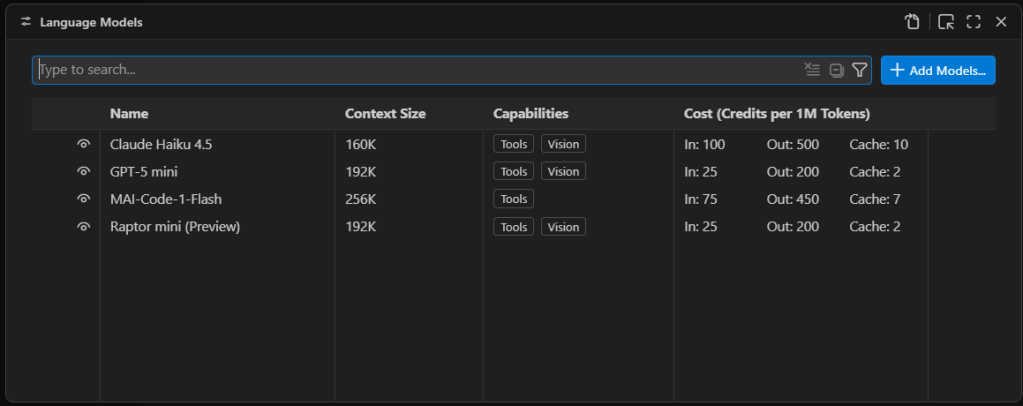
Managing VS Code's AI language model list

Managing VS Code’s AI language model list. The models available by default are only models available as external APIs, not models that run locally.

Foundry

First you will see a list of the built-in models, which are all externally hosted. To add a new model, select Add Models at the top right and select Custom Endpoint.

You’ll then get a series of prompts:

  • Group Name: This is “Custom Endpoint” by default, but you can choose any name you want. The name is strictly for organizing the model list and doesn’t affect things like model recognition or connectivity.
  • API Key: If you’ve configured LM Studio to use an API key for serving models, provide it here. If you’re hosting the model locally and you haven’t explicitly set up API keys, you can leave this blank.
  • API Type: The options here are Chat CompletionsResponses, and Messages. Most of the time you’ll want to use Responses, as it’s the most general-purpose option of the three.

Once you finish providing those answers, you’ll be dropped into a modal editor for a JSON file that holds the details about the endpoint you’re configuring.
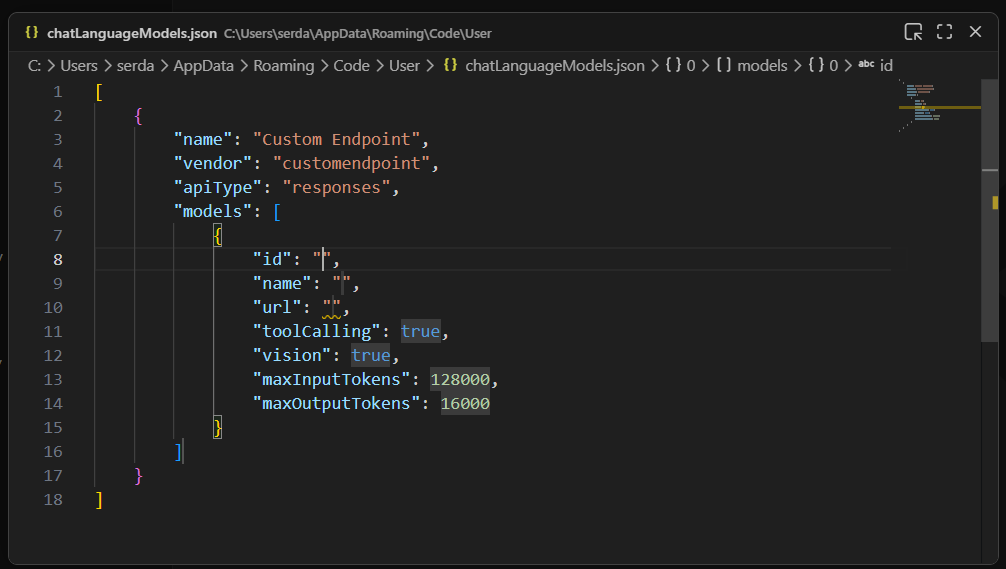
A newly created custom endpoint for a locally hosted model

A newly created custom endpoint for a locally hosted model. The ID, name, and URL still need to be defined for this model to be useful.

Foundry

You’ll need to provide a few more details by typing them into the labeled fields:

  • id: A text field that uniquely identifies this particular entry. The choice of ID is pretty much arbitrary; if you’re using only a single model, the ID could be the model name.
  • name: The name of the model that is used to identify it on the model server. In LM Studio, you can get this name by clicking on My Models in the main interface, then selecting the three-dot icon for the model in question and clicking Copy Default Identifier. For Qwen 2.5, for instance, name might be something like qwen2.5-coder-7b-instruct.
  • url: The URL to the server’s endpoint. On LM Studio, this defaults to something like http://127.0.0.1:1234/v1. The /v1 at the end is important because that endpoint is used for autodiscovery of models and their capabilities.

The other fields generally don’t need editing. Most models have tool calling functionality. If you know for a fact that the model you’re using doesn’t have vision support, then set vision to false.

Once you have these fields filled in, you can close the modal editor to save the changes. If you reload the Manage Language Models page, you’ll now see your new endpoint:
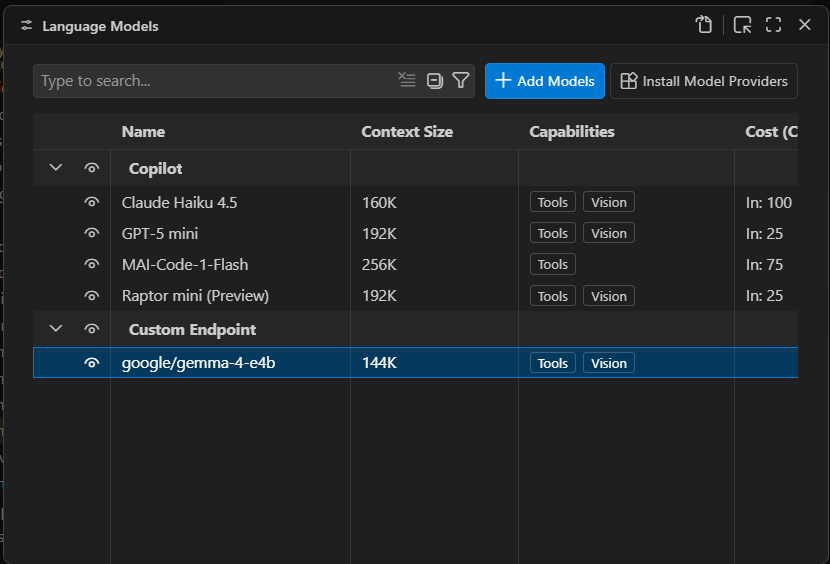
A newly created local endpoint

A newly created local endpoint. The choice of name and group is arbitrary. “Custom Endpoint” is the default name for a newly created group of endpoints.

Foundry

You should now be able to launch the chat window and use the defined model for conversation and utilities:
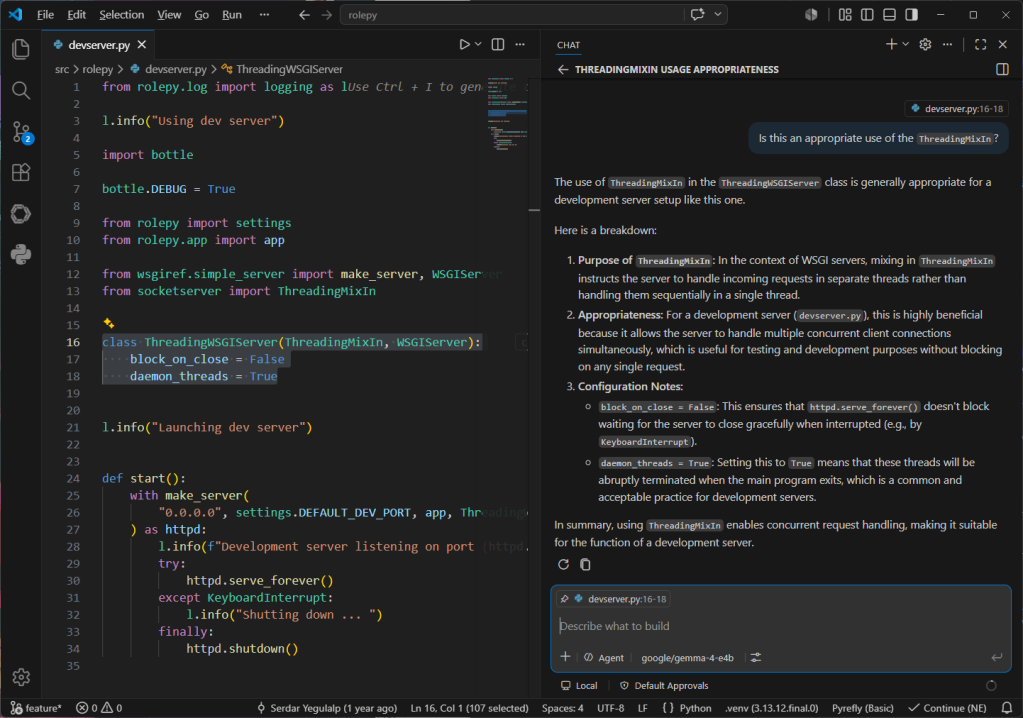
Conversing with the local model using VS Code's chat window

Conversing with the local model using VS Code’s chat window. Note the selected code block in the left pane that is being used as the context for the conversation.

Foundry

One current, and major, limitation of Visual Studio Code’s BYOK functionality is that it only works for chat and utility tasks. It doesn’t allow you to use a local model for inline suggestions or code completions. The only way to take advantage of local models for expanded functionality with VS Code is to use a third-party tool like Continue.

It isn’t clear if Microsoft will eventually lift this restriction. GitHub Copilot integration in VS Code is a large part of how Copilot as a service reaches its target audience. For the time being, you can certainly use third-party and local models for a significant part of your AI-assisted development work in VS Code, and you can close the functionality gap with additional tooling.

Serdar Yegulalp

Serdar Yegulalp is a senior writer at InfoWorld. A veteran technology journalist, Serdar has been writing about computers, operating systems, databases, programming, and other information technology topics for 30 years. Before joining InfoWorld in 2013, Serdar wrote for Windows Magazine, InformationWeek, Byte, and a slew of other publications. At InfoWorld, Serdar has covered software development, devops, containerization, machine learning, and artificial intelligence, winning several B2B journalism awards including a 2024 Neal Award and a 2025 Azbee Award for best instructional content and best how-to article, respectively. He currently focuses on software development tools and technologies and major programming languages including Python, Rust, Go, Zig, and Wasm. Tune into his weekly Dev with Serdar videos for programming tips and techniques and close looks at programming libraries and tools.

More from this author

Show me more