

惯性聚合 高效追踪和阅读你感兴趣的博客、新闻、科技资讯
阅读原文 在惯性聚合中打开

推荐订阅源

aimingoo的专栏
aimingoo的专栏
S
Securelist
博客园 - Franky
Cyber Security Advisories - MS-ISAC
IT之家
IT之家
GbyAI
GbyAI
Microsoft Azure Blog
The Cloudflare Blog
云风的 BLOG
云风的 BLOG
N
News and Events Feed by Topic
AI
AI
cs.AI updates on arXiv.org
Schneier on Security
Attack and Defense Labs
Vercel News
Vercel News
腾讯CDC
Google DeepMind News
K
KPMG report finds enterprise disconnect between AI and its ROI | CIO
M
MIT News - Artificial intelligence
WordPress大学
WordPress大学
freeCodeCamp Programming Tutorials: Python, JavaScript, Git & More
N
Netflix TechBlog - Medium
量子位
S
Schneier on Security
Hacker News: Ask HN
Hacker News: Ask HN
Cyberwarzone
Cyberwarzone
S
Security Affairs
钛媒体:引领未来商业与生活新知
钛媒体:引领未来商业与生活新知
N
News and Events Feed by Topic
T
Tenable Blog
PCI Perspectives
PCI Perspectives
MyScale Blog
MyScale Blog
L
Lohrmann on Cybersecurity
cs.CL updates on arXiv.org
C
Cyber Attacks, Cyber Crime and Cyber Security
W
WeLiveSecurity
N
News | PayPal Newsroom
P
Proofpoint News Feed
O
OpenAI News
C
CERT Recently Published Vulnerability Notes
B
Blog
Cisco Talos Blog
Cisco Talos Blog
Microsoft Security Blog
V
Visual Studio Blog
MongoDB | Blog
MongoDB | Blog
大猫的无限游戏
大猫的无限游戏
A
Arctic Wolf
Y
Y Combinator Blog
OSCHINA 社区最新新闻
OSCHINA 社区最新新闻
Spread Privacy
Spread Privacy

Video Conferencing Blog

Optimizing TrueConf Room for Multi-Monitor Conference Setups — Video Conferencing Blog TrueConf 4.1 for iOS: Messenger Improvements — Video Conferencing Blog Secure Communication Platform for Enterprises: 2026 Guide TrueConf 3.2 for Android TV: Tone Dialling, User-Friendly Conference Management, and Updated UI — Video Conferencing Blog Webinar: New Features of API and Chat Bots — Video Conferencing Blog What will happen to Microsoft Teams on Windows 7, 8, and 10? — Video Conferencing Blog How to use TrueConf chatbots with the Hermes AI agent — Video Conferencing Blog TrueConf Calendar Connector 2.4: Support for Rooms and “Do Not Disturb” Status for Offline Meetings — Video Conferencing Blog How to use TrueСonf bots with the OpenClaw AI agent — Video Conferencing Blog How to create a "Let's Encrypt" certificate on Windows TrueConf AI Server 1.1: Detecting Speakers by Voice, Uploading Recordings, and Transcription Search — Video Conferencing Blog TrueConf Server: Security Updates for June 2026 — Video Conferencing Blog Enterprise Video Conferencing: Top 10 Platforms, Features and Deployment Options TrueConf 4.0 for iOS: Voice Messages and Additional Statuses — Video Conferencing Blog Self-Hosted Video Conferencing in Enterprise Environments Business Document Sharing: Secure Files Collaboration + 5 Best Tools TrueConf Room 5.1: Setting Up an Additional Video Stream and Convenient Content Sharing from a TrueConf Group 2.1 Major Update: AI, New Interface, Tablet Control, and Much More — Video Conferencing 10 Best Free Video Conferencing Tools with No Time Limit TrueConf Earns “Top Performer” Recognition in FeaturedCustomers’ Spring 2026 Report — Video TrueConf 2.0.1 Add-ons for Corporate Calendars — Video Conferencing Blog 10 Best Video Meeting Tools in 2026 TrueConf 3.2 for Android: Voice Messages and PIN to Access the App — Video Conferencing Blog Video Conferencing 2026: A Complete Guide to 9 Leading Platforms TrueConf Calendar Connector 2.3: Changes and Improvements — Video Conferencing Blog TrueConf Server: Security Updates for April 2026 — Video Conferencing Blog TrueConf AI Server 1.0.2: Conference Summary — Video Conferencing Blog TrueConf Server 5.5.4: Changes and Improvements — Video Conferencing Blog TrueConf 8.5.4: Changes and Improvements — Video Conferencing Blog How to install TrueConf client application for Linux TrueConf at GITEX Africa 2026 — Video Conferencing Blog TrueConf Server 5.5.3: User Connection History, List of Videos in the Personal Area — Video TrueConf Calendar Connector: What's New in Versions 2.1 and 2.2 — Video Conferencing Blog TrueConf 3.1.2 for Android TV: Updated UI — Video Conferencing Blog What to do if file transfer is not working? — Video Conferencing Blog TrueConf 8.5.3: Useful Changes and Improvements — Video Conferencing Blog TrueConf MCU 2.2: New Layout Editor, Improved Cascading, and Security Settings — Video Conferencing Blog TrueConf at Convergence India 2026 — Video Conferencing Blog TrueConf 3.1.2 for Android: List of Upcoming Meetings and New Noise Suppression — Video Conferencing TrueConf Server: Security Updates for March 2026 — Video Conferencing Blog Future of secure collaboration at GITEX Africa 2026 — Video Conferencing Blog Important TrueConf Server security updates — Video Conferencing Blog No outages in collaboration: Power Grid Bangladesh adоpts TrueConf — Video Conferencing Blog Filtering LDAP accounts — Video Conferencing Blog
Password Management in TrueConf — Video Conferencing Blog
Theodor Lazarev · 2026-05-07 · via Video Conferencing Blog

When using TrueConf solutions, you will often need to access your personal profile and account as a user, or the server software admin panel as an administrator. This article explains how to set or change passwords, as well as the reasons why the password configuration option may be unavailable.

User Passwords

Changing a TrueConf Server User Password

If you need to change your password, follow these steps:

No further confirmation will be required. Your password has been changed!

Why Password Change May Be Unavailable

The password change function may not always be available—for example, if your administrator has configured integration with Active Directory (or another directory service). If you have forgotten your old password or wish to change it, you will need to contact your system administrator. Their contact details can usually be found on your video conferencing server’s guest page.

Personal Data Security – Can the Administrator See Your Password?

An important question regarding user data security is whether passwords could be leaked.

Regardless of the credential storage mode (Registry or LDAP), passwords on the TrueConf Server side always remain inaccessible to the server administrator. Therefore, if you forget your password, it cannot be retrieved—only reset, allowing you to set a new one. Additionally, when using local passwords, an administrator may set a temporary password for your initial account login, which you will be required to change upon first authentication. When accounts are synchronized from LDAP/AD, passwords are managed entirely by the directory service.

TrueConf Server Administrator Passwords

In addition to user passwords, there are also passwords for administrators to access the server panel.

The administrator password is the same as that used for user accounts belonging to the designated administrator group. For more details, please refer to our documentation.

On Linux operating systems, you can change your password using the passwd command. Let’s consider two possible scenarios:

  • If you are logged into the OS under the account for which you want to change the password, simply run:
  • passwd

  • If you are logged into the OS under one account but want to change the password for another:
  • sudo passwd [user]

After entering the command, you will be prompted to enter your current password and then set a new one.

Note: When changing passwords on CentOS, there are specific considerations related to extended file access control lists (ACLs). After changing a user account password in the OS, the following command must be executed (as an administrator):

sudo setfacl -m u:trueconf:r /etc/shadow

Administrator and Operator Passwords in TrueConf MCU

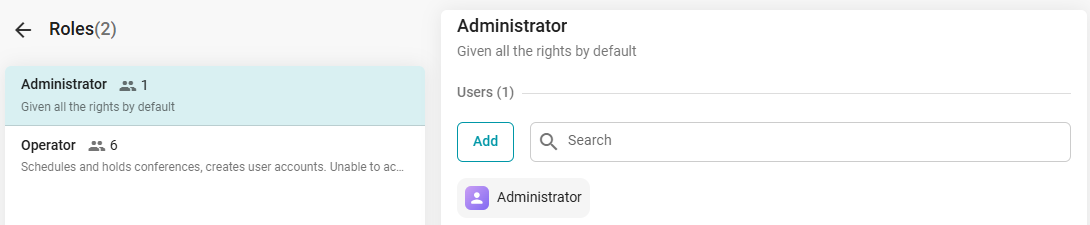
TrueConf MCU has two roles for accessing its management panel: Administrator and Operator. To learn about the permissions associated with these roles, please refer to our documentation.

By default, immediately after deploying TrueConf MCU, the administrator credentials are as follows:

  • Username: admin
  • Password: admin

You can change your own login credentials, as well as those for users with the Operator role, after completing the registration procedure. This can be done in the Contact Card menu under the Account section:
Password Management in TrueConf 5