
惯性聚合 高效追踪和阅读你感兴趣的博客、新闻、科技资讯
阅读原文 在惯性聚合中打开

推荐订阅源

H
Heimdal Security Blog
P
Privacy International News Feed
S
Schneier on Security
P
Proofpoint News Feed
L
Lohrmann on Cybersecurity
Spread Privacy
Spread Privacy
P
Privacy & Cybersecurity Law Blog
D
Darknet – Hacking Tools, Hacker News & Cyber Security
Scott Helme
Scott Helme
K
Kaspersky official blog
大猫的无限游戏
大猫的无限游戏
freeCodeCamp Programming Tutorials: Python, JavaScript, Git & More
aimingoo的专栏
aimingoo的专栏
Simon Willison's Weblog
S
Securelist
Help Net Security
Help Net Security
B
Blog
H
Hackread – Cybersecurity News, Data Breaches, AI and More
Security Archives - TechRepublic
云风的 BLOG
云风的 BLOG
The GitHub Blog
The GitHub Blog
N
News and Events Feed by Topic
Hacker News: Ask HN
Hacker News: Ask HN
cs.CV updates on arXiv.org
CTFtime.org: upcoming CTF events
M
MIT News - Artificial intelligence
雷峰网
雷峰网
博客园 - 司徒正美
V
V2EX
AWS News Blog
AWS News Blog
Know Your Adversary
Know Your Adversary
N
News | PayPal Newsroom
T
Tor Project blog
Cisco Talos Blog
Cisco Talos Blog
OSCHINA 社区最新新闻
OSCHINA 社区最新新闻
PCI Perspectives
PCI Perspectives
Google DeepMind News
Threat Intelligence Blog | Flashpoint
U
Unit 42
C
Cybersecurity and Infrastructure Security Agency CISA
P
Palo Alto Networks Blog
G
Google Developers Blog
T
Threat Research - Cisco Blogs
博客园 - Franky
I
InfoQ
D
DataBreaches.Net
爱范儿
爱范儿
Y
Y Combinator Blog
博客园 - 叶小钗
奇客Solidot–传递最新科技情报
奇客Solidot–传递最新科技情报

Computerworld

Microsoft 365: A guide to the updates Windows 11 Insider Previews: What’s in the latest build? Windows 11: A guide to the updates Apple can't make chips fast enough, but that's only part of the story AI-led job cuts don’t always mean stronger ROI — Gartner Microsoft, Google push AI agent governance into enterprise IT mainstream Microsoft now has more than 20M paying Copilot users AI is more accurate than doctors in emergency diagnoses — study Start small, but start now: How to bring AI into your small business Apple is preparing to spend, but not necessarily on AI 10 quick productivity tips for Microsoft 365 mobile apps Relying on LLMs is nearly impossible when AI vendors keep changing things Apple breaks records, admits it can’t make Macs fast enough Spotlight report: Transforming software development with AI - Whitepaper Repository - 25 great uses for an old Android device AI chatbots need ‘deception mode’ Friendlier chatbots can be less reliable, study says Gartner sees untamed growth in agentic AI Apple reportedly abandons Vision Pro AI venture funding to shoot up this year as bubble looms Scaling up a tech startup in Europe is hard — 'EU Inc.' aims to help Apple will be behind on AI — until it isn’t EU lawmakers fail to agree on watered-down AI Act, talks pushed to May Android reminders, reinvented Who’s the better CEO, Apple’s Tim Cook or Microsoft’s Satya Nadella? AWS unveils trio of key AI strategy announcements SAS makes AI governance the centerpiece of its agent strategy Can Apple’s new CEO turn things around? Enterprises need to think beyond GPUs for agentic AI, analysts say Fleet hopes to be the MDM provider for the AI Era Why simplicity is the silent driver of hybrid workplace success Why security matters in the meeting room Can everyday IT decisions turn sustainability from intent into impact? Why the meeting room has become the true test of hybrid work Why smart meeting rooms are becoming strategic IT assets How collaboration technology defines the next phase of hybrid work Microsoft, OpenAI change contract terms–again OpenAI plans its own ‘iPhone killer’ Your AI strategy is all wrong Agent Mode is now available in Microsoft Word, Excel, and PowerPoint Adobe bets on AI agents to stay at the center of marketing workflows Microsoft to offer voluntary retirement buyouts to about 7% of the US workforce Google Keep cheat sheet: How to get started The AI workplace paradox: Higher productivity, higher anxiety Gartner: Global IT spending to grow by 13.5% this year Apple may be the only laptop vendor to grow in 2026 Tim Cook’s legacy: a successful CEO who stumbled over AI Google Chat becomes an agent interface for Workspace Gemini Enterprise update brings AI agents into collaborative workflows Meta to track employee keystrokes, screen activity to train AI agents The smartest ways to sync your Android and computer clipboards Microsoft trims cloud desktop pricing, even as it boosts AI costs Adobe builds an ‘agentic content supply chain’ for the AI era You can now test and compare AI models on LinkedIn With John Ternus as CEO, expect Apple’s platforms to proliferate Apple CEO Tim Cook stepping down, to be replaced by John Ternus Global RAM shortage appears set to continue through 2027 Is this where Apple Silicon will be in 5 years? AI-ready skills are not what you think World ID expands its ‘proof of human’ vision for the AI era Microsoft's Patch Tuesday updates: Keeping up with the latest fixes Microsoft’s Patch Tuesday release for April is a whopper Robot Zuckerberg shows how IT can free up CEOs’ time UK wants to build sovereign AI — with just 0.08% of OpenAI’s market cap 20 tricks for more efficient Android messaging AI is finally delivering productivity — for remote employees Google should share search data to break its monopoly, European Commission suggests How to think about Apple Business Microsoft Teams cheat sheet: How to get started Reporter’s notebook: In Nepal and Sri Lanka, AI boom brings hope How to create your own custom Android air gesture Can Microsoft really meet its carbon-negative goal by 2030? About the Best Places to Work in IT Microsoft to cut Windows 365 price for SMBs Blancco confirms Mac adoption is accelerating Apple devices’ satellite link is under new ownership IBM’s government DEI settlement could increase pressure to avoid tech hiring diversity Microsoft is developing Copilot features inspired by Openclaw Global RAM shortage prompts Microsoft to hike Surface prices Apple Business rolls out to 200+ countries today Windows 10: A guide to the updates Nvidia’s Stephen Jones on the toolkit powering GPUs: ‘A wild ride’ The French government eyes alternatives to Windows Apple preps for the face race How to build your own AI agents with Google Workspace Studio Adobe Summit 2026: How Adobe hopes to redesign marketing and creativity with AI DARPA wants to help AI agents to talk to one another Apple unveiled a new high-end market opportunity this week Microsoft adds hidden feature flags to Windows Insider builds Meta moves fast toward a world where AI builds the software PC sales rise in Q1 despite memory shortage — IDC Agentic AI – Ongoing coverage of its impact on the enterprise Google’s new AI app is a glimpse of the future This problem might not need a solution: customer-service bots that code for free Chrome, Vivaldi, and the challenge of changing browsers The new M5-based MacBook Air is built to last — and perform Apple worst, Asus best for laptop repairability US court refuses to stay Pentagon’s ‘supply-chain risk’ blacklisting of Anthropic The top priority for Adobe’s next CEO? Prepping for the ‘age of agents’ It's iPhone speculation time: flips, flaps — and Fold
Give yourself an on-demand Android taskbar
2026-05-06 · via Computerworld

Holy moly, I am flying around my phone this week.

It’s a wild feeling — especially since Google’s grand I/O gala, which is traditionally the time when shapeshifting new Android additions are supposed to command our attention, isn’t for another couple weeks yet.

These days, though, we’ve reached a point where many of the most interesting and non-AI-gobblydegook Android innovations aren’t even coming from Google itself but rather from third-party apps, add-ons, and crafty configuring (a fancy way of saying “good old-fashioned geeky tinkering”).

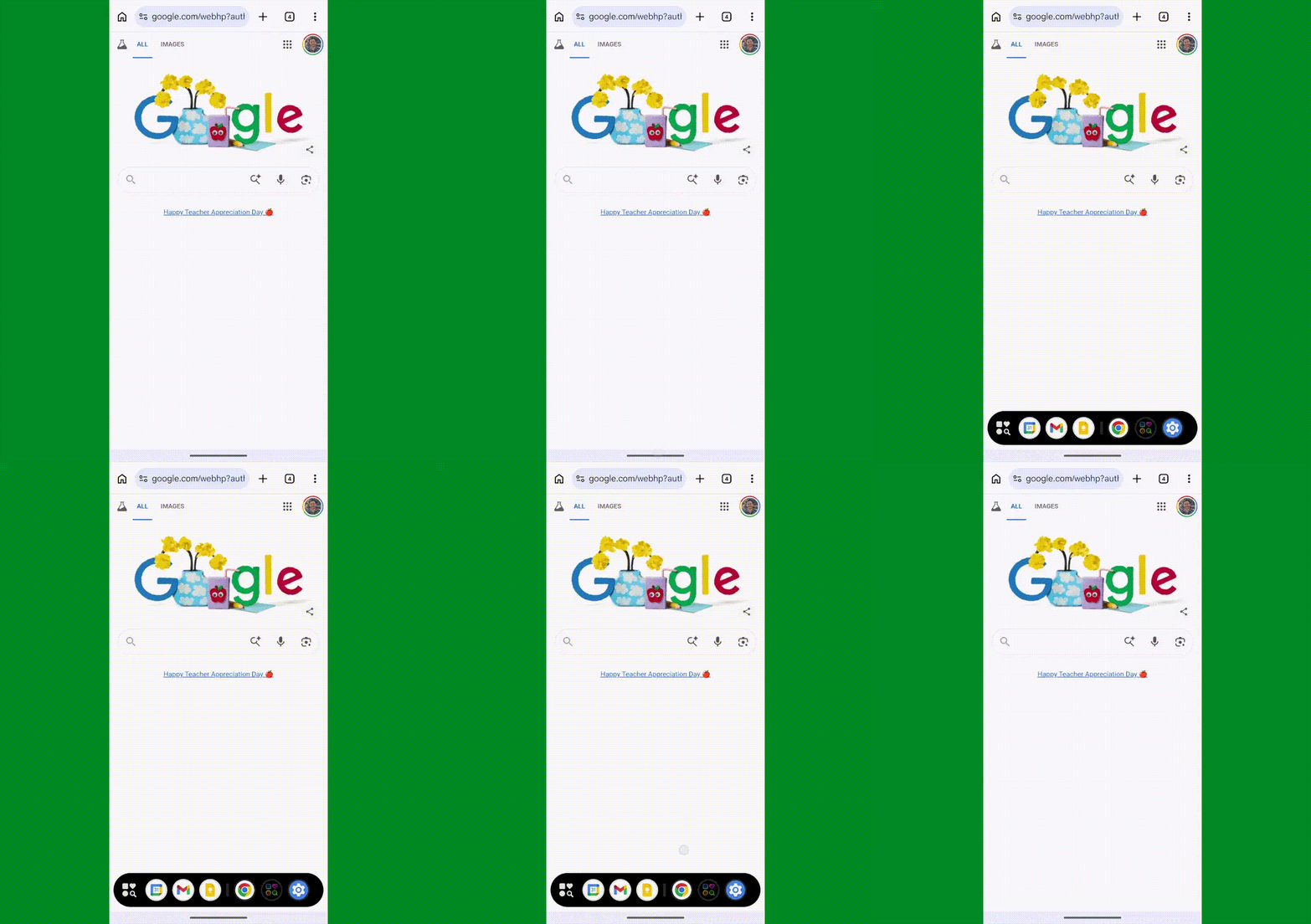
And that’s absolutely the case with this latest superpower I’ve just been granted. It’s an on-demand desktop-style taskbar that makes it delightfully swift ‘n’ simple to switch over to any other app on your favorite Android gadget without first having to head back to your home screen and then poke around to find it.

Instead, you just summon that taskbar — or even set it to be always visible, if you’d rather — and, exactly like on a desktop computer, you either tap a commonly accessed app that you’ve pinned to a specific position or you tap the app drawer icon within your newfound taskbar to find any app from a list, all without ever interrupting whatever else you were doing.
Android taskbar: Dsk Mode
Tap, tap, and bam: Your Android taskbar is there and ready to serve you.

JR Raphael, Foundry

It’s a serious time-saver and workflow-enhancer. And you can grant the same superpower to yourself this instant — no matter what Android device you’ve got in your greasy gibbon paws.

Best of all? It’ll take you all of two minutes to do.

Lemme show ya how.

[Keep the knowledge coming with my free Android Intelligence newsletter — three new things to try every Friday and my Android Notification Power-Pack as a special welcome bonus!]  

Your Android taskbar advantage

First, for a quick pinch of context: The feat at the center of this surprise is actually something that Google itself offers in certain extremely limited environments on Android — on foldable phones and tablets only, as of now — and that the company’s been rumored to be working on in a more universal manner for a while, though we’ve yet to see any concrete sign of such plans progressing in recent months and as far as the upcoming Android 17 update is concerned.

It’s also something I’ve been longing to see on the Android phone front for ages — and, to that end, something I’ve come up with wacky workarounds to accomplish a few different times now, both via official buried Android developer settings (which can work admirably well but that bring about some unavoidable awkward side effects) and via a wonderful third-party app called Panels (which is one of my favorite power-user tools but can be a bit unwieldy and overwhelming for mass consumption).

This new setup is by far the simplest, in terms of its initial setup and as far as how it works in day-to-day practice — particularly because of the instantly familiar nature of the interface it gives you, provided you’re spent at least seven seconds of your life looking at virtually any desktop computer operating system.

But enough blathering: The secret at the center of this is a clever little creation called Dsk Mode (which I’m assuming is short for Desk Mode and not Disk Mode, Dusk Mode, or Dad Socks and Knickerbockers Mode).

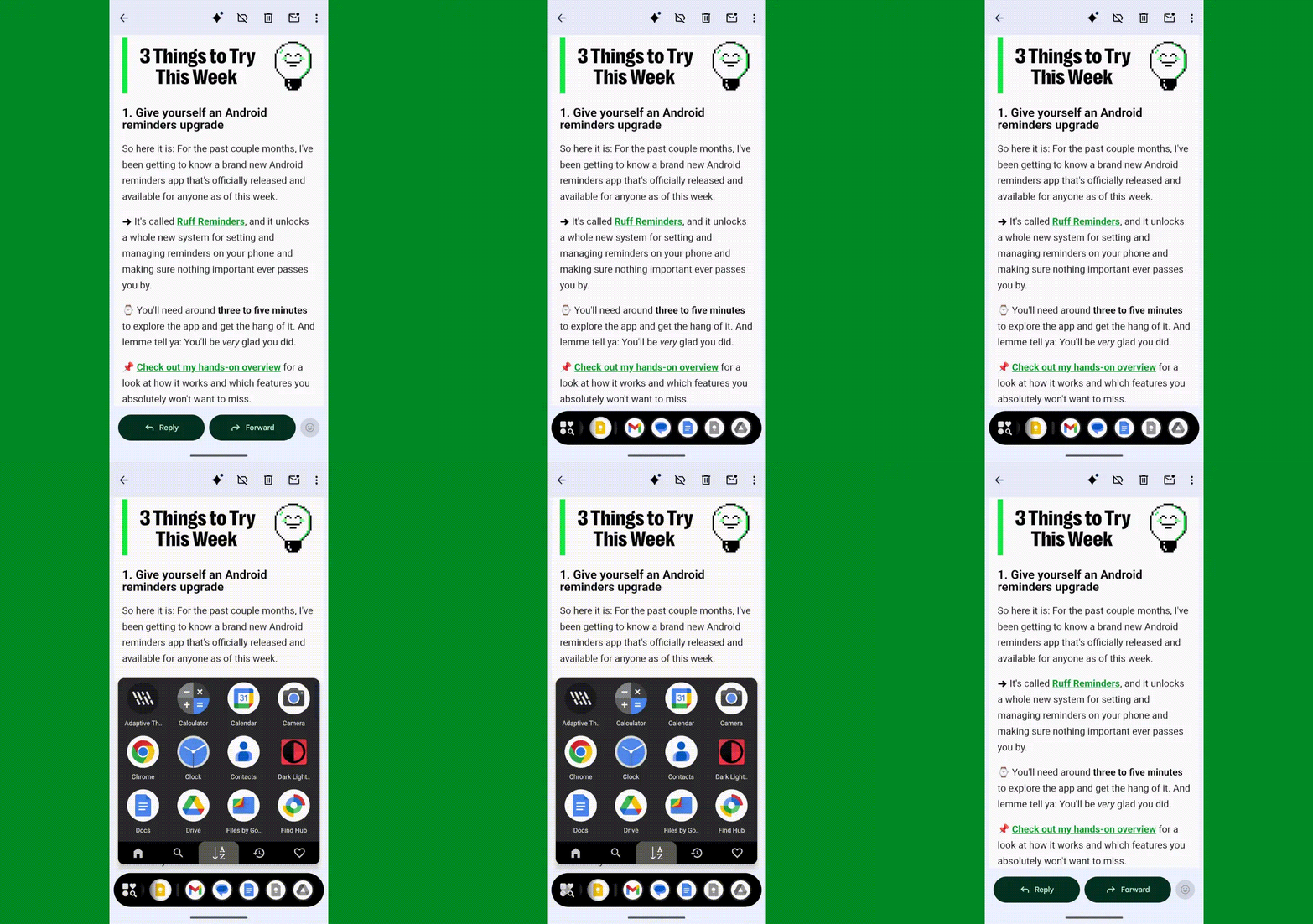
Vowel-challenged moniker aside, Dsk Mode does one thing and does it brilliantly well: It gives you that tantalizing taskbar we’ve been talking about — whenever you double-tap the bottom of your phone’s screen to summon it, in the setup I find most advantageous, or you opt to keep it perpetually present as an always-visible entity, if that sounds more enticing to ye.
Android taskbar: Dsk Mode app drawer
Dsk Mode’s taskbar includes full app drawer access for swift switching to anything you’ve got installed.

JR Raphael, Foundry

Either way you go, getting this going really is almost shockingly simple:

  • First, install the app from the Play Store (obviously, right?).
  • Open ‘er up and follow the steps the app shows you — which mostly just involves tapping through to allow the thing to act as an Android accessibility service.
    • That’s a level of access Dsk Mode legitimately needs in order to be summoned as an element on top of other active apps and processes.
    • The app is clear about the fact that it doesn’t store, save, or share any manner of personal data. And it doesn’t request any other permissions, either.
  • And — well, that’s about it!

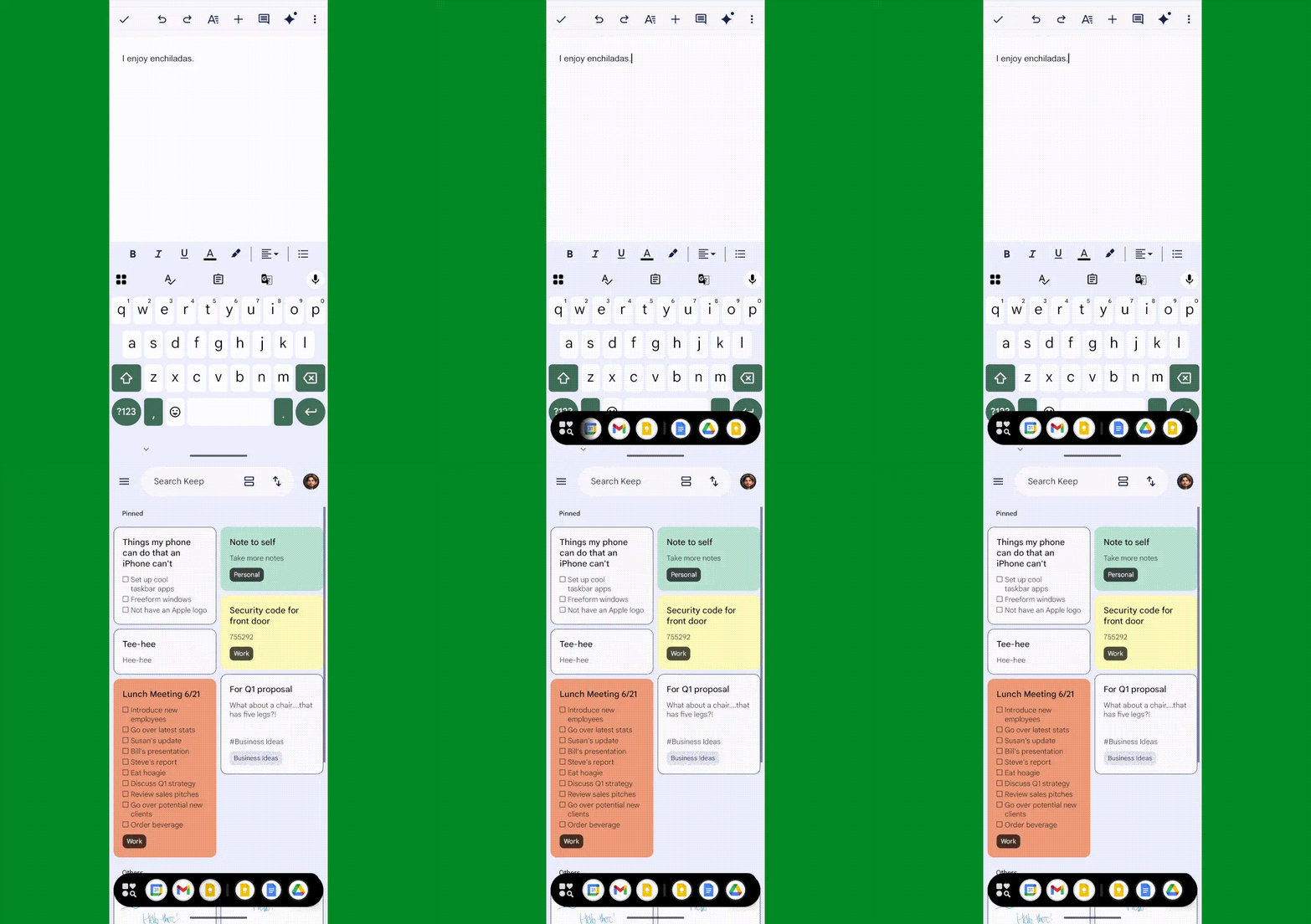
At that point, you can officially start double-tapping the bottom-center of your screen to summon your snazzy new taskbar — no matter where else you are within Android or what else you happen to be doing.
Android taskbar: Dsk Mode switch apps
You can find and switch to anything quickly and intuitively with your new taskbar companion.

JR Raphael, Foundry

But you can — and certainly should — take a moment to review Dsk Mode’s various options while you’re there in its configuration tool.

Of particular note:

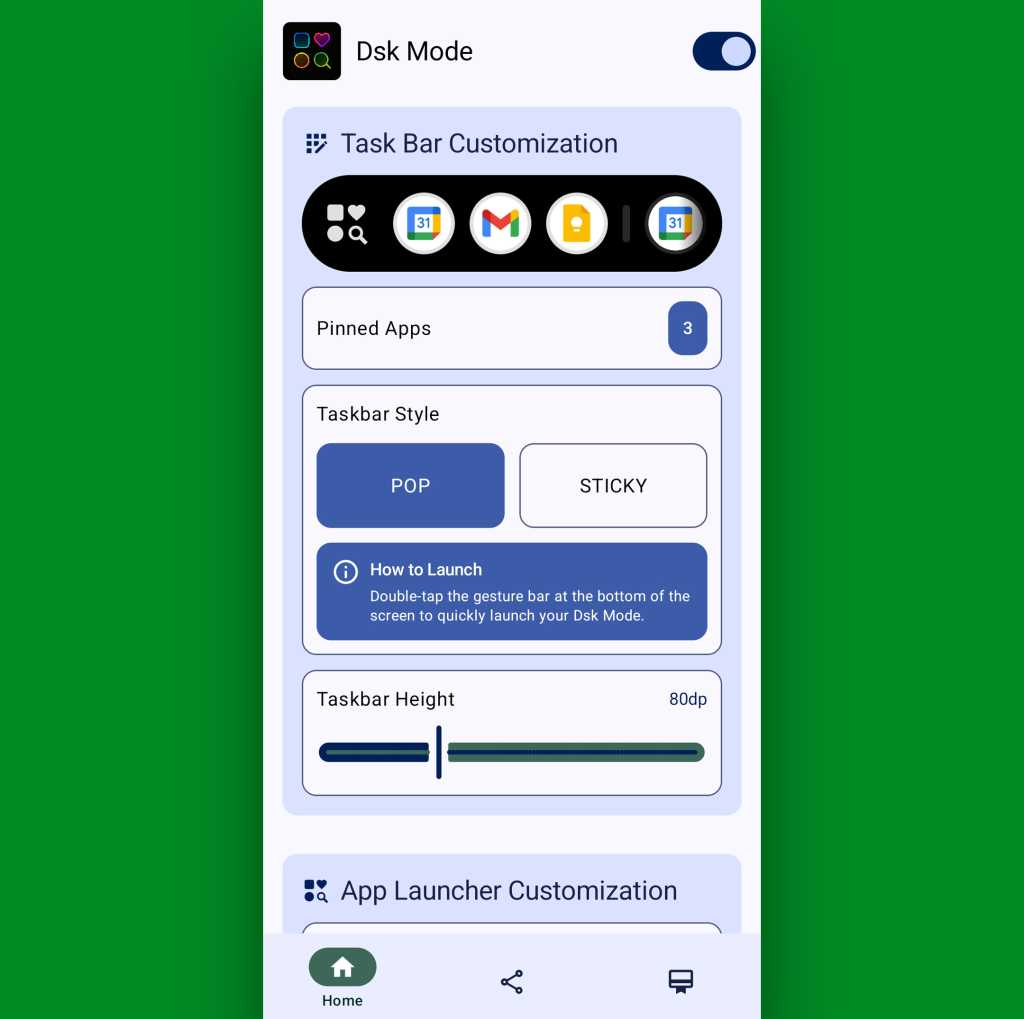
  • You can tap the “Pinned Apps” line to, y’know, pin apps to the taskbar and make ’em always visible and easy to access (in addition to just seeing recently used apps, as the taskbar displays by default).
  • You can change the “Taskbar Style” setting from “Pop” to “Sticky” if you want your taskbar to be permanently visible instead of being summoned by that bottom-screen tapping action.
  • And you can play around with the “Taskbar Height” setting to adjust exactly how large or small the taskbar is — something that’s well worth messing around with to get it how you like (and avoid having it be weirdly small and impossible to see without excessive squinting, as I had to do upon my own initial setup).
Android taskbar: Dsk Mode settings
Dsk Mode has some helpful options for making your taskbar look and work exactly the way you want.

JR Raphael, Foundry

Beyond that, if you scroll down a little within the Dsk Mode configuration interface, you’ll see settings for adjusting exactly how the taskbar’s app drawer looks and works as well as for tweaking your taskbar’s visual appearance and a couple other pertinent possibilities.

There really isn’t much more to it, and you’ll probably never need to come back into the app’s settings again (though if you ever decide you aren’t into the taskbar anymore for whatever reason, you can always go back in to flip the toggle at the top into the off position — or you can just uninstall it entirely).

The one other thing worth noting is the final tab at the bottom of Dsk Mode’s configuration interface, which contains a saucy little “Support” button. If you tap that, then tap the toggle at the top of the screen that comes up next to the words “This App,” you’ll find options for upgrading to the app’s premium version — at a cost of five bucks a year or, most sensibly, $10 for a lifetime, cross-device license.

The premium subscription unlocks a handful of otherwise limited options — like being able to set more than three pinned favorites for your taskbar and being able to use the taskbar’s app drawer search function. It also eliminates the mildly annoying full-screen ads that pop up occasionally throughout the configuration interface (though you won’t see those all that often, longer term, once you’ve finished configuring the app initially).

It supports the app’s independent developer, too, of course, which is always something worth considering in an era when everyone expects everything to be free and yet the people making stuff for us still need to make a living.

Whatever you decide, you can pat yourself on the back and embrace the newfound feeling of flying around your phone and enjoying desktop-style multitasking on mobile — in a way that only Android would ever allow.

SUBSCRIBE TO OUR NEWSLETTER

From our editors straight to your inbox

Get started by entering your email address below.