


No Android 17? No problem. You can still enjoy some of the software's most noteworthy additions — no matter who made your device or what Android version it's running.
Google’s latest and greatest Android version is officially now out in the world and available — but if you’re using any phone other than a Pixel, that doesn’t mean much for you just yet.
The reason why is simple: Despite Google officially launching Android 17 and starting to send it out to Android phone-owners this week, it’s up to each individual device-maker to process the software and deliver it to its customers. And outside of Google itself, unfortunately, most Android device-makers are exasperatingly unreliable about making that happen — some of ’em to almost comically bad extremes (insert exaggerated sigh here).
Hold the phone, though — ’cause there is some good news here: While we can’t force any Android phone-maker to start treating software support as a priority, we can get creative and find ways to bring interesting new Android features to devices running older Android versions. In fact, all four of the Android 17 features I called out earlier this week can be emulated on any Android phone this instant. All it takes is a teensy pinch of inspiration and a dash of tenacity — and, of course, the right roadmap to make it all come together.
The tenacity’s on you, but if you’re game, I’ve got your roadmap ready. Here’s exactly how to enjoy a similar sort of Android-17-style sorcery on whatever phone you’re using right now — as far as some of the more surface-level highlights, at least — without having the actual Android 17 upgrade in front of you.
[Get fresh Android tips in your inbox with my free Android Intelligence newsletter — one new and useful thing to try every Friday!]
Android 17 feature #1: Bubbles multitasking magic
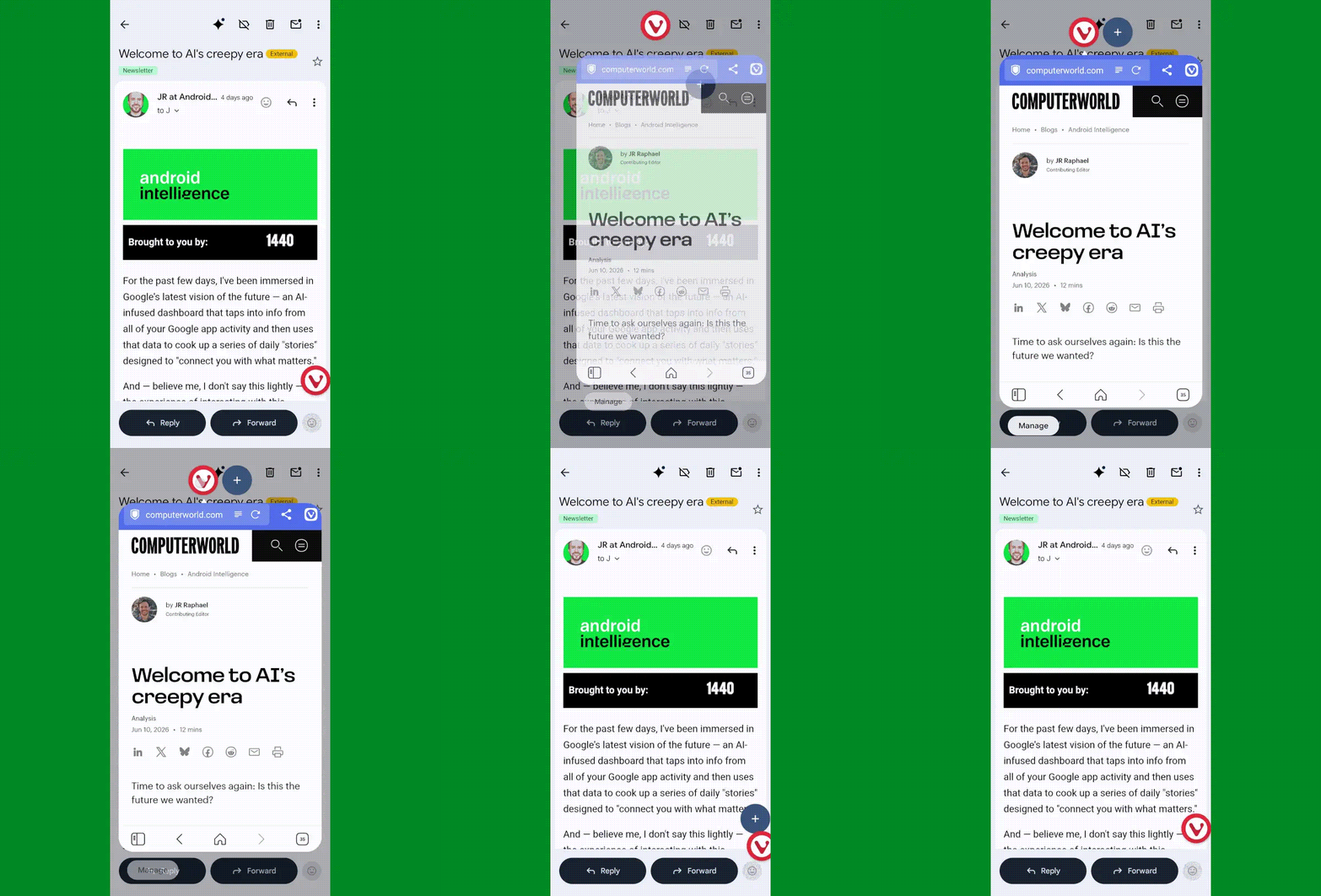
The most shape-shifting Android 17 of all, without a doubt, is Bubbles — a snazzy new way to turn any app into a floating, collapsible window that’s readily available for on-demand access but also out of your hair when you aren’t actively using it.
JR Raphael, Foundry
I wrote about Bubbles and ways to achieve similar feats just a few months back. It’s surprisingly easy to accomplish, even without Android 17 in the picture.
Look over this list of crafty Bubbles-bringing workarounds and see which makes the most sense for you. One way or another, you’ll find yourself facing a fantastic new option for multitasking anytime you want it — no waiting or out-of-reach upgrades required.
Android 17 feature #2: Smarter location access
Our next Android 17 addition is a little trickier to emulate without the actual operating system update in the equation. But fear not, for this is Android — and when there’s a will, there’s a way.
The feature of which we speak is an expansion of Android’s framework for how apps can access your location. It’s a two-parter: First, whenever any app is accessing your location, you’ll now see a blue dot appear in the upper-right corner of your screen — and if you swipe down once from the top of your screen to open your notification panel, you can actually tap on the location icon that appears in its place to get detailed info about exactly which app or apps are involved. Second, when an app asks to access your precise location, Android 17 adds in the option to allow such access only temporarily — for that one brief moment and purpose — without giving the app permanent permission for ongoing use.
The second part, unfortunately, is challenging to achieve without Android 17 being present. But the first part is something we can make happen with a sliver of creative zest.
The trick revolves around a classic third-party app called Privacy Dashboard. Privacy Dashboard came about back in the Android 12 era, when Google first introduced a full-fledged privacy dashboard into Android and certain devices were lagging behind and taking too long to adopt it.
With Android 12 now being five years old, the app hasn’t had much need in recent years — until now. Interestingly enough, the ability to see full details about ongoing location access and then tap to adjust the associated app’s settings is something Privacy Dashboard has long offered. And it’s consequently a great way to bring that newfound native ability from Android 17 onto a device running an older Android version.
The catch is that because of the limited need for the app all this time, it’s no longer being actively developed — and as a result, if you hadn’t previously downloaded it, the Play Store will probably give you an error saying it’s made for an older Android version and can’t be installed on your device.
It will still work, though, and it’s perfectly functional and effective.
Provided you’re comfortable and that this won’t violate any of your company-associated policies, you can download the original verified Privacy Dashboard app package from my own personal Drive storage. I saved it using the Google Files file manager and then uploaded it directly to Drive. It’s quite literally the same exact app you’d get from the Play Store, if the Play Store would let you download it — and while I wouldn’t often advise installing apps from unknown sources, I don’t exactly consider myself to be “unknown” (most of the time). So as long as you share that same trust, you can grab the app from me and put it on any device you want.
Once you get the app installed and give it the permissions it needs to operate, open ‘er up and tap the “App Settings” options on its main screen. Tap the line that says “Indicator Customization,” beneath “Privacy Indicators,” then flip the toggle next to “Click action” into the on and active position.
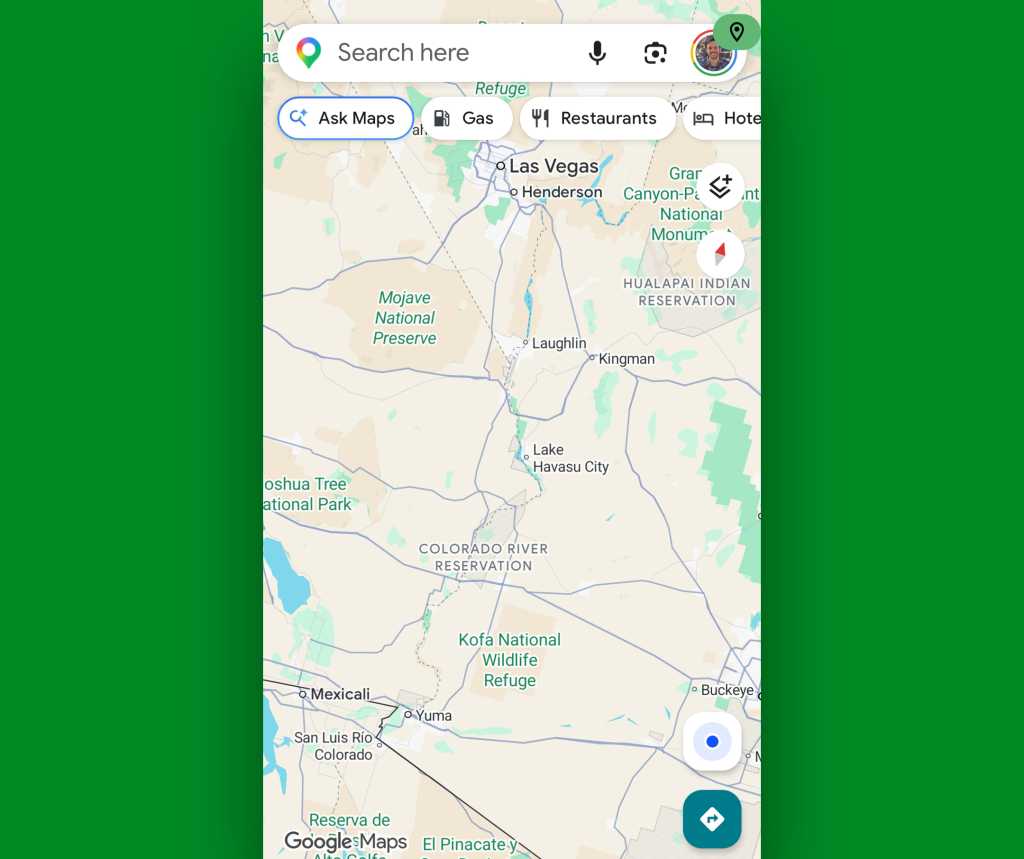
Aaaaand, that’s it: Anytime an app is accessing your location, you’ll see a green location icon appear in the upper-right corner of your screen. And tapping it will take you to the system-level timeline of exactly which apps have accessed your location recently, for added context.
JR Raphael, Foundry
Before you install Privacy Dashboard, you might also want to try just opening an app that you know accesses your location — like Google Maps — and seeing what, if any, indicator appears in the corner of your screen and if you can tap it. While that ability is technically associated with Android 17, it was actually included in an earlier Android quarterly update, and it’s possible your device may already have that piece of the puzzle in place even if it isn’t yet running Android 17.
Android 17 feature #3: More dynamic dark mode
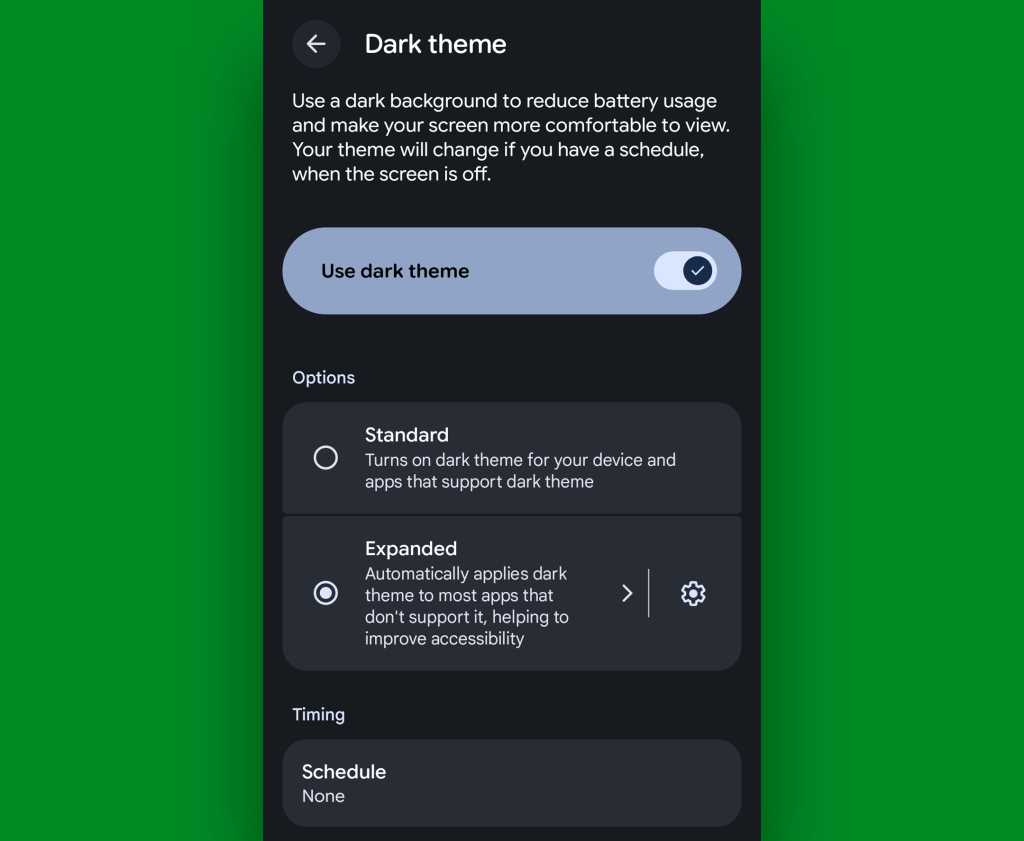
Android’s dark mode is better than ever as of Android 17, with a nifty new way to force each and every app to respect your device-wide dark mode setting and adjust its interface to a less glary look — even if it doesn’t technically support the option.
JR Raphael, Foundry
Well, get this: If your phone’s Android software is reasonably recent, it’s entirely possible you can unlock the very same function by adjusting a few out-of-sight system settings.
Try this:
- First, you’ll need enable Android’s developer options, if you haven’t done that previously.
- That’s a special, typically hidden section of Android’s system settings with all sorts of advanced options that aren’t typically intended for average phone-usin’ folk to futz around with.
- There’s no risk to you or your phone with enabling ’em, and as long as you follow the instructions here exactly and enable only the one single setting we’re about to go over, it’s actually quite easy. (It’s also quite easy to undo, if you ever decide you aren’t into it and want to go back.) But we are pokin’ around in an area of Android that’s meant mostly for developers, and if you veer off-course and mess with the wrong setting, you could make a mess — so follow the steps closely, capisce?
- The process for enabling Android’s developer options may sound strange, but I swear it works: Head into the “About phone” section of your system settings, tap “Software information,” if needed, then find the line that says “Build number.” Tap your finger on it seven times, then enter your PIN or password, if prompted, and confirm that you want to activate the developer options.
- Now, go back to your main settings screen and either tap on the “Developer options” that appears within that list or tap “System” and then tap “Developer options” from there.
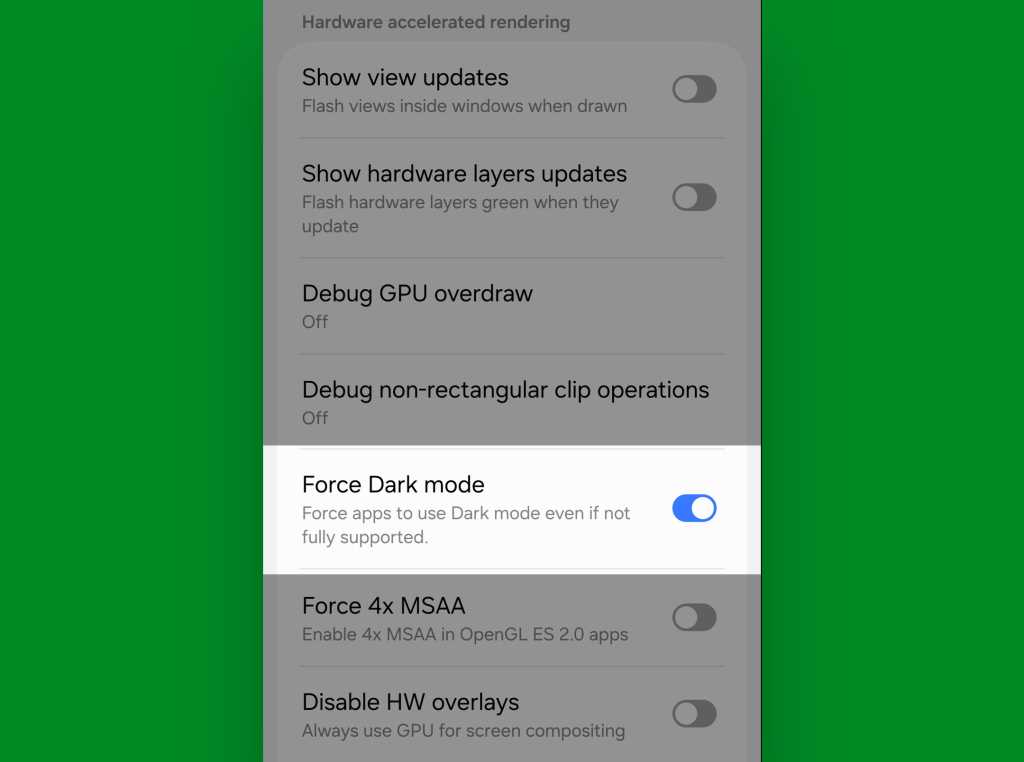
- Scroll down through that section until you see an option called “Force Dark mode.” Flip the toggle next to it.
JR Raphael, Foundry
And there ya have it: You should now be able to open any app, even if it doesn’t officially support dark mode, and see it shift into a darkened state whenever you have dark mode enabled at the system level.
Easy peasy, no?
Android 17 feature #4: A more comfy all-around view
Our final Android 17 feature is a saucy little somethin’ called Comfort View. It applies a softer, pastel-oriented filter to your display with automatic adjustments based on your current viewing environment in order to make your screen easier on the eyes.
If you’re using a Samsung device, you may already have something similar in place even with an older Android version. Look in the Display section of your system settings and see if you see something called “Adaptive color tone,” then try activating it if it’s there — and/or look for “Screen mode” and play around with some of the settings in that area to see vaguely similar sorts of adjustments. It isn’t quite as intelligent or automatic as the new incoming Android-level equivalent, but it’s a start!
In any other scenario — or if you just want more nuance and control, even with a Samsung gizmo — grab an app called Twilight. It’ll let you tweak all sorts of specifics about the appearance of your screen, and while it’s presented mostly for nighttime optimization, you can use those same controls to create your own custom modes for any scenario imaginable.
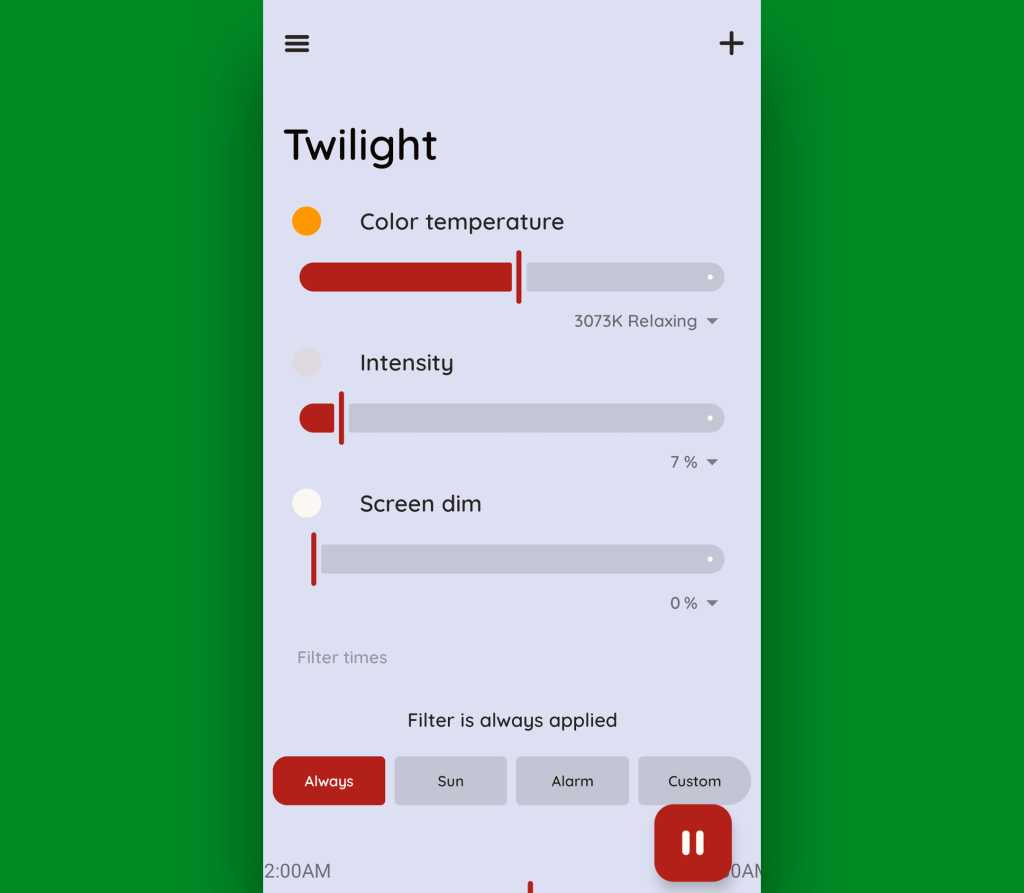
JR Raphael, Foundry
The app doesn’t collect or share any manner of data, and while it does offer a $10 Pro upgrade, the free version is perfectly functional for most purposes.
And with that, give yourself a pat on the back: Your phone is officially now set up to showcase some of Android 17’s finest flavors — even without the software itself being available to you yet.
That, my friend, is quite an accomplishment. Well done.
SUBSCRIBE TO OUR NEWSLETTER
From our editors straight to your inbox
Get started by entering your email address below.