


惯性聚合 高效追踪和阅读你感兴趣的博客、新闻、科技资讯
阅读原文 在惯性聚合中打开

推荐订阅源

Engineering at Meta
Engineering at Meta
The GitHub Blog
The GitHub Blog
博客园_首页
T
The Blog of Author Tim Ferriss
H
Hackread – Cybersecurity News, Data Breaches, AI and More
OSCHINA 社区最新新闻
OSCHINA 社区最新新闻
腾讯CDC
I
InfoQ
量子位
J
Java Code Geeks
P
Proofpoint News Feed
有赞技术团队
有赞技术团队
Webroot Blog
Webroot Blog
Martin Fowler
Martin Fowler
D
Docker
F
Fortinet All Blogs
云风的 BLOG
云风的 BLOG
V
Vulnerabilities – Threatpost
罗磊的独立博客
P
Proofpoint News Feed
T
The Exploit Database - CXSecurity.com
Cyberwarzone
Cyberwarzone
P
Privacy & Cybersecurity Law Blog
Last Week in AI
Last Week in AI
爱范儿
爱范儿
The Hacker News
The Hacker News
S
SegmentFault 最新的问题
钛媒体:引领未来商业与生活新知
钛媒体:引领未来商业与生活新知
博客园 - 三生石上(FineUI控件)
V
V2EX
Simon Willison's Weblog
AI
AI
Y
Y Combinator Blog
Security Archives - TechRepublic
让小产品的独立变现更简单 - ezindie.com
GbyAI
GbyAI
V
Visual Studio Blog
H
Heimdal Security Blog
S
Secure Thoughts
B
Blog RSS Feed
雷峰网
雷峰网
T
Tenable Blog
C
Check Point Blog
G
Google Developers Blog
大猫的无限游戏
大猫的无限游戏
D
Darknet – Hacking Tools, Hacker News & Cyber Security
Exploit-DB.com RSS Feed
Cyber Security Advisories - MS-ISAC
A
About on SuperTechFans
Recent Commits to openclaw:main

Comments for The Eclectic Light Company

Should you try Golden Gate beta? Solutions to Saturday Mac riddles 367 In the shadow: Diego Velázquez Comment on Last Week on My Mac: Freshen up your documents by David Comment on Happy 250th birthday America 2 by mac Happy 250th birthday America 1 Brushstrokes: Portraits 1760-1877 Spotlight and Core Spotlight are different Comment on Sort order, collation and the Finder by eyelessjerry Comment on Apple has just released macOS 26.5.2 Tahoe by Derek Currie Great Ladies of Impressionism: Marie Bracquemond Comment on Get more from your Mac’s log by extending its duration by John Gilbert Comment on Keep your Mac cool using physics by F Portraits of trees: Coppices and pollards Comment on Firmware has become complicated again by John Woods Comment on Logistician 1.2 fixes a couple of bugs by info395288a4d1d Comment on What does Activity Monitor measure? by hoakley Last Week on My Mac: Spotlight on semantics An American in Paris: paintings of Henry Ossawa Tanner 1902-1930 An American in Paris: paintings of Henry Ossawa Tanner 1880-1902 Great Ladies of Impressionism: Berthe Morisot 1874-1891 What to do with a hot Mac Deprecations and removals from Golden Gate Brushstrokes: From El Greco to Rembrandt Portraits of trees: Dutch Golden Age How to get the most from SilentKnight 3 Comment on Hero or hooligan: Achilles becomes the warrior by Deborah J. Brasket Solutions to Saturday Mac riddles 365 Comment on SilentKnight 3.0 for Apple silicon Macs running Sequoia and later (full release) by michaelriccioli Comment on Last Week on My Mac: Uncompressed compressed files by fds Comment on Explainer: Memory by jzonedotcom Comment on Colin Campbell Cooper painting America: 1896-1910 by House of Heart Brushstrokes: 16th century What can you do when an app uses too much memory? SilentKnight 3 second beta adds text and JSON reporting In the shadow: Caravaggism What to do with your encrypted HFS+ disks First beta-test version of SilentKnight 3 for Apple silicon Macs Hero or hooligan: Jason and Medea Comment on Fix documents that won’t open as expected using Quarant2 by EcleX Last Week on My Mac: The mystery of Safari’s Web Archives Last Week on My Mac: Why is it so hard to open a document? Explainer: Disk encryption In the shadow: Caravaggio Brushstrokes: innovators of the first century Changing Paintings: 36 Theseus and the Minotaur macOS virtualisation is leaping forward in Golden Gate Why can’t Preview open that PDF? Crossing the Golden Gate, Intel support, and an update to SystHist Reading the Finder’s Get Info dialog In memoriam Mary Cassatt: 2, 1880-81 Last Week on My Mac: What’s in a name? Explainer: Getting a location Get more from Get Info and the Finder’s contextual menu Stop your photos revealing your location Apple has released an update to XProtect for all macOS Apple has released macOS Tahoe 26.5.1 Comment on What Location Services do in macOS by Tristan Hubsch Comment on Protect files with the Locked or Immutable flag by markbot2zero Portraits of trees: Introduction Which tasks require mains power? Comment on Online reference to external displays for Apple silicon Macs by Brian What’s in that phishing email? How to search document versions Rubens’ Peace and War Comment on Last Week on My Mac: Syncing metadata in iCloud Drive by hoakley A weekend with Misia: 2 How to search Time Machine backups? Medium and message: Pottery Hero or hooligan: Theseus and the sandals How QuickLook provides thumbnails and previews Hunting extended attributes with an update to xattred Saturday Mac riddles 360 Comment on How to preserve versions, and how to create versioned PDFs by markbot2zero Comment on What gets synced in iCloud Drive? by hoakley Solutions to Saturday Mac riddles 359 Last Week on My Mac: snapshots, the elephant in APFS How to check whether Spotlight is getting the right metadata macOS Tahoe no longer fully supports Time Capsules The bicentenary of Frederic Edwin Church: 1857-77 macOS virtual machines and audio-video syncing Comment on Use Finder tags for categories by Chuck Last Week on My Mac: Dependency and skill fade Comment on Virtualisation on Apple silicon Macs is different by AndyS Painting Pandora and her box: 1883-1919 Mac Easter eggs Painting Spring blossom 2 Comment on The macOS Natural Language framework and Nalaprop by Ingo Comment on The MACL extended attribute by hoakley On Reflection: Cézanne Privacy: Which folders are protected in Tahoe? Last Week on My Mac: Root cause analysis and ClickFix Last Week on My Mac: Root cause analysis and ClickFix Last Week on My Mac: Root cause analysis and ClickFix Last Week on My Mac: Root cause analysis and ClickFix Why you can’t trust Privacy & Security How can I now have two apps named Pages? How to survive the loss of Rosetta Use Fallback Recovery on Apple silicon Macs Clean install macOS
Have you saved thousands of versions? Versatility 1.2 might be what you need
hoakley · 2026-06-03 · via Comments for The Eclectic Light Company

Every four weeks or so I spend much of the week preparing and writing my Genius Tips section in MacFormat and MacLife for their next editions. Out of curiosity, this week I checked how many versions had been saved of my scratch writing file. As of 1 June, it had 3,702 versions, far more than any other file I have ever come across.

Not that I intended the file to save any versions at all. Its edit cycle is simple: when I start work on the next edition, I move this file content.txt from the folder for the previous edition to that for the next. I open the file, cut out all its content, ready to paste in the beginnings of the content for the next edition.

Over the course of the week I assemble the eight long and ten short questions from emails sent in by readers, add an outline of each answer, then flesh those out into a first draft of the six-page section. Once they are ready, I paste them into a fresh template file laid out ready to edit and submit, and content.txt is left to move on to the next edition in three weeks.

Almost all my editing of context.txt is performed using BBEdit, which I have been using since the days of classic Mac OS. At some time in the last couple of years, probably with the release of version 15.0, BBEdit has saved files using the macOS versioning system. Because content.txt is moved from one edition to the next, every change saved to it since has become a new version as far as macOS is concerned. And as macOS seems to have been perfectly happy to keep adding new versions, the total has now reached a staggering 3,702.
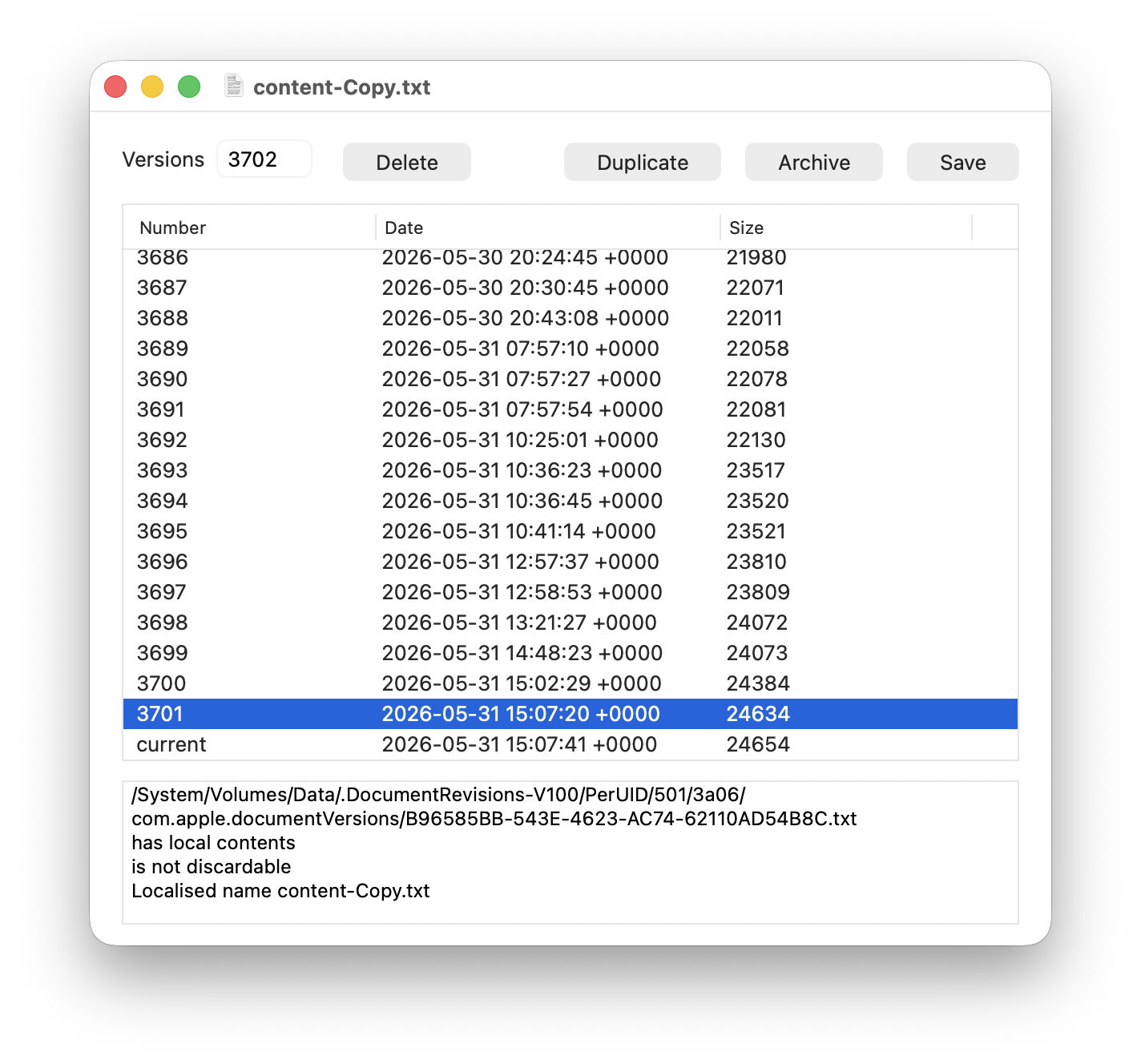
This left me with a problem, as the largest number of versions I had encountered previously was around 200. My version utilities Revisionist and Versatility have been designed to cope with no more than 999, which I thought was ample. While Revisionist was happy to list all 3,702 and let me access their contents, neither it nor Versatility could archive all those versions correctly, because they were numbering files using just three digits, which isn’t enough for 3,702.

Versatility 1.2 is now intended to cope perfectly well with up to 99,999 versions, as it uses five rather than three digits to number archived versions as individual files. There are a couple of points to note.

Five-digit file numbering is backward compatible with the three-digit numbering in Versatility 1.1 and the current version of Revisionist. Versatility 1.2 will unarchive folders created by previous versions and Revisionist, although the file names used will be two characters shorter at the end. I’m intending to release an update to Revisionist in the next week or two to give it similar capability, and to fix a bug that has appeared in its Unarchive window.

Archiving so many versions takes significant time, during which Versatility will spin a beachball. If you’re unsure whether it has come to a grinding halt, watch the file numbers rising in the folder that it’s archiving all those versions to.

Versatility version 1.2 is now available from here: versatility12
from Downloads above, from its Product Page, and via its auto-update mechanism.

Finally, I’m sure I’m not the only one who works repeatedly with the same file, generating large numbers of saved versions. If you do something similar, you might like to check how many versions your file has. When all you want to do is clear away those old versions, simply duplicate the file (Command-D) in the Finder and trash the original. But before doing that, you might just want to archive all those versions from the original. In my case, they totalled 92 MB on disk, but squeezed down to an Apple Archive of just 1.3 MB.