

惯性聚合 高效追踪和阅读你感兴趣的博客、新闻、科技资讯
阅读原文 在惯性聚合中打开

推荐订阅源

Hugging Face - Blog
Hugging Face - Blog
Microsoft Azure Blog
月光博客
月光博客
S
Securelist
J
Java Code Geeks
Recorded Future
Recorded Future
Exploit-DB.com RSS Feed
K
KPMG report finds enterprise disconnect between AI and its ROI | CIO
M
MIT News - Artificial intelligence
S
Secure Thoughts
Y
Y Combinator Blog
H
Hackread – Cybersecurity News, Data Breaches, AI and More
D
Docker
Martin Fowler
Martin Fowler
The Last Watchdog
The Last Watchdog
WordPress大学
WordPress大学
The GitHub Blog
The GitHub Blog
Vercel News
Vercel News
O
OpenAI News
www.infosecurity-magazine.com
博客园_首页
OSCHINA 社区最新新闻
OSCHINA 社区最新新闻
PCI Perspectives
PCI Perspectives
N
News and Events Feed by Topic
H
Heimdal Security Blog
SecWiki News
SecWiki News
奇客Solidot–传递最新科技情报
奇客Solidot–传递最新科技情报
Cyber Security Advisories - MS-ISAC
cs.AI updates on arXiv.org
博客园 - 【当耐特】
T
Troy Hunt's Blog
L
LINUX DO - 最新话题
Hacker News: Ask HN
Hacker News: Ask HN
Hacker News - Newest:
Hacker News - Newest: "LLM"
N
Netflix TechBlog - Medium
A
Arctic Wolf
The Hacker News
The Hacker News
I
Intezer
S
Schneier on Security
CTFtime.org: upcoming CTF events
Apple Machine Learning Research
L
Lohrmann on Cybersecurity
宝玉的分享
宝玉的分享
P
Privacy & Cybersecurity Law Blog
Stack Overflow Blog
Stack Overflow Blog
T
Tor Project blog
小众软件
小众软件
Simon Willison's Weblog
The Cloudflare Blog
Jina AI
Jina AI

Comments for The Eclectic Light Company

Should you try Golden Gate beta? Solutions to Saturday Mac riddles 367 In the shadow: Diego Velázquez Comment on Last Week on My Mac: Freshen up your documents by David Comment on Happy 250th birthday America 2 by mac Happy 250th birthday America 1 Brushstrokes: Portraits 1760-1877 Spotlight and Core Spotlight are different Comment on Sort order, collation and the Finder by eyelessjerry Comment on Apple has just released macOS 26.5.2 Tahoe by Derek Currie Great Ladies of Impressionism: Marie Bracquemond Comment on Get more from your Mac’s log by extending its duration by John Gilbert Comment on Keep your Mac cool using physics by F Portraits of trees: Coppices and pollards Comment on Firmware has become complicated again by John Woods Comment on Logistician 1.2 fixes a couple of bugs by info395288a4d1d Comment on What does Activity Monitor measure? by hoakley Last Week on My Mac: Spotlight on semantics An American in Paris: paintings of Henry Ossawa Tanner 1902-1930 An American in Paris: paintings of Henry Ossawa Tanner 1880-1902 Great Ladies of Impressionism: Berthe Morisot 1874-1891 What to do with a hot Mac Deprecations and removals from Golden Gate Brushstrokes: From El Greco to Rembrandt Portraits of trees: Dutch Golden Age How to get the most from SilentKnight 3 Comment on Hero or hooligan: Achilles becomes the warrior by Deborah J. Brasket Solutions to Saturday Mac riddles 365 Comment on SilentKnight 3.0 for Apple silicon Macs running Sequoia and later (full release) by michaelriccioli Comment on Last Week on My Mac: Uncompressed compressed files by fds Comment on Explainer: Memory by jzonedotcom Comment on Colin Campbell Cooper painting America: 1896-1910 by House of Heart Brushstrokes: 16th century What can you do when an app uses too much memory? SilentKnight 3 second beta adds text and JSON reporting In the shadow: Caravaggism What to do with your encrypted HFS+ disks First beta-test version of SilentKnight 3 for Apple silicon Macs Hero or hooligan: Jason and Medea Comment on Fix documents that won’t open as expected using Quarant2 by EcleX Last Week on My Mac: The mystery of Safari’s Web Archives Last Week on My Mac: Why is it so hard to open a document? Explainer: Disk encryption In the shadow: Caravaggio Brushstrokes: innovators of the first century Changing Paintings: 36 Theseus and the Minotaur macOS virtualisation is leaping forward in Golden Gate Why can’t Preview open that PDF? Crossing the Golden Gate, Intel support, and an update to SystHist Reading the Finder’s Get Info dialog In memoriam Mary Cassatt: 2, 1880-81 Last Week on My Mac: What’s in a name? Explainer: Getting a location Get more from Get Info and the Finder’s contextual menu Have you saved thousands of versions? Versatility 1.2 might be what you need Apple has released an update to XProtect for all macOS Apple has released macOS Tahoe 26.5.1 Comment on What Location Services do in macOS by Tristan Hubsch Comment on Protect files with the Locked or Immutable flag by markbot2zero Portraits of trees: Introduction Which tasks require mains power? Comment on Online reference to external displays for Apple silicon Macs by Brian What’s in that phishing email? How to search document versions Rubens’ Peace and War Comment on Last Week on My Mac: Syncing metadata in iCloud Drive by hoakley A weekend with Misia: 2 How to search Time Machine backups? Medium and message: Pottery Hero or hooligan: Theseus and the sandals How QuickLook provides thumbnails and previews Hunting extended attributes with an update to xattred Saturday Mac riddles 360 Comment on How to preserve versions, and how to create versioned PDFs by markbot2zero Comment on What gets synced in iCloud Drive? by hoakley Solutions to Saturday Mac riddles 359 Last Week on My Mac: snapshots, the elephant in APFS How to check whether Spotlight is getting the right metadata macOS Tahoe no longer fully supports Time Capsules The bicentenary of Frederic Edwin Church: 1857-77 macOS virtual machines and audio-video syncing Comment on Use Finder tags for categories by Chuck Last Week on My Mac: Dependency and skill fade Comment on Virtualisation on Apple silicon Macs is different by AndyS Painting Pandora and her box: 1883-1919 Mac Easter eggs Painting Spring blossom 2 Comment on The macOS Natural Language framework and Nalaprop by Ingo Comment on The MACL extended attribute by hoakley On Reflection: Cézanne Privacy: Which folders are protected in Tahoe? Last Week on My Mac: Root cause analysis and ClickFix Last Week on My Mac: Root cause analysis and ClickFix Last Week on My Mac: Root cause analysis and ClickFix Last Week on My Mac: Root cause analysis and ClickFix Why you can’t trust Privacy & Security How can I now have two apps named Pages? How to survive the loss of Rosetta Use Fallback Recovery on Apple silicon Macs Clean install macOS
Stop your photos revealing your location
spudge · 2026-06-04 · via Comments for The Eclectic Light Company

One of the most common ways that folk leak details of their locations is in images containing GPS data from their phones. This can also have the gravest impact: there are many who have died when their leak has enabled them to be targeted by an attack in which they and others were killed. While I hope your consequences aren’t as terminal, revealing where you and others have been, and when, can bring on all sorts of trouble.

In the early days of digital photography, cameras had no GPS or location hardware, but that was soon to change as small GPS units became a popular accessory. When Apple released its second iPhone, the 3G in 2008, it integrated both camera and GPS, and all our photos came with fairly precise details of where they had been taken. While those are generally useful, there are many circumstances when we don’t want to tell everyone where we took each of our photos.

Stop at source

If you live, work or travel in places where revealing your location or movements could have serious consequences, the only solution is to block your phone’s camera from obtaining any information from Location Services. In iOS, this is done in Settings > Privacy & Security > Location Services > Camera.
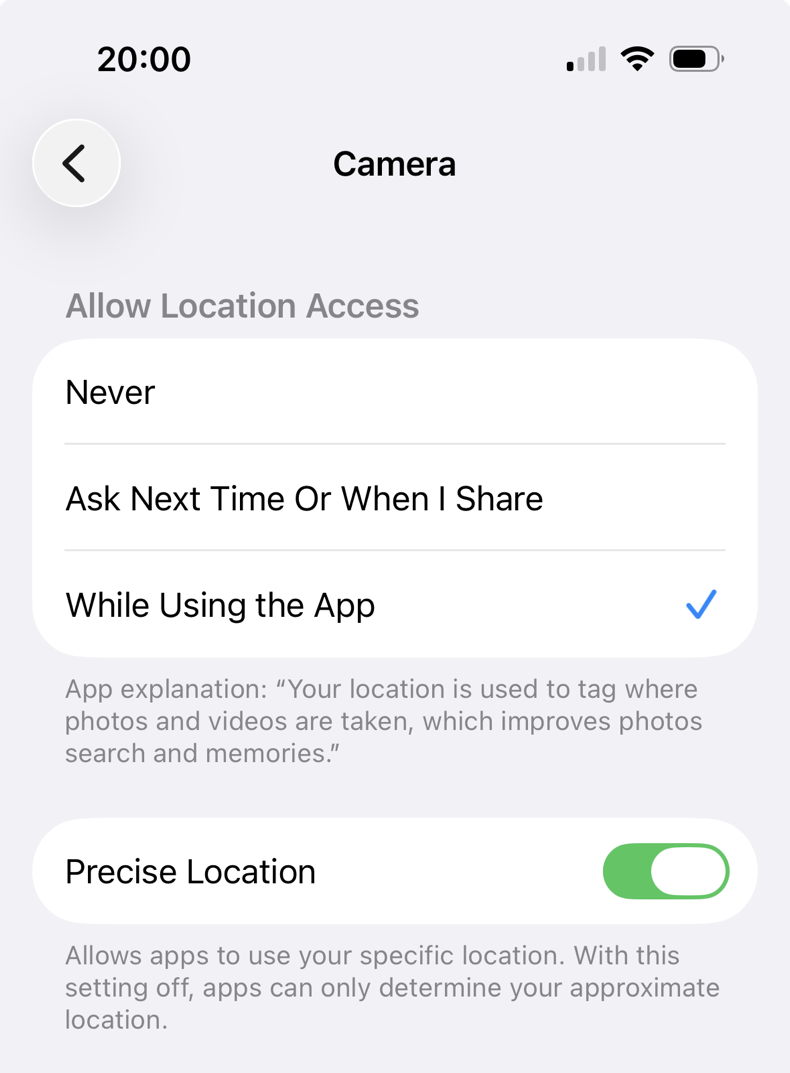
There’s also an option here to turn off Precise Location that can be more appropriate for those who still want sufficient to place an image, but don’t need it to be as precise as possible.

Of course these only apply to photos you take after changing that setting. You’ll also need to remove location information from those you have already taken.

Stop when sharing

If you want your location to remain in images you keep in your Mac and devices, but don’t want it to be included in those you share, the Photos app has a useful setting that can remove the data. In Photos on macOS that’s in its General settings, towards the bottom, under Sharing. Uncheck that box and when you share images from Photos, their location information should be removed automatically.
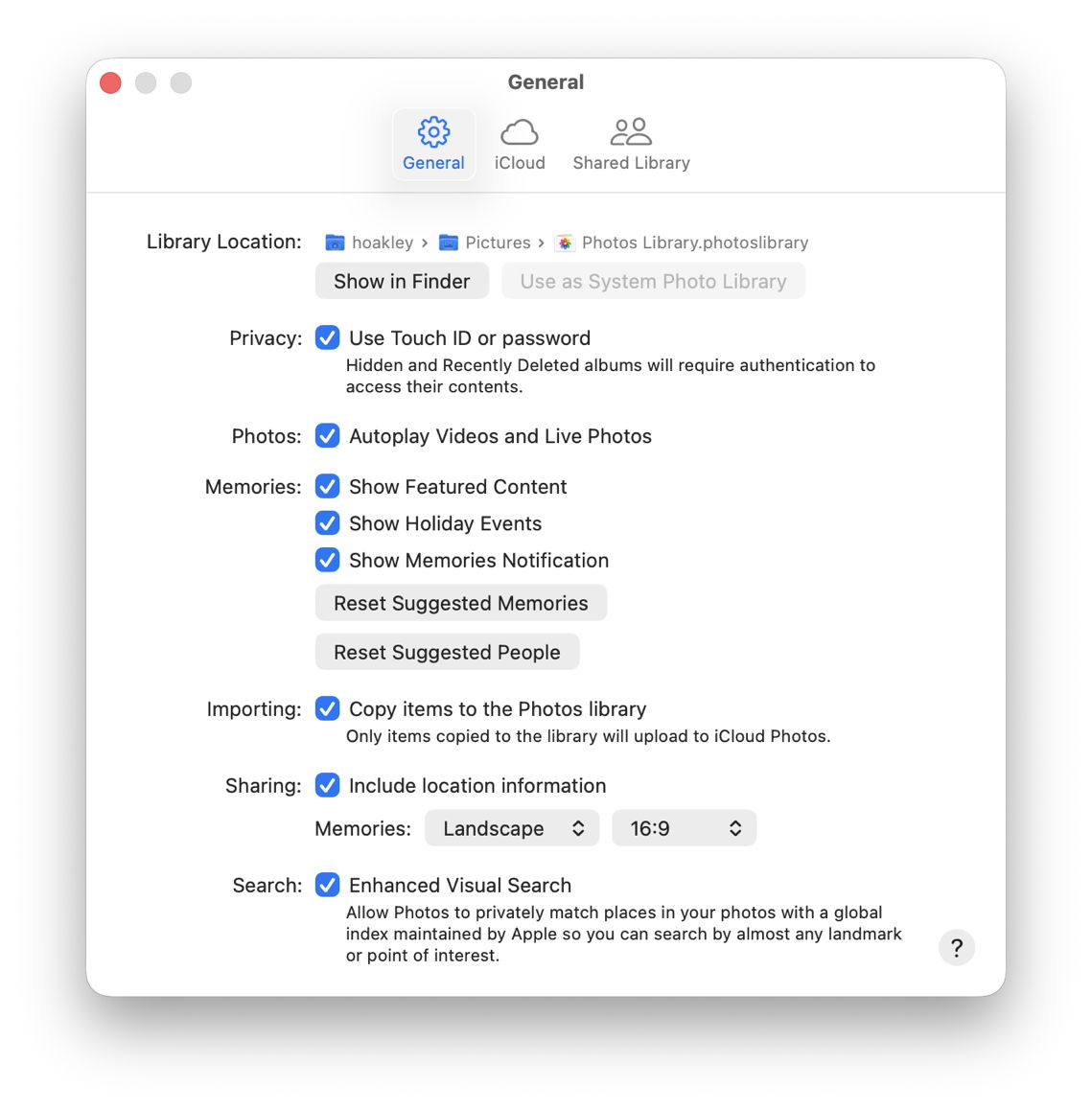
This doesn’t apply to images you share outside the Photos app, though.

Remove location data

For images within Photos on iOS, use its Adjust Location feature, accessible in various ways for selected images.
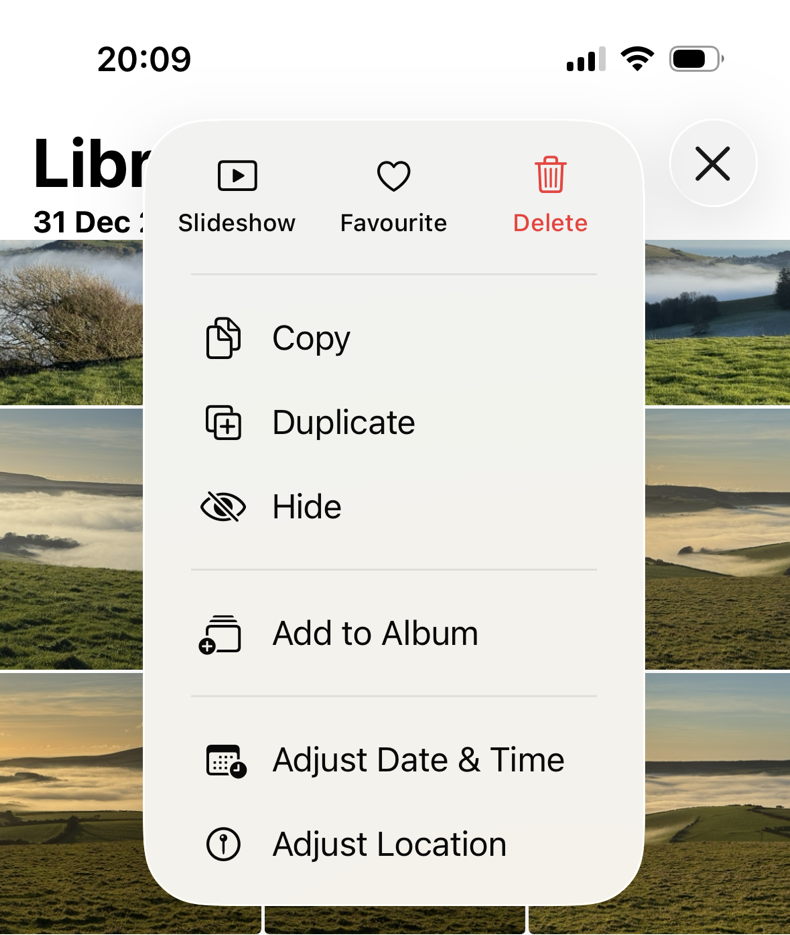
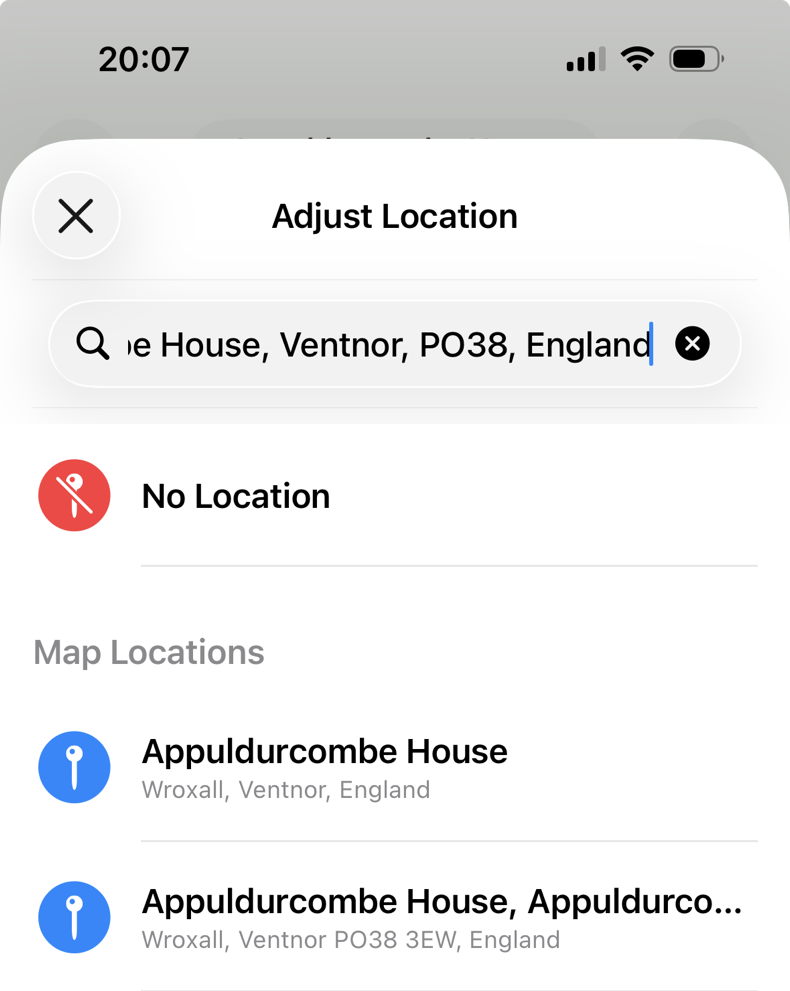
Unfortunately, this isn’t as unambiguous in the macOS version of Photos, which refers to hiding rather than removing the location.
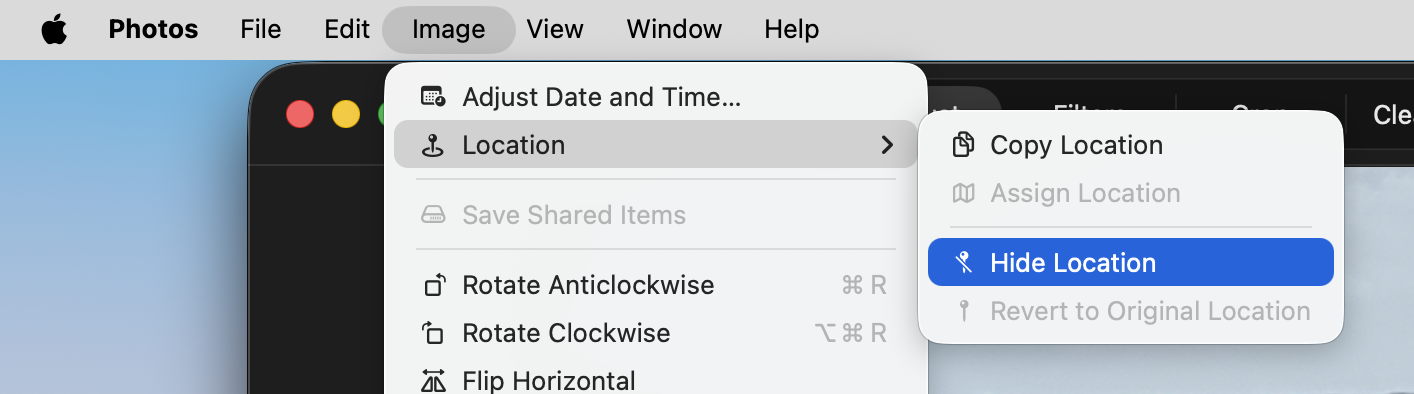
Images that aren’t in a Photos library can have their location data removed using an app, including Preview and my favourite GraphicConverter.
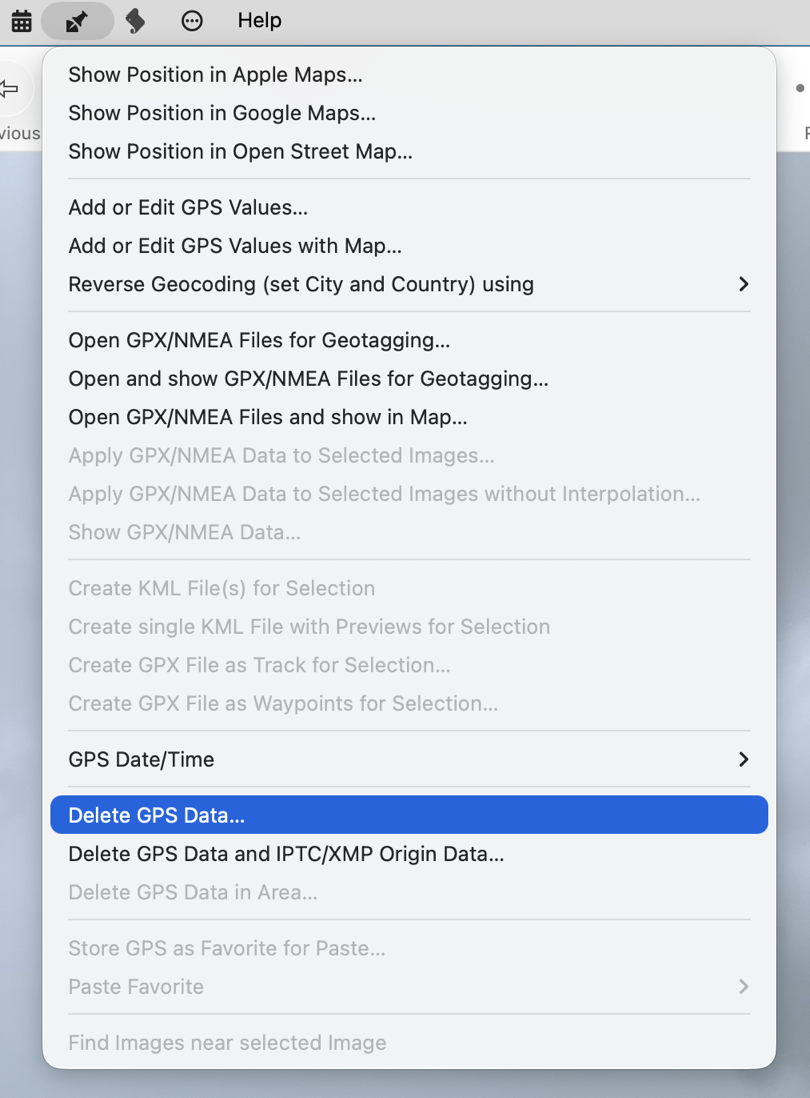
Why isn’t this easier?

When the first Mac was launched in 1984, it was designed to separate file data from metadata in its file system, but that principle never caught on in other systems, in particular successors to IBM’s PC running Microsoft operating systems. As modern image formats developed, they were designed to embed their metadata within the file data, rather than use separate resources. As a result, all major formats do the same. While macOS could store image metadata in extended attributes, that would be incompatible with all other systems, so they have to conform to cross-platform standards.

Since its introduction in 1995, several of the most popular image file formats, including JPEG and PNG, have used the Exchangeable Image File Format, Exif (often referred to as EXIF), which includes location metadata stored using standard tags with the image data. Those formats can also use XMP and other metadata formats, and the more recent HEIF format adopted by Apple in 2017 can embed metadata in Exif, XMP and other formats.
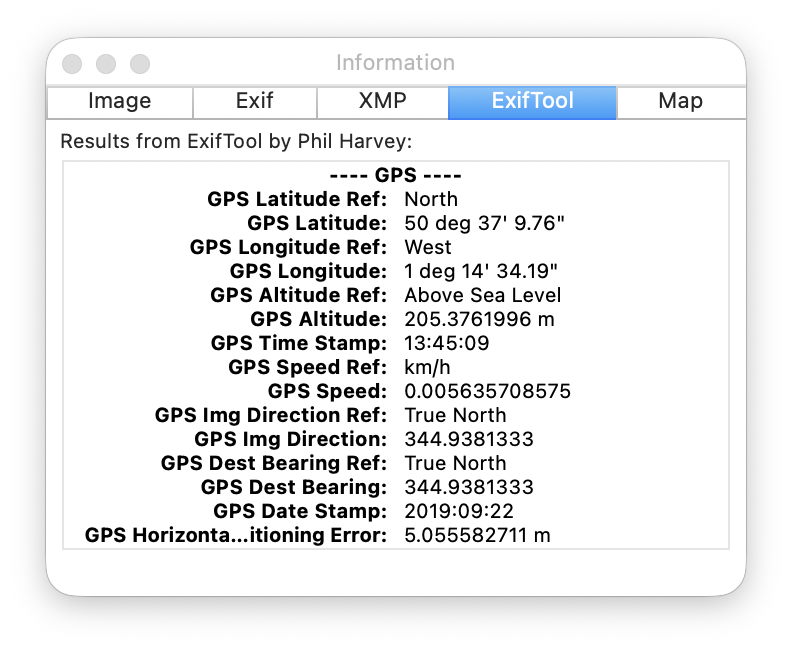
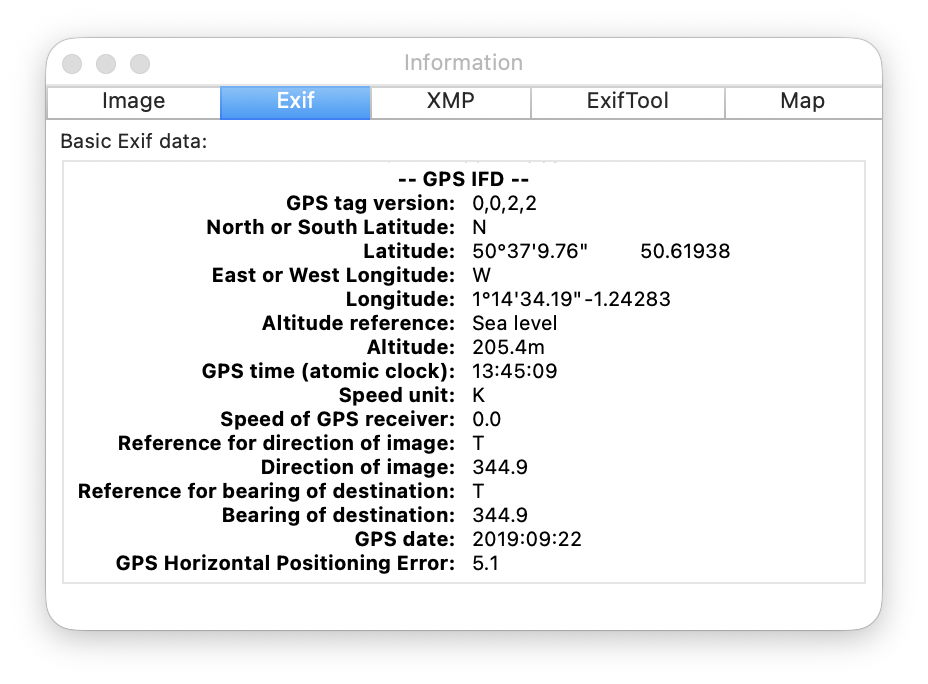
Removing location data from an image file thus requires the file data to be changed and rewritten. With the potential for it to be stored in one or more metadata formats, this becomes non-trivial, and has resulted in problems with some apps that edit images and their metadata.

Because of the possibility of duplicating location metadata using different formats, when it’s important to ensure that none leaks out, each image should be checked individually using an app like GraphicConverter, or a specialist utility. One robust approach is to convert the image to a lossless flat pixmap format that can’t store any metadata, then convert it back again. However, that strips all metadata and not just that for location.

Further reading

Apple’s Personal Safety User Guide is helpful, including
Manage location information
Manage location metadata in Photos.