
惯性聚合 高效追踪和阅读你感兴趣的博客、新闻、科技资讯
阅读原文 在惯性聚合中打开

推荐订阅源

Cloudbric
Cloudbric
T
Threat Research - Cisco Blogs
Simon Willison's Weblog
AWS News Blog
AWS News Blog
P
Privacy & Cybersecurity Law Blog
H
Help Net Security
云风的 BLOG
云风的 BLOG
G
GRAHAM CLULEY
Spread Privacy
Spread Privacy
Cyber Security Advisories - MS-ISAC
A
Arctic Wolf
Project Zero
Project Zero
Engineering at Meta
Engineering at Meta
P
Privacy International News Feed
Blog — PlanetScale
Blog — PlanetScale
Stack Overflow Blog
Stack Overflow Blog
M
MIT News - Artificial intelligence
The Register - Security
Recorded Future
Recorded Future
cs.AI updates on arXiv.org
C
Cisco Blogs
PCI Perspectives
PCI Perspectives
Recent Announcements
Martin Fowler
Martin Fowler
A
About on SuperTechFans
W
WeLiveSecurity
GbyAI
GbyAI
V
Vulnerabilities – Threatpost
The GitHub Blog
The GitHub Blog
D
Darknet – Hacking Tools, Hacker News & Cyber Security
C
Check Point Blog
Y
Y Combinator Blog
月光博客
月光博客
Scott Helme
Scott Helme
奇客Solidot–传递最新科技情报
奇客Solidot–传递最新科技情报
Google DeepMind News
F
Fortinet All Blogs
U
Unit 42
G
Google Developers Blog
钛媒体:引领未来商业与生活新知
钛媒体:引领未来商业与生活新知
T
Threatpost
Application and Cybersecurity Blog
Google Online Security Blog
Recent Commits to openclaw:main
OSCHINA 社区最新新闻
OSCHINA 社区最新新闻
Cisco Talos Blog
Cisco Talos Blog
博客园 - 三生石上(FineUI控件)
Hugging Face - Blog
Hugging Face - Blog
MongoDB | Blog
MongoDB | Blog
博客园 - 司徒正美

Raz1ner

Github Pages 设置自定义域名 - Raz1ner Deep Clean Pro 使用方法 - Raz1ner Mac 实用软件推荐 - Raz1ner 视频动态字幕合成使用方法 - Raz1ner Google Opal 系统提示词 - Raz1ner Google Opal Use Memory 功能解析 - Raz1ner Sheet Toos 使用教程 - Raz1ner 电子表格批量修改 使用教程 - Raz1ner 表格分页批量修改 使用教程 - Raz1ner 滚动字幕视频合成使用方法 - Raz1ner SnapOCR - 截图文字识别工具 - Raz1ner 说说 - 智能语音输入工具 - Raz1ner HEIC Converter 使用方法 - Raz1ner 悬浮歌词播放器 - Raz1ner
QSwitch 使用方法 - Raz1ner
Raz1ner · 2026-02-06 · via Raz1ner

#软件 #macOS

一键快速切换屏幕分辨率与音频设置。

我使用的是 4K 分辨率的显示器,在与别人共享屏幕画面或远程会议的时候,对方看到的屏幕的中的文字就特别小,看不清楚。为了解决这个问题,我需要进入系统设置,找到显示器选项并且手动调低分辨率,有时还需要共享系统声音,就需要到音频MIDI设置里面进行调整。使用结束后,有需要将这些设置全部还原,整个过程十分繁琐。

QSwitch 正是为了解决这一系列重复而且繁琐的操作设计的,可以一键显示器的分辨率或音频设置,没有繁琐的设置步骤。

使用方法

下载链接:https://raz1ner.com/Awesome-Software/QSwitch/

启动软件后,会在菜单栏出现显示器的图标,点击后会显示设置界面。
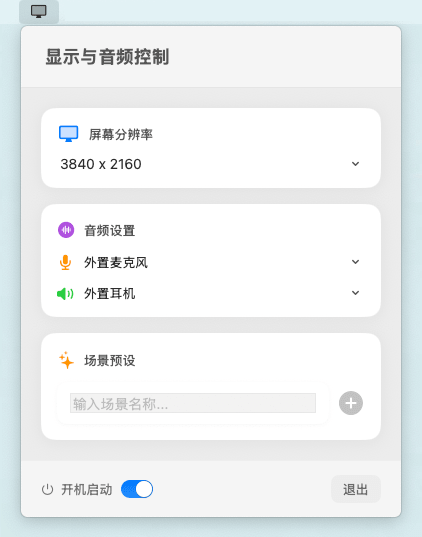
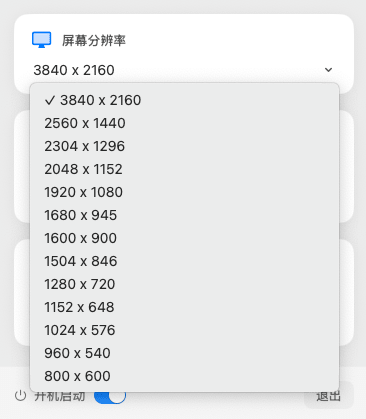
点击屏幕分辨率的下拉菜单,可以切换不同的显示器分辨率。
在音频设置中,可以分别选择音频的输入设备和输出设备。完成配置后,可在场景预设中自定义一个场景名称,点击右侧的加号即可将当前音频设置保存为一个场景,方便后续快速切换。
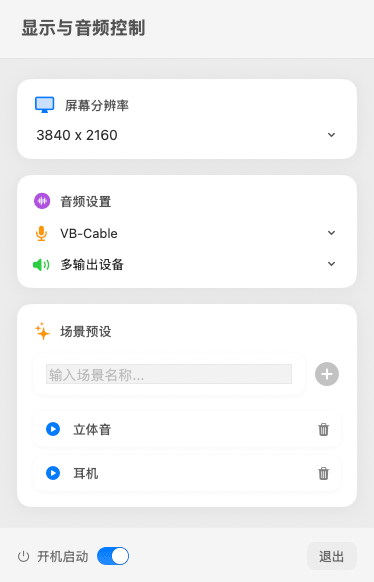
例如在日常使用场景中,我的音频输入设备是「外置麦克风」,输出设备是「外置耳机」,就可以将该配置命名为「耳机」并保存。

当需要使用立体声或共享系统声音时,音频输入设备切换为「VB-Cable」,输出设备设置为「多输出设备」,即可将该配置命名为「立体音」并保存。

完成设置后,只需在场景预设列表中点击对应的场景名称,即可一键快速切换到相应的音频配置。