


Why a developer portal isn’t a development platform, and how to design the all-important layer beneath it.
Key takeaways
- Backstage solved the portal problem, not the platform problem. A portal organizes catalogs, documentation, and templates. A platform owns deployments, environments, policies, and runtime operations. Backstage assumes that the execution layer exists beneath it.
- Point-to-point integrations become a maintenance burden. Many organizations end up with a “messy middle” where Backstage is connected directly to CI/CD, GitOps, Kubernetes, and observability tools through custom wiring that’s fragile and hard to evolve.
- Abstractions are the interface between developers and infrastructure. Developers work with components, endpoints, and dependencies. Platform engineers work with environments, pipelines, and component types. The platform compiles both into Kubernetes resources.
- A control plane bridges the gap. It sits between the portal and runtime, compiling abstractions into infrastructure, enforcing policies consistently, reconciling drift, and aggregating runtime state back to the portal.
- Good abstractions enable advanced capabilities. Unified observability, automated guardrails, and AI agents that can reason about and act on your platform. All becomes possible when you have well-defined concepts and a control plane that understands both sides.
…
Start with Backstage
If you’re building an internal developer platform, Backstage is certainly part of your architecture. It solved the discovery problem and became the default choice for developer portals.
Before Backstage, developers navigated wikis, spreadsheets, and tribal knowledge just to find who owned a service or how to spin up a new one. Backstage brought structure: a unified catalog, a plugin ecosystem, and golden-path templates that actually got adopted.
Backstage is a Cloud Native Computing Foundation (CNCF) project with one of the most active contributor communities in the ecosystem. When organizations evaluate developer portals, Backstage is the starting point.
However, many teams discover something after deployment: Backstage provides a portal, not a platform. A portal organizes information. A platform owns execution: deployments, environments, policies, observability, and runtime operations.
Backstage assumes that the execution layer exists beneath it. That layer is where most of the complexity lives, and it’s what this article is about.
What a developer platform actually is
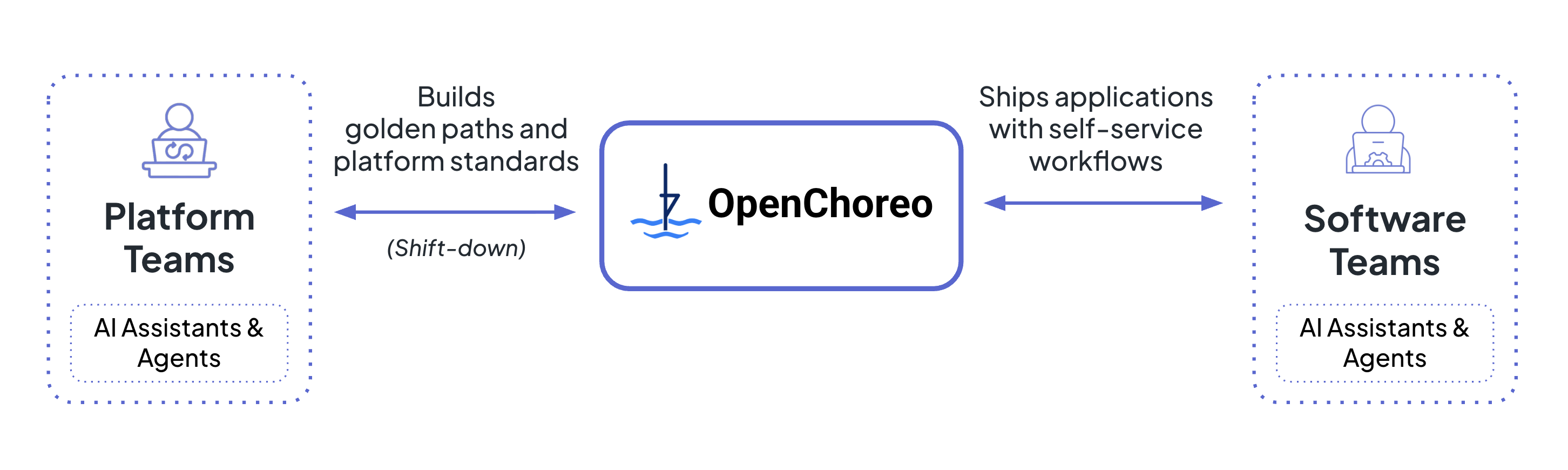
A developer platform or an internal developer platform is a self-service framework you build to help developers build, deploy, and manage applications independently.
WSO2
Most organizations already have an organically grown version of this:
- Developer commits code
- CI pipeline builds and pushes images to a registry
- Pipeline updates a GitOps repo containing Helm charts or Kubernetes manifests
- Argo CD or Flux syncs those manifests to clusters
You may have this workflow running today. The question is whether it’s a pipeline stitched together with scripts and tribal knowledge, or a platform with consistent abstractions and self-service capabilities.
What usually happens after adopting Backstage
How do you add Backstage to this setup? The common approach is for developers to maintain Backstage entity files (primarily component and API entities) alongside the source code. Then you configure the built-in entity provider in Backstage to scan source code repositories to populate the catalog. Eventually, you’ll end up with a portal with all your systems, components, APIs, and other resources. So far, so good.
Once developers start using the portal, you’ll be hit with a consistent flow of feature requests:
- “I see my component in the catalog, but is it actually running?” You configure the Kubernetes plugin and link components to their corresponding manifests. Now developers can see pod status, deployment state, and replica counts.
- “I need logs, metrics, and traces related to my component.” You integrate your observability stack or developers context-switch to Grafana, Datadog, or whatever you’re running. Either way, more wiring.
- “Can I create new components from here?” You build Backstage templates that scaffold repos with the right structure, Backstage entities, Helm charts, and CI pipelines, all of which encode your organization’s best practices. Now you’re maintaining golden paths in templates, separately from the runtime configuration that actually enforces them.
Each request is reasonable and achievable, but they add up.
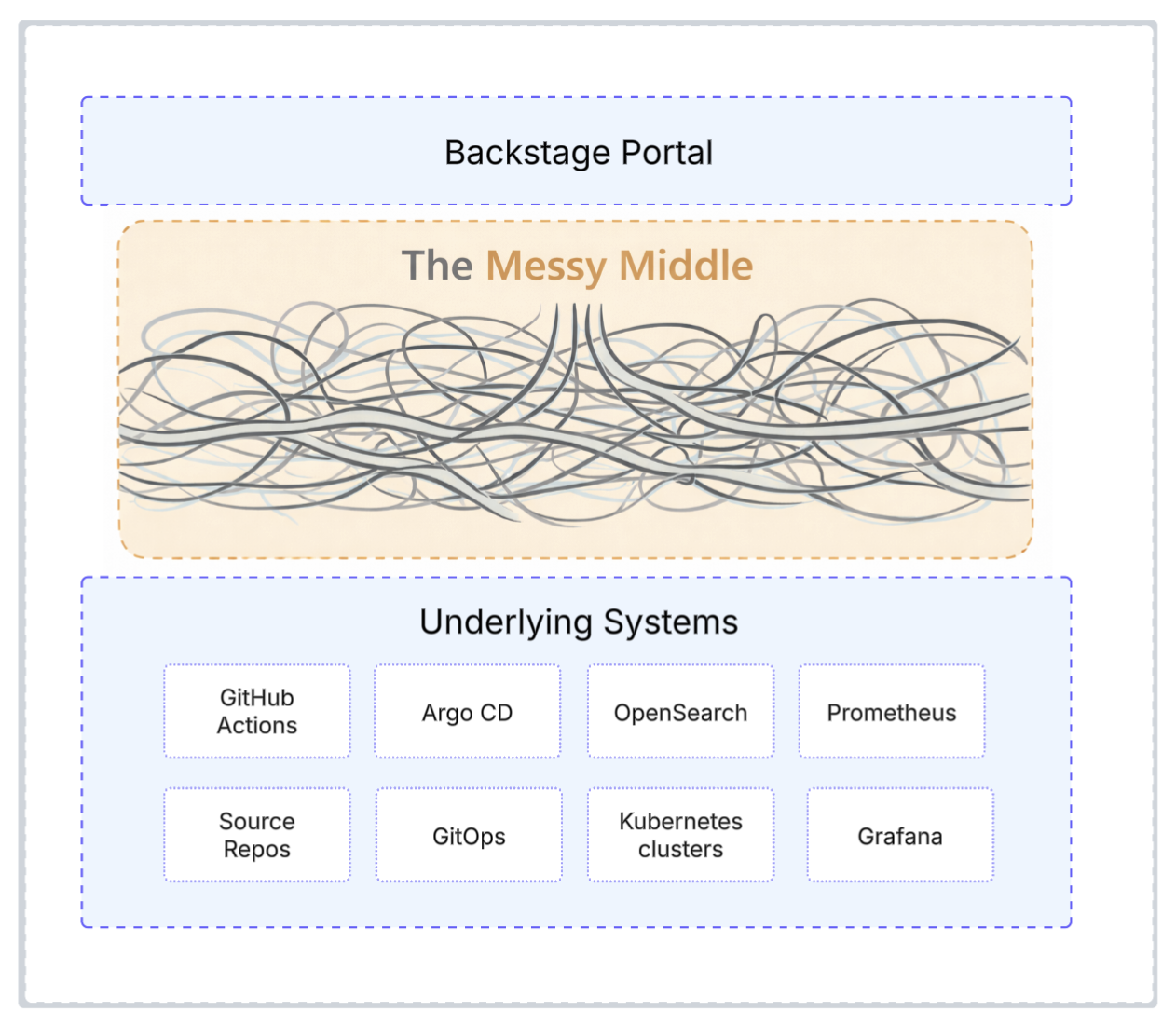
The messy middle
Eventually, you end up with a platform held together by point-to-point connections. Every new capability requires new wiring. Every upgrade risks breaking something. You spend more time maintaining integrations than building features.
WSO2
You would never design a production system with this many point-to-point dependencies. Why accept it for your platform?
Treat the platform as a product, but also as a system
Organically grown systems get you started, but once you commit to Backstage as your portal, you need a product mindset. Start from developer experience, understand their pain points, then design a system that addresses them coherently.
A platform is also a system. Approach it the way you would approach any production system you’re building. You wouldn’t design a back-end service without thinking about separation of concerns, clear interfaces, and extensibility.
The same principles apply here:
- Separation of concerns: Don’t mix developer-facing abstractions with infrastructure implementation. Keep them separate so you can evolve each independently.
- Clear interfaces: Define explicit abstractions. Developers and platform engineers should interact with well-defined concepts rather than implementation details scattered across Helm charts and CI scripts.
- Extensibility: Requirements keep changing. If every new capability requires custom wiring, you’ll spend more time maintaining than improving. Design for extension from the start.
The difference between a pile of integrations and a platform is architecture. Get the system design right, and new capabilities slot in cleanly. Get it wrong, and every feature request becomes a maintenance burden.
The missing layer beneath Backstage
Moving from an organically grown pipeline to an actionable developer platform is a big leap. You probably have CI/CD pipelines that work, a Kubernetes cluster running workloads, and a Backstage catalog describing what exists.
The questions are:
- How do you transform an informational portal into one with a platform under the hood?
- How do you bridge the gap between what the catalog describes and what’s actually running?
- How do you enforce golden paths beyond initial scaffolding?
- How do you design a platform that evolves with your organization’s needs?
What’s missing is a connective layer between Backstage and your runtime, something that makes the portal operational rather than just informational. Let’s look at the key architectural elements to consider when designing that layer and the whole platform.
Start with abstractions
One of the main goals of a developer platform is to reduce cognitive load. The platform should meet developers where they are and speak their language, not Kubernetes’.
Every organization has its own vocabulary, but the Backstage system model is a good starting point. It may not cover everything, but you can extend it with custom entities. The key is that developers work with high-level concepts while the platform compiles them into Kubernetes resources. Developers are abstracted away from the underlying details, but they can still see what’s happening underneath.
| Concept | Description | Backstage mapping |
| Project | A cloud-native application composed of multiple components. It is also a unit of isolation. | System |
| Component | A deployable unit, such as web services, APIs, workers, or scheduled tasks. | Component |
| Endpoint | A network-accessible interface exposed by a component. | API |
| Resource | External infrastructure such as databases, queues, and caches. | Resource |
| Dependency | A component’s reliance on endpoints or resources. | consumesAPI, dependsOn |
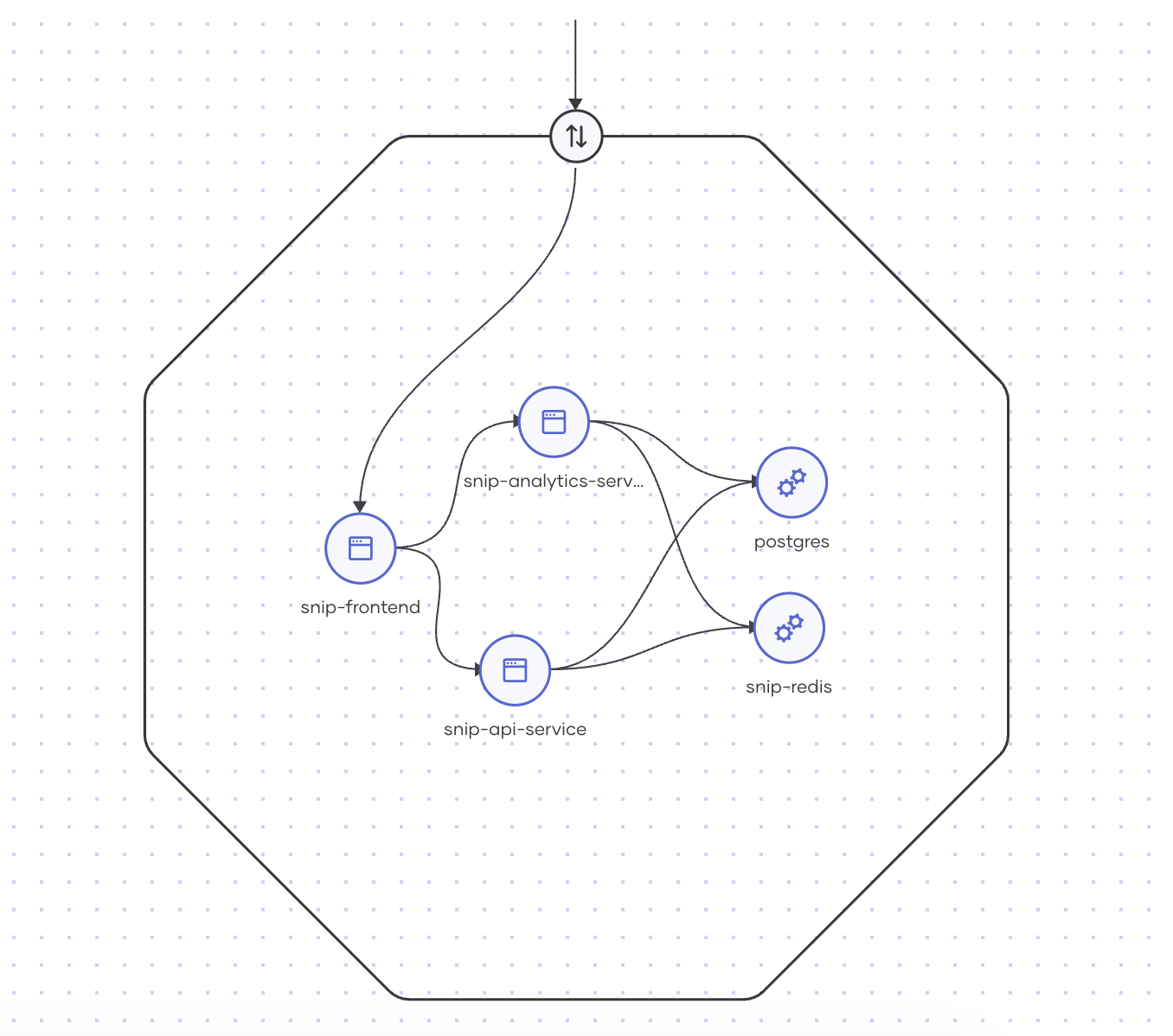
These are not just static abstractions; they also have associated runtime semantics. The following diagram illustrates runtime representations of these concepts.
WSO2
In the workload cluster, a project becomes an isolation boundary for all of its components. The platform translates this into Kubernetes namespaces and network policies that enforce the boundary, not just document it.
Endpoint visibility determines which endpoints can talk to which. A project-scoped endpoint gets network policies that block traffic from outside the project. An organization-scoped endpoint is exposed to internal traffic but remains behind the internal gateway. An external endpoint gets routed through the public gateway with appropriate authentication. Developers declare visibility; the platform generates the policies.
Dependencies work the same way. When a component declares a dependency on an endpoint, the platform injects the URL and other environment variables required to connect to the dependency. It configures the network policies for both directions, egress from the calling endpoint and ingress to the target endpoint. Without the declared dependency, egress is blocked by default. The dependency graph you see above reflects actual permitted traffic flow, not just intended relationships.
You need platform abstractions, too
Developer abstractions help your developers. Platform abstractions help you.
While developers work with components, endpoints, and dependencies, you need a different vocabulary to design and operate the platform itself. These abstractions let you and your team define standards, enforce policies, and create structure without writing low-level configurations for every scenario.
| Concept | Description |
| Namespace | A logical grouping of users and resources, typically aligned to a company, business unit, or team. Defines ownership and access boundaries. |
| Data plane | A Kubernetes cluster that hosts one or more deployment environments. You can have multiple data planes for isolation, regional distribution, or scaling. |
| Environment | A runtime context, such as dev, test, staging, or prod, where workloads are deployed and executed. Environments carry their own policies and resource configurations. |
| Pipeline | A defined process that governs how work, such as builds, deployments, promotions, or any automated workflows, flows through the platform. Encodes your operational processes as a platform primitive. |
| Component type | Defines a category of workload—Service, Worker, Cron, Job. |
| Trait | A reusable capability that attaches to any component, such as autoscaling, resilience, observability, and security policies. Compose behaviors without duplicating configuration. |
These abstractions separate platform concerns from application concerns. Developers don’t need to know which cluster their code runs on or how environments are wired together. They deploy to “staging” or “prod,” and you define what those terms mean.
The missing layer is a control plane
The control plane is where abstractions become real. It sits between the portal and your workload clusters, translating developer intent into infrastructure configuration.
You can think of it as a compiler that targets Kubernetes clusters, converting higher-level abstractions into what Kubernetes and its underlying frameworks understand. It can also apply platform-wide rules during this compilation. Resource limits, security requirements, etc., can be enforced consistently, not merely documented and hoped for.
But compilation is only half the job. The control plane also reconciles continuously. It monitors drift between the declared and actual states. When they diverge, it corrects. Your abstractions remain the source of truth; the control plane enforces them over time.
Programmability is not optional
One of the key aspects of this control plane is programmability. If you want your platform to evolve, the control plane needs to be extensible. Different teams have different requirements. New capabilities emerge. You can’t anticipate everything up front.
This means allowing customization of how abstractions compile to Kubernetes manifests. But extensibility without guardrails is dangerous. You need programmability that preserves your invariants. The goal is constrained flexibility, open enough to evolve, structured enough to stay coherent.
Observable abstractions make the portal useful
The control plane also aggregates runtime state and associates it with your abstractions. This is what makes the portal useful. Without this, developers piece together information from different tools: Kubernetes dashboard for pod status, Argo CD for the deployment state, Grafana for metrics, Jaeger for traces. Each tool knows part of the story; none shows the full picture.
With the control plane aggregating state, the portal tells a connected story. When a developer opens a component page in Backstage, they see:
- Deployed environments and their status
- Current replicas and resource usage
- Recent deployments and who triggered them
- Logs, metrics, and traces that are scoped to that component, in each environment
- Dependencies and their health
No context-switching. No reconstructing which pod belongs to which service in which cluster. The abstraction is the anchor; everything else attaches to it.
This only works because the control plane understands both sides. It compiled the abstractions to Kubernetes, so it knows how to map runtime data back. Information flows in both directions. Downward: developer intent flows through the control plane and becomes running workloads. Upward: runtime state flows back through the control plane and appears in the portal.
This is what makes the portal actionable. It’s not just displaying information; it’s connected to a system that can act.
Data plane: keep it simple
The data plane is where your workloads actually run. In most cases, this means one or more Kubernetes clusters. The data plane doesn’t know about your abstractions. It understands Kubernetes primitives such as pods, deployments, services, and ingresses. The control plane’s job is to compile your higher-level concepts into these primitives and apply them.
The data plane does one thing: it runs what the control plane tells it to run. The intelligence lives in the control plane; the execution happens in the data plane.
Where AI fits into the platform
AI is now part of every platform conversation, but the architectural question is where it actually belongs.
The abstractions and control plane you’ve built create the foundation. You have well-defined concepts such as components, endpoints, and dependencies. You have a runtime state aggregated and tied to those concepts. You have a connected view of your system. AI agents can definitely leverage this.
Agents as platform users
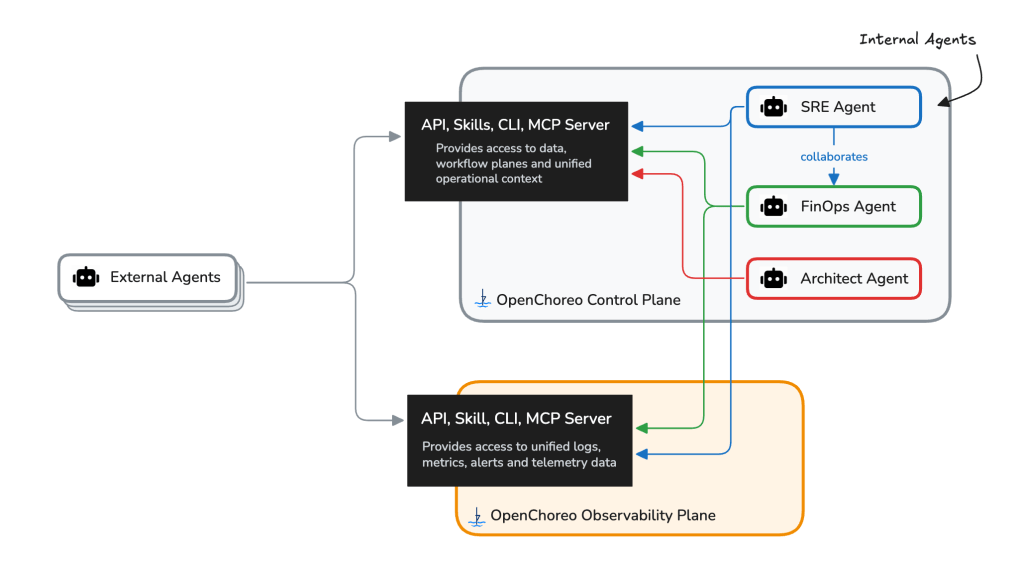
AI agents should be able to interact with your platform as first-class participants. This requires exposing platform capabilities through interfaces that agents can use, such as Model Context Protocol (MCP) servers, APIs with clear semantics, user-friendly CLIs, and skills that map to platform operations.
These capabilities of the platform enable agents to create components, trigger builds and deployments, query environment status, and reason about dependencies. They help you and your developers become more productive.
Agents as platform capabilities
You can also embed agents inside your platform to help your teams’ day-to-day operations. Here are some examples of agents you can develop:
- SRE agents: Analyze logs, metrics, and traces to surface likely root causes. Instead of developers digging through dashboards, the agent correlates signals and suggests where to look.
- FinOps agents: Help teams understand and optimize resource costs across environments and components.
- Architect agents: Assist with system design decisions, such as dependency analysis, capacity planning, and migration impact assessment.
These agents work because they have access to the control plane’s unified view. They see abstractions, runtime state, and observability data in one place, the same connected story developers see in the portal.
The pattern holds. Good abstractions make everything easier, including AI.
OpenChoreo as a reference implementation
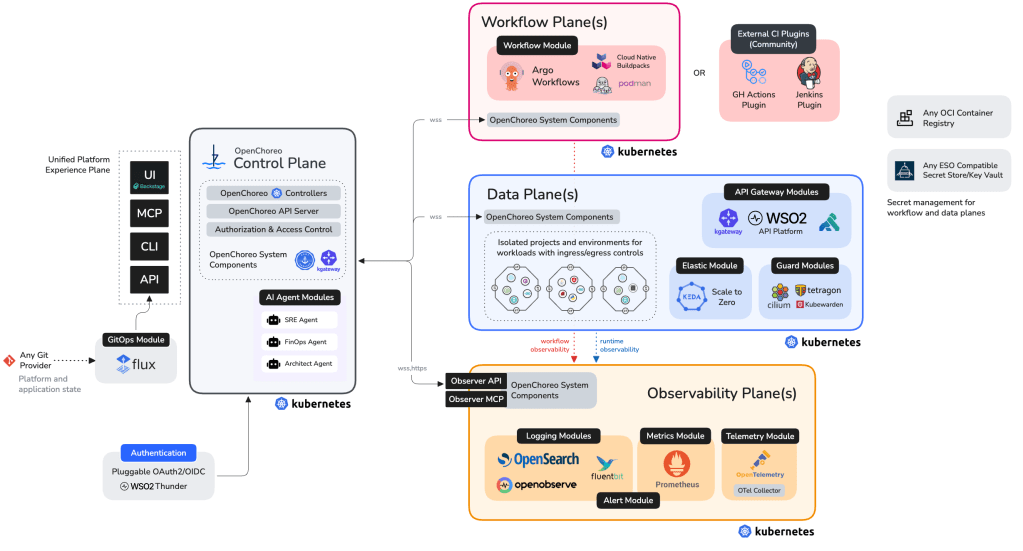
OpenChoreo is an open-source developer platform for Kubernetes. It was recently accepted into the CNCF as a sandbox project. OpenChoreo implements the architecture described in this article: developer abstractions backed by a control plane, a Backstage-powered portal, integrated CI/CD and GitOps, and observability wired to your abstractions.
If you’re building this architecture yourself, OpenChoreo is worth studying as a reference, even if you don’t adopt it directly. The project demonstrates how these pieces fit together: how abstractions compile into Kubernetes resources, how runtime state flows back to the portal, and how guardrails are enforced during compilation.
You can use OpenChoreo as a complete platform, or install its Backstage plugins into your existing portal and use just the control plane layer. Either way, the underlying patterns are what matter. The architecture is the idea. OpenChoreo is one way to implement it.
WSO2
A useful mental model: multi-plane architecture
OpenChoreo separates concerns across five planes:
- Experience plane: Where developers, platform engineers, and SREs interact with the platform via the Backstage-powered portal, CLI, GitOps, or AI agents.
- Control plane: The brain that translates high-level abstractions (components, APIs, environments, pipelines) into Kubernetes manifests. Programmable through component types and traits, so you can extend it without forking or writing low-level controllers. Continuously reconciles the runtime state back into those abstractions.
- Data plane: Where workloads run. Enforces the semantics of your abstractions, such as project isolation, traffic policies, and security boundaries. These aren’t just configurations; the platform guarantees them.
- Observability plane: Feeds metrics, logs, and traces back through the same abstractions developers already understand, requiring no translation.
- Workflow plane (optional): Handles builds using Cloud Native Buildpacks and Argo Workflows by default.
These planes work together but remain separate concerns. You can reason about each independently, evolve them at different rates, and deploy them flexibly: a single cluster with namespace isolation for dev/test, fully separated multi-cluster setups for production, or hybrid topologies that colocate planes like Control and CI for cost efficiency.
AI and OpenChoreo
OpenChoreo is being built to treat AI agents as first-class participants. In OpenChoreo 1.0, external agents can interact with the platform via MCP servers, agent skills, or the CLI to generate and edit component configurations, reason about releases and environments, and more. The built-in SRE Agent is a first example of this. It analyzes logs, metrics, and traces from your deployments and uses LLMs to surface likely root causes and actionable insights.
WSO2
From portal to platform
Backstage solved the portal problem. It gave you a unified interface for catalogs, documentation, and golden paths. But a portal isn’t a platform. There’s a gap between what developers see and what’s actually running, and that’s where you get stuck. You fill it with point-to-point integrations, custom plugins, and scripts that become their own maintenance burden.
The pattern that works is portal, control plane, data plane:
- A portal that gives developers ready access to catalogs, documentation, and templates.
- A control plane that compiles platform abstractions, reconciles drift, and aggregates runtime state.
- A data plane that runs workloads and enforces guarantees.
Whether you build this yourself or you adopt something like OpenChoreo, the architecture matters more than the tools. Get the layers right, and new capabilities slot in cleanly. Get them wrong, and every feature request becomes a project.
Backstage gives you the front door. The real platform begins behind it.
—
New Tech Forum provides a venue for technology leaders—including vendors and other outside contributors—to explore and discuss emerging enterprise technology in unprecedented depth and breadth. The selection is subjective, based on our pick of the technologies we believe to be important and of greatest interest to InfoWorld readers. InfoWorld does not accept marketing collateral for publication and reserves the right to edit all contributed content. Send all inquiries to doug_dineley@foundryco.com.