
惯性聚合 高效追踪和阅读你感兴趣的博客、新闻、科技资讯
阅读原文 在惯性聚合中打开

推荐订阅源

钛媒体:引领未来商业与生活新知
钛媒体:引领未来商业与生活新知
B
Blog RSS Feed
W
WeLiveSecurity
I
InfoQ
L
Lohrmann on Cybersecurity
Simon Willison's Weblog
腾讯CDC
S
Schneier on Security
酷 壳 – CoolShell
酷 壳 – CoolShell
T
Threat Research - Cisco Blogs
P
Palo Alto Networks Blog
Attack and Defense Labs
I
Intezer
Recent Commits to openclaw:main
D
Darknet – Hacking Tools, Hacker News & Cyber Security
Last Week in AI
Last Week in AI
WordPress大学
WordPress大学
Cisco Talos Blog
Cisco Talos Blog
T
The Exploit Database - CXSecurity.com
S
Securelist
T
Tailwind CSS Blog
CTFtime.org: upcoming CTF events
美团技术团队
Stack Overflow Blog
Stack Overflow Blog
T
Tor Project blog
博客园 - 叶小钗
Engineering at Meta
Engineering at Meta
Microsoft Security Blog
Project Zero
Project Zero
C
Cybersecurity and Infrastructure Security Agency CISA
Apple Machine Learning Research
V
Visual Studio Blog
Know Your Adversary
Know Your Adversary
T
The Blog of Author Tim Ferriss
N
News and Events Feed by Topic
小众软件
小众软件
G
Google Developers Blog
F
Full Disclosure
O
OpenAI News
The Last Watchdog
The Last Watchdog
G
GRAHAM CLULEY
TaoSecurity Blog
TaoSecurity Blog
U
Unit 42
Jina AI
Jina AI
S
SegmentFault 最新的问题
cs.AI updates on arXiv.org
P
Proofpoint News Feed
Y
Y Combinator Blog
N
News and Events Feed by Topic
K
Kaspersky official blog

山葵酱部落格

2024年本人年终总结 - 山葵酱部落格 你在全世界写日记,他在北京送快递 - 山葵酱部落格 AU有声书广播剧后期制作新手小白入门教程 - 山葵酱部落格 Adobe Audition软件AU各版本破解版及插件下载 - 山葵酱部落格 AU有声书广播剧后期常用混响参数 - 山葵酱部落格 如何转播Youtube的直播到Bilibili。 - 山葵酱部落格 2023年本人年终报告 - 山葵酱部落格 【2023最新教程】百度网盘免费不限速下载,免费SVIP解析 - 山葵酱部落格 使用Cloudflare免费定制自己的ChatGPT Telegram机器人 - 山葵酱部落格
如何用虚拟机在微信上创建自己Chatgpt机器人 - 山葵酱部落格
博主: 山葵酱 Wasabi · 2023-03-04 · via 山葵酱部落格
  • 发布时间:
  • 6852 次浏览
  • 暂无评论
  • 1754字数
  • 分类: 搞机
  1. 首页
  2. 正文  
  3. 分享到:

前提准备

  1. 一台虚拟机,这里以新加坡机器,Ubuntu为例。
  2. 一个实名认证过的微信,并且是用+86的手机号注册的。
  3. Openai的Token

感谢Github的原创项目 chatgpt-on-wechat


1.克隆项目代码:

git clone https://github.com/zhayujie/chatgpt-on-wechat

cd chatgpt-on-wechat/

2.安装所需核心依赖:

pip3 install itchat-uos==1.5.0.dev0

pip3 install --upgrade openai

注:itchat-uos使用指定版本1.5.0.dev0,openai使用最新版本,需高于0.27.0。

3. 复制模板

cp config-template.json config.json

4.配置文件

vim config.json 按键盘“i”,修改以下引号里面的内容

{
"open_ai_api_key": "sk-xxxxxxxxxxxxx", # 填入上面创建的 OpenAI API KEY
"single_chat_prefix": ["Wasabi", "@Wasabi"], # 私聊时文本需要包含该前缀才能触发机器人回复
"single_chat_reply_prefix": "[Wasabi] ", # 私聊时自动回复的前缀,用于区分真人
"group_chat_prefix": ["@Wasabi"], # 群聊时包含该前缀则会触发机器人回复
"group_name_white_list": ["记事本", "测试群2"], # 开启自动回复的群名称列表
"image_create_prefix": ["画", "看", "找"], # 开启图片回复的前缀
"conversation_max_tokens": 1000, # 支持上下文记忆的最多字符数
"character_desc": "你是ChatGPT, 一个由OpenAI训练的大型语言模型, 你旨在回答并解决人们的任何问题,并且可以使用多种语言与人交流。" # 人格描述
}

5.启动

python3 app.py

使用nohup命令在后台运行程序:

touch nohup.out # 首次运行需要新建日志文件
nohup python3 app.py & tail -f nohup.out # 在后台运行程序并通过日志输出二维码

6.扫码登录

当成功启动后会出现二维码界面如下:
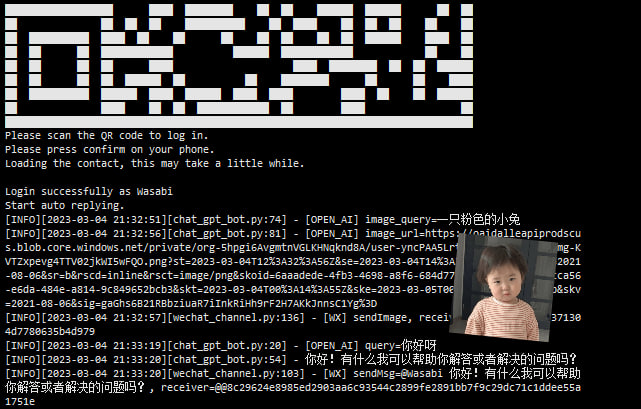
请输入图片描述
最后,因为我没有多余的微信号,
只能拿自己的号做实验,自己跟自己说话。
像个傻子。
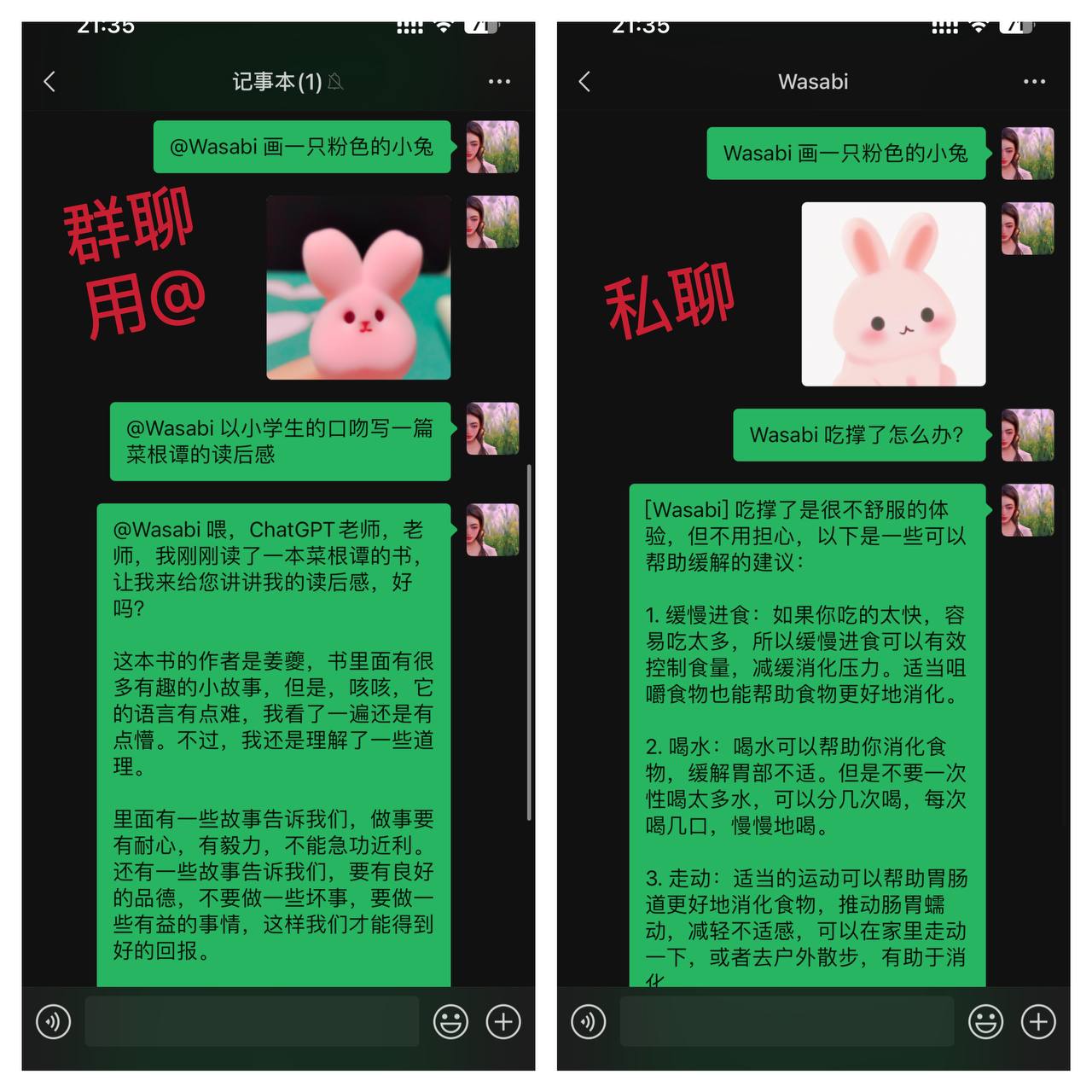
请输入图片描述

赞赏作者

如果觉得我的文章对您有用,请随意赞赏

如何用虚拟机在微信上创建自己Chatgpt机器人