惯性聚合 高效追踪和阅读你感兴趣的博客、新闻、科技资讯
阅读原文 在惯性聚合中打开

推荐订阅源

Cloudbric
Cloudbric
T
Threat Research - Cisco Blogs
Simon Willison's Weblog
AWS News Blog
AWS News Blog
P
Privacy & Cybersecurity Law Blog
H
Help Net Security
云风的 BLOG
云风的 BLOG
G
GRAHAM CLULEY
Spread Privacy
Spread Privacy
Cyber Security Advisories - MS-ISAC
A
Arctic Wolf
Project Zero
Project Zero
Engineering at Meta
Engineering at Meta
P
Privacy International News Feed
Blog — PlanetScale
Blog — PlanetScale
Stack Overflow Blog
Stack Overflow Blog
M
MIT News - Artificial intelligence
The Register - Security
Recorded Future
Recorded Future
cs.AI updates on arXiv.org
C
Cisco Blogs
PCI Perspectives
PCI Perspectives
Recent Announcements
Martin Fowler
Martin Fowler
A
About on SuperTechFans
W
WeLiveSecurity
GbyAI
GbyAI
V
Vulnerabilities – Threatpost
The GitHub Blog
The GitHub Blog
D
Darknet – Hacking Tools, Hacker News & Cyber Security
C
Check Point Blog
Y
Y Combinator Blog
月光博客
月光博客
Scott Helme
Scott Helme
奇客Solidot–传递最新科技情报
奇客Solidot–传递最新科技情报
Google DeepMind News
F
Fortinet All Blogs
U
Unit 42
G
Google Developers Blog
钛媒体:引领未来商业与生活新知
钛媒体:引领未来商业与生活新知
T
Threatpost
Application and Cybersecurity Blog
Google Online Security Blog
Recent Commits to openclaw:main
OSCHINA 社区最新新闻
OSCHINA 社区最新新闻
Cisco Talos Blog
Cisco Talos Blog
博客园 - 三生石上(FineUI控件)
Hugging Face - Blog
Hugging Face - Blog
MongoDB | Blog
MongoDB | Blog
博客园 - 司徒正美

毛俊的博客

Shell中的错误重定向和标准重定向 - 毛俊的博客 离线编译并安装 Python 3.7 - 毛俊的博客 对终身会员软件停止服务的思考总结 - 毛俊的博客 Vue3项目搭建的4种方式 - 毛俊的博客 Kubernetes及其生态介绍和使用 - 毛俊的博客 MPV播放器默认快捷键 - 毛俊的博客 Windows设置操作URI指令 - 毛俊的博客 极简生活可以尝试的实践 - 毛俊的博客 《不持有的生活》读书摘录 - 毛俊的博客 艾宾浩斯遗忘曲线复习计划表 - 毛俊的博客 Google搜索技巧 - 毛俊的博客 GitHub搜索技巧 - 毛俊的博客 运动类影视剧集清单 - 毛俊的博客 常用软件清单 - 毛俊的博客 COCA 20000词根词汇练习 - 毛俊的博客 少吃或不吃的食物 - 毛俊的博客 美军两分钟睡眠法 - 毛俊的博客 健康食物清单 - 毛俊的博客 Git客户端工具GitUi安装及使用 - 毛俊的博客
Markdown导出带大纲目录的Html - 毛俊的博客
毛 俊 · 2024-04-05 · via 毛俊的博客

Typora导出HTML

原生侧边栏导出

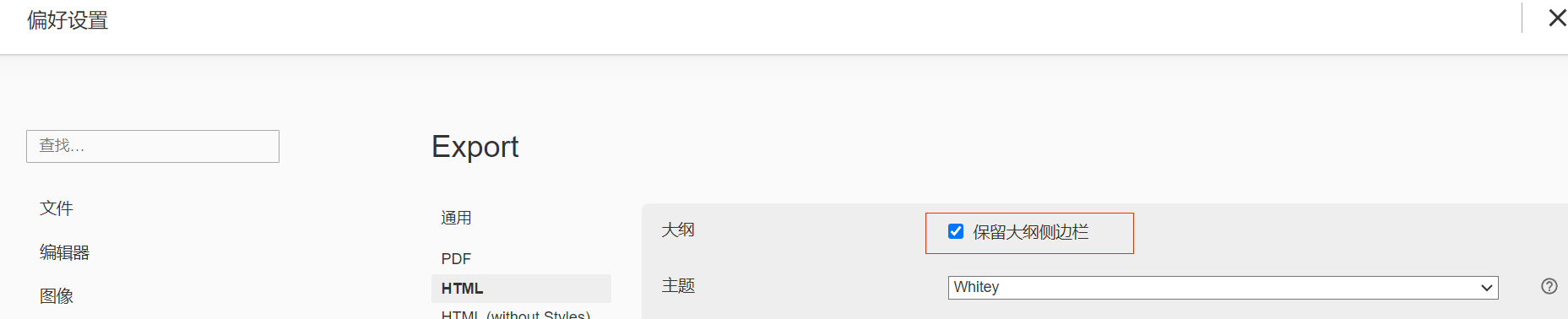
Typora导出HTML是支持导出目录大纲的,导出的时候勾选保留大纲侧边栏

导出保留大纲侧边栏

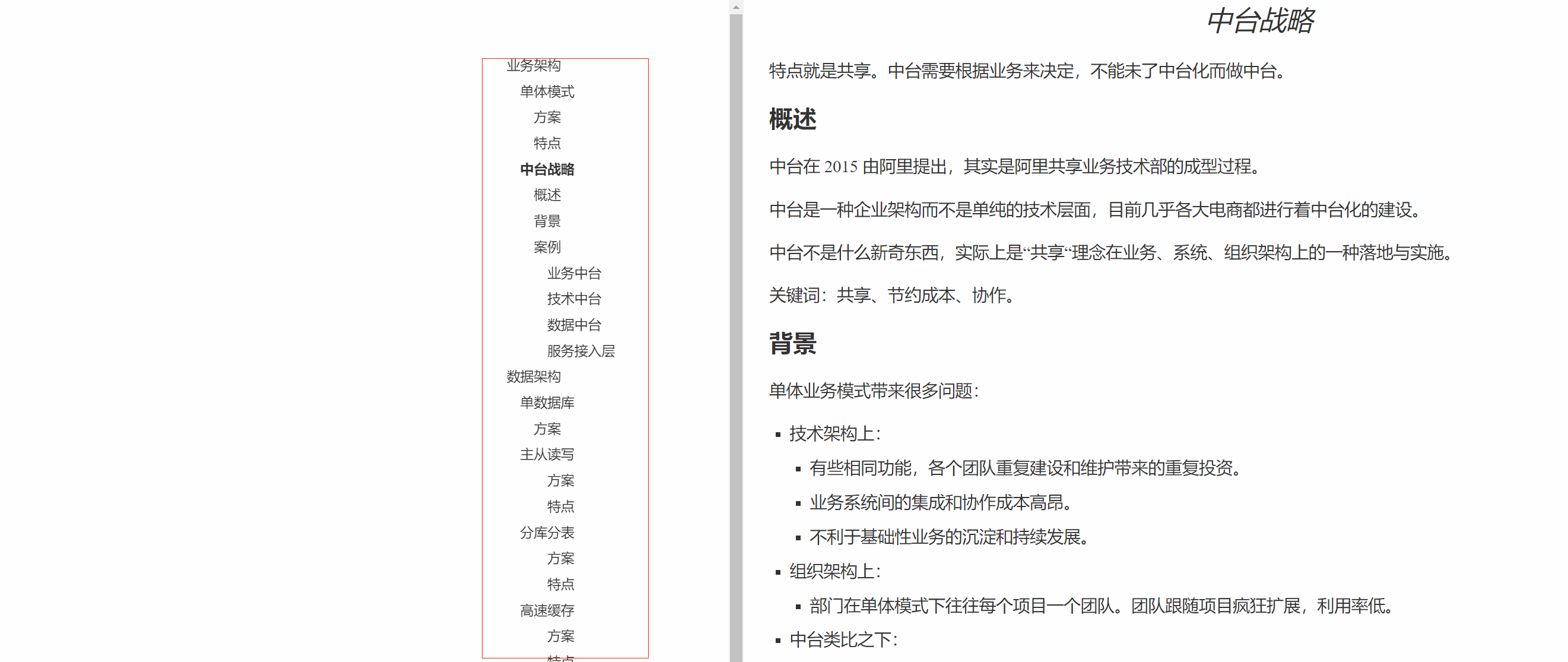
导出后的样式有些美观,侧边栏左侧空隙过大。但是锚点和功能都可以正常使用,是一种快速方便的导出HTML且保留大纲的方式。

默认导出大纲样式

自定义导出样式

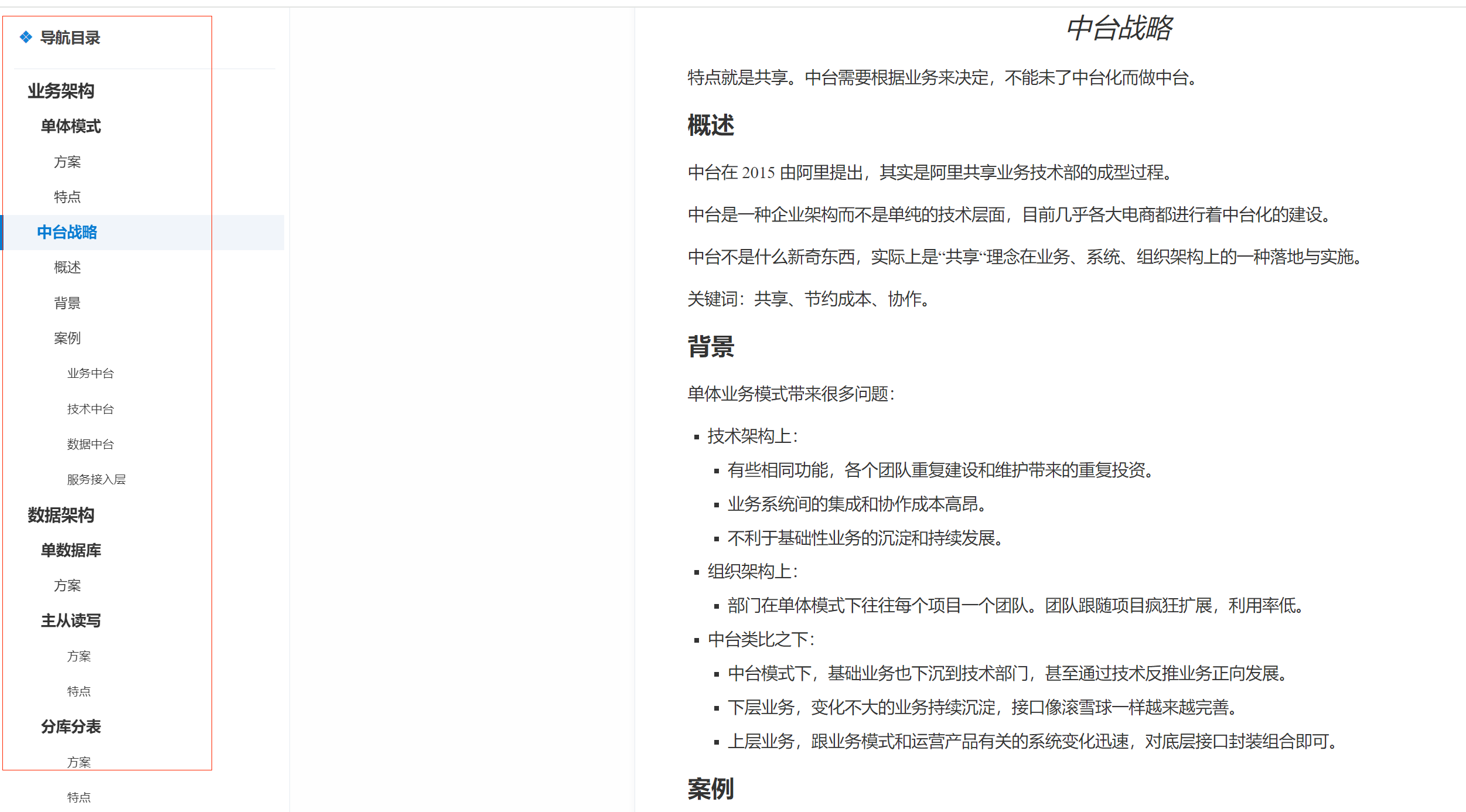
根据通过引入外部样式来自定义修改导出的HTML样式。导出的自定义样式效果如下:

自定义导出大纲样式

配置步骤

  1. 下载jquery-3.3.1.min.js文件到本地文件。

    下载地址

  2. 保存下面的css内容为md2html.js文件。

1
2
3
4
5
6
7
8
9
10
11
12
13
14
15
16
17
18
19
20
21
22
23
24
25
26
27
28
29
30
31
32
33
34
35
36
37
38
39
40
41
42
43
44
45
46
47
48
49
50
51
52
53
54
55
56
57
58
59
60
61
62
63
64
65
66
67
68
69
70
71
72
73
74
75
76
77
78
79
80
81
82
83
84
85
86
87
88
89
90
91
92
93
94
95
96
97
98
99
100
101
102
103
104
105
106
107
108
109
110
111
112
113
114
115
116
117
118
119
120
121
122
123
124
125
126
127
128
129
130
131
132
//是否显示导航栏
var showNavBar = true;
//是否展开导航栏
var expandNavBar = true;

$(document).ready(function(){

var h1s = $("body").find("h1");
var h2s = $("body").find("h2");
var h3s = $("body").find("h3");
var h4s = $("body").find("h4");
var h5s = $("body").find("h5");
var h6s = $("body").find("h6");

var links = document.links;
for (var i = 0; i < links.length; i++) {
if (!links[i].target) {
if (
links[i].hostname !== window.location.hostname ||
/\.(?!html?)([a-z]{0,3}|[a-zt]{0,4})$/.test(links[i].pathname)
) {
links[i].target = '_blank';
}
}
}

var headCounts = [h1s.length, h2s.length, h3s.length, h4s.length, h5s.length, h6s.length];
// 获取所有样式
var vH1Tag = null;
var vH2Tag = null;
var vH3Tag = null;
var vH4Tag = null;
var vH5Tag = null;
var vH6Tag = null;
for(var i = 0; i < headCounts.length; i++){
if(headCounts[i] > 0){
if(vH1Tag == null){
vH1Tag = 'h' + (i + 1);
}else if(vH2Tag == null){
vH2Tag = 'h' + (i + 1);
}else if(vH3Tag == null){
vH3Tag = 'h' + (i + 1);
}else if(vH4Tag == null){
vH4Tag = 'h' + (i + 1);
}else if(vH5Tag == null){
vH5Tag = 'h' + (i + 1);
}else if(vH6Tag == null){
vH6Tag = 'h' + (i + 1);
}
}
}
if(vH1Tag == null){
return;
}

// 导航侧边栏
$("body").prepend('<div class="BlogAnchor">' +

'<p class="html_header">' +
'<span></span>' +
'</p>' +
'<div class="AnchorContent" id="AnchorContent"> </div>' +
'</div>' );

var menuIndex = 0;
$("body").find("h1,h2,h3,h4,h5,h6").each(function(i,item){
var id = '';
var tag = $(item).get(0).tagName.toLowerCase();
var className = '';
if(tag == vH1Tag){
className = 'item_h1';
}else if(tag == vH2Tag){
className = 'item_h2';
}else if(tag == vH3Tag){
className = 'item_h3';
}else if(tag == vH4Tag){
className = 'item_h4';
}else if(tag == vH5Tag){
className = 'item_h5';
}else if(tag == vH6Tag){
className = 'item_h6';
}

//修改 id 生成策略
id = "_" + menuIndex;
menuIndex++;

$(item).attr("id","wow"+id);
$(item).addClass("wow_head");
$("#AnchorContent").css('max-height', ($(window).height() - 80) + 'px');
$("#AnchorContent").append('<li><a class="nav_item '+className+' anchor-link" onclick="return false;" href="#" link="#wow'+id+'">'+""+""+$(this).text()+'</a></li>');
});

$(".anchor-link").click(function(){
$("html,body").animate({scrollTop: $($(this).attr("link")).offset().top}, 500);
});

var headerNavs = $(".BlogAnchor li .nav_item");
var headerTops = [];
$(".wow_head").each(function(i, n){
headerTops.push($(n).offset().top);
});
$(window).scroll(function(){
var scrollTop = $(window).scrollTop();
$.each(headerTops, function(i, n){
var distance = n - scrollTop;
if(distance >= 0){
$(".BlogAnchor li .nav_item.current").removeClass('current');
$(headerNavs[i]).addClass('current');
return false;
}
});
});

if(!showNavBar){
$('.BlogAnchor').hide();
}
if(!expandNavBar){
$("#AnchorContent").hide();
}
});

$(window).resize(function() {
$("#AnchorContent").css('max-height', ($(window).height() - 80) + 'px');
});

//插入title的ico图标
var ico_link = "<link rel=icon sizes=32x32 href=favicon.ico>";
$("head").prepend(ico_link);

  1. 保存下面的css内容为md2html.css文件。
1
2
3
4
5
6
7
8
9
10
11
12
13
14
15
16
17
18
19
20
21
22
23
24
25
26
27
28
29
30
31
32
33
34
35
36
37
38
39
40
41
42
43
44
45
46
47
48
49
50
51
52
53
54
55
56
57
58
59
60
61
62
63
64
65
66
67
68
69
70
71
72
73
74
75
76
77
78
79
80
81
82
83
84
85
86
87
88
89
90
91
92
93
94
95
96
97
98
99
100
101
102
103
104
105
106
107
108
109
110
111
112
113
114
115
116
117
118
119
120
121
122
123
124
125
126
127
128
129
130
131
132
133
134
135
136
137
138
139
140
141
142
143
144
145
146
147
148
149
150
151
152
153
154
155
156
157
158
159
160
161
162
163
164
165
166
167
168
169
170
171
172
173
174
175
176
177
178
179
180
181
182
183
184
185
/*markdown_box*/
html{background: #F4F6F9; font-family:"Microsoft YaHei", "微软雅黑", Arial; font-weight: 400}
body{background:#F4F6F9;font-size: 16px; color: #515254; line-height: 188%; margin: 0 !important; padding: 0 !important;}
.html_header{display:block; height: 60px; line-height: 46px; border-bottom: 1px solid #E6ECF1; text-align: left !important;}
.html_header span::after{content: "导航目录"; font-size: 17px; font-weight: bold;}
.html_header span::before{content: "❖"; font-size: 19px; font-weight: bold; margin:0 8px 0 5px; color: #1284d9}
blockquote{border-radius:0 4px 4px 0;color:#708090;border-left:3px solid #1284d9; background:rgba(238,242,249,.7); padding:8px 16px; font-size: 15px;}
code{padding: 2px 4px 1px; font-weight: bold; margin:0 3px; border:1px solid rgba(255,130,130,.3);background:rgba(255,130,120,.05); color:#F66; font-family:arial;}
a{color: #1284d9}
a:visited{color:#1284d9}
a:hover{text-decoration: none; color: #087cd2}

h2{margin: 40px 0 20px; font-size: 36px; font-weight: 400}
h3{margin-top: 40px; font-size: 30px; font-weight: 400}
img{border-radius:5px;margin:30px 0 46px !important;width:100%;max-width: 1100px; opacity: .6; transition: opacity .3s}
img:hover{opacity: 1}

#write{margin:50px 50px 50px 260px; padding: 20px 60px; max-width: unset; background: #fff;border: 1px solid #E6ECF1; box-shadow: 0 2px 8px rgba(116, 129, 141, .08); border-radius: 4px}
.BlogAnchor {width: 330px !important}

@media screen and (max-width: 1620px) {
#write{margin:40px 40px 40px 250px; padding: 20px 40px;}
.BlogAnchor {width: 330px !important}
}

@media screen and (max-width: 1370px) {
#write{margin:30px 30px 30px 230px; padding: 20px 40px;}
.BlogAnchor {width: 200px !important}
}

@media screen and (max-width: 1220px) {
#write{margin:20px 20px 20px 220px; padding: 20px 40px;}
}

@media screen and (max-width: 820px) {
#write{margin:20px 20px 20px 200px; padding: 20px 20px; font-size: 15px; line-height: 170%}
.BlogAnchor {width: 180px !important}
.html_header span::before{ margin-left: 0}
.html_header span::after{ font-size: 15px;}
h2{ font-size: 30px; }
h3{ font-size: 24px; }
}

@media screen and (max-width: 640px) {
#write{margin:10px; padding: 16px; font-size: 14px; line-height: 160%}
.BlogAnchor {display: none;}
h2{ font-size: 28px; }
h3{ font-size: 22px; }
}

/*scroll_style*/
.AnchorContent {
overflow-y: auto !important;
overflow-x: hidden !important;
margin-right:0 !important
}

.AnchorContent::-webkit-scrollbar {
width: 6px;
height: 10px;
background-color: rgba(0,0,0,0) !important;
position: absolute;
right: 10px
}
.AnchorContent::-webkit-scrollbar-track {
-webkit-box-shadow: none;
border-radius: 0;
background-color: rgba(0,0,0,0) !important
}
.AnchorContent::-webkit-scrollbar-thumb {
border-radius: 0px;
-webkit-box-shadow: none;
background-color: none;
opacity: 0 !important;
transition: all .3s
}

.AnchorContent:hover::-webkit-scrollbar-thumb {
border-radius: 0px;
-webkit-box-shadow: none;
background-color: #d4d6d8;
border-right:2px solid #fff;
opacity:1;
}

.AnchorContent::-webkit-scrollbar-thumb:hover {
background-color: #c0c2c4 !important
}

/*导航*/
.BlogAnchor {
background: #fff;
padding: 10px 0 ;
line-height: 180%;
position: fixed;
height: 100%;
width: 200px;
left: 0;
top: 0;
border-right: 1px solid #E6ECF1;

}
.BlogAnchor p {
font-size: 20px;
color: #444;
margin: 0 16px;
text-align: center;
}
.BlogAnchor .AnchorContent {
padding: 5px 0px;
overflow: auto;
}
.BlogAnchor li{
text-indent: 1.5rem;
font-size: 14px;
list-style: none;
padding: 0 0px;
}
.BlogAnchor li .nav_item{
padding:3px 16px;

}
.BlogAnchor li .item_h1{
margin-left: 0rem;
padding-left:3px;
font-size: 1rem;
font-weight: bold;
}
.BlogAnchor li .item_h2{
margin-left: 0;
font-size: 0.9rem;
padding-left: 18px;
font-weight: bold;
}
.BlogAnchor li .item_h3{
margin-left: 0;
font-size: 0.8rem;
padding-left: 33px;
}
.BlogAnchor li .item_h4{
margin-left: 0;
font-size: 0.7rem;
padding-left: 48px;
}
.BlogAnchor li .item_h5{
margin-left: 0;
font-size: 0.7rem;
padding-left: 63px;
}
.BlogAnchor li .item_h6{
margin-left: 0;
font-size: 0.7rem;
padding-left: 78px;
}
.BlogAnchor li .nav_item.current{
color: #087cd2;
background-color: rgba(238,242,249,.8);
border-left:4px solid #087cd2;
text-indent: 20px;
font-weight: bold;

}
#AnchorContentToggle {
font-size: 13px;
font-weight: normal;
color: #FFF;
display: inline-block;
line-height: 20px;
background: rgb(7,196,189);
font-style: normal;
padding: 1px 8px;
}
.BlogAnchor a:hover {
color: #087cd2 ;
background:rgba(238,242,249,.5);
}
.BlogAnchor a {
text-decoration: none;
color: #333;
display: block;
border-radius: 0px;
}

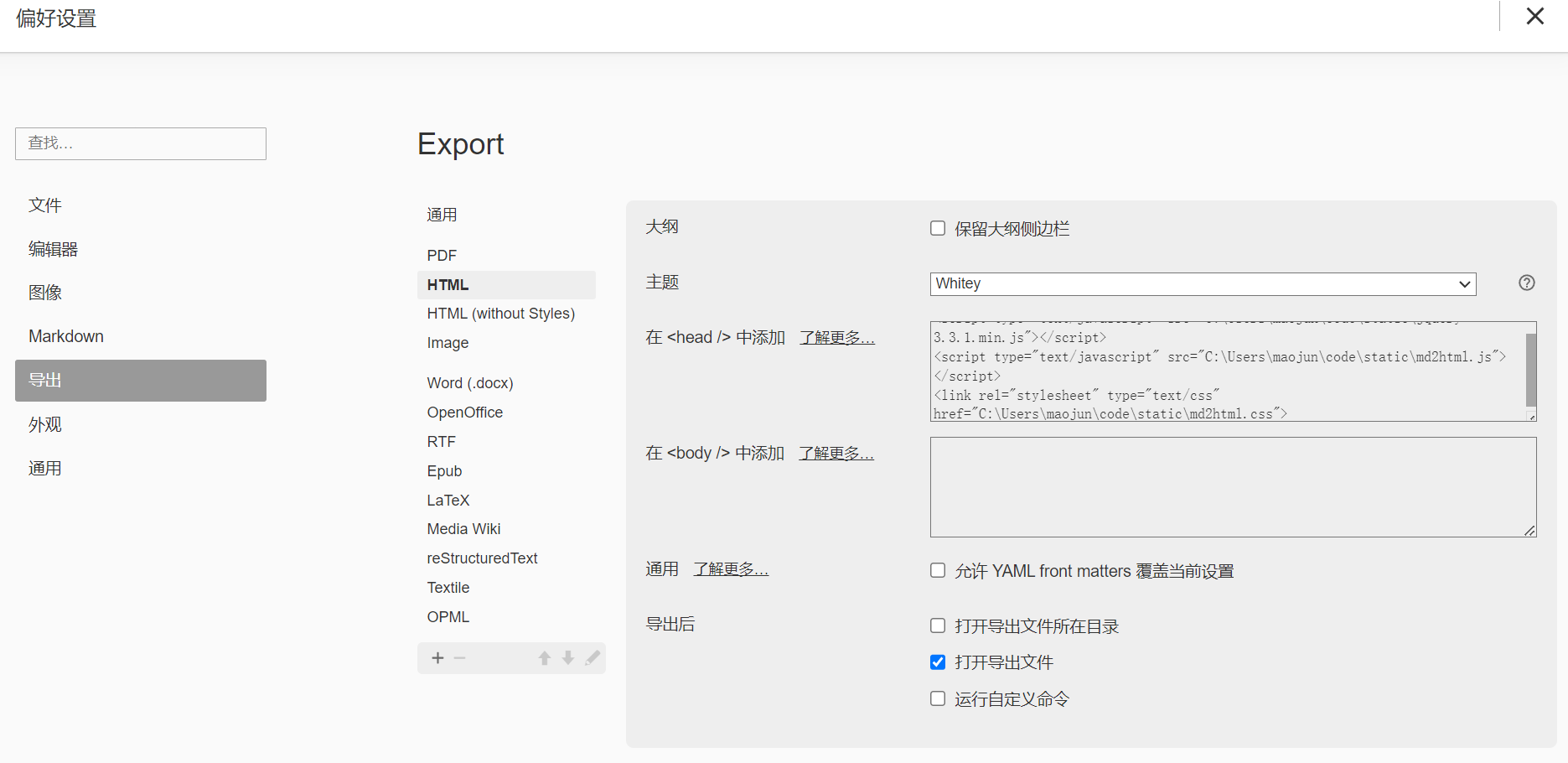
  1. 设置Typora导出的偏好,将下载和保存的文件配置到导出HTML的header位置。
1
2
3
<script type="text/javascript" src="C:\Users\maojun\code\static\jquery-3.3.1.min.js"></script>
<script type="text/javascript" src="C:\Users\maojun\code\static\md2html.js"></script>
<link rel="stylesheet" type="text/css" href="C:\Users\maojun\code\static\md2html.css">

导出HTML添加样式

注意,不要勾选保留大纲侧边栏,否则会生成2个侧边栏。

(完)

参考