
惯性聚合 高效追踪和阅读你感兴趣的博客、新闻、科技资讯
阅读原文 在惯性聚合中打开

推荐订阅源

Cloudbric
Cloudbric
T
Threat Research - Cisco Blogs
Simon Willison's Weblog
AWS News Blog
AWS News Blog
P
Privacy & Cybersecurity Law Blog
H
Help Net Security
云风的 BLOG
云风的 BLOG
G
GRAHAM CLULEY
Spread Privacy
Spread Privacy
Cyber Security Advisories - MS-ISAC
A
Arctic Wolf
Project Zero
Project Zero
Engineering at Meta
Engineering at Meta
P
Privacy International News Feed
Blog — PlanetScale
Blog — PlanetScale
Stack Overflow Blog
Stack Overflow Blog
M
MIT News - Artificial intelligence
The Register - Security
Recorded Future
Recorded Future
cs.AI updates on arXiv.org
C
Cisco Blogs
PCI Perspectives
PCI Perspectives
Recent Announcements
Martin Fowler
Martin Fowler
A
About on SuperTechFans
W
WeLiveSecurity
GbyAI
GbyAI
V
Vulnerabilities – Threatpost
The GitHub Blog
The GitHub Blog
D
Darknet – Hacking Tools, Hacker News & Cyber Security
C
Check Point Blog
Y
Y Combinator Blog
月光博客
月光博客
Scott Helme
Scott Helme
奇客Solidot–传递最新科技情报
奇客Solidot–传递最新科技情报
Google DeepMind News
F
Fortinet All Blogs
U
Unit 42
G
Google Developers Blog
钛媒体:引领未来商业与生活新知
钛媒体:引领未来商业与生活新知
T
Threatpost
Application and Cybersecurity Blog
Google Online Security Blog
Recent Commits to openclaw:main
OSCHINA 社区最新新闻
OSCHINA 社区最新新闻
Cisco Talos Blog
Cisco Talos Blog
博客园 - 三生石上(FineUI控件)
Hugging Face - Blog
Hugging Face - Blog
MongoDB | Blog
MongoDB | Blog
博客园 - 司徒正美

Xiaoxia[PG]

nginx的proxy_pass使用https(SSL加密) | Xiaoxia[PG] Python里使用zbar识别二维码 | Xiaoxia[PG] CentOS7上MySQL返回Too many connections | Xiaoxia[PG] 发现一个不需要打密码的sudo方法 | Xiaoxia[PG] 继续玩路由器,交叉编译Python 3.3,压成1.5MB | Xiaoxia[PG] 无聊开始玩路由器,入门Tomato固件 | Xiaoxia[PG] Python与简单网络爬虫的编写 | Xiaoxia[PG] 2012年的中秋节 | Xiaoxia[PG] 悬疑 微电影《生日快乐》/ Once Again | Xiaoxia[PG]
Windows上最小的Python运行环境,700KB | Xiaoxia[PG]
作者是Xiaoxia。 · 2013-09-25 · via Xiaoxia[PG]

之前还没有编译过Windows上的Python,打包发布一般使用py2exe和pyinstaller,生成的文件至少有3MB。而且Python只有VS的Project文件,也就是说,如果自己要用GCC来编译,就需要自己编写或者修改Makefile了。我是在Debian上安装了Mingw32之后,修改默认的Makefile来让它支持编译成Windows版本,而且源代码有大幅度改动,所以这里就不把过程写出来了,我也忘了做了多少修改。编译方法可以参考我的上一篇博文。建议有VS的同学还是选择VS编译比较方便,不用改动那么多。
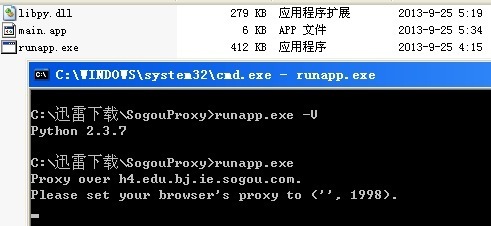
python23

图是我编译好的Python环境,运行以前写的Sogou代理脚本。这次我使用的是Python2.3这个版本,编译出来的文件用UPX压缩过之后,体积还是小的很可观。对比如下:

Python2.3(Windows):   不带库 412KB,带基本标准库 695KB
Python2.6(Linux):   不带库 800KB,带基本标准库 1.3MB
Python3.3(Linux):不带库 1MB,带基本标准库 2.1MB

这次Windows的Python2.3版本,编译了下面的内建模块:

builtin23

标准库文件都打包进了libpy.dll,这不是一个动态链接库文件,而是一个zip压缩包,里面有标准库编译好的pyc。
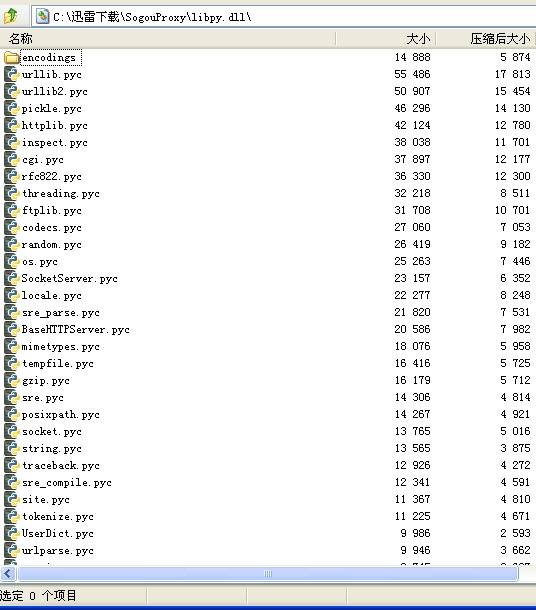
standard23

编译好的Python.exe也改名成为runapp.exe了。而且默认参数运行的不是一个可交互的shell,如果要交互,可以随意加一个参数,例如-v之类的。

如果默认没有参数的话,会调用当前目录下一个叫main.app的pyc文件(编译好的py)。

做的这些修改,都是为了方便把Python运行环境部署和嵌入到其他应用之中。需要注意的是,毕竟不是一个完整的环境,所以某些功能例如SSL以及emails的标准库,都不在其中。我喜欢的urllib和SimpleHTTPServer还是有的,如果没有,可以自己打包进libpy.dll 😀

--2013年9月26日更新--

附 SogouProxy便携版:

下载 SogouProxy  (Python2.3运行环境,695KB)