惯性聚合 高效追踪和阅读你感兴趣的博客、新闻、科技资讯
阅读原文 在惯性聚合中打开

推荐订阅源

Cloudbric
Cloudbric
T
Threat Research - Cisco Blogs
Simon Willison's Weblog
AWS News Blog
AWS News Blog
P
Privacy & Cybersecurity Law Blog
H
Help Net Security
云风的 BLOG
云风的 BLOG
G
GRAHAM CLULEY
Spread Privacy
Spread Privacy
Cyber Security Advisories - MS-ISAC
A
Arctic Wolf
Project Zero
Project Zero
Engineering at Meta
Engineering at Meta
P
Privacy International News Feed
Blog — PlanetScale
Blog — PlanetScale
Stack Overflow Blog
Stack Overflow Blog
M
MIT News - Artificial intelligence
The Register - Security
Recorded Future
Recorded Future
cs.AI updates on arXiv.org
C
Cisco Blogs
PCI Perspectives
PCI Perspectives
Recent Announcements
Martin Fowler
Martin Fowler
A
About on SuperTechFans
W
WeLiveSecurity
GbyAI
GbyAI
V
Vulnerabilities – Threatpost
The GitHub Blog
The GitHub Blog
D
Darknet – Hacking Tools, Hacker News & Cyber Security
C
Check Point Blog
Y
Y Combinator Blog
月光博客
月光博客
Scott Helme
Scott Helme
奇客Solidot–传递最新科技情报
奇客Solidot–传递最新科技情报
Google DeepMind News
F
Fortinet All Blogs
U
Unit 42
G
Google Developers Blog
钛媒体:引领未来商业与生活新知
钛媒体:引领未来商业与生活新知
T
Threatpost
Application and Cybersecurity Blog
Google Online Security Blog
Recent Commits to openclaw:main
OSCHINA 社区最新新闻
OSCHINA 社区最新新闻
Cisco Talos Blog
Cisco Talos Blog
博客园 - 三生石上(FineUI控件)
Hugging Face - Blog
Hugging Face - Blog
MongoDB | Blog
MongoDB | Blog
博客园 - 司徒正美

蚊帐

用树莓派给 iMac 加上 Face ID 链接 小米 YU7 三个月驾乘体验 波分单线复用笑传之Custom Combo Broadband 新柏石KNX协议智能家居网关接入 HomeAssistant 双方无公网状态下 RouterOS 基于 WireGuard 的组网方案 广东联通 IPTV 鉴权&抓源脚本(以及碎碎念) 广东电信 IPTV 自助鉴权 + 获取播放列表 为什么我们要拒绝 PON 方案的 FTTR 把 Windows 11/10 不完全转换为 Windows Server 2022 高通410随身WiFi的进阶USB网络共享和IPv6配置 ThinkBook 14+ 锐龙版上手体验 ArchLinux + KDE 一周使用小结 修复 Edge/Chrome 在 GNOME 分数缩放下的窗口位置问题 虚拟显示器终极解决方案 IndirectDisplay 基于PVE的新网络架构 - 踩坑回顾 蚊子
轻松抓取并解析广东电信 IPTV 全部直播源
蚊子 · 2021-04-12 · via 蚊帐

2023年6月25日更新:广东电信似乎废弃了 ChannelURL 属性,这个属性下的 RTSP 地址经测试无法播放。需改用 ChannelSDP 属性,后文代码已经同步更新,请放心使用。

老爸说想在卧室看电视,网上的电视直播软件大多都不怎么稳定,还有广告。而 GitHub 上的 IPTV 项目里的源清晰度也都不咋地。自己动手,丰衣足食,自己从机顶盒里抓吧!

首先我们需要抓取机顶盒从开机到进入电视播放的所有数据包,怎么抓随你,网上有很多,在这里我就提供一个非常简单的思路。

  • 保证你的机顶盒和电脑在同一个局域网
  • 电脑打开 网络连接 - 属性 - 共享,开启 “允许其他网络用户通过此计算机的 Internet 连接来连接”
  • 机顶盒 - 设置 - 网络 - 静态 IP - 网关 设置为你的电脑 IP
  • 打开人见人爱的 Wireshark

当然你想用路由器抓包之类的什么方法都可以,总之抓到包就行。

抓到完整过程的包之后,找到 POST /EPG/jsp/getchannellistHWCTC.jsp 这个请求
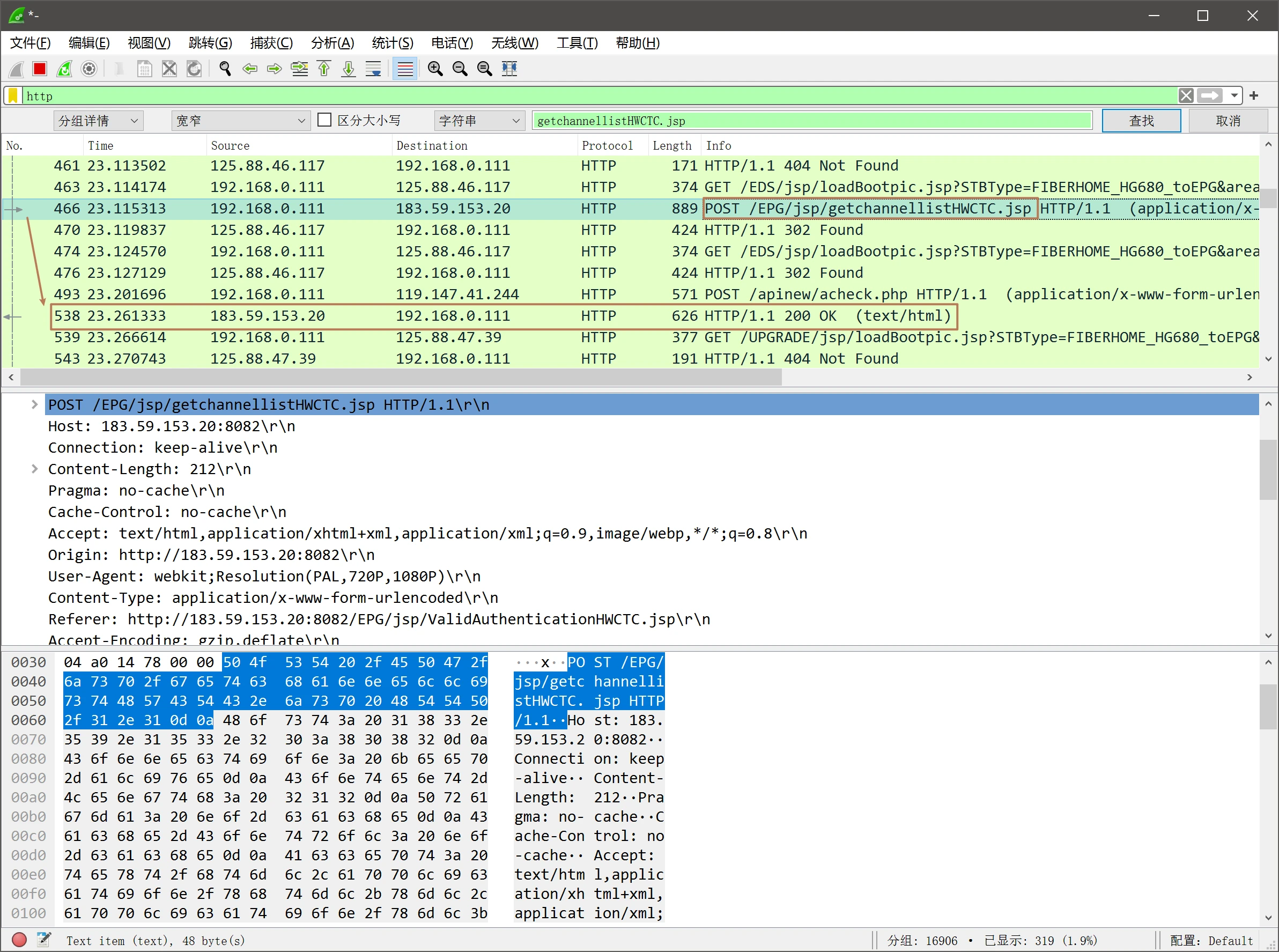
然后跟着下面找到返回包,在 Line-based text data 上右键,导出分组字节流。导出文件名就叫 channel.html
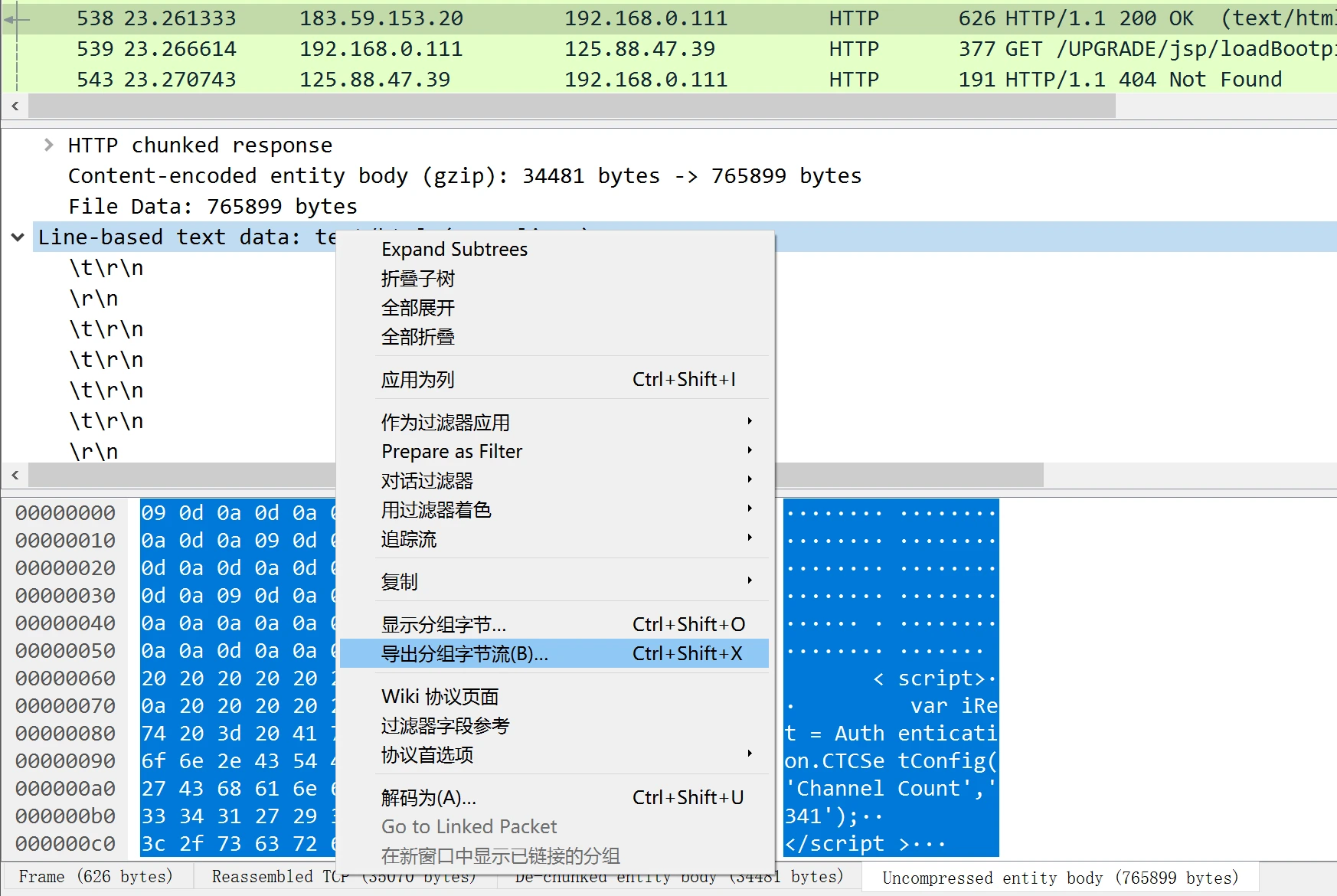
用记事本或者什么编辑软件打开 channel.html ,在开头加上以下代码。

<script>
  const goServicesEntry=function(){};
  var Authentication={};
  var m3u8Channels="";
  Authentication['CTCSetConfig']=function(){
  const regex = /,?(.+?)="(.*?)"/gm;
  if(arguments[0]=='Channel'){
  var info={};
  while ((m = regex.exec(arguments[1])) !== null) {
      if (m.index === regex.lastIndex) {
          regex.lastIndex++;
      }
  if(m[1]=="ChannelName"){
  m3u8Channels+="#EXTINF:-1 tvg-name=\"" + m[2] + "\"," + m[2] + "\n"
  }
  if(m[1]=="ChannelSDP"){
  m3u8Channels+=m[2]+"\n"
  }
  
  }
  }
  }
  setTimeout(function(){
  var a = window.document.createElement('a');
  a.href = window.URL.createObjectURL(new Blob([m3u8Channels], {type: 'application/x-mpegURL'}));
  a.download = 'IPTV.m3u8';
  document.body.appendChild(a);
  a.click();
  document.body.removeChild(a);
  },1000);
  </script>

然后拉到文件最下面找到 goServicesEntry(),把整个函数(如下图中的1178 - 1181行)删掉
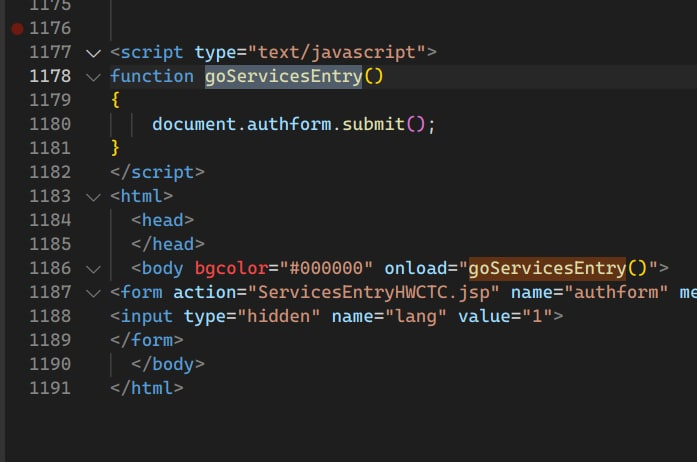
image-20220628213725092

保存,然后用浏览器打开就会提示你下载解析好的 m3u8 了。这些 RTSP 或者 HLS 播放地址里面都带有你机顶盒的用户鉴权信息,所以建议不要随便分享给别人,自己抓自己用就好。

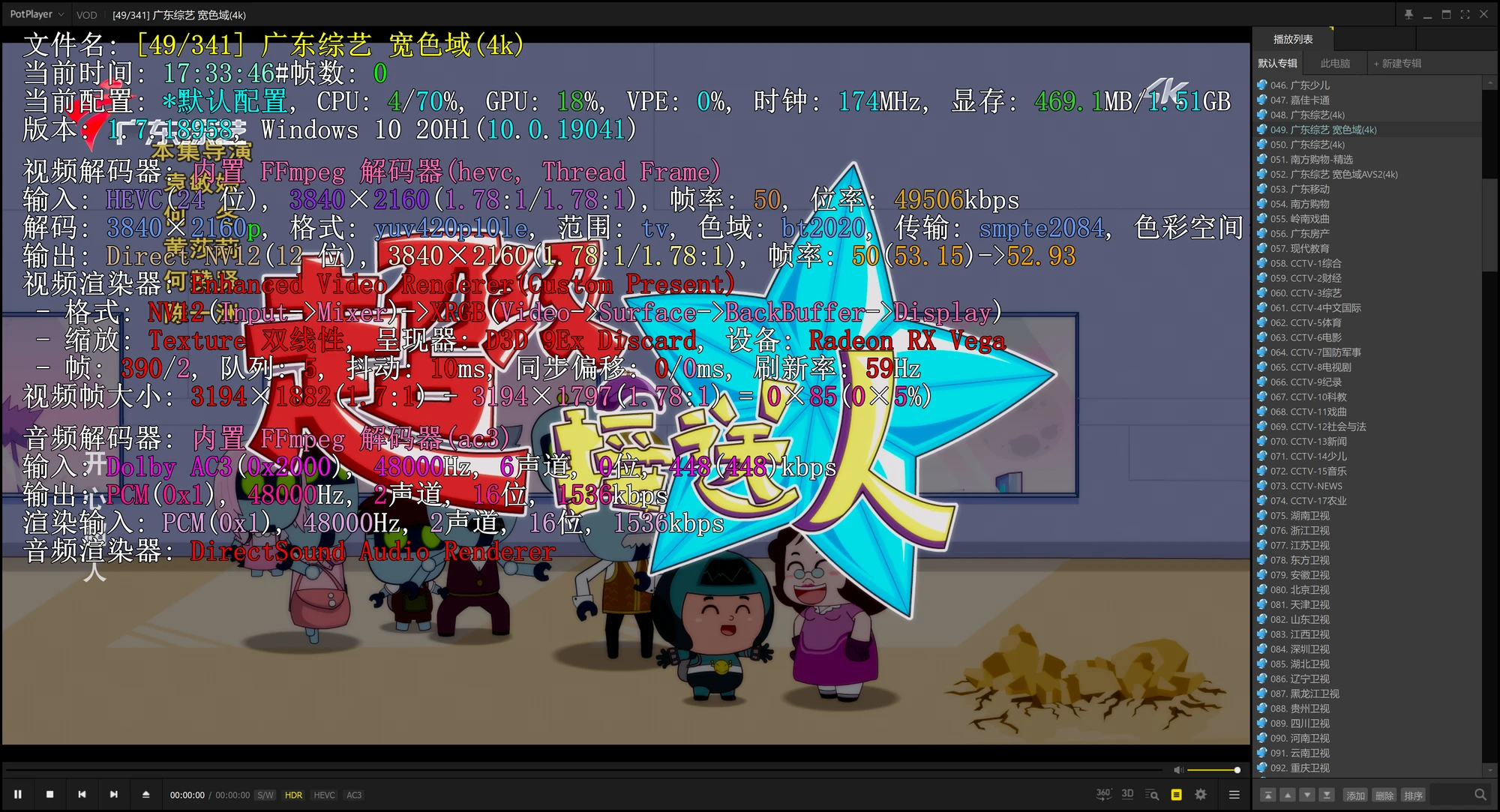
最后,使用 PotPlayer 即可正常播放,其中有个别台看不了属于正常现象,因为它们用的是AVS+和AVS2编码(比如CCTV5超清、广东综艺宽色域AVS2)。关于这一点,我做过测试:gitee 上有人编译的支持 AVS2 的 FFMPEG 和 VLC 也依然不能正确转码、播放这些台。如果有人测试成功了,欢迎留言告诉我你是怎么在电脑上正常播放的。目前来看,只有使用国产SoC的电视盒子才能正常硬解观看这些频道。

在安卓上可以用 DIYP 播放器看,抓出来之后加个 EGP 甚至能支持回看,完美替代电信的机顶盒。

整个过程得到了子安大佬的大力支持和帮助,特别感谢。

一些补充:现在广东电信的IPTV需要对网段做分流走 @iptv.gd 的专网才能看了,同时还要注意抓到的RTSP地址可能还会进行二次跳转,建议使用 ffprobe 看一下实际地址段是多少再写规则分流。