


大一入学的时候因为寝室电压不稳定导致玩PS4的时候显示器时常黑屏,再加上担心哪天忘了交电费玩游戏玩到一半断电导致存档丢失,所以买了个UPS放寝室。
今年因为去医院见习,没什么时间打机,所以就把UPS丢在家里吃灰。直到国庆前几天,从不停电的家竟然停电了。担心断电对系统和硬盘造成损害,所以国庆的时候就把吃灰了几个月的UPS搬了出来,接到Homelab上。
我的UPS是APC家的BK650M2-CH,所以用apcupsd进行管理。
sudo apt install apcupsd
插上RJ45网口到USB-A的线
lsusb
查看USB设备连接情况
Bus 001 Device 009: ID 051d:0002 American Power Conversion Uninterruptible Power Supply
因为不是使用 systemd 启动 apcupsd ,所以需要将ISCONFIGURED修改为yes
vim /etc/default/apcupsd
先备份
cp /etc/apcupsd/apcupsd.conf{,.backup}
vim /etc/apcupsd/apcupsd.conf
修改为
#
UPSTYPE usb
DEVICE
DEVICE留空,不然会出现STATUS:COMMLOST的错误
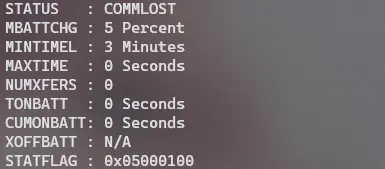
查看运行状况
apcaccess
vim /etc/apcupsd/apcupsd.conf
#
# Note: BATTERYLEVEL, MINUTES, and TIMEOUT work in conjunction, so
# the first that occurs will cause the initation of a shutdown.
#

# If during a power failure, the remaining battery percentage
# (as reported by the UPS) is below or equal to BATTERYLEVEL,
# apcupsd will initiate a system shutdown.
BATTERYLEVEL 40

# If during a power failure, the remaining runtime in minutes
# (as calculated internally by the UPS) is below or equal to MINUTES,
# apcupsd, will initiate a system shutdown.
MINUTES 20

# If during a power failure, the UPS has run on batteries for TIMEOUT
# many seconds or longer, apcupsd will initiate a system shutdown.
# A value of 0 disables this timer.
#
#  Note, if you have a Smart UPS, you will most likely want to disable
#    this timer by setting it to zero. That way, you UPS will continue
#    on batteries until either the % charge remaing drops to or below BATTERYLEVEL,
#    or the remaining battery runtime drops to or below MINUTES.  Of course,
#    if you are testing, setting this to 60 causes a quick system shutdown
#    if you pull the power plug.
#  If you have an older dumb UPS, you will want to set this to less than
#    the time you know you can run on batteries.
TIMEOUT 0
一共三个参数,分别是
| 名称 | 注释 | 单位 |
|---|---|---|
| BATTERYLEVEL | 当UPS电池电量低于 | 百分比 |
| MINUTES | 电池剩余可支持时间 | 分钟 |
| TIMEOUT | 断电时间 | 分钟 |
/etc/init.d/apcupsd enable
/etc/init.d/apcupsd start
拔掉电源
status从变成了ONBATT
Broadcast message from root@homelab (somewhere) (Fri Sep 29 12:10:57 2023):

Power failure on UPS homelab. Running on batteries.

---
触发关机事件
---

Broadcast message from root@homelab (somewhere) (Fri Sep 29 12:52:54 2023):

Remaining battery charge below limit on UPS homelab. Doing shutdown.


Broadcast message from root@homelab (somewhere) (Fri Sep 29 12:52:54 2023):

UPS homelab initiated Shutdown Sequence

Connection to 192.168.1.*** closed by remote host.
Connection to 192.168.1.*** closed.
测试了几次发现一个严重的问题:
触发关机事件后,主机是正常关机了,但同时UPS关机,不再给其他设备供电。
因为Homelab用的是PN41,内置只有一个nvme和一个2.5寸硬盘位,所以同时外接了一个硬盘柜。UPS断电的时候主机关机,但外接的硬盘还在转,所以断电就能听到一声让人毛骨悚然的“吱~”。
希望主机能够自己关机但不停止UPS对其他设备的供电,所以需要修改默认的关机指令。
先创建一个另外的关机脚本
vim powerfailure_shutdown.sh
# 等待30秒后关机
sleep 30
sudo shutdown -h now
然后修改断电关机指令
cp /etc/apcupsd/apccontrol{,.backup}
vim /etc/apcupsd/apccontrol
将
doshutdown)
    echo "UPS ${2} initiated Shutdown Sequence" | ${WALL}
    #${SHUTDOWN} -h now "apcupsd UPS ${2} initiated shutdown"
    ;;
修改成
doshutdown)
    echo "UPS ${2} initiated Shutdown Sequence" | ${WALL}
    /path/to/powerfailure_shutdown.sh &  # 脚本路径
;;
再次拔掉电源测试,主机关机之后UPS还在持续给硬盘柜断电,让硬盘有足够的停转时间。
参考文章
APCUPSD User Manual
Apcupsd on Debian stretch 9 no connection to UPS?
此内容由惯性聚合(RSS阅读器)自动聚合整理,仅供阅读参考。 原文来自 — 版权归原作者所有。