


Vue 是一种流行的 JavaScript 框架,用于构建交互式的网页界面。它易于学习、多功能,并拥有一个支持性强的社区。
使用 Vue 开发单页面应用非常方便。
然而,在父组件和子组件之间传递值的场景中,有时候可能会遇到一些挑战。
还不清楚?想象一下这种情景:你创建了一个按钮,希望它可以控制一个 <p></p> 元素的内容,以满足特定的开发需求。
这时,就该将不同的值传递给 ChildComponent,来改变属性或触发事件了。
- 为父组件创建一个新的 Vue 组件文件(例如
ParentComponent.vue)。 - 在组件的模板中,定义父组件的内容并包含子组件。
<template>
    <div class="FatherBox">
        <ChildComponent />
        <button></button>
    </div>
</template>- 通过添加必要的导入语句导入子组件。
<script lang="ts">
import ChildComponent from './ChildComponent.vue';
</script>- 在父组件的 components 属性中注册子组件。
<script lang="ts">
export default {
  components: {
    ChildComponent,
    },
}
</script>- 在父组件的脚本部分中,定义一个数据属性来存储将传递给子组件的值。
<script lang="ts">
export default {
  data() {
    return {

    };
  },
}
</script>- 给数据属性赋初始值。这将是最初传递给子组件的值。
<script lang="ts">
export default {
  data() {
    return {
      message: 'Hello from the parent component!', // Value to pass to child component
    };
  },
}
</script>- 在父组件的模板中,添加子组件并使用冒号(:)绑定将数据属性作为 prop 传递给子组件。
<template>
    <div class="FatherBox">
        <ChildComponent :message="message" />
    </div>
</template>- 在子组件中,prop 的名称应与在父组件中传递 prop 时选择的名称相匹配。
<script lang="ts">
import ChildComponent from './ChildComponent.vue';

export default {
    components: {
        ChildComponent,
    },
    data() {
        return {
            message: 'Hello from the parent component!', // Value to pass to child component
        };
    },
    methods: {
      changeMessage() {
            this.message = 'New message from parent!';
        },
    }
};
</script>-
为子组件创建一个新的 Vue 组件文件(例如,
ChildComponent.vue)。 -
在子组件的模板中,定义子组件的内容。这将包括呈现从组件传递的 prop 值。
<template>
    <div>
        <p>{{ message }}</p>
    </div>
</template>- 在子组件的脚本部分中,定义用于接收父组件发送的数据的 prop。
<script lang="ts">
export default {
    props: {
        message: {

        },
    },
};
</script>- 为了确保数据的完整性,可以指定 prop 的类型(例如
String、Number等)。如果必须传递该 prop,则还可以设置required: true。
message: {
  type: String,
  required: true,
},- 在子组件的脚本中,定义一个方法来发出事件,与父组件进行通信。
methods: {
  changeMessage() {
    const newMessage = 'New message from child!';

  },
},- 在该方法内部,使用
this.emit('事件名称',数据)来发出事件。选择一个合适的事件名称,并将任何相关数据递给父组件。
methods: {
  changeMessage() {
    const newMessage = 'New message from child!';
    this.$emit('update-message', newMessage);
  },
},- 在父组件的脚本中,定义一个方法来处理子组件发出的事件。
updateMessage(newMessage: any) {

},- 在父组件的模板中,通过使用
@event-name="methodName"为子组件实例添加事件监听器。
<template>
<ChildComponent :message="message" @update-message="updateMessage" />
</template>- 在该方法中,将发出的数据作为参数接收,并相应地更新父件的数据。
updateMessage(newMessage: any) {
  this.message = newMessage;
},
父组件:
<template>
    <div class="FatherBox">
        <ChildComponent :message="message" @update-message="updateMessage" />
        <button @click="changeMessage">Change Message By ParentComponent</button>
    </div>
</template>

<script lang="ts">
import ChildComponent from './ChildComponent.vue';

export default {
    components: {
        ChildComponent,
    },
    data() {
        return {
            message: 'Hello from the parent component!', // Value to pass to child component
        };
    },
    methods: {
        updateMessage(newMessage: any) {
            this.message = newMessage;
        },
        changeMessage() {
            this.message = 'New message from parent!';
        },
    },
};
</script>

<style scoped>
.FatherBox {
    background-color: #f1f1f1;
    border-radius: 20px;
    box-shadow: 0 5px 5px rgba(0, 0, 0, 0.2);
    padding: 20px;
}
</style>
子组件:
<template>
    <div>
        <p>{{ message }}</p>
        <button @click="changeMessage">Change Message</button>
    </div>
</template>

<script lang="ts">
export default {
    props: {
        message: {

        },
    },
    methods: {
        changeMessage() {
            const newMessage = 'New message from child!';
            this.$emit('update-message', newMessage);
        },
    },
};
</script>
然后我们可以执行 yarn dev 来启动开发服务器,然后我们就可以看到一个类似这样的页面:

现在让我们尝试点击第一个按钮!
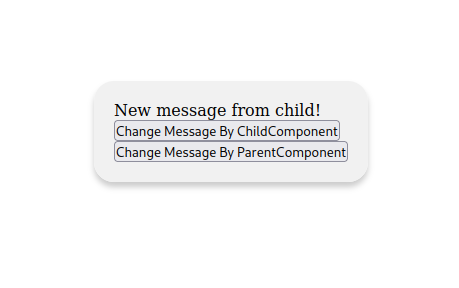
显然!文本的内容发生了变化!
那么让我们点击第二个按钮吧!
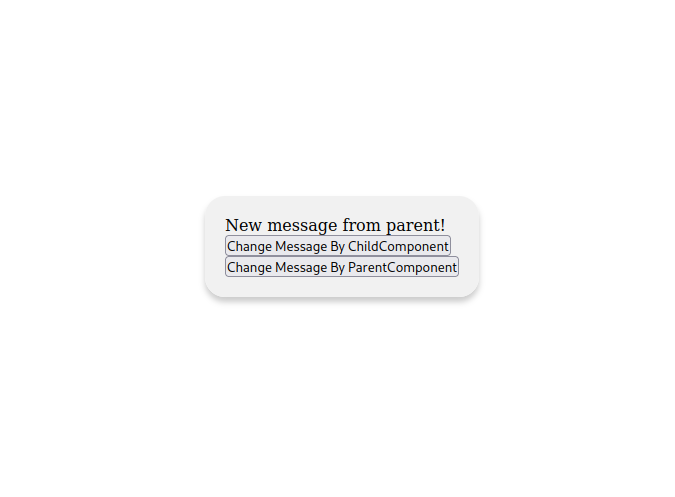
它变成了"New message from parent!"
是不是很神奇呢?
没错!通过按照这些步骤,在Vue.js中可以成功地通过props和事件将值从父组件传给子组件。不要忘记保存文件,根据需要导组件,并适当注册组件。