







说明:一般我们观看自己下载的电影时候,通常会因为网络或者带宽原因很卡,所以就得处理下,这里萌咖大佬闭关半个月,写出了一个视频转码切片后自动上传至国内cdn的脚本,脚本默认提供上传到语雀cdn的脚本、采用多线程上传,这里默认10线程,基本上可以很大程度上提高视频的播放速度。
【2020.4.1】
由于语雀修复了上传bug,所以移除语雀cdn,默认修改为阿里云图床。
Github地址:https://github.com/MoeClub/Note/tree/master/ffmpeg
1、安装ffmpeg
wget https://www.moerats.com/usr/down/ffmpeg/ffmpeg-git-$(getconf LONG_BIT)bit-static.tar.xz
tar xvf ffmpeg-git-*-static.tar.xz
mv ffmpeg-git-*/ffmpeg  ffmpeg-git-*/ffprobe /usr/local/bin/
rm -rf ffmpeg-git-*
2、安装脚本
#新建/opt/ffmpeg文件夹存放脚本等文件
mkdir /opt/ffmpeg && cd $_
#下载并运行脚本
wget https://raw.githubusercontent.com/MoeClub/Note/master/ffmpeg/Install.sh
bash Install.sh
3、启动播放器
由于切片生成m3u8文件后,需要播放器才能播放,而上传脚本也会自动推送m3u8文件到播放器根目录,所以这里可以配合一起用,当然自己会播放m3u8的也可以不用搭建,自行选择。
安装pip3:
#CenOS 6系统
rpm -Uvh https://dl.fedoraproject.org/pub/epel/epel-release-latest-6.noarch.rpm
yum install python34 -y
wget https://bootstrap.pypa.io/get-pip.py
python3 get-pip.py

#CenOS 7系统
rpm -Uvh https://dl.fedoraproject.org/pub/epel/epel-release-latest-7.noarch.rpm
yum install python36 -y
wget https://bootstrap.pypa.io/get-pip.py
python3 get-pip.py

#Debian/Ubuntu系统
apt update
apt install python3-pip -y
安装依赖:
#进入到播放源码文件夹
cd /opt/ffmpeg/Player
pip3 install tornado
后台启动:
nohup python3 Player.py&
注意Player.py文件的MasterKey值需和publish.sh的Token值对应,别乱改就行。
4、脚本用法
#命令示例
bash /path/to/media.sh <不含特殊字符的文件名.mp4> [特殊选项]

#特殊选项: 数字;可选参数,默认为0
#0:自动根据文件比特率计算合适的切片大小。(目标文件大小小于20M,一般情况下没问题)
#1:强制重新编码,重新编码比特率为2400k。(一般用于非H264编码,文件切片,速度较慢)
#2:自定义切片时间,当为2时切片时间为3秒,当大于等于3时切片时间为特殊选项数字。
使用示例:
#进入视频所在目录
cd /root/movies

#默认模式切片
bash /opt/ffmpeg/media.sh rats.mp4
#强制重新编码
bash /opt/ffmpeg/media.sh rats.mp4 1
#极速模式, 设置2s一个切片(源文件为H264编码情况下)
bash /opt/ffmpeg/media.sh rats.mp4 2
5、播放示例
#查看推送到播放器这边的m3u8所有文件
http://ip:5866/Player/list

#播放list显示的根目录下的rats.m3u8文件
http://ip:5866/Player/rats.m3u8
提示:该方案可选,目前语雀默认免费10G,具体可参考官方说明。
先前往语雀官网注册一个账号→传送门,然后获取ctoken和session的值,这里说下大概获取方法,以谷歌浏览器为例。
登录后,F12进入控制台选择Network,随便点击一个以yuque开头的链接文件,再选择Cookies即可看到所需要的2个参数。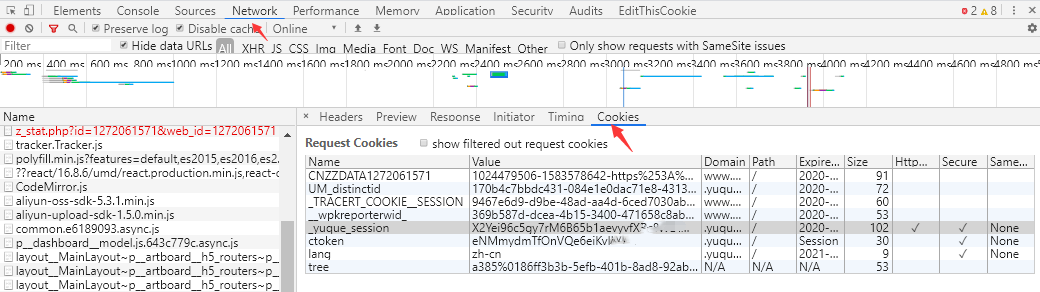
然后复制ctoken和session的值。
接下来查看语雀脚本→传送门,将脚本所有的内容复制替换到upload.sh脚本里面,并填入ctoken和session的值,保存即可,上传方法参考上面。
最后如果你是vps的话,就不建议强制转码,只切片就行了,不然长时间占用cpu的话,服务器可能会被ban,基本上大多数mp4都可以直接切片。
版权声明:本文为原创文章,版权归 Rat's Blog 所有,转载请注明出处!
本文链接:https://www.moerats.com/archives/1024/
如教程需要更新,或者相关链接出现404,可以在文章下面评论留言。
此内容由惯性聚合(RSS阅读器)自动聚合整理,仅供阅读参考。 原文来自 — 版权归原作者所有。