


惯性聚合 高效追踪和阅读你感兴趣的博客、新闻、科技资讯
阅读原文 在惯性聚合中打开

推荐订阅源

WordPress大学
WordPress大学
The GitHub Blog
The GitHub Blog
F
Fortinet All Blogs
Cloudbric
Cloudbric
P
Palo Alto Networks Blog
T
Threatpost
T
Tor Project blog
T
Tenable Blog
AWS News Blog
AWS News Blog
Project Zero
Project Zero
L
LangChain Blog
Cyberwarzone
Cyberwarzone
Engineering at Meta
Engineering at Meta
雷峰网
雷峰网
C
CERT Recently Published Vulnerability Notes
钛媒体:引领未来商业与生活新知
钛媒体:引领未来商业与生活新知
Security Latest
Security Latest
云风的 BLOG
云风的 BLOG
I
Intezer
cs.CL updates on arXiv.org
P
Proofpoint News Feed
A
Arctic Wolf
Cyber Security Advisories - MS-ISAC
Google DeepMind News
V
Vulnerabilities – Threatpost
C
Cybersecurity and Infrastructure Security Agency CISA
MongoDB | Blog
MongoDB | Blog
aimingoo的专栏
aimingoo的专栏
K
Kaspersky official blog
Jina AI
Jina AI
N
News | PayPal Newsroom
T
The Blog of Author Tim Ferriss
D
DataBreaches.Net
A
About on SuperTechFans
博客园 - 三生石上(FineUI控件)
博客园 - 【当耐特】
Hugging Face - Blog
Hugging Face - Blog
Recorded Future
Recorded Future
cs.AI updates on arXiv.org
S
Secure Thoughts
TaoSecurity Blog
TaoSecurity Blog
P
Privacy & Cybersecurity Law Blog
P
Proofpoint News Feed
MyScale Blog
MyScale Blog
IT之家
IT之家
Forbes - Security
Forbes - Security
The Hacker News
The Hacker News
Last Week in AI
Last Week in AI
T
Threat Research - Cisco Blogs
Y
Y Combinator Blog

Rat's Blog - bilibili

一款跨平台的快速,简单,干净的视频下载器:Annie,支持Bilibili/Youtube等多个网站 - Rat's Blog 使用RSS订阅B站UP主的方法 - Rat's Blog
Linux VPS快速下载Bilibili视频脚本 ,支持1080P/720P/360P等格式 - Rat's Blog
博主: Rat's · 2018-12-26 · via Rat's Blog - bilibili

说明:最近想下载点B站的一些资源到Onedrive网盘存着,以免日后由于版权等一些问题,导致资源被下架,所以就从git找了个py脚本,使用起来很方便,支持1080P720P360P等格式下载,下载视频速度也挺快的。这里就大概的说下使用教程,有需求的同学可以用用。

使用

Github地址:https://github.com/Henryhaohao/Bilibili_video_download

由于Win系统下载工具非常多,所以就不说Win系统使用,这里就只说下Linux系统用法。

1、安装Python3

#CentOS系统
wget https://www.moerats.com/usr/shell/Python3/CentOS_Python3.6.sh && sh CentOS_Python3.6.sh
#Debian系统
wget https://www.moerats.com/usr/shell/Python3/Debian_Python3.6.sh && sh Debian_Python3.6.sh
#由于Ubuntu 16+自带Python3,所以只需要安装pip3就可以了
apt install python3-pip -y

2、安装ffmpeg

#下载ffmpeg二进制
wget https://www.moerats.com/usr/down/ffmpeg/ffmpeg-git-$(getconf LONG_BIT)bit-static.tar.xz
#解压文件
tar xvf ffmpeg-git-*-static.tar.xz
#移动ffmpeg可执行文件
mv ffmpeg-git-*/ffmpeg  ffmpeg-git-*/ffprobe /usr/bin/
#删除文件
rm -rf ffmpeg-git-*

3、下载脚本

#下载脚本并存放在/root/bz文件夹
git clone https://github.com/Henryhaohao/Bilibili_video_download.git /root/bz
#安装依赖
cd /root/bz && pip3 install -r requirements.txt
#开始运行脚本
python3 bilibili_video_download.py

然后会要求你输入B站的AV号或者视频链接地址,然后选择你需要的格式,直到下载完成。
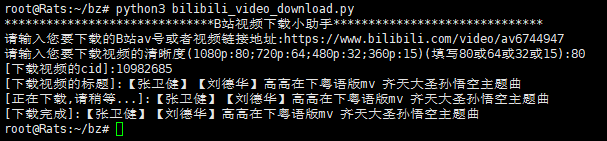
请输入图片描述

如果你运行脚本的时候出现UnicodeEncodeError: 'ascii' codec can't encode错误,那就需要先将系统的默认语言环境编码设置为UTF-8格式,使用命令:

echo 'export LANG=en_US.UTF-8 LANGUAGE=en_US.UTF-8' >> /etc/profile
source /etc/profile

最后下载的视频会存放/root/bz文件夹,不过好像下载的1080P视频清晰度比在线播放的稍微差一点点,不知道是不是看错了,不过还是挺清晰的,然后有需求的同学们可以下好后上传到OneDrive或者GoogleDrive网盘保存下。


版权声明:本文为原创文章,版权归 Rat's Blog 所有,转载请注明出处!

本文链接:https://www.moerats.com/archives/848/

如教程需要更新,或者相关链接出现404,可以在文章下面评论留言。