








说明:差不多很多博主都会遇到被CC攻击和SSH爆破的情况,这个时候就需要做下防御措施了,前几天发过一个防CC脚本,参考:CC-Attack-Protector:Linux VPS防CC攻击一键脚本,带微信提醒,不过对于CentOS 7来说,由于防火墙的因素,配置起来还是有点麻烦的,这里争对CentOS 7再分享个简单防CC攻击和SSH爆破的方法。
fail2ban可以监视你的系统日志,然后匹配日志的错误信息执行相应的屏蔽动作。网上大部分教程都是关于fail2ban+iptables组合,考虑到CentOS 7已经自带Firewalld,所以这里我们也可以利用fail2ban+Firewalld来防CC攻击和SSH爆破。
本教程编辑文件使用vi命令,如果不会用的,可以使用比较简单的nano,可以参考:一个简单易用的Linux文本编辑器:nano的安装与使用,或者使用FTP工具,如WinSCP登录VPS操作。
1、检查Firewalld是否启用
#如果您已经安装iptables建议先关闭
service iptables stop
#查看Firewalld状态
firewall-cmd --state
#启动firewalld
systemctl start firewalld
#设置开机启动
systemctl enable firewalld.service
启用Firewalld后会禁止所有端口连接,因此请务必放行常用的端口,以免被阻挡在外,以下是放行SSH端口(22)示例,供参考:
#放行22端口
firewall-cmd --zone=public --add-port=80/tcp --permanent
#重载配置
firewall-cmd --reload
#查看已放行端口
firewall-cmd --zone=public --list-ports
2、安装fail2banfail2ban可以监控系统日志,并且根据一定规则匹配异常IP后使用Firewalld将其屏蔽,尤其是针对一些爆破/扫描等非常有效。
#CentOS内置源并未包含fail2ban,需要先安装epel源
yum -y install epel-release
#安装fial2ban
yum -y install fail2ban
安装成功后fail2ban配置文件位于/etc/fail2ban,其中jail.conf为主配置文件,相关的匹配规则位于filter.d目录,其它目录/文件一般很少用到,如果需要详细了解可自行搜索。
3、配置规则
新建jail.local来覆盖fail2ban的一些默认规则:
#新建配置
vi /etc/fail2ban/jail.local
#默认配置
[DEFAULT]
ignoreip = 127.0.0.1/8
bantime  = 86400
findtime = 600
maxretry = 5
#这里banaction必须用firewallcmd-ipset,这是fiewalll支持的关键,如果是用Iptables请不要这样填写
banaction = firewallcmd-ipset
action = %(action_mwl)s
参数说明:
ignoreip:IP白名单,白名单中的IP不会屏蔽,可填写多个以(,)分隔
bantime:屏蔽时间,单位为秒(s)
findtime:时间范围
maxretry:最大次数
banaction:屏蔽IP所使用的方法,上面使用firewalld屏蔽端口
如果您还在使用默认SSH端口(22),可能每天都会被扫描,我们可以修改端口尽量避免被扫,参考:Linux VPS服务器SSH端口一键修改脚本,或者可以使用fail2ban将恶意IP屏蔽。
继续修改jail.local这个配置文件,在后面追加如下内容:
[sshd]
enabled = true
filter  = sshd
port    = 22
action = %(action_mwl)s
logpath = /var/log/secure
参数说明:
[sshd]:名称,可以随便填写
filter:规则名称,必须填写位于filter.d目录里面的规则,sshd是fail2ban内置规则
port:对应的端口
action:采取的行动
logpath:需要监视的日志路径
到这一步,我们jail.local的规则看起来可能像下面这样子:
[DEFAULT]
ignoreip = 127.0.0.1/8
bantime  = 86400
findtime = 600
maxretry = 5
banaction = firewallcmd-ipset
action = %(action_mwl)s

[sshd]
enabled = true
filter  = sshd
port    = 22
action = %(action_mwl)s
logpath = /var/log/secure上面的配置意思是如果同一个IP,在10分钟内,如果连续超过5次错误,则使用Firewalld将他IP ban了。输入systemctl start fail2ban启动fail2ban来试试效果。
使用另一台服务器不断尝试连接SSH,并且不断的将密码输入错误,你会发现连续超过5次后直接连不上,说明IP被ban了,可以输入:fail2ban-client status sshd查看被ban的IP,如下截图。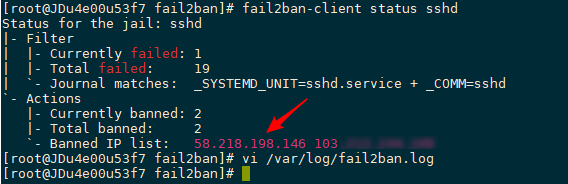
这里仅以Nginx为例,使用fail2ban来监视nginx日志,匹配短时间内频繁请求的IP,并使用firewalld将其IP屏蔽,达到CC防护的作用。
#需要先新建一个nginx日志匹配规则
vi /etc/fail2ban/filter.d/nginx-cc.conf
#填写如下内容
[Definition]
failregex = <HOST> -.*- .*HTTP/1.* .* .*$
ignoreregex =
继续修改jail.local追加如下内容:
[nginx-cc]
enabled = true
port = http,https
filter = nginx-cc
action = %(action_mwl)s
maxretry = 20
findtime = 60
bantime = 3600
logpath = /usr/local/nginx/logs/access.log
上面的配置意思是如果在60s内,同一IP达到20次请求,则将其IP ban 1小时,上面只是为了测试,请根据自己的实际情况修改。logpath为nginx日志路径。
如果您经常分析日志会发现有大量机器人在扫描wordpress登录页面wp-login.php,虽然对方可能没成功,但是为了避免万一还是将他IP干掉为好。
#需要先新建一个nginx日志匹配规则
vi /etc/fail2ban/filter.d/wordpress.conf
#填写如下内容
[Definition]
failregex = ^ -.* /wp-login.php.* HTTP/1\.."
ignoreregex =
继续修改jail.local追加如下内容:
[wordpress]
enabled = true
port = http,https
filter = wordpress
action = %(action_mwl)s
maxretry = 20
findtime = 60
bantime = 3600
logpath = /usr/local/nginx/logs/access.log
当然,别忘记输入systemctl restart fail2ban重启fail2ban使其生效。
#启动
systemctl start fail2ban
#停止
systemctl stop fail2ban
#开机启动
systemctl enable fail2ban
#查看被ban IP,其中sshd为名称,比如上面的[wordpress]
fail2ban-client status sshd
#删除被ban IP
fail2ban-client set sshd delignoreip 192.168.111.111
#查看日志
tail /var/log/fail2ban.log
fail2ban已经内置很多匹配规则,位于filter.d目录下,包含了常见的SSH/FTP/Nginx/Apache等日志匹配,如果都还无法满足您的需求,您也可以自行新建规则来匹配异常IP。使用fail2ban+Firewalld来阻止恶意IP是行之有效的办法,可极大提高服务器安全。
文章来源:CentOS 7安装fail2ban+Firewalld防止爆破与CC攻击
版权声明:本文为原创文章,版权归 Rat's Blog 所有,转载请注明出处!
本文链接:https://www.moerats.com/archives/487/
如教程需要更新,或者相关链接出现404,可以在文章下面评论留言。
此内容由惯性聚合(RSS阅读器)自动聚合整理,仅供阅读参考。 原文来自 — 版权归原作者所有。