
惯性聚合 高效追踪和阅读你感兴趣的博客、新闻、科技资讯
阅读原文 在惯性聚合中打开

推荐订阅源

The Last Watchdog
The Last Watchdog
博客园 - 司徒正美
L
LangChain Blog
P
Proofpoint News Feed
阮一峰的网络日志
阮一峰的网络日志
V
V2EX
L
LINUX DO - 热门话题
Google DeepMind News
Security Latest
Security Latest
Microsoft Security Blog
Cyberwarzone
Cyberwarzone
Project Zero
Project Zero
M
MIT News - Artificial intelligence
NISL@THU
NISL@THU
C
CERT Recently Published Vulnerability Notes
Engineering at Meta
Engineering at Meta
T
Tenable Blog
C
Cybersecurity and Infrastructure Security Agency CISA
T
Troy Hunt's Blog
月光博客
月光博客
大猫的无限游戏
大猫的无限游戏
CTFtime.org: upcoming CTF events
Scott Helme
Scott Helme
Recent Announcements
S
Secure Thoughts
H
Hackread – Cybersecurity News, Data Breaches, AI and More
量子位
aimingoo的专栏
aimingoo的专栏
MyScale Blog
MyScale Blog
云风的 BLOG
云风的 BLOG
Hacker News - Newest:
Hacker News - Newest: "LLM"
雷峰网
雷峰网
Attack and Defense Labs
A
About on SuperTechFans
Last Week in AI
Last Week in AI
T
Tailwind CSS Blog
Martin Fowler
Martin Fowler
V2EX - 技术
V2EX - 技术
S
Securelist
Microsoft Azure Blog
N
Netflix TechBlog - Medium
B
Blog RSS Feed
C
CXSECURITY Database RSS Feed - CXSecurity.com
D
DataBreaches.Net
Cyber Security Advisories - MS-ISAC
博客园 - 叶小钗
T
The Blog of Author Tim Ferriss
PCI Perspectives
PCI Perspectives
让小产品的独立变现更简单 - ezindie.com
H
Hacker News: Front Page

Rat's Blog - Telegram

一个基于Go的Telegram RSS Bot机器人,支持应用内阅读预览 - Rat's Blog 使用EH Forwarder Bot实现Telegram同时收发多个微信/QQ消息 - Rat's Blog TeleShellBot:通过Telegram机器人远程执行shell命令 - Rat's Blog
Telegram MTProxy一键安装脚本 - Rat's Blog
博主: Rat's · 2018-06-11 · via Rat's Blog - Telegram

说明:我们一般使用Telegram的时候,都需要先爬Q,这样还是比较麻烦的,而在Telegram最新版本中内置了MTProxy代理,占用小,耗电量也小,只需要我们简单设置下,就可以让Telegram和本地应用一样,即开即用,而不需要额外的爬Q了。

安装

说明:这里使用的是逗比针对Go 语言版写的一键脚本,相比官方版本主要是不容易出错,而且功能更完善。

系统要求: CentOS 6+Debian 7+Ubuntu 14+

安装命令:

wget -N --no-check-certificate https://raw.githubusercontent.com/iiiiiii1/doubi/master/mtproxy_go.sh && bash mtproxy_go.sh

运行脚本后,会出现如下选项:
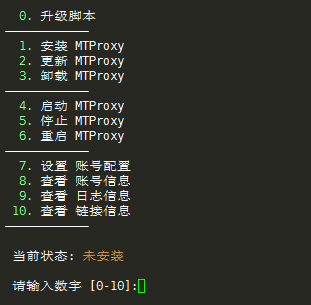
请输入图片描述
安装完成后会得到相应的配置信息。

这里使用方法有2种,如下:

1、将链接复制到浏览器或者TG对话框打开并添加。
2、进入Settings(设置)—Data and Storage(数据和存储),找到相应的应用填入信息即可。

版权声明:本文为原创文章,版权归 Rat's Blog 所有,转载请注明出处!

本文链接:https://www.moerats.com/archives/650/

如教程需要更新,或者相关链接出现404,可以在文章下面评论留言。

Vultr新用户注册送100美元/16个机房按小时计费,支持支付宝,【点击查看】。