






说明:很久前博主介绍过一个Telegram RSS机器人→传送门,用起来还不错,就是安装对新手不太友好,这里就再介绍一个基于Go的Telegram RSS Bot,安装很快,也支持直接在Telegram应用内预览订阅文章,很方便,也是博主用过最好用的一个Telegram RSS机器人,这里就说下使用方法。
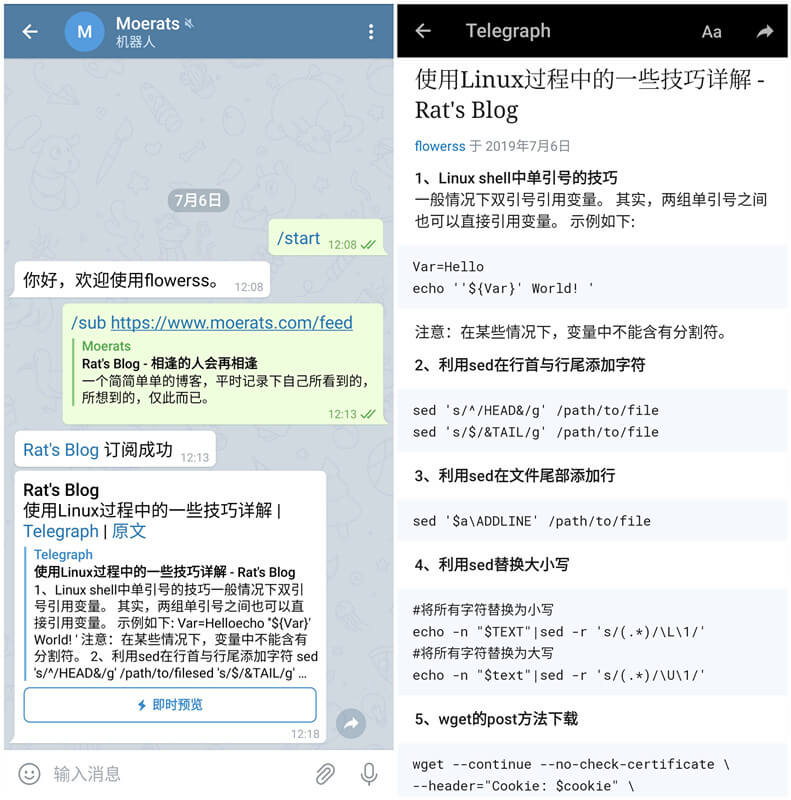
Telegram应用内Instant View。10分钟抓取一次。Group和Channel订阅RSS消息。Github地址:https://github.com/indes/flowerss-bot
1、申请Bot Token
打开Telegram,搜索@BotFather,发送/newbot ,申请一个Bot,申请完成后,会发给你一个Bot Token。
2、申请Telegraph Token
curl https://api.telegra.ph/createAccount?short_name=moerats&author_name=moerats&author_url=https://www.moerats.com返回的JSON中access_token字段值即为Telegraph Token。
1、安装Docker
#CentOS 6
rpm -iUvh http://dl.fedoraproject.org/pub/epel/6/x86_64/epel-release-6-8.noarch.rpm
yum update -y
yum -y install docker-io
service docker start
chkconfig docker on

#CentOS 7、Debian、Ubuntu
curl -sSL https://get.docker.com/ | sh
systemctl start docker
systemctl enable docker
2、修改配置文件
#新建配置文件存放目录
mkdir ~/flowerss && cd $_
#下载配置文件
wget -O config.yml https://raw.githubusercontent.com/indes/flowerss-bot/master/config.yml.sample
#编辑配置文件
nano config.yml
配置文件参数详情可以查看下面手动安装的参数说明。
3、启动镜像
docker run -d -v ~/flowerss:/root/.flowerss indes/flowerss-bot
1、安装golang
这里直接使用最新版的go二进制安装,不然后面编译会因版本问题出错。
wget https://dl.google.com/go/go1.12.6.linux-amd64.tar.gz
#解压
tar -C /usr/local -xzf go1.12.6.linux-amd64.tar.gz
#生效
echo 'export PATH=$PATH:/usr/local/go/bin' >>/etc/profile
source /etc/profile
2、安装依赖
#Debian、Ubuntu系统
apt install make gcc git -y

#CentOS系统
yum install make gcc git -y
3、运行机器人
#拉取源码
git clone https://github.com/indes/flowerss-bot
cd flowerss-bot
#编译
make build
#新建配置文件
nano config.yml
参数说明大致如下:
#Telegram Bot Token,必填
bot_token: XXX
#Telegraph Token,用于转存原文到Telegraph,也就是即时查看功能,选填
telegraph_token: xxxx
#User Agent,选填
user_agent: Mozilla/5.0 (X11; Linux x86_64) AppleWebKit/537.36 (KHTML, like Gecko) Chrome/51.0.2704.103 Safari/537.36
#纯文字预览字数(不借助Telegraph),默认0, 0为禁用,选填
preview_text: 0
#是否禁用web页面预览,默认false, true为禁用,选填
disable_web_page_preview: false
#用于国内等无法连接Telegram API的情况,国外忽略
socks5: 127.0.0.1:1080
#RSS源扫描间隔(分钟),选填
update_interval: 10
#源最大出错次数,选填
error_threshold: 100
#自定义telegram bot api url,选填
telegram:
  endpoint: https://xxx.com/
#使用Mysql数据库,不填则默认使用SQLite
mysql:
  host: 123.123.132.132
  port: 3306
  user: moerats
  password: moerats
  database: moerats
#使用Sqlite数据库,填入Mysql则该选项失效
sqlite:
  path: ./data.db

##这里博主默认使用的SQLite,扫描间隔为5分钟,所以使用到的参数如下:
bot_token: XXX
telegraph_token: xxxx
update_interval: 5
sqlite:
path: ./data.db然后新建Systemd配置文件,只适用于CentOS 7、Debian 8+、Ubuntu 16+等。
#修改下flowerss-bot源码路径即可,然后一起复制到SSH运行
cat > /etc/systemd/system/flowerss.service <<EOF
[Unit]
Description=flowerss
After=network.target
Wants=network.target

[Service]
Type=simple
PIDFile=/var/run/flowerss.pid
WorkingDirectory=/root/flowerss-bot
ExecStart=/root/flowerss-bot/flowerss-bot
RestartPreventExitStatus=23
Restart=always

[Install]
WantedBy=multi-user.target
EOF
启动并开机自启:
systemctl start flowerss
systemctl enable flowerss如果没有Systemd的,比如CentOS 6,Debian 7等,直接使用rc.local,使用命令:
#先启动
nohup ./flowerss-bot &
#设置开机自启,路径和命令自行修改
sed -i '/exit/d' /etc/rc.local
echo "cd /root/flowerss-bot && nohup ./flowerss-bot &" >> /etc/rc.local
使用命令:
/sub [url] 订阅(url 为可选)
/unsub [url] 取消订阅(url 为可选)
/list 查看当前订阅
/set 设置订阅
/help 帮助
Channel订阅使用方法:
1、将Bot添加为Channel管理员
2、发送相关命令给Bot

#Channel订阅支持的命令
/sub @ChannelID [url] 订阅
/unsub @ChannelID [url] 取消订阅
/list @ChannelID 查看当前订阅
ChannelID只有设置为Public Channel才有。如果是Private Channel,可以暂时设置为Public,订阅完成后改为Private,不影响Bot推送消息。
例如要给t.me/moerats频道订阅RSS更新:
1、将Bot添加到moerats频道管理员列表中
2、给Bot发送/sub @moerats https://www.moerats.com/feed/ 命令
最后作者更新也很频繁,有心的可以去给个star鼓励下作者,说不定可以开发更多好用的功能。
版权声明:本文为原创文章,版权归 Rat's Blog 所有,转载请注明出处!
本文链接:https://www.moerats.com/archives/969/
如教程需要更新,或者相关链接出现404,可以在文章下面评论留言。
此内容由惯性聚合(RSS阅读器)自动聚合整理,仅供阅读参考。 原文来自 — 版权归原作者所有。