


惯性聚合 高效追踪和阅读你感兴趣的博客、新闻、科技资讯
阅读原文 在惯性聚合中打开

推荐订阅源

AI
AI
TaoSecurity Blog
TaoSecurity Blog
H
Heimdal Security Blog
Help Net Security
Help Net Security
cs.CV updates on arXiv.org
Microsoft Azure Blog
www.infosecurity-magazine.com
Google DeepMind News
爱范儿
爱范儿
The Cloudflare Blog
OSCHINA 社区最新新闻
OSCHINA 社区最新新闻
人人都是产品经理
人人都是产品经理
大猫的无限游戏
大猫的无限游戏
N
News | PayPal Newsroom
V2EX - 技术
V2EX - 技术
博客园 - 【当耐特】
D
Darknet – Hacking Tools, Hacker News & Cyber Security
S
Secure Thoughts
C
CERT Recently Published Vulnerability Notes
罗磊的独立博客
Exploit-DB.com RSS Feed
钛媒体:引领未来商业与生活新知
钛媒体:引领未来商业与生活新知
P
Privacy & Cybersecurity Law Blog
有赞技术团队
有赞技术团队
S
Schneier on Security
S
SegmentFault 最新的问题
Google Online Security Blog
H
Hacker News: Front Page
The Last Watchdog
The Last Watchdog
Schneier on Security
PCI Perspectives
PCI Perspectives
IT之家
IT之家
Project Zero
Project Zero
博客园 - 司徒正美
P
Privacy International News Feed
Recent Commits to openclaw:main
Jina AI
Jina AI
Security Latest
Security Latest
Hacker News - Newest:
Hacker News - Newest: "LLM"
腾讯CDC
C
CXSECURITY Database RSS Feed - CXSecurity.com
阮一峰的网络日志
阮一峰的网络日志
C
Check Point Blog
aimingoo的专栏
aimingoo的专栏
V
Vulnerabilities – Threatpost
W
WeLiveSecurity
NISL@THU
NISL@THU
Webroot Blog
Webroot Blog
N
Netflix TechBlog - Medium
L
Lohrmann on Cybersecurity

Rat's Blog - ssh

Linux VPS安装Google Authenticator实现SSH登陆二次验证 - Rat's Blog Xshell 6官方永久免费版,可解决评估期已过的提示问题 - Rat's Blog 一款全新且强大的SSH客户端:FinalShell - Rat's Blog 一款非常好用的Web端SSH工具:GateOne安装教程 - Rat's Blog JuiceSSH/Termius:安卓/IOS平台上好用且免费的SSH客户端 - Rat's Blog 一个可以在浏览器上运行的SSH客户端:WebSSH2安装教程 - Rat's Blog Linux VPS服务器SSH端口一键修改脚本 - Rat's Blog SSH密钥安装器升级,一键安装VPS密钥安全登录 - Rat's Blog Ubuntu 安装Fail2ban服务来防止暴力破解FTP/SSH - Rat's Blog
为Linux VPS配置SSH-KEY登录并禁用root密码 - Rat's Blog
博主: Rat's · 2017-07-30 · via Rat's Blog - ssh

说明:很多人可能喜欢剁手,买了很多VPS,密码也记不住,也容易被大量的扫描器扫描爆破(检测扫描方法参考:通过Auth.log来查看SSH是否被扫)。这时候我们可以利用SSH-KEY方式登录服务器可以很好的解决被爆破和忘记密码的问题!

1、登录Linux主机生成并配置SSH-KEY

ssh-keygen -t rsa
Enter file in which to save the key (/root/.ssh/id_rsa): 建议直接回车使用默认路径
Enter passphrase (empty for no passphrase): 输入密码短语(留空则直接回车)
Enter same passphrase again: 重复密码短语

此时在/root/.ssh/目录下生成了2个文件,id_rsa为私钥,id_rsa.pub为公钥。私钥自己下载到本地电脑妥善保存(丢了服务器可就没法再登陆了),为安全,建议删除服务器端的私钥。公钥则可以任意公开。

2、导入KEY文件

cat /root/.ssh/id_rsa.pub >> /root/.ssh/authorized_keys

3、修改SSH的配置文件/etc/ssh/sshd_config
可以借助WinSCP工具登录VPS进行编辑修改!

RSAAuthentication yes
PubkeyAuthentication yes
AuthorizedKeysFile .ssh/authorized_keys
PasswordAuthentication no

进行上述修改后我们就完成了关闭root并启用SSH-KEY登录方式。

重启SSH服务

#CentOS系统
service sshd restart
#Debian/Ubuntu系统
service ssh restart

4、通过Xshell用SSH-KEY方式登录
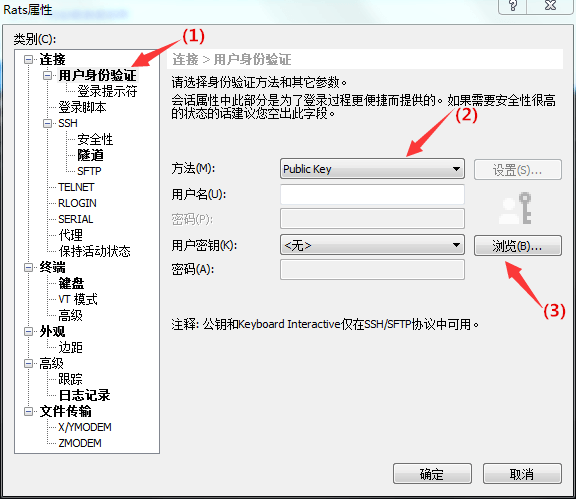
请输入图片描述
最后导入密匙即可!


版权声明:本文为原创文章,版权归 Rat's Blog 所有,转载请注明出处!

本文链接:https://www.moerats.com/archives/229/

如教程需要更新,或者相关链接出现404,可以在文章下面评论留言。

Vultr新用户注册送100美元/16个机房按小时计费,支持支付宝,【点击查看】。