





说明:一般我们考虑到VPS的安全问题的时候,都是更改SSH端口和密码,然后更安全的也就是禁用密码使用密匙登录。方法很久前就水过了,这里再分享一个方法,可以在VPS上安装一个Google Authenticator(谷歌身份验证器),这样我们登录VPS的时候,不仅需要密码正确,而且还要你输入正确的动态验证码才能登录进去,这样安全性就高了不少,这里就说下CentOS、Debian、Ubuntu的使用。
提示:教程需要配合Google身份验证器一起使用,手机没有安装该APP的需要安装一下,方便获取动态验证码。
1、软件包安装
#CentOS 6系统
rpm -Uvh https://dl.fedoraproject.org/pub/epel/epel-release-latest-6.noarch.rpm
yum install google-authenticator -y

#CentOS 7系统
rpm -Uvh https://dl.fedoraproject.org/pub/epel/epel-release-latest-7.noarch.rpm
yum install google-authenticator -y

#Debian/Ubuntu系统
apt update
apt install libpam-google-authenticator -y
2、编译安装
安装依赖:
#CentOS系统
yum install gcc make pam-devel libpng-devel libtool wget git autoconf automake qrencode -y

#Debian/Ubuntu系统
apt update
apt install -y gcc make autoconf automake libtool libpam0g-dev libqrencode3 git
安装验证器:
git clone https://github.com/google/google-authenticator-libpam.git
cd google-authenticator-libpam
./bootstrap.sh
./configure
make && make install
1、配置验证器
google-authenticator
输出如下:
Do you want authentication tokens to be time-based (y/n) y
#验证二维码,在浏览器打开使用谷歌验证器APP扫描添加即可。
https://www.google.com/chart?chs=200x200xxx
Your new secret key is: WKDPJHOKR2P3DOWL
Your verification code is 189192
#临时验证码,手机不在身边可以使用,不过一个码只能用一次
Your emergency scratch codes are:
  77678926
  14729443
  83656478
  55669982
  23960253

#下面可以直接照着填,或者自己使用谷歌翻译,然后自行选择
Do you want me to update your "/root/.google_authenticator" file (y/n) y

Do you want to disallow multiple uses of the same authentication
token? This restricts you to one login about every 30s, but it increases
your chances to notice or even prevent man-in-the-middle attacks (y/n) y

By default, tokens are good for 30 seconds and in order to compensate for
possible time-skew between the client and the server, we allow an extra
token before and after the current time. If you experience problems with poor
time synchronization, you can increase the window from its default
size of 1:30min to about 4min. Do you want to do so (y/n) y

If the computer that you are logging into isn't hardened against brute-force
login attempts, you can enable rate-limiting for the authentication module.
By default, this limits attackers to no more than 3 login attempts every 30s.
Do you want to enable rate-limiting (y/n) y
2、配置PAM文件
修改PAM配置文件:
nano /etc/pam.d/sshd
在相应的位置添加auth required pam_google_authenticator.so代码,大概如下:
#CentOS 6在#%PAM-1.0下面一行添加
#CentOS 7在auth substack password-auth下面一行添加
#Debian和Ubuntu在末尾添加然后使用Ctrl+x、y保存退出。
或者直接使用命令添加:
#CentOS 6系统
sed -i '1a\auth required pam_google_authenticator.so' /etc/pam.d/sshd
#CentOS 7系统
sed -i "/auth[ ]*substack[ ]*pass*/a\auth required pam_google_authenticator.so" /etc/pam.d/sshd
#Debian/Ubuntu系统
echo 'auth required pam_google_authenticator.so' >>/etc/pam.d/sshd
如果是编译安装的,还需要做一下软链接:
#CentOS系统
ln -fs /usr/local/lib/security/pam_google_authenticator.so /lib64/security/
#Debian/Ubuntu系统
ln -fs /usr/local/lib/security/pam_google_authenticator.so /lib/x86_64-linux-gnu/security/
3、修改SSH文件
这里可以直接使用命令:
sed -i -r 's#(ChallengeResponseAuthentication) no#\1 yes#g' /etc/ssh/sshd_config
然后同步下时间:
#查看下服务器时间
date
#如果时区不一样,再使用命令修改为本地时间
ln -sf /usr/share/zoneinfo/Asia/Shanghai /etc/localtime
对于CentOS系统,还需要关闭SELINUX,不过并不是所有系统都是开启状态,使用命令:
#使用命令查看状态
getenforce
#如果输出disabled则为关闭,反之开启,然后使用命令关闭
sed -i 's/SELINUX=enforcing/SELINUX=disabled/g' /etc/selinux/config
最后重启SSH:
#CentOS系统
service sshd restart
#Debian/Ubuntu系统
service ssh restart配置好了,再登录SSH的时候,这里以Xshell为例,类型选择Keyboard Interactive方式,然后会要你输入动态验证码了。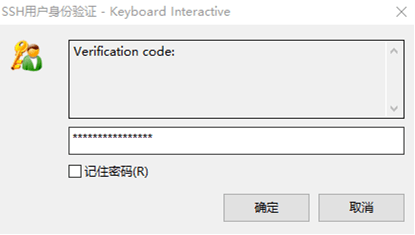
基本上以后我们每次登录VPS的时候,不仅会要你输入密码,还会要你输入谷歌验证的动态码才能进入VPS,安全增加了不少。
版权声明:本文为原创文章,版权归 Rat's Blog 所有,转载请注明出处!
本文链接:https://www.moerats.com/archives/928/
如教程需要更新,或者相关链接出现404,可以在文章下面评论留言。
此内容由惯性聚合(RSS阅读器)自动聚合整理,仅供阅读参考。 原文来自 — 版权归原作者所有。