




惯性聚合 高效追踪和阅读你感兴趣的博客、新闻、科技资讯
阅读原文 在惯性聚合中打开

推荐订阅源

B
Blog RSS Feed
Martin Fowler
Martin Fowler
爱范儿
爱范儿
IT之家
IT之家
Last Week in AI
Last Week in AI
A
About on SuperTechFans
Google DeepMind News
阮一峰的网络日志
阮一峰的网络日志
V
V2EX
aimingoo的专栏
aimingoo的专栏
G
Google Developers Blog
J
Java Code Geeks
Microsoft Azure Blog
美团技术团队
The Cloudflare Blog
MyScale Blog
MyScale Blog
T
The Blog of Author Tim Ferriss
Hugging Face - Blog
Hugging Face - Blog
奇客Solidot–传递最新科技情报
奇客Solidot–传递最新科技情报
云风的 BLOG
云风的 BLOG
Y
Y Combinator Blog
The GitHub Blog
The GitHub Blog
腾讯CDC
Microsoft Security Blog

Rat's Blog - BBR

Ubuntu 18.04/18.10快速开启Google BBR的方法 - Rat's Blog CentOS 6/7手动安装BBR和魔改BBR教程 - Rat's Blog Debian/Ubuntu开启超级暴力版魔改BBR教程 - Rat's Blog OpenVZ平台魔改BBR一键脚本之Rinetd方式 - Rat's Blog OpenVZ平台安装魔改BBR:LKL一键安装脚本 - Rat's Blog BBR+BBR魔改+Lotsever(锐速)一键脚本 for Centos/Debian/Ubuntu - Rat's Blog 魔改BBR一键安装脚本 for Debian/CentOS - Rat's Blog Debian 9/10快速开启Google BBR的方法,实现高效单边加速 - Rat's Blog OpenVZ平台Google BBR加速TCP之Rinetd方式 - Rat's Blog
超级暴力版魔改BBR一键脚本 for Debian - Rat's Blog
博主: Rat's · 2018-02-27 · via Rat's Blog - BBR

说明:超级暴力版魔改BBR安装方法刚说过了,参考:Debian/Ubuntu开启超级暴力版魔改BBR教程,不过是手动的,有点麻烦,这里就分享下南琴浪大佬的一键脚本,只适用Debian系统,Ubuntu系统可以查看教程手动安装。

安装

Github地址:https://github.com/nanqinlang/tcp_nanqinlang-test

Debian 789系统都可以,使用命令:

wget https://raw.githubusercontent.com/iiiiiii1/tcp_nanqinlang-test/master/tcp_nanqinlang-test.sh
bash tcp_nanqinlang-test.sh

使用脚本后会出现如下选项:
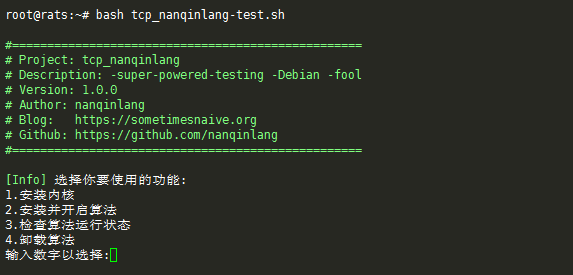
请输入图片描述
先选择1更换内核,然后reboot重启后,再使用bash tcp_nanqinlang-test.sh进行第2步开启超级暴力BBR模式。

如果在删除内核环节出现这样一张图
请输入图片描述
注意选择NO,然后根据提示操作。

有问题请咨询大佬,南琴浪博客:https://sometimesnaive.org/


版权声明:本文为原创文章,版权归 Rat's Blog 所有,转载请注明出处!

本文链接:https://www.moerats.com/archives/523/

如教程需要更新,或者相关链接出现404,可以在文章下面评论留言。