


惯性聚合 高效追踪和阅读你感兴趣的博客、新闻、科技资讯
阅读原文 在惯性聚合中打开

推荐订阅源

I
Intezer
V
Vulnerabilities – Threatpost
Google Online Security Blog
T
The Exploit Database - CXSecurity.com
C
CXSECURITY Database RSS Feed - CXSecurity.com
AWS News Blog
AWS News Blog
G
GRAHAM CLULEY
P
Privacy & Cybersecurity Law Blog
www.infosecurity-magazine.com
C
Cybersecurity and Infrastructure Security Agency CISA
N
News | PayPal Newsroom
T
Tenable Blog
Spread Privacy
Spread Privacy
Threat Intelligence Blog | Flashpoint
S
Secure Thoughts
P
Privacy International News Feed
IT之家
IT之家
Project Zero
Project Zero
T
The Blog of Author Tim Ferriss
Engineering at Meta
Engineering at Meta
大猫的无限游戏
大猫的无限游戏
博客园_首页
GbyAI
GbyAI
奇客Solidot–传递最新科技情报
奇客Solidot–传递最新科技情报
量子位
雷峰网
雷峰网
Apple Machine Learning Research
Hacker News: Ask HN
Hacker News: Ask HN
Google DeepMind News
MongoDB | Blog
MongoDB | Blog
N
Netflix TechBlog - Medium
Martin Fowler
Martin Fowler
NISL@THU
NISL@THU
I
InfoQ
D
DataBreaches.Net
有赞技术团队
有赞技术团队
K
Kaspersky official blog
Security Latest
Security Latest
The Register - Security
Hugging Face - Blog
Hugging Face - Blog
S
Security @ Cisco Blogs
P
Proofpoint News Feed
M
MIT News - Artificial intelligence
H
Hackread – Cybersecurity News, Data Breaches, AI and More
让小产品的独立变现更简单 - ezindie.com
AI
AI
Exploit-DB.com RSS Feed
P
Proofpoint News Feed
Security Archives - TechRepublic
N
News and Events Feed by Topic

Rat's Blog - Nginx

使用Nginx反向代理,自建CDN加速节点 - Rat's Blog LNMP环境下,利用Nginx反代Google网站的方法 - Rat's Blog Nginx环境下对部分网站做防盗链设置及外链的跳转 - Rat's Blog CentOS 7安装配置Nginx 1.10、PHP 5.6、MySQL 5.7教程 利用Nginx反向代理来简单镜像HTTP(S)网站的方法 - Rat's Blog LNMP环境下使用CDN后获取访客真实IP的方法 - Rat's Blog Nginx给网站添加用户认证配置( Basic HTTP authentication) - Rat's Blog Nginx环境开启ssl后强制https 301全部指向www的方法 - Rat's Blog 防止Linux VPS主机Nginx环境根目录被解析的方法 - Rat's Blog
Nginx环境使用auth_basic密码保护wordpress后台登录界面 - Rat's Blog
博主: Rat's · 2017-06-10 · via Rat's Blog - Nginx

说明:现在很多使用wordpress的人,或多或少都会出现后台被登录很多次的现象,运气不好就被进去了,通常大家都会通过修改wp-login文件来保护wordpress后台,但是这种方法有个不方便的地方就是每次WP升级就又要重改一遍,感觉很麻烦,不过使用Nginxauth_basic基本http验证功能可以保护web目录下的文件,于是我们就可以使用此文件来保护wp-login.php文件,效果就是进入后台之前,还需要验证成功,这样感觉很有效。这里以军哥的lnmp环境为例。
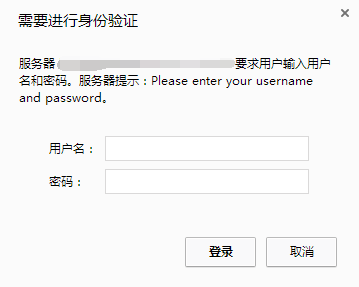
请输入图片描述

更多设置请参考:Nginx给网站添加用户认证配置( Basic HTTP authentication)

方法

1、生成用户名密码
进入网站:http://tool.oschina.net/htpasswd,然后输入用户名密码后选择Crypt加密算法。在vps上的/home目录下新建一个htpasswd文件,然后编辑htpasswd文件将刚才生成的用户名密码复制进去。可以通过Ftp工具完成,也可以执行这个命令:

#以下3种加密任选其一,记得修改用户名rats和密码moerats
#crypt加密
printf "rats:$(openssl passwd -crypt moerats)\n" >> /home/htpasswd

#apr1加密
printf "rats:$(openssl passwd -apr1 moerats)\n" >> /home/htpasswd

#MD5加密
printf "rats:$(openssl passwd -1 moerats)\n" >> /home/htpasswd

2、修改网站conf文件
这里我们用vim命令编辑,或者直接用WinSCP工具修改

vim /usr/local/nginx/conf/vhost/moerats.com.conf   

下面一段加到include enable-php.conf;后面

location = /wp-login.php {
auth_basic "Please enter your username and password";
auth_basic_user_file /home/htpasswd;
fastcgi_pass unix:/tmp/php-cgi.sock;
fastcgi_index wp-login.php;
include fastcgi.conf;
}

主要修改auth_basic_user_file这一行后面为你的密码文件位置就可以了。

3、重启Nginx生效

/etc/init.d/nginx restart

现在访问xxx.com/wp-login.php或者xxx.com/wp-admin应该都会弹出用户名密码的验证框就对了。


版权声明:本文为原创文章,版权归 Rat's Blog 所有,转载请注明出处!

本文链接:https://www.moerats.com/archives/170/

如教程需要更新,或者相关链接出现404,可以在文章下面评论留言。