



惯性聚合 高效追踪和阅读你感兴趣的博客、新闻、科技资讯
阅读原文 在惯性聚合中打开

推荐订阅源

酷 壳 – CoolShell
酷 壳 – CoolShell
T
Threatpost
Latest news
Latest news
N
News | PayPal Newsroom
Threat Intelligence Blog | Flashpoint
Help Net Security
Help Net Security
D
Darknet – Hacking Tools, Hacker News & Cyber Security
AI
AI
Simon Willison's Weblog
TaoSecurity Blog
TaoSecurity Blog
The Last Watchdog
The Last Watchdog
L
LINUX DO - 热门话题
Google DeepMind News
T
Threat Research - Cisco Blogs
O
OpenAI News
钛媒体:引领未来商业与生活新知
钛媒体:引领未来商业与生活新知
T
The Exploit Database - CXSecurity.com
NISL@THU
NISL@THU
Application and Cybersecurity Blog
S
Securelist
小众软件
小众软件
cs.CL updates on arXiv.org
Martin Fowler
Martin Fowler
S
SegmentFault 最新的问题
Cisco Talos Blog
Cisco Talos Blog
云风的 BLOG
云风的 BLOG
AWS News Blog
AWS News Blog
GbyAI
GbyAI
N
News and Events Feed by Topic
cs.CV updates on arXiv.org
美团技术团队
Engineering at Meta
Engineering at Meta
A
About on SuperTechFans
博客园 - 三生石上(FineUI控件)
S
Schneier on Security
博客园 - 聂微东
V2EX - 技术
V2EX - 技术
T
Troy Hunt's Blog
SecWiki News
SecWiki News
S
Secure Thoughts
B
Blog RSS Feed
Hugging Face - Blog
Hugging Face - Blog
WordPress大学
WordPress大学
腾讯CDC
H
Heimdal Security Blog
Exploit-DB.com RSS Feed
Apple Machine Learning Research
月光博客
月光博客
www.infosecurity-magazine.com
P
Privacy International News Feed

刺客博客

面向 LXC/KVM 的轻量虚拟化管理面板:CLICD 银河麒麟下Nginx 高危漏洞修复:升级至 1.30.2(附 RPM 安装包) 银河麒麟操作系统 V10 SP1(ARM/x86)Nginx 1.29.8 和 Redis 8.6.2 RPM 安装包 ARM&X86架构下Centos7升级到openssh-10.3p1版本 利用Docker交叉编译AMD64 与 ARM64 双架构的 MinIO 最新版本 ARM架构下Centos7&银河麒麟v10升级到openssh-10.1p1版本 解决CVE-2025-49844|Centos7&银河麒麟v10升级redis到8.2.2版本 Centos7&银河麒麟v10升级到openssh-10.1p1版本 Centos7下使用rpm包将openssl升级到最新版openssl 3.5.2
Linux 磁盘空间分析利器:ncdu
刺猬 · 2025-09-04 · via 刺客博客

在 Linux 系统维护中,磁盘空间使用情况的快速分析是一项非常常见的运维任务。虽然我们常用 du -sh * 来分析目录占用,但效率和可读性不高。今天,我们来介绍一个更专业、更直观的工具 —— ncdu(NCurses Disk Usage)。

什么是 ncdu?

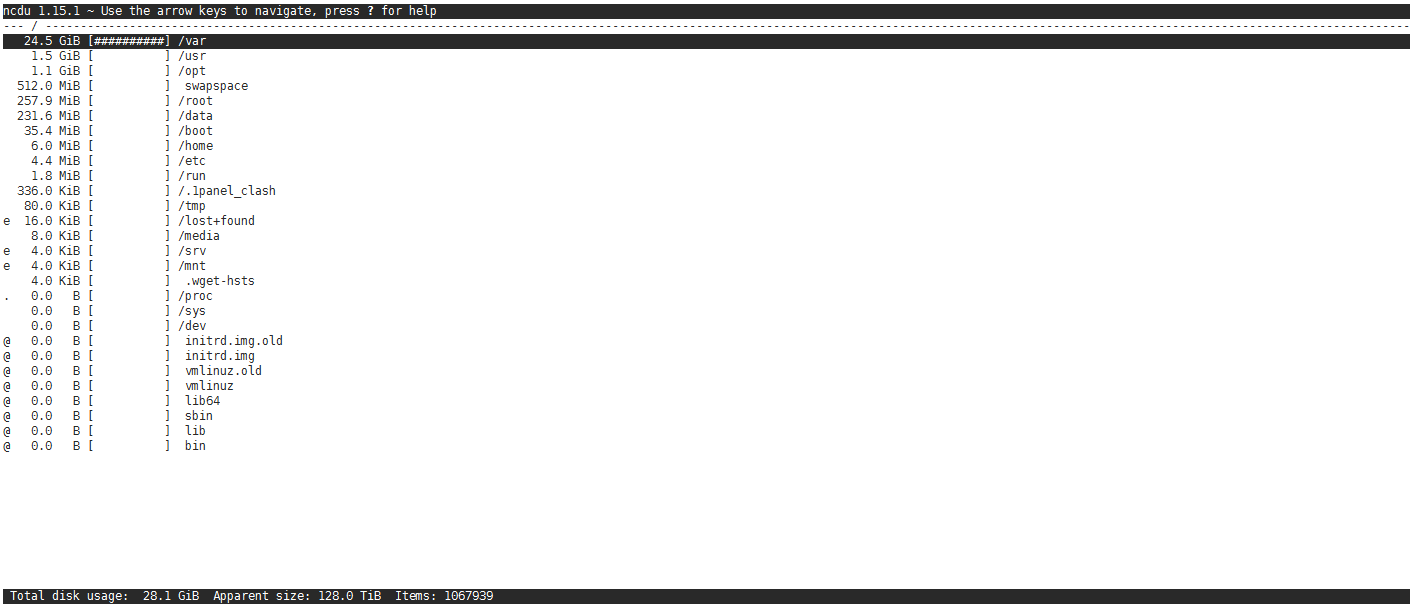
ncdu 全称为 NCurses Disk Usage,是一个基于终端的交互式磁盘空间分析工具。它类似于 du,但提供了一个 可视化界面,你可以像浏览器一样上下键浏览不同目录,并快速定位占用空间最大的文件或目录。

ncdu 的核心优点:

支持交互式操作,按键即可进入目录、删除文件等;
运行速度快,大目录扫描也很迅速;
占用资源极少,适合服务器环境;
支持导出 JSON 报告、排序、自定义显示等高级功能。

截图:
如何安装 ncdu

1、CentOS 7:

yum install epel-release -y
yum install ncdu -y

安装完成后可以通过以下命令验证版本:

ncdu --version

手动下载安装 RPM 包

如果你不能联网,可以直接下载 RPM 文件手动安装:

wget https://cikeblog.com/s/ncdu-1.20-1.el7_9.x86_64.rpm
rpm -ivh ncdu-1.20-1.el7_9.x86_64.rpm

2、Debian:

apt install ncdu -y

手动下载安装 deb 包:

wget https://cikeblog.com/s/ncdu_1.18-0.2~nd110+1_amd64.deb
dpkg -i ncdu_1.18-0.2~nd110+1_amd64.deb

使用方法:

1. 扫描整个系统

ncdu /

会从根目录开始扫描所有文件夹,生成磁盘占用图。你可以:

使用 上下箭头 浏览文件和目录;
按 回车键 进入子目录;
按 d 删除选中的文件/目录;
按 q 退出程序。

2. 扫描当前目录

ncdu .

适合排查当前目录下的空间问题。

3. 排除某些目录

ncdu --exclude /proc /

可以跳过如 /proc、/sys 等特殊目录。

4. 导出分析报告(适合定时任务)

ncdu -1xo report.json /

生成一个 JSON 格式的磁盘使用报告,方便后续可视化处理。