


惯性聚合 高效追踪和阅读你感兴趣的博客、新闻、科技资讯
阅读原文 在惯性聚合中打开

推荐订阅源

美团技术团队
W
WeLiveSecurity
Stack Overflow Blog
Stack Overflow Blog
L
LangChain Blog
S
SegmentFault 最新的问题
Apple Machine Learning Research
Google DeepMind News
F
Full Disclosure
奇客Solidot–传递最新科技情报
奇客Solidot–传递最新科技情报
The Register - Security
G
Google Developers Blog
C
Check Point Blog
GbyAI
GbyAI
A
About on SuperTechFans
V
Vulnerabilities – Threatpost
T
The Blog of Author Tim Ferriss
T
Tor Project blog
AWS News Blog
AWS News Blog
Cyberwarzone
Cyberwarzone
C
CERT Recently Published Vulnerability Notes
MongoDB | Blog
MongoDB | Blog
Latest news
Latest news
aimingoo的专栏
aimingoo的专栏
U
Unit 42
Y
Y Combinator Blog
P
Privacy International News Feed
Cisco Talos Blog
Cisco Talos Blog
S
Securelist
S
Schneier on Security
雷峰网
雷峰网
cs.CV updates on arXiv.org
Attack and Defense Labs
P
Proofpoint News Feed
C
Cisco Blogs
Webroot Blog
Webroot Blog
T
Troy Hunt's Blog
Google Online Security Blog
月光博客
月光博客
P
Privacy & Cybersecurity Law Blog
Security Archives - TechRepublic
罗磊的独立博客
Cloudbric
Cloudbric
钛媒体:引领未来商业与生活新知
钛媒体:引领未来商业与生活新知
Recent Commits to openclaw:main
Application and Cybersecurity Blog
Hacker News: Ask HN
Hacker News: Ask HN
H
Hackread – Cybersecurity News, Data Breaches, AI and More
博客园 - 司徒正美
freeCodeCamp Programming Tutorials: Python, JavaScript, Git & More
Microsoft Security Blog

野小新 – 魔帆博客

Python包管理的血泪史:从混乱到秩序的漫长征 | 魔帆博客 Mac mini + iPad 随航梦幻联动!零显示器配置指南,iPad 秒变 Mac 主屏幕 | 魔帆博客 解锁iOS侧载自由:使用sideStore轻松搞定ipa签名 | 魔帆博客 Git配置:如何优雅的配置多用户并使用 ssh 密钥验证 | 魔帆博客 Git 合并本地两个不同的 Repo 仓库 | 魔帆博客 Git 提示 fatal: unsafe repository is owned by someone else 错误 | 魔帆博客 安装有 RootMagiskXposedPlay 的 WSA 安卓子系统 | 魔帆博客 Fedora 系统升级 32->34 跨版本升级 | 魔帆博客 教程:如何更新安装 docker-compose V2 和使用 docker switch | 魔帆博客 2022 年 Android 下的安卓浏览器使用指北-Firefox向 | 魔帆博客 Docker WSL1/2 迁移 Linux 发行版目录 | 魔帆博客 WSA 安卓子系统 adb 提示 cannot connect the target machine actively refused it 10061 | 魔帆博客 双重验证 Authy 导出所有 TOTP token 和 golang 配置 GOPROXY 解决网络问题 | 魔帆博客 powershll 像 bash 一样为单个命令设置临时环境变量 | 魔帆博客 Linux 教程:Linux 初学者必了解的概念 | 魔帆博客 安卓电池充电保护-智能充电/温控切断(Root方案) | 魔帆博客 备用机养成方案 - Tasker 安卓短信转发到 telegram | 魔帆博客 创建支持安全启动(Secure Boot)的 Arch Linux ISO 安装镜像 | 魔帆博客 MiBand小米手环2/3刷机刷固件刷表盘刷字体指南(iPhone iOS 也支持) | 魔帆博客
Spotify 主题 spicetify-fluent - 微软 win11 风格美化 | 魔帆博客
野小新 · 2022-01-11 · via 野小新 – 魔帆博客
fluent spotify logo

Fluent Spotify

Icon made by Qirkl

MorFans.cn


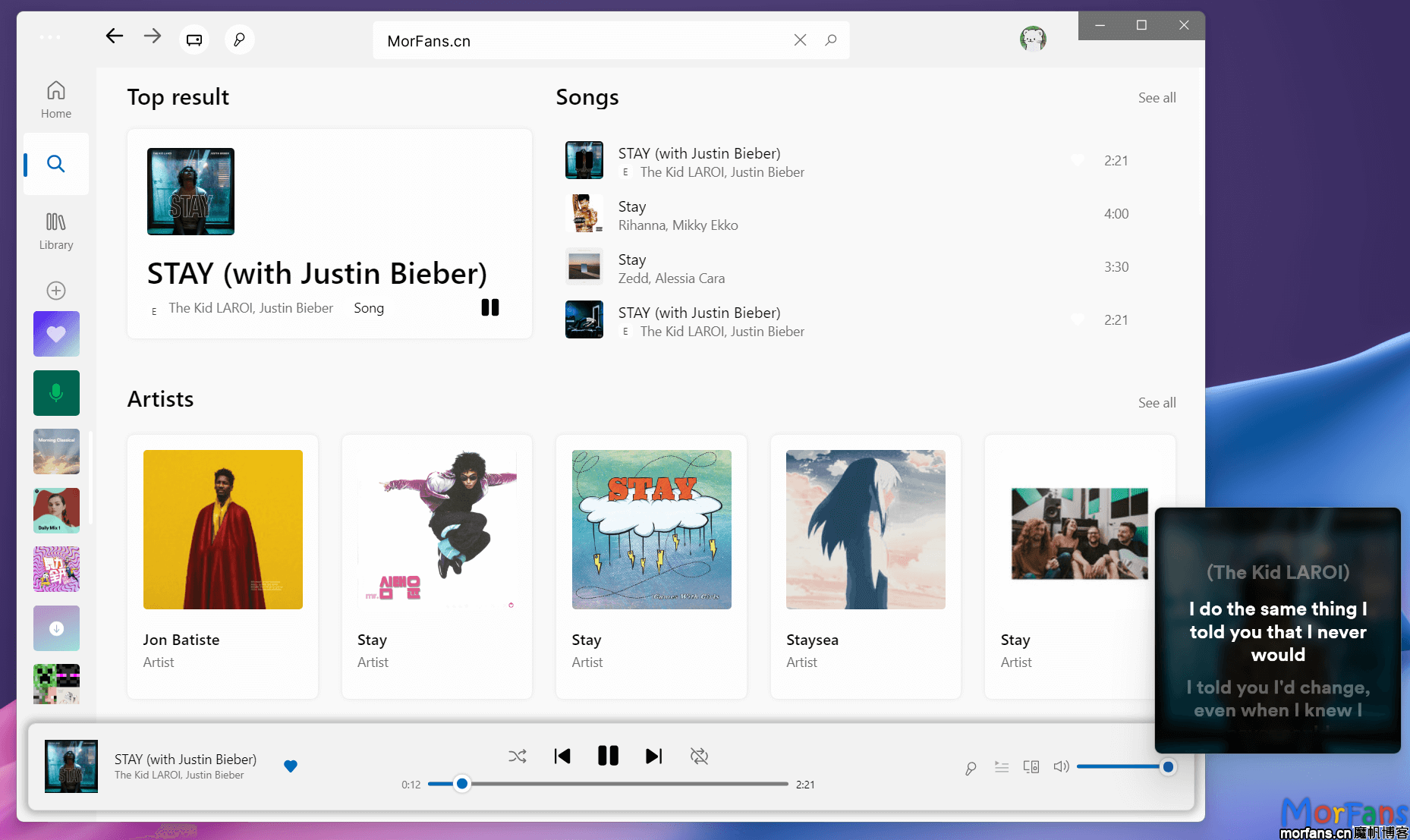
Spotify Fluent 美化后带歌词效果
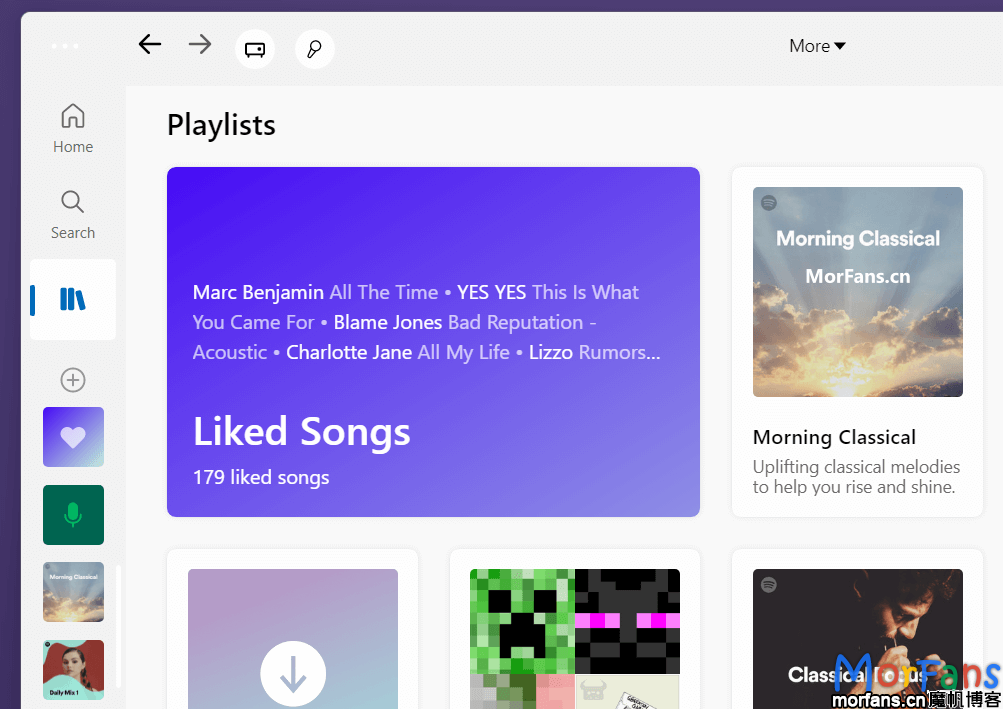
Spotify Fluent 美化后Playlists效果
win11 风格效果(fluent UI) 的 Spotify

TL;DR

本文能实现:

  • spotify 使用微软的 fluent UI 风格
  • 没有广告(no ads),所有播放功能都可用
  • 不要求 Spotify Premium

实现方式:

下面是详细的教程:

下载 spotify

目前最新版应用上美化 css 样式会有问题,所以使用稍微旧的版本

下载完后安装即可。

禁止 spotify 更新

管理员身份运行

mkdir "C:\Users\$($env:UserName)\AppData\Local\Spotify\Update"
icacls "C:\Users\$($env:UserName)\AppData\Local\Spotify\Update" /deny "$($env:UserName):W"

出现 Successfully processed 1 files; 就成功了

安装 spicetify

由社区驱动的主题和拓展集合

# 运行自动安装
Invoke-WebRequest -UseBasicParsing "https://raw.githubusercontent.com/khanhas/spicetify-cli/master/install.ps1" | Invoke-Expression

绿色版本 spotify 注意事项

使用官方安装程序安装的,请忽略本小章

如果你的 spotify 不是正常方式安装的,安装完 spicetify 后需要到编辑 文件中的 [setting] 中指定如下参数:

  • spotify_path = Spotify 安装路径
  • prefs_path = Spotify prefs 文件路径【通常在 AppData\Roaming 里】

安装 spicetify-fluent 主题

打开终端,运行:

cd "$(spicetify -c | Split-Path)\Themes"
git clone https://github.com/williamckha/spicetify-fluent Fluent
Copy-Item Fluent\fluent.js ..\Extensions

# 添加主题插件
spicetify config extensions fluent.js

# 设定当前主题为 fluent 和配色方案
spicetify config current_theme Fluent color_scheme dark
spicetify config inject_css 1 replace_colors 1 overwrite_assets 1

# 最后应用主题
## 首次 apply 请使用:
## spicetify backup apply

spicetify apply

然后编辑 %userprofile%\.spicetify\config-xpui.ini

[Patch]
; spicetify-fluent
xpui.js_find_8008 = ,(\w+=)32,
xpui.js_repl_8008 = ,${1}56,

编辑之后记得应用: spicetify apply

如何更换配色

能够使用的配色方案:

  • light
  • dark
  • dracula
spicetify config color_scheme <scheme_name>
spicetify apply

如何编辑侧栏的固定歌单

点击头像,在弹出的菜单中,选择 Sidebar config

白嫖指南(不建议使用)

如果没有开通订阅服务,会有广告,这里有一个工具能去除。

# 运行如下命令安装工具:
[Net.ServicePointManager]::SecurityProtocol = [Net.SecurityProtocolType]::Tls12; iex "& { $((iwr -useb 'https://raw.githubusercontent.com/amd64fox/SpotX/main/Install.ps1').Content) } -confirm_uninstall_ms_spoti -podcasts_on -cache_off -block_update_on -exp_standart -hide_col_icon_off -start_spoti"

里面会问到是否更新到最新版本,请输入 N (不更新,主题样式会出问题)

最后

到这里就全部完成啦。

你还可以使用 spicetify 添加其他拓展(extensions)去增强/优化 spotify 体验。spicetify 的使用以后可能会有一篇单独的文章介绍。

遇到了什么问题或有什么想法欢迎评论留言。