


technical Jack Ellis · Oct 27, 2023
One of the questions I have been asked more than any is, “What third-party software did you use for your referral program.” And I always feel like a bit of an ass when I say, “We built it ourselves in three hours,” because that doesn’t help the person asking. So let’s end this once and for all, and allow me to go over all of the details on how we built our privacy-focused referral program.
It’s a super simple program. It’s nothing fancy, but it’s allowed us to pay customers 25% for life whenever they refer someone to Fathom Analytics, and we’ve paid out over $100,000 since we launched the program. So let me explain what it does:
That’s it. That’s all we do. And it’s beautiful.
Alright, so I don’t just want to dump code here because that’s no use for anyone. I will walk you through what happens from start to finish and share code along the way. The easiest way to do that is to break it down into steps here. So let’s do it.
The database schema is the core part here. We have two tables, affiliate_payments and referral_code_performance.
affiliate_payments
This table consists of the following fields:
referral_code_performance
This is our analytics table for tracking actions around a referral code (the SCOOBY value you see in the link above). This table is structured as follows:
That’s it, that’s the schema. If you’re happy, let’s move on and go from start to finish.
The first thing we had to do was set up the usefathom.com/ref/scooby area on our marketing website. This is a dynamic route, you can change “scooby” to anything, but we return a static file, not a dynamic file.
Instead, we return a static file and use Alpine.js to grab the window.location.pathname and change the href values of the buttons; take a look:
<a href="https://app.usefathom.com/ref/scooby/register" x-bind:href="'https://app.usefathom.com' + window.location.pathname + '/register'" class="button pad-big button-alt">Get started for free</a>

<a href="https://app.usefathom.com/ref/scooby" x-bind:href="'https://app.usefathom.com' + window.location.pathname" class="button pad-big button-main">Learn about Fathom</a>
And this has worked perfectly for us. I’m not against a dynamic page for this, by the way, but our marketing site is a static website, so we don’t do dynamic content.
When they click those buttons, they’re taken to our actual application. You can see there we have a /register path and then a root path. So, we added routing in our application to handle these.
Route::get('ref/{code}', [RegisterController::class, 'setReferralCode']);
Route::get('ref/{code}/register', [RegisterController::class, 'setReferralCodeAndRegister']);
Then we want to track VIEWS of the page (no cookies are set for the views since cookie setting is opt-in), which we use this route for (a background pixel triggers it):
Route::get('ref/{code}/click', [RegisterController::class, 'trackReferralCodeClick']);Let’s go through what we do on each of those methods.
This route is hit when they click to “Learn about Fathom”. We run the following code:
rescue(function () use ($code) {
	retry(20, function () use ($code) {
		ReferralCodePerformance::track([
			'referral_code' => $code,
			'cookies' => 1,
				]);
		});
}, null, false);

return redirect('https://usefathom.com')->cookie('referred_by', $code, 43200, '/', null, true, true, false, 'strict');
Firstly, we track an entry into our `referral_code_performance analytics table to say a cookie was set. This will be used later in the user’s Referrals section so they can see how their link is doing.
And then this cookie is set for 30 days.
This route is hit when they click “Get started for free.” We do the same as above, but instead of redirecting back to usefathom.com, we redirect them to our registration page.
This endpoint sets no cookies; it simply tracks a click in the referral_code_performance analytics table and then returns a 1x1 GIF—no code to show here.
When a user registers now or within a 30-day slot, we want to ensure the referring user is attributed for that.
During step one of our registration, we check whether they have a cookie for referred_by. If they do, we set a referral credit of $10:
if ($request->hasCookie('referred_by')) {
	$referralCredit = 10;
}
Then, we display this credit to the user on step one so that they know the affiliate link has worked.
<small>
	<template v-if="referralCredit > 0">
		${{ referralCredit }} credit will be applied to your first invoice<br><br>
		</template>
		Your card will not be charged until your 7-day trial has ended, and you can cancel + export your data any time before that.
</small>
Great, now they know the deal; it’s time to make sure they’re given the credit when they submit the form. To do this, we do the following during form submission handling:
if (! is_null($request->cookie('referred_by'))) {
	$referredByUserId = User::where('referral_code', $request->cookie('referred_by'))->value('id');
} else {
	$referredByUserId = null;
}
And then, later on in the code, we have a specific area that handles users who were referred by an affiliate:
// If they were referred by someone, give them credit
if (! empty($user->referred_by)) {
	// Add $10 for all users who were referred
		$customerOptions = ['balance' => -1000];

		ReferralCodePerformance::track([
			'referral_code' => $referralCode,
				'conversions' => 1,
		]);
}
The balance here is equal to $10 in Stripe. This $customerOptions variable is passed to Laravel Cashier’s createAsStripeCustomer() method and will give the user credit in Stripe.
The second part of this code is where we track that someone has converted; woohoo!
The minimum time to first payout will realistically be about 61 days, depending on when the conversion happened. This is because of the following:
But let’s talk about how we track the commission that comes in. It’s simple, actually: webhooks.
In the StripeWebhookController, we do the following (amongst other things, I’m just showing the affiliate earnings bit)
protected function handleInvoicePaymentSucceeded(array $payload)
{
	// The user who made the payment
	$user = $this->getUserByStripeId($payload['data']['object']['customer']);

	$affiliateMultiplier = 0.25;

	//Here's the juicy part
	if (! is_null($user->referred_by)) {
		// Create an affiliate payment
				rescue(function () use ($user, $payload, $affiliateMultiplier) {
						AffiliatePayment::forceCreate([
								'parent_user_id' => $user->referred_by,
								'child_user_id' => $user->id,
								'invoice_amount_paid' => $payload['data']['object']['total'],
								'amount_to_payout' => ceil($payload['data']['object']['total'] * $affiliateMultiplier),
								'available_at' => now()->endOfDay()->addDays(30),
						]);
				});

				rescue(function () use ($user, $payload, $affiliateMultiplier) {
						ReferralCodePerformance::track([
								'referral_code' => User::findOrFail($user->referred_by)->referral_code,
								'earnings' => $payload['data']['object']['total'] * $affiliateMultiplier,
						]);
				});
		}
}
This is where we insert the AffiliatePayment. Remember our schema (described above; scroll up if you’ve forgotten); this is how we insert the commission. We use rescues because, when this code was in its infancy, errors occurred, and we’d rather deal with them manually via Sentry (our error tracking software) than break the whole webhook. We don’t have errors here anymore, so we could deprecate the rescue wrapper.
The final bit is us tracking the earnings made on the referral_code so we can show it later on the user’s stats page (we’ll get to that shortly).
We payout on the 1st of every month:
$schedule->job(new ProcessPayout)->monthlyOn(1, '14:00')->thenPing('https://ping.ohdear.app/[Redacted]');Easy peasy! Then, we use OhDear to track that commands are running as expected.
class ProcessPayout implements ShouldQueue
{
		use Dispatchable, InteractsWithQueue, Queueable, SerializesModels;

		/**
		 * Execute the job.
		 */
		public function handle(): void
		{
				// Send out the email
				Notification::route('mail', 'affiliates@acme.inc')
								->notify(new AffiliatePayout);

				// Mark them as paid
				DB::table('affiliate_payments')
						->where('available_at', '<=', now()->startOfDay())
						->update(['paid_out' => 1]);
		}
}
Super simple job. It generates the AffiliatePayout notification and marks them all as paid.
For the notification, we do the following:
<?php

namespace App\Notifications\Admin;

use App\Exports\Admin\AffiliatePayoutExport;
use Illuminate\Notifications\Messages\MailMessage;
use Illuminate\Notifications\Notification;
use Maatwebsite\Excel\Facades\Excel;

// We never queue this!
class AffiliatePayout extends Notification
{
		/**
		 * Get the notification's delivery channels.
		 *
		 * @param  mixed  $notifiable
		 */
		public function via($notifiable): array
		{
				return ['mail'];
		}

		/**
		 * Get the mail representation of the notification.
		 *
		 * @param  mixed  $notifiable
		 */
		public function toMail($notifiable): MailMessage
		{
				return (new MailMessage)
										->subject('Payout payout payout')
										->greeting('Get the money moving')
										->line('Yes, you, pay it out.')
										->attachData(
												Excel::raw(new AffiliatePayoutExport(), 'Csv'),
												now()->format('F').' Export.csv',
												['mime' => 'text/csv']
										)
										->view('vendor/notifications/email');
		}
}
This notification gets sent, and you can see we attachData() here. This is an Export we create using the Maatwebsite\Excel package. It’s great for things like this. Here’s the export we do:
<?php

namespace App\Exports\Admin;

use Illuminate\Support\Collection;
use Illuminate\Support\Facades\DB;
use Maatwebsite\Excel\Concerns\Exportable;
use Maatwebsite\Excel\Concerns\FromCollection;
use Maatwebsite\Excel\Concerns\WithColumnFormatting;
use Maatwebsite\Excel\Concerns\WithHeadings;
use Maatwebsite\Excel\Concerns\WithStrictNullComparison;
use PhpOffice\PhpSpreadsheet\Style\NumberFormat;

class AffiliatePayoutExport implements FromCollection, WithHeadings, WithColumnFormatting, WithStrictNullComparison
{
		use Exportable;

		public function collection(): Collection
		{
				return DB::table('affiliate_payments')
										->selectRaw("
												COALESCE(ANY_VALUE(users.paypal_email), ANY_VALUE(users.email)) as email,
												FORMAT(SUM(amount_to_payout) / 100, 0) as payout,
												'USD',
												'',
												'From Fathom with love',
												'PayPal'
										")
										->leftJoin('users', 'users.id', '=', 'affiliate_payments.parent_user_id')
										->where('affiliate_payments.available_at', '<=', now()->startOfDay())
										->where('paid_out', false)
										->whereNotIn('parent_user_id', config('affiliates.excluded_users'))
										->whereNotNull('email')
										->groupBy('parent_user_id')
										->get();
		}

		public function headings(): array
		{
				return [
						'Email/Phone',
						'Amount',
						'Currency code',
						'Reference ID (optional)',
						'Note to recipient',
						'Recipient wallet',
				];
		}

		public function columnFormats(): array
		{
				return [
						'B' => NumberFormat::FORMAT_NUMBER,
				];
		}
}
In this code, we prefer to use the PayPal email a user has given us, but sometimes, they haven’t filled that in, so we send it to their account email. You can see we remember to divide the amount to payout by 100 (phew), and we’re putting the CSV together in a format supported by PayPal’s Mass Payment system. Long story short, we have a CSV given to us by this script that we upload to PayPal, and it does the rest. How cool is that?
The analytics are essential. Users want to see how their efforts are going, and they can do so easily via our Referrals section. I’ll show you how it looks and then discuss how we calculate it.
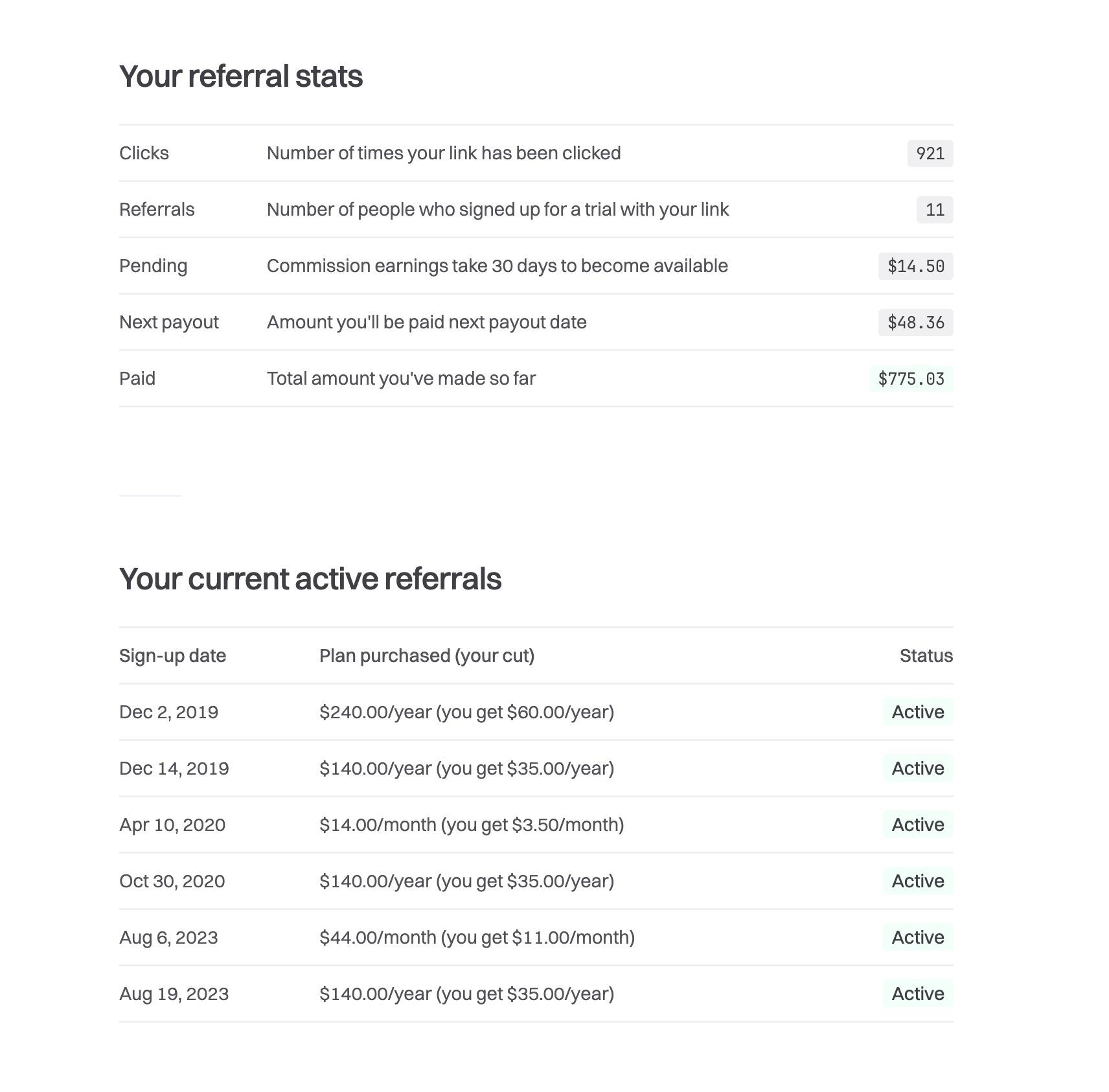
To build the “Your referral stats” section, we are simply doing the following:
$nextPayoutDate = now()->next('month')->startOfMonth();

$clicks = ReferralCodePerformance::where('referral_code', $request->user()->referral_code)->sum('clicks');

$referrals = ReferralCodePerformance::where('referral_code', $request->user()->referral_code)->sum('conversions');

$nextPayout = AffiliatePayment::where('parent_user_id', $request->user()->id)
																				->where('available_at', '<=', $nextPayoutDate)
																				->where('paid_out', false)
																				->sum('amount_to_payout');

$pending = AffiliatePayment::where('parent_user_id', $request->user()->id)
																		->where('available_at', '>', $nextPayoutDate)
																		->where('paid_out', false)
																		->sum('amount_to_payout');

$totalPaidOut = AffiliatePayment::where('parent_user_id', $request->user()->id)
																				->where('paid_out', true)
																				->sum('amount_to_payout');
Simple. And these queries are rapid because we’re holding this data in an OLAP database.
For the “Your current active referrals,” we go through the users table, look at the plans they’re on, and compile the signup date, plan purchased, the cut and the status. I won’t include that code here because it’s specific to our unique setup.
This is a really basic system. It works great for us. There are a lot of features we don’t have, but we now have a place to send people when they ask us about it. In terms of what I’d recommend if you want something more, fellow Laravel community members, Lemon Squeezy has an incredible affiliate platform. We’re not paid to promote them; I just want to share a more advanced way of doing affiliates if you’ve finished this post and are thinking, “I want more.”
Anyway, I hope you enjoyed the post. And if you’re looking to take our affiliate program for a spin, you can sign up to Fathom here and gain access to our affiliate program.
此内容由惯性聚合(RSS阅读器)自动聚合整理,仅供阅读参考。 原文来自 — 版权归原作者所有。