


When shadow IT is discussed, it’s usually in the context of unauthorized SaaS apps or stray cloud buckets. But there’s a new, faster-moving frontier emerging on developer workstations and administrative endpoints: agentic AI.
Over the past few weeks, a tool called OpenClaw (formerly known as Moltbot and Clawdbot) has exploded in popularity. OpenClaw, recently acquired by OpenAI, is an open-source framework designed to build autonomous AI agents—think digital assistants that don’t just “chat” but actually do things. They can browse the web, write code, execute shell commands, and manage your calendar. For a developer or a sysadmin, the technology could be seen as a productivity godsend. For a threat hunter, it’s a potential nightmare.
In this blog, we’ll pull back the curtain on a recent threat hunt we conducted around OpenClaw. We’ll walk through our internal process—from the initial spark of an idea to the final actionable outcomes—to show you how we went about identifying risks posed by unauthorized AI skills from OpenClaw.
Every great hunt begins with an idea. But in a world of infinite telemetry, how do you know which idea is worth your time? For threat hunts, we often look at ideas through three primary lenses: Relevance, impact, and likelihood.
OpenClaw usage has grown exponentially since its release. Because it’s open-source, built with Node.js and designed to run on a user’s local machine, it has bypassed the traditional procurement “front door” of many organizations. It’s seen increased usage at organizations that allow users to install applications for productivity or either have bring your own device (BYOD) or liberal application install policies. If your users are running it, it’s relevant.
Unlike a standard LLM interface, OpenClaw is designed for system-level access. According to its own documentation, an OpenClaw agent can:
If an adversary compromised an OpenClaw instance, they wouldn’t just be stealing a chat history; they’d gain a persistent, high-privilege foothold inside your environment.
The biggest red flag here is ClawHub, the centralized, public registry where users share “skills” (modular code packages that extend an agent’s capabilities). ClawHub is a little like the “wild west” of AI right now. There’s been an influx of malicious skills designed to look like productivity boosters—”calendar optimizers” or “email automators”—that actually contain hidden backdoors. A recent report suggested that the top-downloaded skill on the platform was a disguised infostealer. This moved the hunt from “theoretical” to “critical.”
When it comes to threat hunting, while it’s easy to jump into EDR telemetry or a data lake and start exploring, that approach can lead to unfocused outcomes. Instead, we spend significant time in the planning phase, where we build a hypothesis that is specific, testable, and falsifiable.
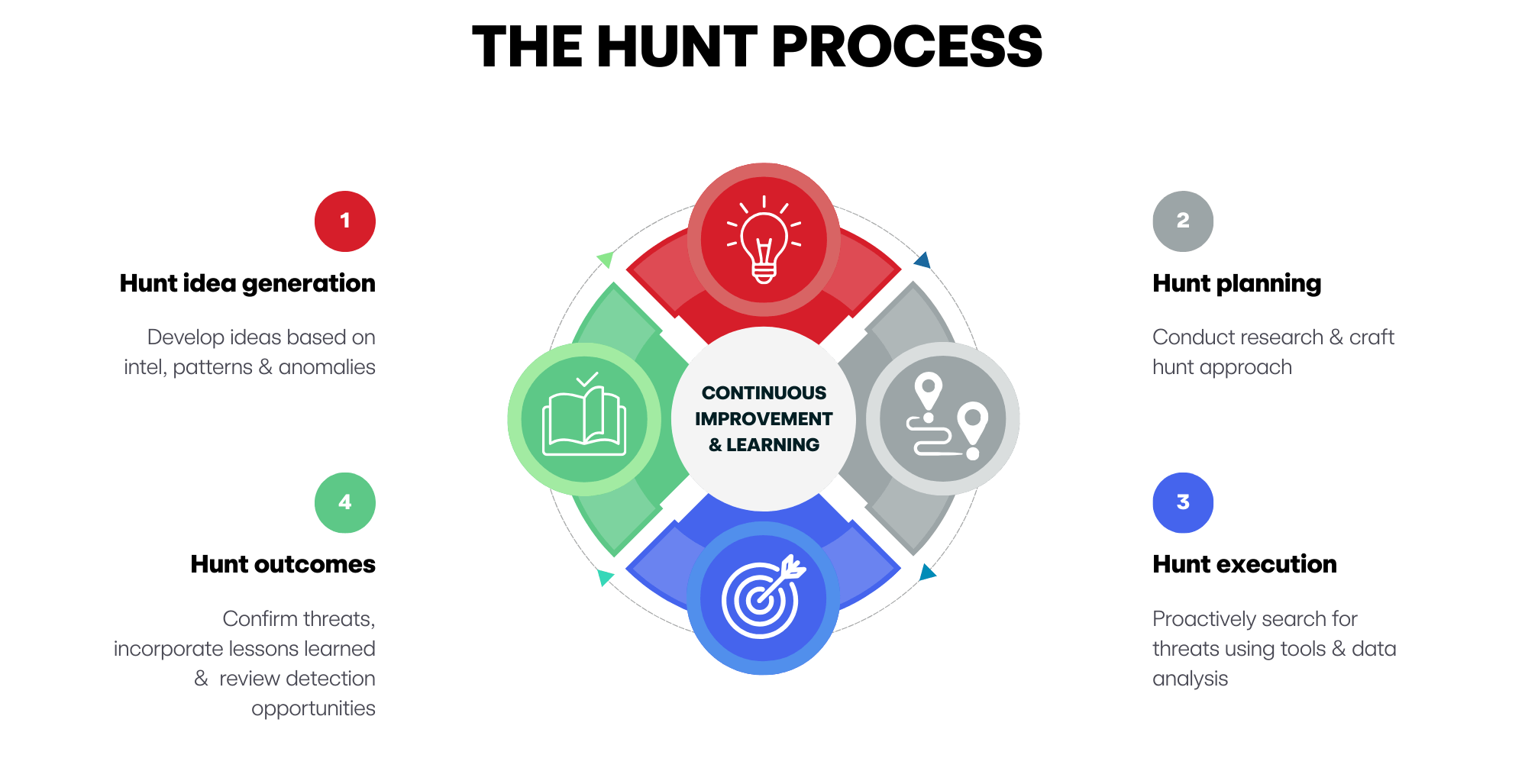
For the OpenClaw hunt, we developed three hypotheses:
openclaw, clawdbot, or moltbot.~/.openclaw/skills/ directory followed by the AI process spawning sh, bash, or zsh within a tight five-minute window.~/.aws/credentials) followed by a network connection to an external site via curl or wget.Once the plan is in place, we dive into the data. Hunting for OpenClaw requires a multi-modal approach—one that correlates process execution with file system changes and network activity.
When we model this activity, we are essentially looking for a sequence that looks like this:
openclaw, clawdbot, moltbot).evil_skill.md).openclaw process spawns a child process like cat or curl to read a sensitive credential file.GET or POST request to an unfamiliar IP address.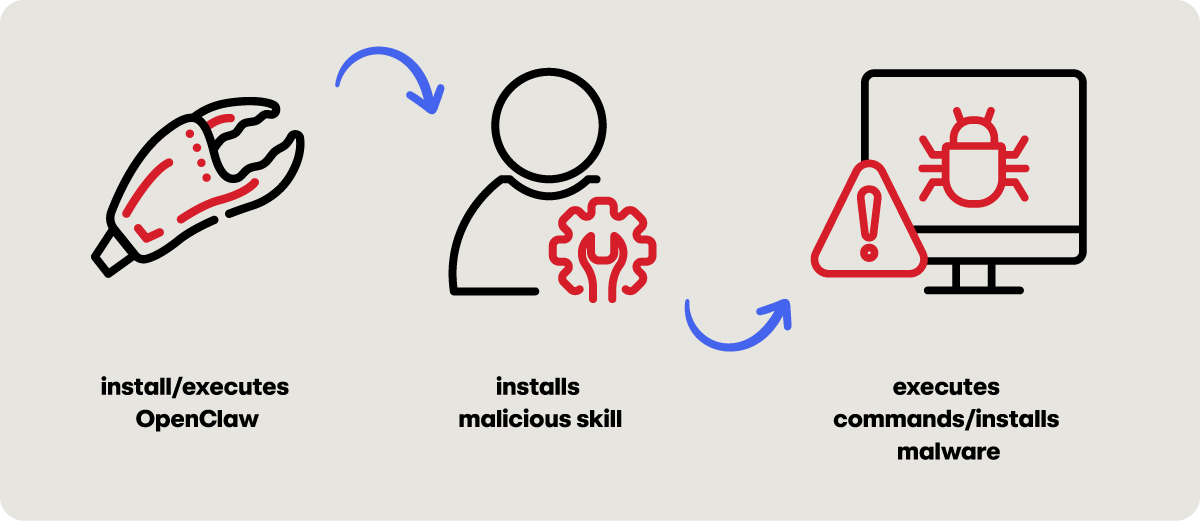
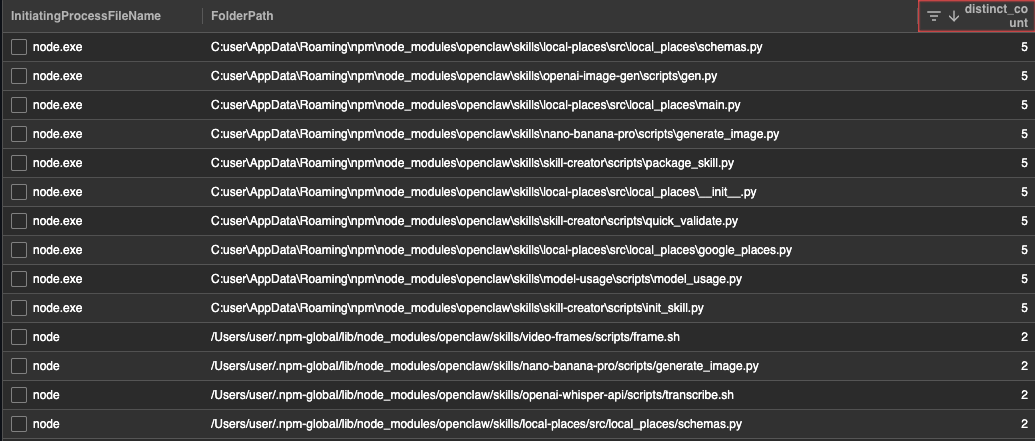
You rarely get manageable results on your first query. If you search for every instance of OpenClaw, you’ll be buried in noise. Instead, consider racking all the skills found in your environment and stacking them by frequency. Common skills may appear often but outliers may only appear on a single machine. These outliers are where the “evil” usually hides. You could also, now that OpenClaw’s skills are scanned by VirusTotal’s threat intelligence platform, filter queries based on known malicious skills and pivot from there.
Threat hunting is a cyclical process, not a linear one. Remember that it’s okay to refine and iterate on your hypotheses as you begin to analyze the data.
To refine your hunt, you may want to do the following:
Use identity context to prioritize your hunt. Focus your efforts on users with access to “crown jewels”’ such as production environments or sensitive financial systems. The stakes change based on the host: an AI agent on a marketing intern’s laptop is a manageable risk but the same agent on a lead DevOps engineer’s laptop could be an emergency. An HR employee executing PowerShell? That’s a red flag that requires investigation.
Develop threat hunt ideas based on intelligence, patterns, and anomalies. By following OpenClaw in the news, we were familiar with its potential security issues. Knowing OpenClaw as an agent allows the execution of arbitrary commands and has the ability to integrate with other tools, like Telegram and Gmail, gave us additional criteria to curate our hunt.
In a perfect world, every hunt ends with the discovery of a sophisticated APT but relying solely on finding threats is not sufficient for a threat hunting program. In the real world, the value of a hunt is often derived from the actionable recommendations and hygiene improvements that come from it.
Our OpenClaw hunt yielded a handful of outcomes, including:
Given there are hundreds of known malicious skills and a variety of social engineering attacks that can leverage them, it can be argued that OpenClaw is insecure by default. While some organizations may want to block OpenClaw outright, failing that, educating users on the safe use of AI, through an AI acceptable use policy is critical.
If the use of OpenClaw is allowed in your environment, consult OpenClaw’s hardening guidelines. Consider limiting permissions so the agent is only granted the minimum permissions for its intended task. Another option is running OpenClaw using a sandbox environment, like an isolated virtual machine or container, to limit potential damage as well. If experimenting with OpenClaw for personal use, consider setting it up on a Raspberry Pi device and installing security skills, including prompt injection resistance and skill auditing.
While our first hypothesis (finding OpenClaw) was a little broad, our second and third hypotheses were high fidelity enough to be candidates for detections. Going forward, whoever’s managing detections for your organization can tune and tailor those to have continual detection and monitoring in your environment so if an AI process like OpenClaw spawns an interactive shell, your SOC can receive an immediate high-priority alert.
If your organization is running OpenClaw, be skeptical of any skill that requires the pasting of raw commands into a shell or the execution of downloaded binaries, as these are classic red flags for malicious intent. Before adding any functionality to an agent, cross-reference the skill in industry-standard databases like Koi Security’s Clawdex or Bitdefender’s AI Skills Checker. For a final layer of technical validation, consider scanning the package with VirusTotal Code Insight—which features specific analysis for OpenClaw skill packages—to identify hidden malicious logic before it touches your production environment.
Threat hunting for AI is a moving target. As tools like OpenClaw evolve and become even more autonomous, our methods must keep pace. Threat hunting isn’t just about finding malicious activity; it’s about understanding the context of the technology, the behavior of the users, and the intent of the adversary.
By following a structured process—idea, plan, execute, and outcome—we can help ensure that the next “must-have” productivity tool doesn’t become the next major breach or infosec headline. The AI gold rush is here, but through proactive hunting, we can confront visibility gaps for a more resilient environment.

此内容由惯性聚合(RSS阅读器)自动聚合整理,仅供阅读参考。 原文来自 — 版权归原作者所有。