







Most security teams are staring across a massive adversary emulation gap. The bridge between “knowing the threat” and “executing realistic tests” has historically involved rigid scripts, manual overhead, and precious time.
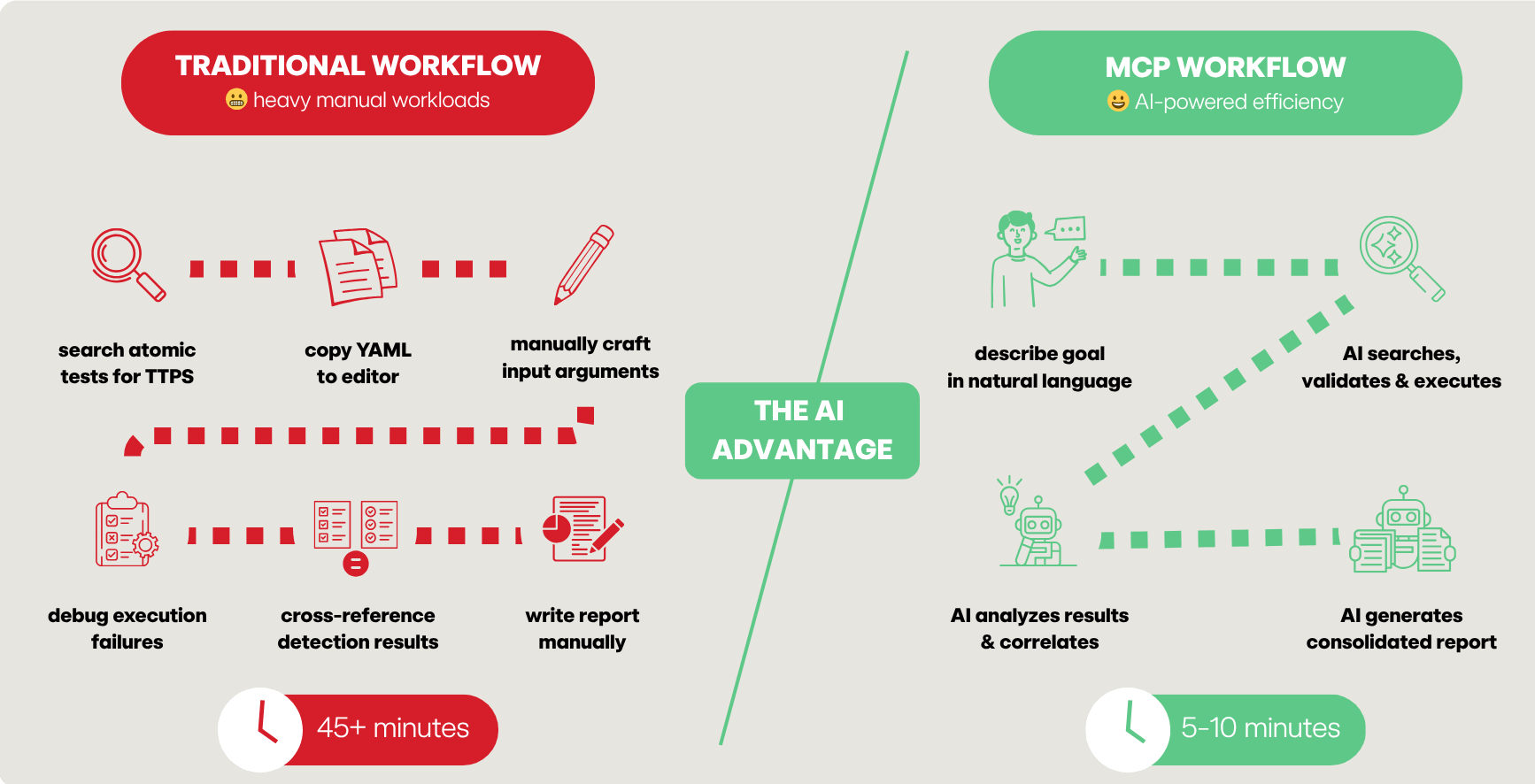
Previously, defenders had to manually search threat intel reports, identify tactics, techniques and procedures (TTPs), hunt through a repository for matches, and then manually craft YAML playbooks. If you weren’t a dedicated red teamer, the barrier to entry for tools like Atomic Red Team could feel like climbing Mount Kilimanjaro without the proper gear.
Then came the AI inflection point.
We’ve moved past the era of AI as a simple chatbot and into the era of AI-powered workflows. The missing link hasn’t been the intelligence of the models, but the connectivity between the human brain and the digital tools. In a recent episode of SecOps Weekly, security engineer and Atomic Red Team maintainer Hare Sudhan unveiled the Atomic Red Team Model Context Protocol (MCP) server and how it is supercharging red team actions for blue team success.
By introducing an MCP server into the mix, the “protocol mismatch” between LLMs and security tooling is effectively solved. As Phil describes it, MCP acts as the “glue” between the front ends (like Claude or VS Code) and the back ends (your security tools and related data sets). An MCP server creates a “fuzzy API,” a paradigm shift where you no longer need to be a syntax expert to run sophisticated adversary emulations. You describe the intent in natural language, and the MCP-enabled AI handles the execution.
Think of an MCP server as a “USB-C port” or a plug-and-play thumb drive for AI. Just as a flash drive adds storage and files to your computer, an MCP server adds specific “skills” and tools to your LLM.
The protocol is structured around three main components:
One of the most transformative aspects of MCP is the ability to “mix and match” servers. In a modern workflow, you aren’t just using the Atomic Red Team MCP; you are orchestrating an entire stack:
This eliminates the “context switching” that so often eats away at your team’s productivity. You no longer need to copy YAML files between machines, RDP into Windows systems, or copy-paste error messages into Google to debug a failed test.
The Atomic Red Team MCP server integrates over 1,500+ focused security tests from the free and open source Atomic Red Team project directly into the hands of your AI assistant. Beyond simple searching, the server enables a self-healing validation loop. If you use this AI-based technology stack to create a new atomic test, it uses the validate_atomic tool to check for schema errors. If it fails, the AI reads the error, reiterates, and fixes the YAML automatically until it’s syntactically perfect.
Below are the Atomic Red Team MCP server’s core tools:
| Tool name | Description |
query_atomics | Search by technique ID, name, or platform |
execute_atomic | Run tests (opt-in, lab only) |
validate_atomic | Iteratively validate and fix YAML schemas |
server_info | Critical for multi-platform labs. It tells the AI which server is Windows, Linux, or MacOS so it can route the right test to the right machine |
refresh_atomics | Syncs your local library with the latest GitHub updates |
get_validation_schema | Provides the “rulebook” to the AI so it knows exactly which executors (e.g., PowerShell or Bash) are supported |
Goal: Build an executable playbook from a raw threat report
Prompt: Here is a report on the Atomic MacOS stealer. Find all matching atomics. If they don’t exist, create them.
Automated workflow:
query_atomics to find matchesvalidation_schema to write a brand-new atomic testvalidate_atomic to ensure the YAML is PR-readyResult: You move from a PDF report to a validated, executable test in minutes, not hours
Timeline:
| Step | Manual | With MCP |
| TTP extraction | 15 min | 30 sec |
| Library search | 20 min | 1 min |
| Gap analysis | 10 min | 1 min |
| Total | 45+ min | 5 min |
Goal: Validate a new Splunk detection rule for Protocol Tunneling (T1572)
Prompt: I wrote a Splunk detection for Cloudflare tunnel abuse (T1572). Validate it by running the relevant atomic tests.
Automated workflow:
server_info to find the correct target machines in your labexecute_atomic triggers the telemetryResult: Rule recommendations in ≤ 5 minutes, as opposed to 30 minutes manually
Some other possible use cases for the MCP server-brokered access to Atomic Red Team content are below. As you experiment in your own environment, consider using them as starting points or inspiration for your own use cases.
Goal: Simulate a threat actor establishing persistence across your entire fleet
Prompt: Simulate T1547.001 registry persistence on Windows and T1053.003 cron persistence on Linux simultaneously.
Goal: Create an atomic test for a new CVE
Prompt: There’s no atomic test for the technique in this CVE <include link or CVE document>. Create one of the following ATT&CK standards and validate it.

To install using Claude CLI at the bash prompt, use the following commands:
# Using uvx (recommended for virtual env management)
此内容由惯性聚合(RSS阅读器)自动聚合整理,仅供阅读参考。 原文来自 — 版权归原作者所有。