


Poisoned packages and pipeline perils in this month’s edition of Intelligence Insights
Coming in at number 1 on this month’s top 10 most prevalent threat list is activity related to March 2026’s axios npm compromise. On March 30, 2026, security researchers discovered that the widely-used npm package axios was compromised through an account takeover attack targeting a lead maintainer. Attackers bypassed the project’s GitHub Actions CI/CD pipeline by compromising the maintainer’s npm account and changing its associated email. The attacker manually published two malicious versions via npm command-line interface (CLI). The poisoned releases inject a hidden dependency called plain-crypto-js@4.2.1, which executes a postinstall script functioning as a cross-platform remote access trojan (RAT) dropper targeting macOS, Windows, and Linux systems. Red Canary detected malicious activity across all three operating systems, including RAT payload installation, but saw no additional follow-on activity.
OWASP’s npm security best practices can help mitigate impacts from npm compromises. Key recommendations include enabling two-factor authentication (2FA) for any accounts with publishing rights to the npm package repository, and using a local npm proxy to cache known good npm packages for use internally. This caching strategy can be combined with a “cooldown check” to avoid using packages less than a day old. For a deeper look at these risks, watch the SecOps Weekly deep-dive into the compromise.
The other newcomer to this month’s top 10 is the threat group TeamPCP, due to the LiteLLM compromise reported in March 2026. On March 24, 2026, the group published two malicious versions of LiteLLM (1.82.7 and 1.82.8) to the Python Package Index (PyPI) after exfiltrating maintainer credentials through the project’s CI/CD pipeline. TeamPCP is a sophisticated criminal group conducting coordinated supply chain attacks and cloud-native infrastructure compromises for ransomware deployment, credential harvesting, and coinmining. In addition to the LiteLLM compromise, TeamPCP is the threat group behind a months-long supply chain campaign that has also targeted GitHub Actions, Docker Hub, npm, OpenVSX, and PyPI.
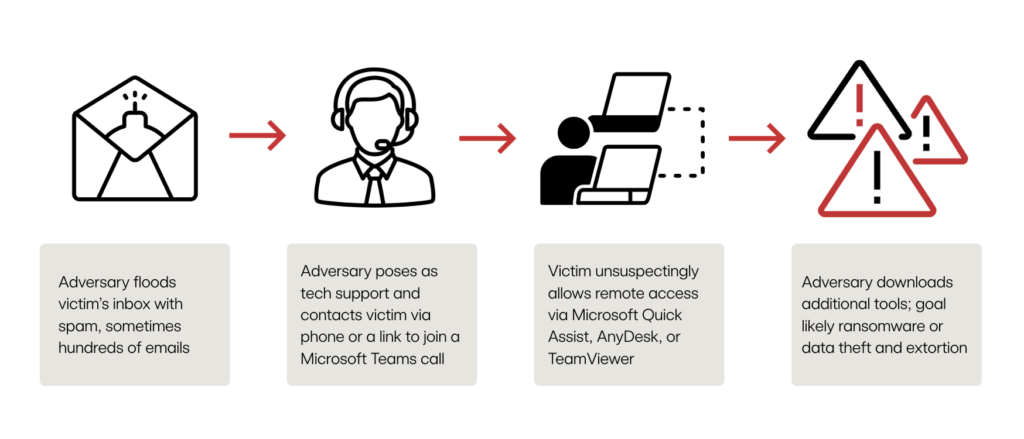
Finally, last month Red Canary observed an increase in Microsoft Teams phishing paired with email bombing. This is not a wholly new trend; in many ways, the recent activity is similar to those we have previously reported. You can read more about this activity below.
To track pervasiveness over time, we identify the number of unique customer environments in which we observed a given threat and compare it to what we’ve seen in previous months.
Here’s how the numbers shook out for March 2026:
| Month's rank | Threat name | Threat description |
|---|---|---|
| Month's rank: ⬆ 1 | Threat name: | Threat description : Campaign involving the account takeover attack of the widely-used npm package axios on March 30, 2026, which resulted in two malicious versions being propagated through automated updates |
| Month's rank: ⮕ 2 | Threat name: | Threat description : Activity cluster that uses JavaScript injected into compromised websites to deliver malware via drive-by download techniques, often using fake CAPTCHA lures to trick users into executing code via malicious copy and paste |
| Month's rank: ⬇ 3 | Threat name: | Threat description : ConnectWise product that administrators and adversaries alike use to remotely access and manage devices |
| Month's rank: ⬇ 4 | Threat name: | Threat description : macOS threat designed with the goal of accessing sensitive information including credentials, payment card data, keychain details, and cryptocurrency wallets |
| Month's rank: ⬇ 5 | Threat name: | Threat description : Red Canary's name for an activity cluster that uses compromised web sites to trick users into executing malicious code |
| Month's rank: ⬇ 6 | Threat name: | Threat description : Information stealer designed to target data within web browsers and locally stored files on macOS systems, with the goal of accessing sensitive information including credentials, payment card data, keychain details, and cryptocurrency wallets |
| Month's rank: ⬆ 7 | Threat name: | Threat description : Legitimate remote access tool (RAT) that can be used as a trojan by adversaries to remotely control victim endpoints for unauthorized access |
| Month's rank: ⬆ 8* | Threat name: | Threat description : Collection of Python classes used to construct and manipulate network protocols |
| Month's rank: ⬆ 8* | Threat name: | Threat description : Legitimate closed-source tool marketed as remote control and surveillance software, often used to gain persistent remote access to systems |
| Month's rank: ⬆ 8* | Threat name: TeamPCP | Threat description : Sophisticated criminal group conducting coordinated supply chain attacks and cloud-native infrastructure compromises for ransomware deployment, credential harvesting, and coinmining |
⬆ = trending up from previous month
⬇= trending down from previous month
➡ = no change in rank from previous month
*Denotes a tie
Red Canary and other researchers have seen an increase in recent campaigns leveraging email bombing followed by Teams phishing and remote monitoring and management (RMM) installation. These email bombing campaigns generally follow the same pattern as previously seen campaigns:
In the latest wave of activity, if a victim falls for the RMM ruse, we have most frequently observed Microsoft Quick Assist installed as the RMM of choice. Adversaries then write ZIP archive files to disk that they unarchive with tar commands:
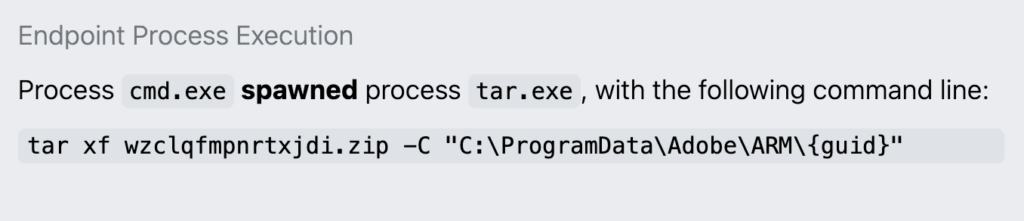
An example of tar writing a ZIP archive to C:\ProgramData\Adobe\ARM\{guid}
The adversaries frequently use C:\ProgramData\Adobe\ARM\{guid} for their initial file writes and, farther along in the attack chain, for DLL sideloading. There could be several reasons they leverage this directory:
ProgramData is a hidden directory by default and allows user writes.{guid} folders offer a relatively clean workspace to do their sideloading without interference from other files.One recently identified change is installing Havoc C2 as one of the tools written to disk. Havoc C2 is a free, open source, malleable post-exploitation command and control (C2) framework that has been abused by various adversaries since at least 2023. Other researchers have reported seeing Havoc C2 used in recent email bombing + Teams phishing campaigns.
Here are some of our recommendations for mitigating this kind of activity:
The activity we observed in March 2026 used C:\ProgramData\Adobe\ARM\{guid} to stage and execute files, as seen in the example below, which gives us a detection opportunity.

cmd.exe being used to execute a binary in the ProgramData folderThis pseudo-detection analytic identifies the Windows Command Processor cmd.exe being used to execute a binary in the ProgramData folder. Adversaries, including those behind recent email bombing campaigns, can leverage the ProgramData folder for staging and executing malicious files. Legitimate executables and startup scripts, such as drive mounting .cmd or .bat files, reside there as well. Investigate suspicious executables spawned by a command prompt, especially if seen at startup, and any subsequent activity. If possible, find the process, run key, or scheduled task that spawned the instance of .cmd.
parent_process == ('explorer.exe', 'svchost.exe')
&&
process == (cmd.exe)
&&
command_line_includes ('/c', 'start', 'programdata')
&&
command_line_excludes (*)
Note: * add exclusion strings as needed to reduce noise
此内容由惯性聚合(RSS阅读器)自动聚合整理,仅供阅读参考。 原文来自 — 版权归原作者所有。