




惯性聚合 高效追踪和阅读你感兴趣的博客、新闻、科技资讯
阅读原文 在惯性聚合中打开

推荐订阅源

N
News | PayPal Newsroom
U
Unit 42
MongoDB | Blog
MongoDB | Blog
IT之家
IT之家
A
About on SuperTechFans
Blog — PlanetScale
Blog — PlanetScale
P
Privacy & Cybersecurity Law Blog
V
V2EX
Threat Intelligence Blog | Flashpoint
Know Your Adversary
Know Your Adversary
L
LINUX DO - 热门话题
GbyAI
GbyAI
T
Threat Research - Cisco Blogs
cs.CL updates on arXiv.org
P
Palo Alto Networks Blog
Recent Commits to openclaw:main
腾讯CDC
WordPress大学
WordPress大学
K
Kaspersky official blog
The GitHub Blog
The GitHub Blog
Spread Privacy
Spread Privacy
Simon Willison's Weblog
D
DataBreaches.Net
cs.CV updates on arXiv.org
M
MIT News - Artificial intelligence
Exploit-DB.com RSS Feed
C
Check Point Blog
阮一峰的网络日志
阮一峰的网络日志
TaoSecurity Blog
TaoSecurity Blog
Latest news
Latest news
freeCodeCamp Programming Tutorials: Python, JavaScript, Git & More
N
News and Events Feed by Topic
NISL@THU
NISL@THU
博客园 - 【当耐特】
Microsoft Azure Blog
PCI Perspectives
PCI Perspectives
T
Threatpost
C
CXSECURITY Database RSS Feed - CXSecurity.com
Scott Helme
Scott Helme
P
Proofpoint News Feed
C
CERT Recently Published Vulnerability Notes
大猫的无限游戏
大猫的无限游戏
Help Net Security
Help Net Security
C
Cybersecurity and Infrastructure Security Agency CISA
H
Hackread – Cybersecurity News, Data Breaches, AI and More
W
WeLiveSecurity
小众软件
小众软件
S
Secure Thoughts
T
The Exploit Database - CXSecurity.com
F
Full Disclosure

James Guo’s Portfolio (@ZE3kr)

Hertz Rental Debt Collection and How I Sued the Debt Collector macOS on iPad? (with Jump Desktop) Vision Pro Initial Experience | ZE3kr The Downtime of Alibaba Cloud Hong Kong Region How Fast is mmWave 5G? 2000Mbps! See if Your iPhone Supports mmWave Magic Keyboard for iPad Pro Experience Self-built PowerDNS Advanced: GeoDNS, dnsdist, Lua Records SSD USB, Windows To Go and Mac WordPress 5.0 Update is Available, New Editor, New Theme Azure DNS, NS1, Constellix, Comparison of Three International GeoDNS Service Providers Recommendations for Some Exquisite and Useful Software on Mac Talk About Data Backup | ZE3kr Introduction to DNSSEC, How Signatures Work Cloudflare Argo And Railgun Comparison Test, The technology of CDN Acceleration Recommendations For Several Free Server Monitoring Services Comparison of Several Full-Site CDNs Some suggestions on website construction and service purchase Detailed Explanation of DNS Domain Name Resolution System - Basics Build Blazing Fast Mobile Pages With AMP Cloudflare's new feature experience - Load Balancing, Rate Limiting Back to WordPress' Built-In Comment System Implementing ECDSA/RSA Dual Certificate with Free Let's Encrypt How to configure for pure IPv6-Only network access Self-built PowerDNS GeoDNS Server | ZE3kr Install GitLab on Your Own Server Instead of GitHub! A Few WordPress Optimization Suggestions Comprehensive Comparison of DNS Services such as CloudXNS, Route 53, and Alibaba Cloud DNS Talk about the streaming of video on the Internet Canon Announces New APS-C Model EOS 80D, Powerful Video Recording, New Focus System and CMOS Several recommended plugins for WordPress Using Matomo with WordPress to Build a Powerful Statistics System TL-PA500 power cat, deploy wireless LAN cluster Why use a CDN service? The pros and cons of static web pages HTTPS Everywhere is Coming | ZE3kr Withings Activité Pop smartwatch recommendation, sleep tracking, exercise recording, smart alarm clock DELL P2415Q 4K Monitor Recommended Use srcset + sizes attributes and w identifier to solve all responsive image problems Eyefi Mobi makes your camera Wi-Fi ready now Mobile First - Speed | ZE3kr MacID Lets iPhone Unlock Apple's Mac with Touch ID ProCamera – Recommended iPhone camera software Mobile First - Origins | ZE3kr
2017, Another Look at SSL and HTTPS
2017-01-24 · via James Guo’s Portfolio (@ZE3kr)

A year ago, I published an article: The era of comprehensive HTTPS is coming. So far, what’s new with HTTPS? This article will explore the changes of HTTPS in 2016 and the possible future development.

Introduction to SSL and HTTPS

HTTPS is an encrypted HTTP protocol. The URL starts with https://, which means that this protocol is used. Compared to HTTP, HTTPS has all of the following features:

  • Transfer data encryption: The communication with the website cannot be obtained by the middleman (eg wireless router owner, operator, listener on the line in between).
  • Data Integrity: Guarantee that the transmitted data has not been tampered with.
    Authentication: Guarantees that the data is provided by the website owner and not by a third party.

Since HTTPS needs to complete authentication, if you need to configure HTTPS, you must obtain a certificate issued by a recognized certificate issuer.

2016

Let’s Encrypt, The First Truly Free Certificate Issuer

To deploy HTTPS, you must have an SSL certificate, and the price range of SSL certificates ranges from several hundred or even tens of thousands of yuan per year. The high certificate price has become a major burden to deploy HTTPS. At the end of 2015, Let’s Encrypt officially started the public beta, and can issue certificates with multiple domain names for free. The original price of such certificates was around 100 to 1,000 yuan. Even in the beta phase, over 1 million certificates were issued in just 3 months! Let’s Encrypt’s certificate uses automatic deployment, and the verification and issuance process are automatically realized through API, which greatly shortens the time required to apply for a certificate; at the same time, various service providers have also provided channels to automatically issue Let’s Encrypt certificates. The popularity of HTTPS has indeed been greatly accelerated by the advent of Let’s Encrypt.

HTTP/2, An Upgraded Version of SPDY

In early 2015, HTTP/2 officially became a standard, followed by major browsers and operating systems: Firefox 36, Chrome 41, iOS 9 & macOS 10.11 (Safari 9), Windows 10 (IE 11 & Edge). Then, CDN providers such as Cloudflare, CloudFront, and UPYUN also supported HTTP/2, and HTTP servers Nginx and Apache also supported it. HTTP/2 appeared to replace HTTP 1.1 and SPDY. HTTP/2 mainly supports multiplexing. The practice of merging CSS and JS files and preparing multiple domain names for many images is unnecessary after using HTTPS/2. Compared with HTTP 1.1, which requires a separate connection for each data, all data of a website in HTTPS/2 requires only one connection.
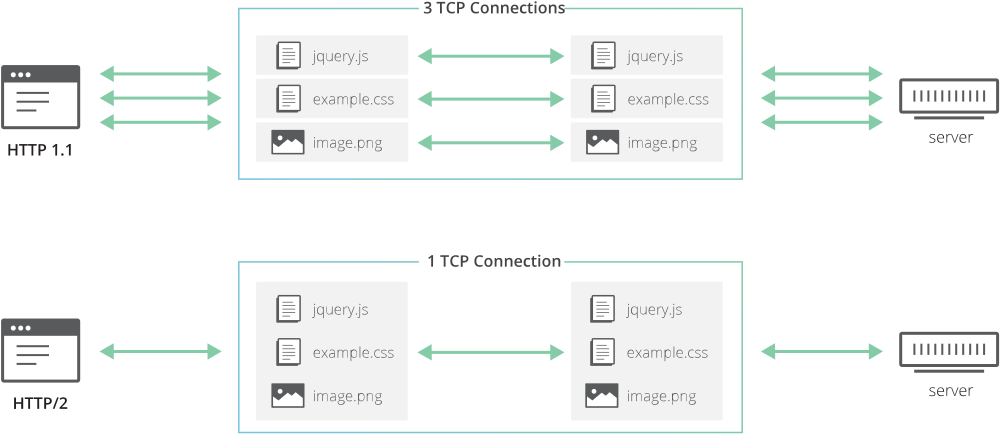
HTTP 1.1 vs. HTTP/2
HTTP 1.1 vs. HTTP/2

Since browsers limit the number of connections, in HTTP 1.1, only a few files can be downloaded at a time. Multiplexing allows these files to be transferred together, greatly reducing load times.

HTTP 1.1 Transport Timeline
HTTP/2 Multiplexing Timeline

However, these browsers only implement HTTP/2 for HTTPS sites. So I thought of improving the loading speed of the website, and I had to use HTTPS. Therefore, the emergence of HTTP/2 also promoted the development of HTTPS.

2017

Google Chrome Zooms in, Showing the Difference Between Websites with and without HTTPS:

Now, Chrome has started showing the word “secure” for websites that use HTTPS (the EV certificate shows the company name in this place):

Chrome shows secure for HTTPS sites

In a future version, for websites without HTTPS, it will eventually be displayed like this (for all HTTP websites, the process of displaying different versions in the future is: gray exclamation mark, red alert exclamation mark, red alert exclamation mark + “insecure word” ; those with credit cards or passwords will be displayed first. The picture below is the final third stage):

Chrome shows insecure for HTTP sites

You can also adjust this to “Always mark HTTP pages as non-secure” in the Chrome settings page. I recommend this setting for everyone, because HTTP is really insecure! Believe no company wants to let users see their website marked as “unsafe”? Browser advancement plays a vital role.

Update 1

In the latest Chrome 58 version, the following information has been displayed at the non-HTTPS password input (here is the website login window of weibo.com):

Chrome extra warning for HTTP sites

It has been tested to show this information even if the form is submitted to an HTTPS page as long as the host is HTTP.

Apple Mandates the Use of HTTPS Encryption (ATS)

Apple started implementing ATS in late 2015, however developers still have the option to turn off the feature. After some time in 2017 or later (the specific deadline Apple has not yet clearly given, but it is certain that the review of not opening ATS will gradually become stricter, and more reasons will be required), all newly submitted APPs must enable ATS , which means that the newly submitted APP must all use HTTPS content. This has prompted many domestic manufacturers to do HTTPS support.

cPanel Web Hosting Automatically Get Free SSL Certificate Method

The recommended web hosting provider on this site TlOxygen now supports applying for a free SSL certificate. The whole process is simple and will automatically renew! Implementation method: automatically install the acme.sh software for the virtual host, and then automatically execute the installation process. In addition, the virtual host of TlOxygen supports SSH access, so you can also use acme.sh or any other tool to operate it yourself.