








屎山嘛,不堆白不堆,反正总会有人堆的。
前言
PCL CE 是一个 Minecraft 启动器,基于龙腾猫跃开发的 PCL 的开源代码进行二次开发。
经过长期维护,PCL CE 的架构现在已经基本成熟,相较于主线版本而言维护难度与开发体验都要更上一层楼。毕竟谁也不想看着一大堆 goto 和到处都是的 VB.NET 代码尝试理解它的逻辑。
但是随着用户与反馈数量的增长,现在的 PCL CE 迫切需要一个错误收集与上报服务,用来调查可能存在的某些神秘 Bug。
于是我就提了个 PR……
Sentry 是一个很成熟的服务,提供了端到端的分布式错误追踪,允许开发者识别、追踪并调试系统与服务中潜在的性能问题与代码错误。它同时也是开源的。
它提供 SaaS 托管,但也允许开发者使用 Docker 自行部署。
对于 PCL CE 来说,自部署已经能满足我们的几乎所有需求了。
修改遥测服务
如你所见,PCL CE 在此之前已经有了一个自行实现的遥测服务,旨在收集设备环境调查信息用来整一些类似 Steam 软硬件调查的东西。
csharp
// ./PCL.Core/App/Essentials/TelemetryService.cs
using System;
using System.IO;
using System.Linq;
using System.Net;
using System.Net.Http;
using System.Runtime.InteropServices;
using System.Text.Json.Serialization;
using System.Threading.Tasks;
using Microsoft.Win32;
using PCL.Core.App.IoC;
using PCL.Core.IO.Net;
using PCL.Core.IO.Net.Dns;
using PCL.Core.IO.Net.Http.Client.Request;
using PCL.Core.Utils.OS;
using STUN.Client;

namespace PCL.Core.App.Essentials;

[LifecycleScope("Telemetry", "遥测")]
[LifecycleService(LifecycleState.Running)]
public sealed partial class TelemetryService
{

    // ReSharper disable UnusedAutoPropertyAccessor.Local

    private class TelemetryDeviceEnvironment
    {
        public required string Tag { get; set; }
        public required string Id { get; set; }
        [JsonPropertyName("OS")] public required int Os { get; set; }
        public required bool Is64Bit { get; set; }
        [JsonPropertyName("IsARM64")] public required bool IsArm64 { get; set; }
        public required string Launcher { get; set; }
        public required string LauncherBranch {get; set; }
        [JsonPropertyName("UsedOfficialPCL")] public required bool UsedOfficialPcl { get; set; }
        [JsonPropertyName("UsedHMCL")] public required bool UsedHmcl { get; set; }
        [JsonPropertyName("UsedBakaXL")] public required bool UsedBakaXl { get; set; }
        public required ulong Memory { get; set; }
        public required string? NatMapBehaviour { get; set; }
        public required string? NatFilterBehaviour { get; set; }
        [JsonPropertyName("IPv6Status")] public required string Ipv6Status { get; set; }
    }

    // ReSharper disable once InconsistentNaming
    private const string STUN_SERVER_ADDR = "stun.miwifi.com";

    // ReSharper restore UnusedAutoPropertyAccessor.Local
    [LifecycleStart]
    private static async Task _StartAsync()
    {
        if (!Config.System.Telemetry) return;
        var telemetryKey = EnvironmentInterop.GetSecret("TELEMETRY_KEY");
        if (string.IsNullOrWhiteSpace(telemetryKey)) return;
        var appDataFolder = Environment.GetFolderPath(Environment.SpecialFolder.ApplicationData);

        // stun test
        StunClient5389UDP? natTest = null;
        var miWifiIps = await DnsQuery.Instance.QueryForIpAsync(STUN_SERVER_ADDR).ConfigureAwait(false);
        try
        {
            miWifiIps ??= await Dns.GetHostAddressesAsync(STUN_SERVER_ADDR).ConfigureAwait(false);
        } catch(Exception) { /* Ignore dns error */ }

        if (miWifiIps != null && miWifiIps.Length != 0)
        {
            natTest = new StunClient5389UDP(new IPEndPoint(miWifiIps.First(), 3478),
                new IPEndPoint(IPAddress.Any, 0));
            await natTest.QueryAsync().ConfigureAwait(false);
        }

        var telemetry = new TelemetryDeviceEnvironment
        {
            Tag = "Telemetry",
            Id = Utils.Secret.Identify.LauncherId,
            Os = Environment.OSVersion.Version.Build,
            Is64Bit = Environment.Is64BitOperatingSystem,
            IsArm64 = RuntimeInformation.OSArchitecture.Equals(Architecture.Arm64),
            Launcher = Basics.VersionName,
            LauncherBranch = Config.Update.UpdateChannel switch
            {
                UpdateChannel.Release => "Release",
                UpdateChannel.Beta => "Beta",
                UpdateChannel.Dev => "Dev",
                _ => "Unknown"
            },
            UsedOfficialPcl =
                bool.TryParse(Registry.GetValue(@"HKEY_CURRENT_USER\Software\PCL", "SystemEula", "false") as string,
                    out var officialPcl) && officialPcl,
            UsedHmcl = Directory.Exists(Path.Combine(appDataFolder, ".hmcl")),
            UsedBakaXl = Directory.Exists(Path.Combine(appDataFolder, "BakaXL")),
            Memory = KernelInterop.GetPhysicalMemoryBytes().Total,
            NatMapBehaviour = natTest?.State.MappingBehavior.ToString(),
            NatFilterBehaviour = natTest?.State.FilteringBehavior.ToString(),
            Ipv6Status = NetworkInterfaceUtils.GetIPv6Status().ToString()
        };
        using var response = await HttpRequest
            .CreatePost("https://pcl2ce.pysio.online/post")
            .WithHeader("Authorization", telemetryKey)
            .WithJsonContent(telemetry)
            .SendAsync()
            .ConfigureAwait(false);
        if (response.IsSuccess)
            Context.Info("已发送设备环境调查数据");
        else
            Context.Error("设备环境调查数据发送失败,请检查网络连接以及使用的版本");
        Context.DeclareStopped();
    }
}
初始化 Sentry SDK
首先,我们要把原本直接向服务器发送 POST 请求的代码(即上述代码块中的 HttpRequest 部分)干掉。因为用了 Sentry 也就没有必要再继续把这些调查数据发到自己搓的服务端上了。
然后跑一下指令安装 Sentry SDK。因为自部署的 Sentry 设置向导给的是 3.34.0,所以这里就装 3.34.0 了。
bash
dotnet add package Sentry -v 3.34.0跑完以后,NuGet PM 会自动在 csproj 文件中添加引用,但它不知道我们在这里做了分类。所以为了符合 CE 的代码规范,我们还得手动改一下这里引用的位置。
xml
<!-- UI -->
<PackageReference Include="CommunityToolkit.Mvvm" Version="8.4.0" />
<PackageReference Include="Microsoft.Xaml.Behaviors.Wpf" Version="1.1.135" />
<PackageReference Include="Sentry" Version="3.34.0" />
<PackageReference Include="Wacton.Unicolour" Version="6.4.0" />
<!-- 语言和系统特性 -->
<PackageReference Include="Microsoft.CSharp" Version="4.7.0" />
<PackageReference Include="System.Management" Version="10.0.3" />
<PackageReference Include="Polly" Version="8.6.5" />
<!-- 本地化 -->
<PackageReference Include="Humanizer.Core.zh-CN" Version="3.0.1" />
<!-- 日志与遥测 -->
<PackageReference Include="Microsoft.Extensions.Logging" Version="10.0.3" />
<PackageReference Include="Microsoft.Extensions.Logging.Abstractions" Version="10.0.3" />
<PackageReference Include="Sentry" Version="3.34.0" />
接下来就可以开始动手了。让我们先往 TelemetryService.cs 里加一下必要的引用:
csharp
// using ...
using PCL.Code.Logging;
using Sentry;

namespace PCL.Core.App.Essentials;
// ...
加入引用之后,在 TelemetryService 类里加一个 _InitSentry() 方法,代码片段如下:
csharp
private static void _InitSentry()
{
    Context.Info("开始初始化 Sentry SDK");
    var dsn = EnvironmentInterop.GetSecret("SENTRY_DSN");
    if (dsn is null)
    {
        Context.Warn("未找到 Sentry DSN");
        return;
    }

    var release = quot;{Basics.VersionName}";

#if DEBUG
    var environment = "Debug";
#else
    var environment = "Production";
#endif

    SentrySdk.Init(options =>
    {
        options.Dsn = dsn;
        #if DEBUG
        options.Debug = true;
        #else
        options.Debug = false;
        #endif
        options.SendDefaultPii = false;
        options.IsGlobalModeEnabled = true;
        options.AutoSessionTracking = true;
        options.Release = release;
        options.Environment = environment;
        options.SetBeforeSend(@event =>
        {
            if (@event.Exception is TimeoutException) return null; // 过滤掉特定的一些 Exception(例如连接超时等等)
            return @event.Level is SentryLevel.Debug ? null : @event; // 过滤掉 Debug 等级的日志
        });
    });

    Context.Info("Sentry SDK 初始化完成");
}
然后把这个方法塞进 _StartAsync() 方法的最上面,这样 Sentry 就会在程序启动时自动初始化了。
让生命周期服务开心
你注意到那个 [LifecycleStart] 了吗?生命周期服务会自动管理各个服务的启动与停止顺序,它会自动把它标记的这个 _StartAsync() 方法用于启动服务,也会自动调用另一个被 [LifecycleStop] 标记的方法停止这个服务。
不过我们一开始的代码中是使用 Context.DeclareStopped(); 声明服务已停止的,这就会导致在初始化完成后服务自动停止。所以我们要把这个删了,然后重新写一个方法 _StopAsync() 以让生命周期服务能够顺利停止这个服务。很简单:
csharp
// 上面是 `_StartAsync()`

[LifecycleStop]
private static void _StopAsync()
{
    SentrySdk.Close();
}

// ...
这样就好了。
设备环境与错误收集上报
接下来要在类里面再加两个方法:_ReportDeviceEnvironment() 与 ReportException(),3、2、1 上代码!
csharp
// 错误上报
public static void ReportException(Exception ex, string plain, LogLevel level)
{
    var sentryEvent = new SentryEvent(ex);

    sentryEvent.Level = level.RealLevel() switch
    {
        LogLevel.Fatal => SentryLevel.Fatal,
        LogLevel.Error => SentryLevel.Error,
        LogLevel.Warning => SentryLevel.Warning,
        LogLevel.Info => SentryLevel.Info,
        LogLevel.Debug or LogLevel.Trace => SentryLevel.Debug,
    };

    if (!string.IsNullOrWhiteSpace(plain))
    {
        sentryEvent.Message = new SentryMessage { Formatted = plain };
    }

    SentrySdk.CaptureEvent(sentryEvent);
}

// 设备环境上报
private static void _ReportDeviceEnvironment(TelemetryDeviceEnvironment content)
{
    Context.Info("正在上报设备环境调查数据");

    SentrySdk.ConfigureScope(scope =>
    {
        scope.Contexts["Telemetry"] = content;
    });

    try
    {
        SentrySdk.CaptureMessage("设备环境调查");
        Context.Info("已发送设备环境调查数据");
    }
    catch(Exception ex)
    {
        Context.Error("设备环境调查数据发送失败,请检查网络连接以及使用的版本", ex);
    }
}
这里上报错误用的是 SentrySdk.CaptureEvent() 而非 SentrySdk.CaptureException(),因为似乎用前者的性能相较而言会更好一点。这个就仁者见仁智者见智了。
把 _ReportDeviceEnvironment() 塞进 _StartAsync() 方法里最下面,这里的工作基本就完成了。
什么?你说如果这个服务没有初始化的话前面的错误全都拿不到?那就看你怎么解决了,
反正我能力有限不知道怎么解决这个问题。或许搓个缓存队列会有点效果?
接入日志服务
现在方法搓好了。因为我们不是直接向主窗口里塞代码,所以这里需要手动调用 ReportException() 方法才会收集错误。
CE 已经有了一套很完善的错误捕获与日志输出机制了。我们只需要简单改一下日志服务就好了。
老规矩,先引入 PCL.Core.Essentials 类:
csharp
// ./PCL.Core/Logging/LogService.cs
// using ...
using PCL.Core.Essentials;
然后再稍微改一下 _LogAction() 方法:
csharp
private static void _LogAction(ActionLevel level, string formatted, string plain, Exception? ex)
private static void _LogAction(LogLevel level, ActionLevel actionLevel, string formatted, string plain, Exception? ex)
{
    if (ex is not null) {
        TelemetryService.ReportException(ex, plain, level);
    }

    // 一定要记得同步修改这个方法中其他地方的签名!!!
}
大功告成!
修改 UI
因为现在这里的逻辑彻底变了,所以之前的 UI 提示已经不准确了。我们需要往涉及到的地方都加上新的文案。
xml
<local:MyCheckBox Grid.Row="0" Grid.Column="1" Text="启用遥测数据收集" x:Name="CheckSystemTelemetry" Tag="SystemTelemetry"
ToolTip="启用此功能后,启动器将会收集并上报错误与设备环境信息,这可以帮助开发者修复潜在的问题、更好的进行规划和开发。
若启用此功能,我们将会收集以下信息:启动器内出现的错误,启动器版本信息与识别码,使用的 Windows 系统版本与架构,已安装的物理内存大小,NAT 与 IPv6 支持情况,是否使用过官方版 PCL、HMCL 或 BakaXL。

这些数据均不与你关联,我们也绝不会向第三方出售数据。不启用此功能不会影响你使用其他功能,但可能会影响开发者修复潜在 Bug。

此项更改将在重新启动启动器后生效。"/>还有个 VB 里面控制的弹窗,懒得整了直接贴链接吧:https://github.com/PCL-Community/PCL-CE/commit/e264b2d2fea127c9aba31cdb90265f409b858720#diff-8f89f2cddd157060c43a539a835bc04f44227dac9409a2a961c2b6f58a830feb。
为什么我要提这个 PR?
正如开篇所言,CE 一直缺少一个错误收集与上报机制,这限制了社区成员调查问题的效率,并且也在一定程度上导致了大量无效反馈的产生。而隔壁 PCL 主线已经实现了这一特性,只不过龙腾猫跃使用的是腾讯云的服务。
以及,在 CE 2.14.0 第一个 Beta 版本发布后,因为“对底层代码进行了大量修改”,启动器经常出现因为严重错误而崩溃的情况。但修复 Bug 完全依靠用户报告,社区无法第一时间发现潜在的异常。
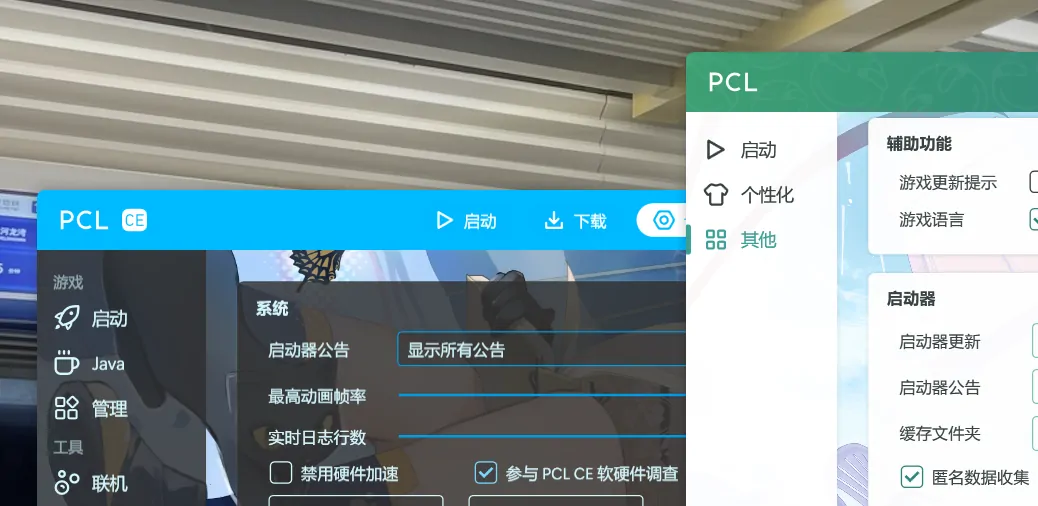
好在现在这个 PR 已经被合并了,或许等到下一个 Beta 版本,这个功能就会正式上线了。希望这套错误上报的代码自己不要出毛病。