


惯性聚合 高效追踪和阅读你感兴趣的博客、新闻、科技资讯
阅读原文 在惯性聚合中打开

推荐订阅源

S
SegmentFault 最新的问题
月光博客
月光博客
大猫的无限游戏
大猫的无限游戏
GbyAI
GbyAI
博客园 - 叶小钗
小众软件
小众软件
WordPress大学
WordPress大学
I
InfoQ
Last Week in AI
Last Week in AI
Vercel News
Vercel News
博客园 - Franky
Stack Overflow Blog
Stack Overflow Blog
P
Proofpoint News Feed
A
About on SuperTechFans
Engineering at Meta
Engineering at Meta
腾讯CDC
D
DataBreaches.Net
有赞技术团队
有赞技术团队
宝玉的分享
宝玉的分享
Jina AI
Jina AI
让小产品的独立变现更简单 - ezindie.com
G
Google Developers Blog
V
Visual Studio Blog
酷 壳 – CoolShell
酷 壳 – CoolShell

Netlify Developers

AI model comparison using Netlify's AI Gateway | Netlify Developers Build an AI agent to automatically process and summarize form submissions | Netlify Developers Build an AI agent to automatically generate relevant images for blog posts | Netlify Developers Prerendering SPA content pages to enable AI agent access | Netlify Developers Identify image optimization opportunities with Netlify Observability | Netlify Developers Fix top 404 page not found errors with Netlify Observability | Netlify Developers Introducing AI Gateway: built-in AI model access on Netlify | Netlify Developers Introducing Observability: your project insights on Netlify | Netlify Developers From first publish to first update with AI agents | Netlify Developers How to use Agent Runners on Netlify | Netlify Developers Add forms to your project with AI + Netlify | Netlify Developers Track Real User Metrics | Netlify Developers Lighthouse performance scores on Netlify | Netlify Developers Review your AI project before you ship | Netlify Developers Using environment variables in AI Projects on Netlify | Netlify Developers Build prototypes and MVPs fast with AI + Netlify | Netlify Developers Pause auto-publishing on Netlify | Netlify Developers Run serverless functions, storage, and more natively in Nuxt dev | Netlify Developers Netlify Office Hours: The AX Arcade challenge | Netlify Developers Netlify Office Hours: Prompting with style | Netlify Developers Netlify Office Hours: RAG Apps with OpenAI + Netlify DB | Netlify Developers How to build a RAG application with Neon, Netlify & OpenAI | Netlify Developers Netlify Office Hours: Netlify DB (powered by Neon) | Netlify Developers Netlify Office Hours: Netlify MCP Server | Netlify Developers Netlify Office Hours: Netlify Vite Plugin | Netlify Developers Building MCPs with Netlify | Netlify Developers Deploying sites from your AI tool | Netlify Developers Adding your domain using Netlify API | Netlify Developers Build a context driven chat bot with Netlify Blob and OpenAI | Netlify Developers Simplify deployments with Netlify’s branch-matching environment variables | Netlify Developers
Explore and download assets generated by your builds | Ne...
2024-02-12 · via Netlify Developers

Understanding what assets your build generates is an important part of developing for the web. During local development that is usually easy to do, but what if you need compare the assets generated by a previous build? Or if you’re looking for assurance that an asset is being faithfully generated by Netlify’s build pipeline in the same way as it is locally? Netlify’s Deploy file explorer can help.

#TL;DR

You can download the output from any of your successful deploys in a single zip file, or by exploring the file structure generated by your builds. This post shows you where the Netlify Admin UI you can do this, and gives you a simple one-click deploy to try this out for yourself if you’ve never deployed a site to Netlify before.

#Prerequisites

  1. A Netlify account
  2. A site successfully deployed to Netlify

Did you know

If you don’t have a site deployed to Netlify to experiment with yet, we’ve got you covered. Clicking the button below will create a new site for you from a simple template, set up the deployment pipeline, and perform your first deploy for your to explore.

Deploy to Netlify

These buttons are your fast-track to cloning and deploying a site into your own account in just few clicks. Look out for them in other examples.

#Just show me

If you prefer to watch a quick video of this, here’s how it looks.

Play

#Where to find the Deploy file explorer

The Deploy file explorer inspects the assets generated by completed build, so is available for each successful deploy regardless of if this is production, branch, or preview build.

Navigate to the Deploys page of any of your sites in the Netlify Admin, and then select any successful deploy.

Below the Deploy log panel, you’ll find the Deploy file explorer where you can navigate through the assets tree of your generated build, and search within it to find precisely what you are looking for.
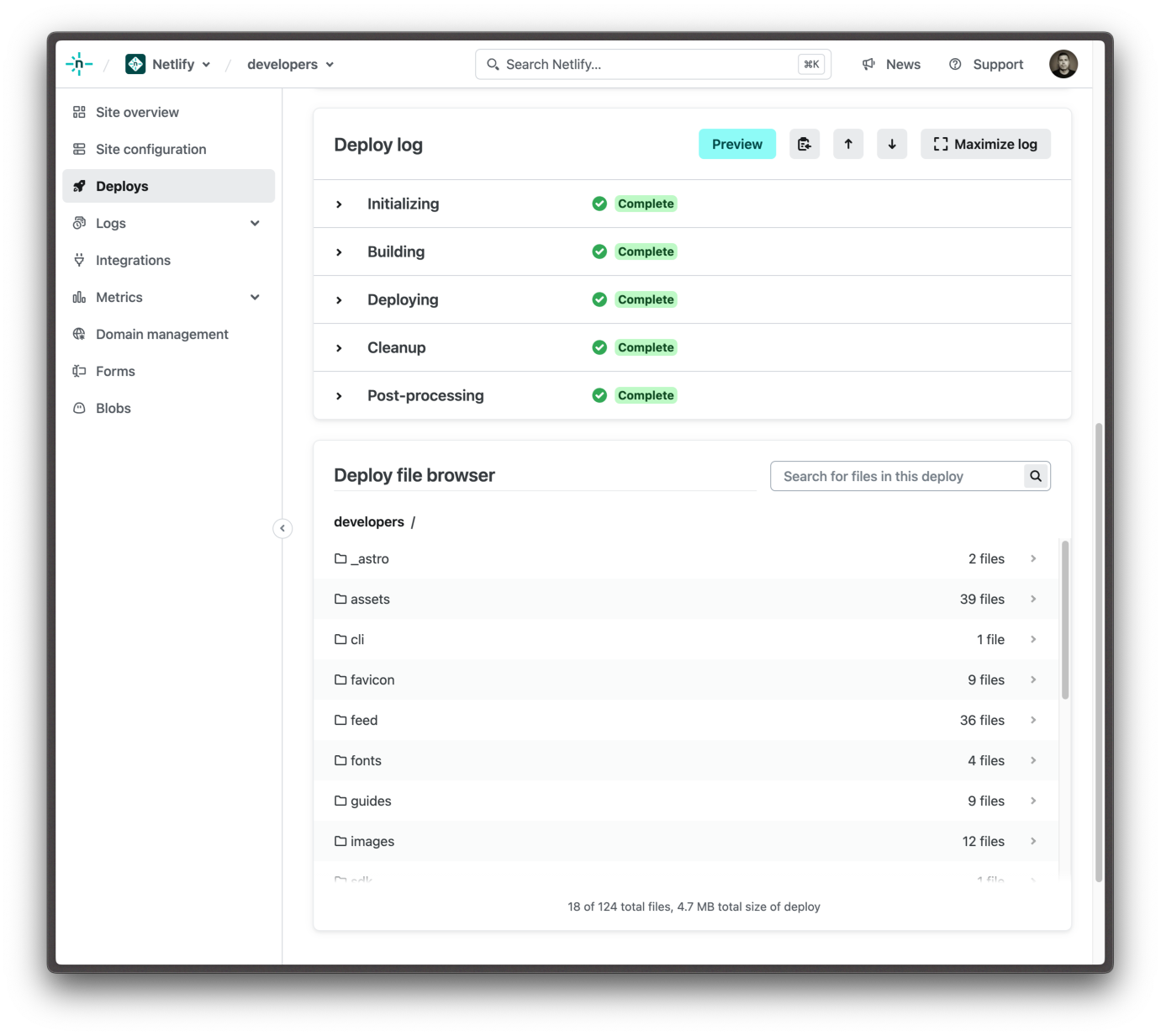
"Explore the assets of any deploy"

#Download the entire deploy

You can also download any of your successful deploys in their entirety as a single zip file.

The information panel above the Deploy summary contains various pieces of information about your deploy. There you’ll find a download link which will generate an archive for you to download as a single asset containing all of the files included in that deploy.
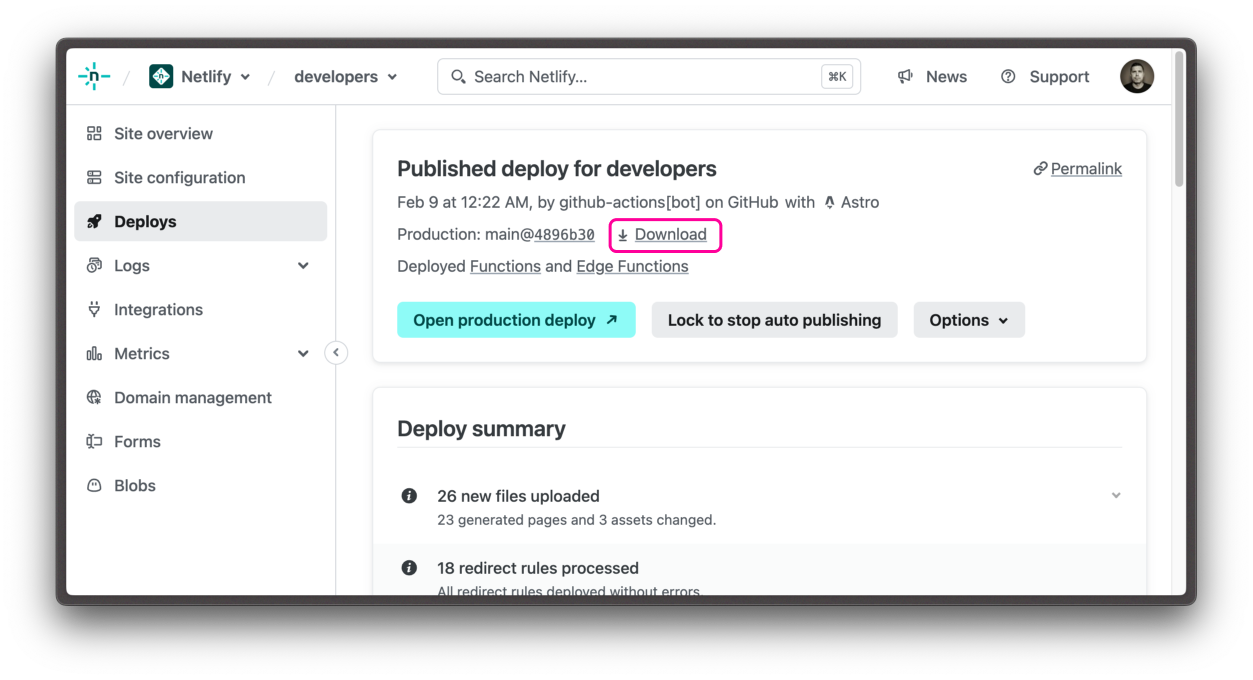
"Download your entire deploy"

It’s good practice not to commit build output to version control, so this feature is a useful way to quickly recover and explore historical archives of different versions of your sites.